Vray Displacement Problem
-
Hi
I'm having a problem with displacement in vray. When I want to render a close up displacement surface I get blurry, irregular edges. But if I zoom out and take render it's hard to notice them. You can see the images below. Does anyone know why this happens or how to fix it? VfSU 1.49.01 & SU 8
-
can you also show your displacement map.
-
Diffuse and Displacement textures
-
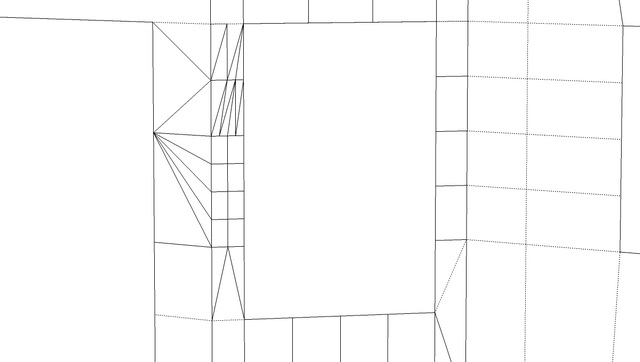
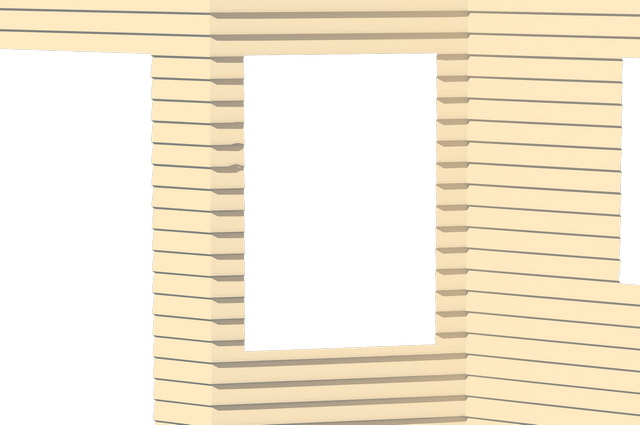
You should subdivide your surface into a grid. vray will triangulate your surface, and if it's a large surface, the displacement will not be as clean and take longer. You can also change your edge length value to a smaller number (though that can lead to long render times) Here is an example of what I mean. I used edge length of 1.5 and subdivs at 500.
If the triangles are too stretched, you'll get that jaggy look, you can see a little bit of it in this image in the middle.
-


Hello! It looks like you're interested in this conversation, but you don't have an account yet.
Getting fed up of having to scroll through the same posts each visit? When you register for an account, you'll always come back to exactly where you were before, and choose to be notified of new replies (either via email, or push notification). You'll also be able to save bookmarks and upvote posts to show your appreciation to other community members.
With your input, this post could be even better 💗
Register Login


Advertisement