[Plugin] Hatchfaces (v1.8 beta) UPDATED 15-Dec-2012
-
Ahhh
 Excellent! That certainly make more sence then the shi£$y stuff I was working on.
I will try this tomorrow, avec plaisire.
Thank you TIG.
-
I think I will alter the "Tourette Syndrome style" prompts in the inputbox you recommended.
-
They were intended as a 'joke'

-
No worries!

-
Well, it seams to be working a little better now. No promises though..
TIG's selection code works like a charm.
Just had to change pt and pt1 to pt=@edge.start.position, p1=@edge.end.position. And use ve=pt.vector_to(p1) as usual.
So now the hatching gets aligned to the selected edge..Maybe it would be a good idea to have the plugin run as usual(axis mode) if NO edge is selected? Some if statements when edge is NOT selected or so..
That way one still would have the possibility to alter several faces should one wish so.
Anyway if no objections I might do the update on this?
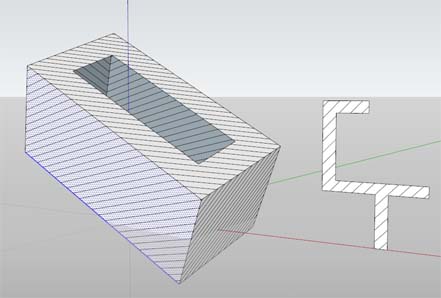
-
eekk, don't know what I'm talking about
 It does multiple faces as long 1 edge is selected and the face is
connected to that edge. -
Could you upload version 1.5 to test it?
-
Yep. This evening.
I was planning on adding the crosshathcing as well. But it's not working yet.
Anyway I will upload ver 1.5 anyway, with or without crosshatching. -
1.5 beta uploaded!
You might as well play with it. An Edge and a Face must be selected. The hatches will be created clockwise according to the edge. Hopefully
I will continue with the crosshatching...
-
Ooops!!
 The "Hatchfaces" menu item in Draw menu isent finished yet. Will fix that later...
Should not affect usage with icons.. -
Ok. ver 1.6 beta added.
http://forums.sketchucation.com/viewtopic.php?f=323&t=38637&p=341461#p341461
Crosshatching should be working. It creates the hatches in 2 groups inside a parentgroup, should you wish crosshatching.
Had to rewrite parts into methods. TIG's been "directing" me more and finding problems than "giving" me code in this version. So I had to suffer and learn a little bit more
Besides the script is getting longer so it takes more time to debug from his part...That said! Beware that this script could surely be optimized, and I'll gladely take tips about how to.
I do feel it's a bit ugly script with all the methodcalling at the end.
Just remember that the temp face(face_clone) method must be separate. So it can be used if there are possibilities to
do other types of hatchpattern, and implement them on the face_clone.Thanks to TIG, again for tutoring

-
Great it's getting there...
The dialog's values aren't getting remembered.
Make variables likeangle/spacing/cross_altinto@types so they get remembered for next time... Otherwise you need to fill in the dialog each time.
Use this too
angle2=@cross_angle angle2=-@angle if not angle2
This way the dialogs value is then the same as last time OR -@angle
similar for spacing etc
Also the menu item can reuse the cmd0 command rather that make another!
Then it uses the same name as the Toolbar command... -
Thanks for the feedback TIG!
I will try to fix those things.
You don't think there are any problems calling all those methods at the end? I mean it works, but feels strange.
-
jolran, some feedback:
- Your undo doesn't undo in a single step, most notable you leave behind an empty group & layer.
- You have your methods inside the main method?
- I consider this to be not a beginner's plugin, especailly if you will continue to add new features. If you are still at the block level and just moving unchanging blocks of code around, you will have lots of problems. You have to understand it from the line level and change it at will. Condense lines, delete lines and rename variables so they are consistant and have personal meaning.
- Your indenting of the code is atrocious, unless it's my setting in notepad++?
An quick example of how I would rewrite it. I tweak everything I could, like if it was my own plugin. I went back to the old way without having to select a line and changed other stuff. Doesn't matter. The goal is to simplify and compartimentalize. Make it consistant, and easy to follow. Then its easy to modify, later. I include a screen grab. The idea is for you, to do your own version. Also, you can see the indents. The image is too tall to post, so here it is in a zip file:
hatchfaces_rewrite_png.zip -
Hi Kyyu.
- yes, thanks. I noticed that. However removing layer is not so good if doing the 2nd+ hatch?
- ? The cmd is calling the self.hatchfaces method, not the module? Ok I will have a look.
- So you mean I should stop developing it until I have matured?
- insulting word, but maybe true.
Is the code example you provided tested?
Like I've said before you have to realize that this plugin is not aimed at linehatches only, and it's still beta.
Everyone knows what beta means......If the plugin is not good enough for publishing I can remove it and post when I "feel" ready? Feel's like I have broken some unwritten rule here..IF implementing other MODULES, with ex patterns of insulation etc AS modules the code structure can of course not remain like this. And you have provided intersection not inside a method, wich can be troublesome if I will have to reuse it for the other modules. Orders matters no?
I'm experimenting right now with possibilities for other patterns. I see no reson to rewrite the whole code structure until I know where this plugin's heading. Might fix TIG's bugspots and your group and layer undo issues.
I appreciate you effort and will take your advice into consideration.
edited: Hmm no, intersection is inside a method. OK thats better. Difficult to see without having the code in Notepad.
But I still need intersection independent of the linehatching.
Also. Remember, each group.entities sent to hatching will need a face for intersection! So in order to keep intersection apart from hatchingmethod there is a need for a face_clone method.
However I do like the way you call the methods. That I will work on. -
Hi jolran,
@unknownuser said:
- So you mean I should stop developing it until I have matured?
@unknownuser said:
Everyone knows what beta means......If the plugin is not good enough for publishing I can remove it and post when I "feel" ready? Feel's like I have broken some unwritten rule here..
No, I am not telling you to stop developing. And no I don't want you to remove it.
You should not take offense, as I am just trying to give you the best advice I can. I debated if I should say anything at all. So don't take it the wrong way and be discouraged.You are right. I don't know what you are going. Anyways, I hope you see something in my example that helps you.
@unknownuser said:
Is the code example you provided tested?
Yes, it works 100%.
-Kwok
-
Ok, ok. No worries... English is not my native language so I might have missunderstood some things.
And I'm a little tempera(mental)@unknownuser said:
So you mean I should stop developing it until I have matured?
Total missunderstanding, sorry.
@unknownuser said:
I debated if I should say anything at all
I do apreciate you advice though!! Really. Don't hold back!
I might have to argument against some of the advice, if there are things behind the scenes that you are not aware about that could change the scenario. That doesent mean your outcome is not apreciated. I WILL use your codeexample further on.All the best.
-
A little report...
Been fooling around a little with DCs. It's all new to me. Took a while to get the attributes from Dc to work in ruby, as well...
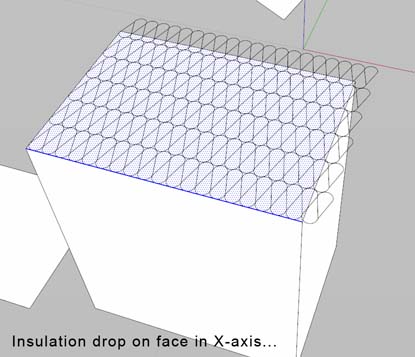
On the picture "insulation-pattern". Insulation "triangles" are sizable in width and height. Get funny unit conversions though when trying to match facesize or other similar tasks. (I work in cm) Either DC's are buggy or the way I construct the DC is wrong. I guess the later theory.
In this example no transformation or rotation is involved, neither intersection. Only alignment to the edge on X-axis. And alignment WOULD be quite a task to fix. Unless one can snap to face? (could not get that to work) Each DC gets added in the components sampler when running the script. I guess there is a way to delete the instance, and question is if the DC would get added if one would do an intersection and delete the dc before the operation is done?So using DC's for this purpose is not as straight forward as I thought. I might explore the possibilities of making patterns
through code instead. Not sure yet. Could fastly become quite complex code with arcs and stuff...
At least rotation would be easier if drawing on the created face-clone.
Will take a peak and then maybe come back and do the bugfixes TIG spotted, and Kyyu's recommendations. Indenting maybe
-
Hm. Not much response. Maybe there is not much demand for other types of hatchpatterns other than lines?

Anyway got another thingy to test. Sort of a stamp tool (if it doesent already exist)
You manually place and edit the 2d component. Select face and component, click an icon and the grouping and intersection is made. With alternatives for keeping materials, and deleting faces etc..Could actually be a good workflow like that, cause if using DC one could see the patterns update with each change that
is made. And then run the intersection-grouping when it looks good.
This way the user could use his own library of patterns, on top of those that will get provided...Just an idea......
-
I unfortunately don't have anything to contribute to your efforts with this great addition to the SU toolkit, but I am lurking on this thread carefully. Like many others, (probly lurking too), I would love to remove other cads from my workflow and do everything in SU. Hatchfaces will be a huge help in achieving this.
Go Joel!
Baz





Advertisement