Cant Apply Materials Properly
-
Hey Guys. Plz plz help me
I cant seem to apply materials properly to my model. I'm not a great model builder, so I am in need of help. When i apply the material e.g. color 'red' it doesn't get applied properly to the surface. It sort of "Artifacts" and I can only see the material been applied at certain angles.
Regards
Julian
-
Can you post a screenshot? It could be a number of things.
-Brodie
-
A screenshot would help a lot...
Also... does this happen with all faces or just some ?
If all then check your Graphics-card options and updated-driver... also Preferences > OpenGL settings. Try with some off etc to see what affect this has...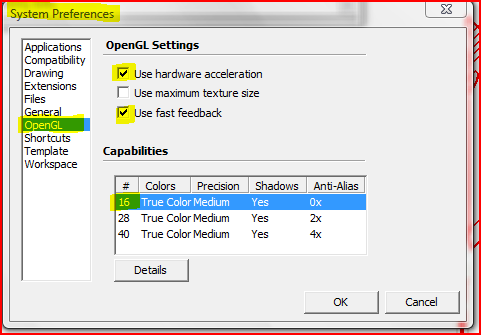 If it happens with just a few faces it could be z-fighting where there are coplanar faces inside groups etc and then the display has to decide which material to show, and it varies depending on the angle - this is fixed by either erasing one of the clashing faces or moving one a few mm away from the other so it doesn't happen...
 -
@tig said:
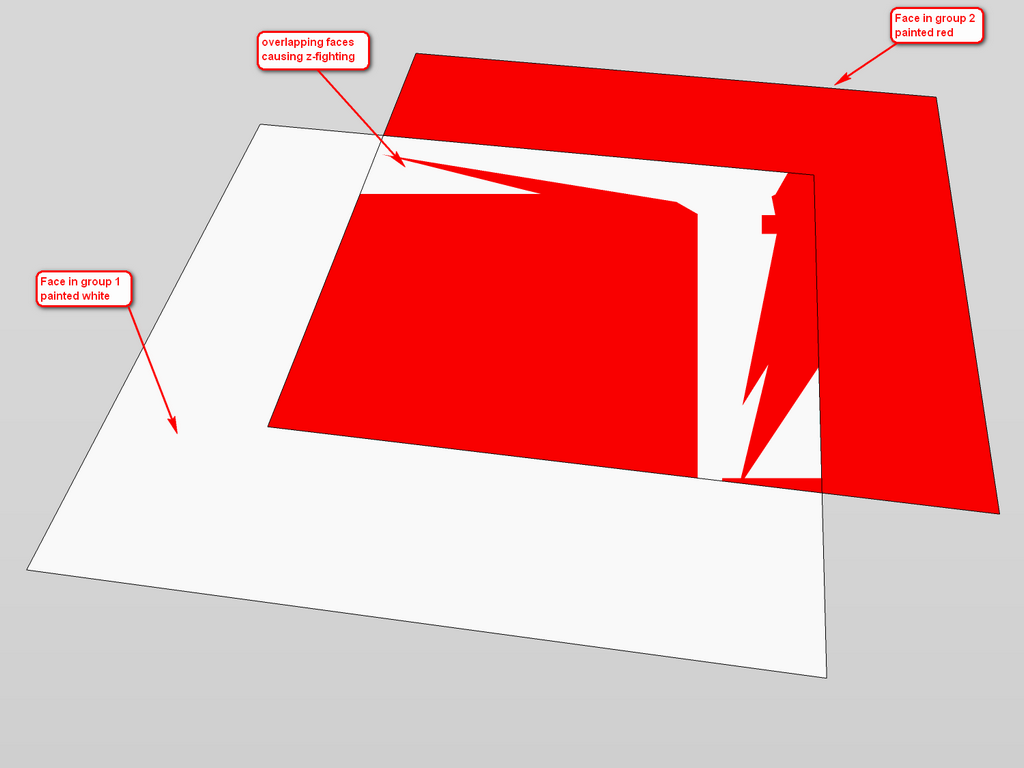
If it happens with just a few faces it could be z-fighting where there are coplanar faces inside groups etc and then the display has to decide which material to show, and it varies depending on the angle - this is fixed by either erasing one of the clashing faces or moving one a few mm away from the other so it doesn't happen...
That's what I would think, too. See attached example.



Hello! It looks like you're interested in this conversation, but you don't have an account yet.
Getting fed up of having to scroll through the same posts each visit? When you register for an account, you'll always come back to exactly where you were before, and choose to be notified of new replies (either via email, or push notification). You'll also be able to save bookmarks and upvote posts to show your appreciation to other community members.
With your input, this post could be even better 💗
Register Login


Advertisement