Layout wishlist
-
@pbacot said:
I suppose the point would be to be able to modify later in LO?
Yes. I've used PDFs if I want to bring in something like a full architectural detail. But it would be nice to be able to bring in vectors directly for anything from custom section marks, symbols, and whatever else without having to draw them in LO or do the whole import through SU.
-
@lemoyne architect said:
The ability to import/insert vector images (dwg, ai, etc). Unless I'm missing something, there is no easy way to do this other than draw your own in Layout or modify the existing scrapbooks.
I suppose the point would be to be able to modify later in LO? Otherwise is using pdf an alternative for now? The image is clear like a vector at any zoom level. It is a tall order, I gather, for dwg line weights etc. to be translated accurately.
Alternatively some programs do a pretty good job of making vector files from vector pdf. [Edit: and what I mean is this might be a possible to develop for LO.]
-
Just wanted to bump this up the list again - really hoping that LO gets a good going over soon
•General speed increases, re-draws and re-links take an age with some files.
•Better handling of files that are being accessed by machines on different operating system platforms so that links are not broken due to drive mapping issues on different platforms.
•Stop render function so you can choose to stop a page from rendering if you spot an error instead of having to wait for every view to render (I know there's auto render but it would be great to be able to stop a page from updating and be able to update views individually or collectively)
•Ability to use drawing labels with common and page only editable sections
•Infinite zoom
•Better handling of vector views - too slow at present
•Automatic page numbering - and ability to add pages in order, ie add a page at the beginning of a 10 page doc and it will be page 01 rather than page 11. Number pages by order but be able to change names
•Batch export for PDFs from LO documents - being able to export a page and have it take its name from the page name in LO rather than the overall LO document.
•Multiple page sizes in same document (A4 and A1 for example)
•Ability to reference model info from selected SU models in order to get component counts
•Better handling of spread sheet data (cells, columns, tabs etc)
•True text box sizes instead of oversized text boxes ie text box is a snug fit to the text rather that lots of spare space to left and right of text
•Styles pallet for text - ability to name styles for dimensions, body text, notes, titles etc
•Better ability to link scenes with LO so that sections and elevations retain their scale and dont throw dimensions out
•Latest saved view causes lots of issues - you should have to save a scene in order to send a file to LO
•Let the RUBY developers loose on Layout.... Please - this is the main strength in SU but something that is sadly lacking in LOThe biggest one for me is speed and stability. LO is WAY too slow. I have a relatively new, well spec'd machine but LO is incredibly sluggish, laggy and unstable. Lots of ram, half decent gfx card and quad 2.26 CPU that deals perfectly happily with very large Photoshop, illustrator and indesign files but fall on its A55 when I make minor changes to a small LO file - like moving a text box?!!?
LO is long overdue an overhaul....
-
Supporting everything samyell77 has eloquently listed. Using Layout as I speak on an upgraded PC, waiting for it to catchup!
-
Simpler way of importing sections from SketchUp…and someone should make a better how-to video for us beginners.
-
@arrowheadman said:
Simpler way of importing sections from SketchUp…and someone should make a better how-to video for us beginners.
Set up the section as desired, turn off the section plane if you don't want it to show, create a new scene and, when given the option, choose 'Save as a new style.' Or, in the Styles window, create a new style after making the section. Make sure you don't have the circular arrows showing on the style's thumbnail.
-
@arrowheadman said:
Simpler way of importing sections from SketchUp…and someone should make a better how-to video for us beginners.
I made a video. It's processing now and I'll post a link to it as soon as it is ready.
Here you go: http://sketchucation.com/forums/viewtopic.php?f=12&t=49300
-
@arrowheadman said:
Simpler way of importing sections from SketchUp…and someone should make a better how-to video for us beginners.
-
@bmike said:
@arrowheadman said:
Simpler way of importing sections from SketchUp…and someone should make a better how-to video for us beginners.
well, that doesn't work.
-
A comprehensive PDF manual or Layout for Dummies would be great for a newbie like me!
-
Speed up the rendering or make it background. No program I ever used stops so long to show a print window. (I'd say "freezes" but it comes back). This is a big hiccup in workflow.
-
I've only recently started using LO.
It's a great application in itself, but I have to agree with many of the wishes that have already been mentioned and I have a few of my own...1.) Rulers and guidelines.
Although the user is able to use the grid and can set the major and minor grid to whatever will suit their needs, I'm still missing an option to turn horizontal and vertical rulers on and off.
Similar to how guidelines work and behave in a program like Adobe Photoshop would also be very great to have.2.) Option to control nudge.
When moving an object I find it difficult to adjust it precisely enough and even with the keyboard arrows it's difficult as the nurge option seem to move the object by 0,5mm, which isn't accurate enough when you have some small parts you need to place within a group.
I recall that Coreldraw had an option where the user could set the nurge number to whatever he/she wanted. In addition there was also micro nudge when pressing the Shift-key while using the arrows to move an object.3.) Import/insert some vector graphic formats to LO.
I'm aware that the user can convert an inserted SketchUp view to vector images, render the viewport as Vector and then explode it, however, since you're unable to import svg-, ai-, eps-, wmf- into SU, the user will still need to draw the object in SU prior to inserting it in LO.
I don't expect all vector formats to be available, but a format like SVG should be available IMO...I'm within the mechanical engineering business and need to make P&ID's for all projects.
All symbols required to make these P&ID's are available in svg-format at i.e. Wikimedia Commons4.) Scrapbook warehouse
I've seen users sharing a few scrapbooks (one of the more recent was the My LayOut Scrapbook for Architectural Drawings posted by Krisidious), but I'm sure other users also have a scrapbook or two, which would be beneficial for others.
Once I've completed the one I'm working on currently, I'm going to share it.5.) Page numbers - and a date field.
I know it has been on the wish-list since v.2, but I really miss this function.6.) Ruby API in Layout.
Back on September 2010 I saw Bjanzen posted this...@bjanzen said:
you could encourage us to do ruby API in LayOut, and that's probably how that and man other features will get implemented.
By that Mr. B was referring to page number and date.
These were my first and immediate observations and wishes.
-
I will continue on my list...
7.) Option to insert a table.
I know that I can draw a table using the line tool and I'm also familiar with copy/paste from Excel and Word, however, I would like to have such an option/tool directly accessible from LO, where I'm able to set the size of the rows and columns as well as the borders and shading.8.) Additional line tool options.
I find myself missing more Shape Style tools.
I.e. I'd like to have an option enabling me to have an arrow placed in the middle of a line and when lines are crossing other lines, I'd like to have an option where I can select if I want an arch where the lines are crossing.
(similar to how it's possible in SmartDraw)To be continued...

-
@unknownuser said:
'd like to have an option enabling me to have an arrow placed in the middle of a line
Like this?
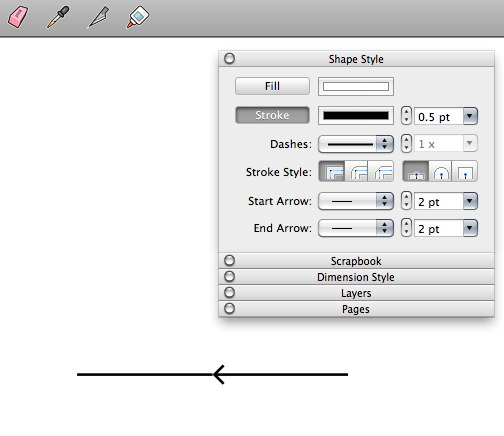
At least that one you can already do.

-
@dave r said:
At least that one you can already do.

Unless I've overseen something, I can't find how this can be done except if you draw two separate lines and then add a start or end the arrow to the line selected...
Or if you use the Split tool and then apply the arrow to the line you've cut...What I would like is a tool, where you can select a line and then apply an arrow in middle of the line... Similar to how you can apply an arrow in the start or end of a line...
SmartDraw have some very intuitive tools for such purposes... -
I do not know if someone has already asked for this:
control the on and off layers inserted from SketchUp model, to avoid having to create scenes with layers off or on.
regards
Pedro
-
Pedro, could you explain that? Scenes made in SketchUp are used to create the viewports in LayOut. You control the visibility of entities with layers in SketchUp. That's the way it is supposed to work.
-
Windoze File extensions: An SU file has the extension .SKP the backup version becomes .SKB and I can readily hide the backups so I don't open them accidentally. In LO the extension is .layout(!) but the back up becomes "Backup of [FILENAME].layout". Is there some way to change the extension so I can keep the files hidden but readily available without cluttering up my layout folder or manually moving them?
.LBK would be a good option to adopt!
-
Hi David.
I read your question and I am preparing some pictures to explain my idea.
Only two days I have been very busy with work.
I hope that this day can upload these pictures.
I send an apology and a hug
regards
Pedro
-
At least for what I'm doing at the architecture firm I work for, options for aligning the edges of a building in a scale viewport with another, as well as showing an equal amount of ground plane would be good. Right now, I'm having to align every single time I update the model. It's tediously slow and frustrating.







Advertisement