sketchucation logo sketchucation
    • 登入
    Oops, your profile's looking a bit empty! To help us tailor your experience, please fill in key details like your SketchUp version, skill level, operating system, and more. Update and save your info on your profile page today!
    🔌 Smart Spline | Fluid way to handle splines for furniture design and complex structures. Download

    [Plugin] Sketchup Ivy

    已排程 已置頂 已鎖定 已移動 Plugins
    732 貼文 172 Posters 314.8k 瀏覽 172 Watching
    正在載入更多貼文
    • 從舊到新
    • 從新到舊
    • 最多點贊
    回覆
    • 在新貼文中回覆
    登入後回覆
    此主題已被刪除。只有擁有主題管理權限的使用者可以查看。
    • cheddaC 離線
      chedda
      最後由 編輯

      Looks great with the new options of leaves but it doesn't work for me on mac osx SU 2014 😞

      Kraken Wrangler https://www.flickr.com/photos/132441293@N03/

      1 條回覆 最後回覆 回覆 引用 0
      • TIGT 離線
        TIG Moderator
        最後由 編輯

        Here's v0.6.5x which has one minor tweak.
        It now refreshes all of the 'ivyleaf_' thumbnail PNGs whenever its dialog opens, so if you have recently edited an 'ivyleaf_' SKP its thumbnail will now be in sync with the SKP's.
        Previously it re-used any existing PNGs that were cached in the user's LiveIvy::TEMP folder, until they were purged by system tools or manually deleted etc, this had meant that a cached thumbnail and its actual SKP could be out of sync !
        http://sketchucation.com/pluginstore?pln=SketchupIvy

        More feedback please...

        TIG

        1 條回覆 最後回覆 回覆 引用 0
        • TIGT 離線
          TIG Moderator
          最後由 編輯

          @chedda said:

          Looks great with the new options of leaves but it doesn't work for me on mac osx SU 2014 😞
          I'll check on MAC... do you have any error messages ?
          Do you have the latest Safari installed ??
          Have you tried alternative settings ???

          EDIT:
          I just managed to try it on a MAC and it worked fine.
          OSX [Mavericks] v2014 etc...
          This screen-shot shows its v0.6.4x, but the latest v0.6.5x is not any different...
          So something is adrift at your end...
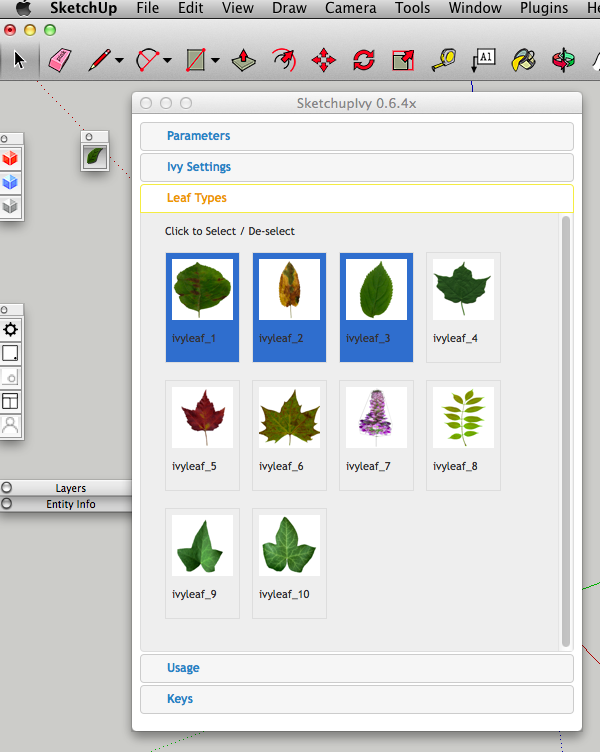

          Screen Shot 2014-11-19 at 11.47.05.png

          TIG

          1 條回覆 最後回覆 回覆 引用 0
          • cheddaC 離線
            chedda
            最後由 編輯

            Thanks for the quick response, i got it briefly working somehow now its a problem again. It's starting the ivy thats the problem for me,

            Kraken Wrangler https://www.flickr.com/photos/132441293@N03/

            1 條回覆 最後回覆 回覆 引用 0
            • cheddaC 離線
              chedda
              最後由 編輯

              Stuff is happening in the progress bar but i don't get any visual feedback and no ivy is created.

              Kraken Wrangler https://www.flickr.com/photos/132441293@N03/

              1 條回覆 最後回覆 回覆 引用 0
              • TIGT 離線
                TIG Moderator
                最後由 編輯

                I assume you mean the bottom status bar is showing info ?

                To start the ivy growing you should mouse-click on a face... typically the base of a wall ?
                Every subsequent mouse-click grows the ivy branches.
                Holding a modifier key changes what a mouse-click does - either to grow branches towards the cursor [with Cmd] or to add some leaves [with Alt].
                To complete the ivy mouse-click with Shift.
                Pressing 'i' should start the ivy again...

                Have you tried adjusting the parameter/settings ?

                Your difficulty seems to have little to do with issues with the newness of its version, more to do with how you are using it...
                Could you post screen-shots of each of the three editable tabs in the dialog etc...

                Kris posted some useful visual guides, just a few posts earlier...

                TIG

                1 條回覆 最後回覆 回覆 引用 0
                • cheddaC 離線
                  chedda
                  最後由 編輯

                  Here is my screenshot video now i don't get activity in the bottom status bar.


                  screenshot.mov

                  Kraken Wrangler https://www.flickr.com/photos/132441293@N03/

                  1 條回覆 最後回覆 回覆 引用 0
                  • cheddaC 離線
                    chedda
                    最後由 編輯

                    perhaps you could add some presets and even a reset to default for the settings because i think my entering values could be the fault.

                    Kraken Wrangler https://www.flickr.com/photos/132441293@N03/

                    1 條回覆 最後回覆 回覆 引用 0
                    • TIGT 離線
                      TIG Moderator
                      最後由 編輯

                      Kris's crib-sheets have lots of good preset examples.
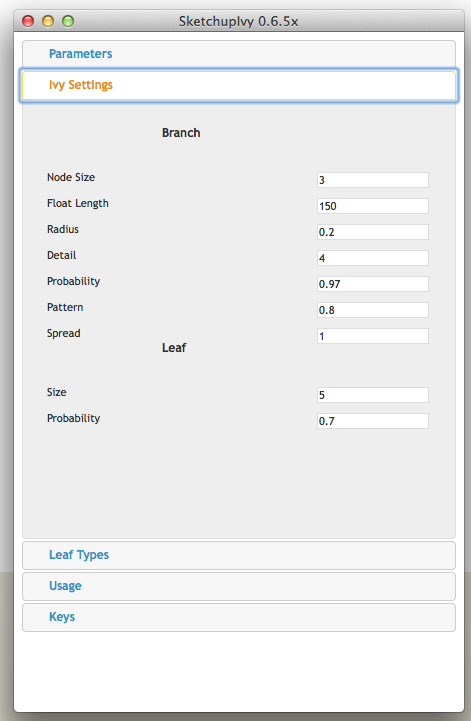
                      The hard-coded default parameter/settings are:

                      
                                  ;branch   => {
                                      ;nodesize    => 3,
                                      ;pattern     => 0.8,
                                      ;probability => 0.97,
                                      ;radius      => 0.8,
                                      ;floatlength => 150,
                                      ;detail      => 4,
                                      ;spread      => 0
                                  },
                                  ;leaf     => {
                                      ;pattern     => 1,
                                      ;probability => 0.7,
                                      ;size        => 5
                                  },
                                  ;gravity  => {
                                      ;weight => 1,
                                      ;vector => [0, 0, -1]
                                  },
                                  ;wind     => {
                                      ;weight => 0.1
                                  },
                                  ;random   => {
                                      ;weight => 0.3
                                  },
                                  ;adhesion =>{
                                      ;max_adhesion_distance => 50,
                                      ;weight                => 0.2
                                  },
                                  ;legacy   => {
                                      ;weight => 0.8
                                  }


                      Perhaps try reseting to use those ?

                      There is no ivyleaf_ Leaf select initially, so any branches should get made bear.
                      Try selecting one or two Leaf Types...
                      Do they appear selected when th dialog is next opened ?

                      The previously used settings are remembered across sessions.

                      TIG

                      1 條回覆 最後回覆 回覆 引用 0
                      • cheddaC 離線
                        chedda
                        最後由 編輯

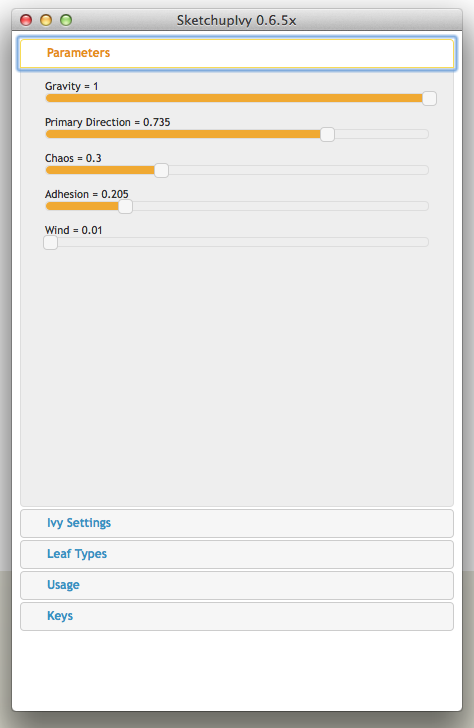
                        Screen Shot 2014-11-19 at 15.21.57.pngScreen Shot 2014-11-19 at 15.21.51.pngScreen Shot 2014-11-19 at 15.21.44.pngOk that's great TIG thanks its working now. I don't see a pattern dialog under the leaf section though.I also don't see a maximum adhesion distance.

                        Kraken Wrangler https://www.flickr.com/photos/132441293@N03/

                        1 條回覆 最後回覆 回覆 引用 0
                        • TIGT 離線
                          TIG Moderator
                          最後由 編輯

                          I'd try Wind = 0.1

                          But what you show is OK... 😄

                          The other settings you refer to are not user-settable - so don't worry about it - they get calculated by the tool from other settings...

                          I just included the whole hash that is hard-coded...

                          TIG

                          1 條回覆 最後回覆 回覆 引用 0
                          • cheddaC 離線
                            chedda
                            最後由 編輯

                            Thanks !

                            Kraken Wrangler https://www.flickr.com/photos/132441293@N03/

                            1 條回覆 最後回覆 回覆 引用 0
                            • Rich O BrienR 離線
                              Rich O Brien Moderator
                              最後由 編輯

                              does it recognize components above 3?

                              my older version used to but this one doesn't see my library of 9 components?

                              Download the free D'oh Book for SketchUp 📖

                              1 條回覆 最後回覆 回覆 引用 0
                              • TIGT 離線
                                TIG Moderator
                                最後由 編輯

                                Did you read the usage guidance ?
                                Did you remove the ../Plugins/LiveIvy/Textures folder and then install the toolset ??

                                It loads ALL of the SKPs it has found in the ../Plugins/LiveIvy/Textures folder...
                                BUT ONLY IF they are named 'ivyleaf_.skp', where the '' can be any text you like, but to keep things ordered I recommend a numerical part.
                                If you have other SKP names these are ignored, and NOT loaded...
                                So rename them and restart the tool's dialog...
                                The thumbnails are made from the loaded SKPs.

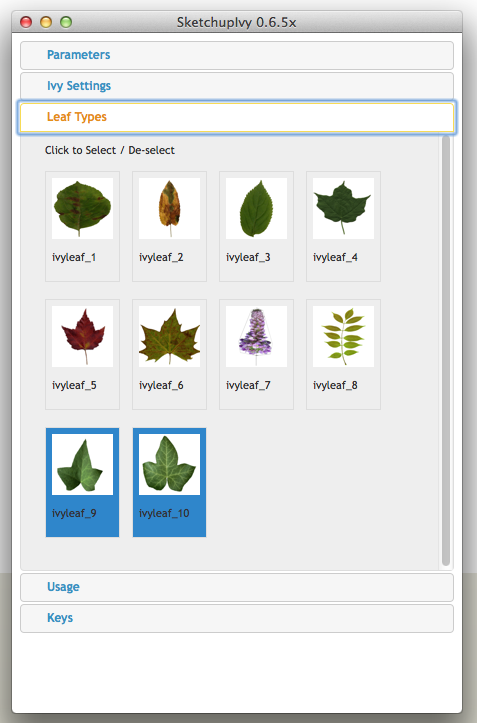
                                It comes with 10 as the default set, others can be added into the folder as desired...

                                The initial default Leaf Type has NO ivyleaf_ thumbnail selected - so initially branches would be bare.
                                However, you can choose any number of available components you wish - all 10 if you want !
                                Click a thumbnail to select and highlight it 'blue', or click again to de-select it...
                                The last used 'set' of selected ivyleaf_ components is re-selected when the dialog opens, this is remembered across sessions.

                                Also ensure that the new custom ivyleaf_ SKP is properly purged, and has no guides or section planes in it: they are best with transparent PNG texture and simple outline hidden edges around the leaf's face...
                                Also setup the default view so the SKP's thumbnail looks good...

                                TIG

                                1 條回覆 最後回覆 回覆 引用 0
                                • Rich O BrienR 離線
                                  Rich O Brien Moderator
                                  最後由 編輯

                                  Yes, I did re-read...

                                  picpick-007.png

                                  picpick-008.png

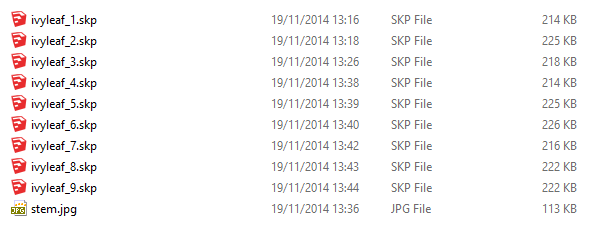
                                  Here's my textures folder saved as v2015 .skp

                                  Download the free D'oh Book for SketchUp 📖

                                  1 條回覆 最後回覆 回覆 引用 0
                                  • Rich O BrienR 離線
                                    Rich O Brien Moderator
                                    最後由 編輯

                                    it loads 3 only

                                    Download the free D'oh Book for SketchUp 📖

                                    1 條回覆 最後回覆 回覆 引用 0
                                    • TIGT 離線
                                      TIG Moderator
                                      最後由 編輯

                                      So you have overwritten the default set of SKPs. 😒

                                      If you saved them as v2015 SKPs, then they'll only load into v2015, that's why I recommended they were saved as v8 in the guidance, then they load in all versions of SketchUp...
                                      Are you using the tool on sketchUcloud or a shared Plugins folder? - if so, then earlier versions of SketchUp will be messed up and only load SKP versions <= their version.
                                      ...
                                      It loads all available SKPs named 'ivyleaf_*', so maybe only 3 are suitable versions in that SketchUp ?
                                      Can you give me your set of 9 SKPs so I can look at them...

                                      TIG

                                      1 條回覆 最後回覆 回覆 引用 0
                                      • Rich O BrienR 離線
                                        Rich O Brien Moderator
                                        最後由 編輯

                                        No, i didn't overwrite. I binned those duds.

                                        I am using 2015 with the plugin.

                                        I am not using the cloud

                                        I emailed you the library

                                        Download the free D'oh Book for SketchUp 📖

                                        1 條回覆 最後回覆 回覆 引用 0
                                        • D 離線
                                          driven
                                          最後由 編輯

                                          here's what I see on mac after extracting and adding icons...2014-11-19 03.32.18 pm.png

                                          learn from the mistakes of others, you may not live long enough to make them all yourself...

                                          1 條回覆 最後回覆 回覆 引用 0
                                          • TIGT 離線
                                            TIG Moderator
                                            最後由 編輯

                                            @rich o brien said:

                                            No, i didn't overwrite. I binned those duds.

                                            I am using 2015 with the plugin.

                                            I am not using the cloud

                                            I emailed you the library

                                            Well I saved them all as v8 SKPs and then they ALL add into the dialog as thumbnails in v8 to v2015 !
                                            The hidden-geom needs switching off in the SKP so the thumbnail is clean...
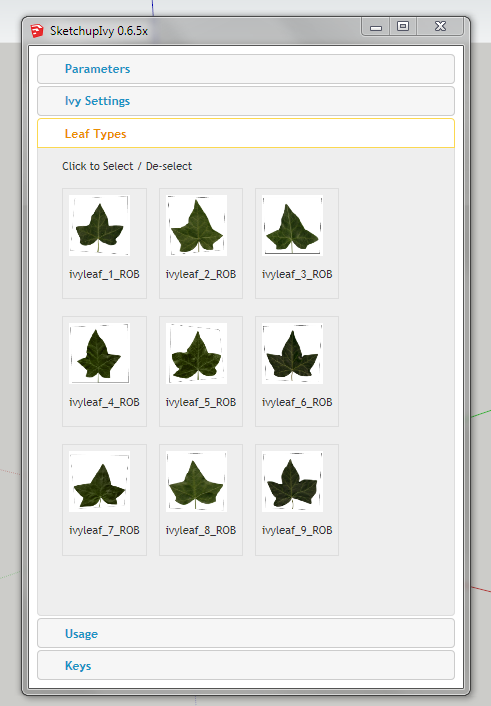

                                            Capture.PNG

                                            TIG

                                            1 條回覆 最後回覆 回覆 引用 0
                                            • 1
                                            • 2
                                            • 3
                                            • 4
                                            • 5
                                            • 6
                                            • 7
                                            • 8
                                            • 36
                                            • 37
                                            • 6 / 37
                                            • 第一個貼文
                                              最後的貼文
                                            Buy SketchPlus
                                            Buy SUbD
                                            Buy WrapR
                                            Buy eBook
                                            Buy Modelur
                                            Buy Vertex Tools
                                            Buy SketchCuisine
                                            Buy FormFonts

                                            Advertisement