sketchucation logo sketchucation
    • 登入
    Oops, your profile's looking a bit empty! To help us tailor your experience, please fill in key details like your SketchUp version, skill level, operating system, and more. Update and save your info on your profile page today!
    🔌 Smart Spline | Fluid way to handle splines for furniture design and complex structures. Download

    [Plugin] Sketchup Ivy

    已排程 已置頂 已鎖定 已移動 Plugins
    732 貼文 172 Posters 314.9k 瀏覽 172 Watching
    正在載入更多貼文
    • 從舊到新
    • 從新到舊
    • 最多點贊
    回覆
    • 在新貼文中回覆
    登入後回覆
    此主題已被刪除。只有擁有主題管理權限的使用者可以查看。
    • X 離線
      xanzan911
      最後由 編輯

      great post...thanks sir...=)

      1 條回覆 最後回覆 回覆 引用 0
      • I 離線
        iamarchitecture
        最後由 編輯

        strange, using Win7 SU8 and 0.6 and leaf size won't respond. can't go smaller than what seems to be size 5.

        1 條回覆 最後回覆 回覆 引用 0
        • B 離線
          bulbangs
          最後由 編輯

          looks amazing!

          1 條回覆 最後回覆 回覆 引用 0
          • I 離線
            iamarchitecture
            最後由 編輯

            Hi,
            can someone post on how to change leaves?
            every time I try to open the skp files within the plugin all i get is a bugsplat.
            it would be greatly appreciated and i know other want to know as well.

            Thanks a billion.

            1 條回覆 最後回覆 回覆 引用 0
            • M 離線
              mickeeman
              最後由 編輯

              @tig said:

              Have you installed all of the supplied files in the correct subfolders within Plugins etc? [attachment=0:eeir6bnk]<!-- ia0 -->Capture.PNG<!-- ia0 -->[/attachment:eeir6bnk]Do you have a 'leaf type' selected in the dialog?
              Are there any error messages in the Ruby Console when you run the tool?
              Clearly it doesn't Bugsplat! all of the time as you managed the screen-shot 😕
              What are the settings you used to get that far ?

              sorry for the very late reply. when i open the SKP files of the leaves, it crashes. (like iAMarchitecture's problem)

              and yes, i placed them in the correct folders. i just dont get it why it can produce any leaves when i use it.

              1 條回覆 最後回覆 回覆 引用 0
              • M 離線
                mickeeman
                最後由 編輯

                just found out some settings for it to work. (seems like the default settings can't produce leaves for win7 SU8 ivy 6.3 users)
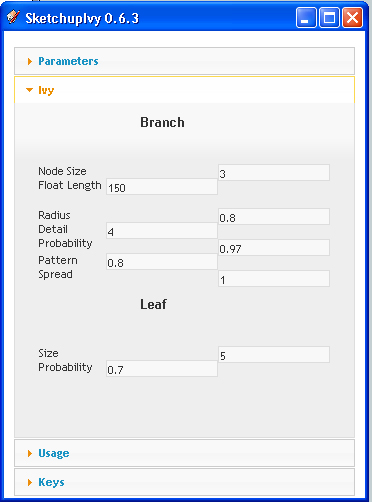
                Link Preview Image

                Link Preview Image

                the links are from sir nomer adona's blog.

                1 條回覆 最後回覆 回覆 引用 0
                • B 離線
                  bedo
                  最後由 編輯

                  Su 8 on windows

                  the plugin is correctly installed, double checked, I read through most of the previous posts to find an answer but still:

                  the plugin only works once, meaning..I can start over and over again with the I key , making several ivy's... however when open a new file, I can make stems(red line) make leafs(green x) but Finishing it up by clicking shift...does not work...It only creates a line on the main stem, and a little squaro on the bottom, which would be the starting point... and someone posted that before here I saw. I have to close sketchup in order to get it working again, and no there is no bug msg.

                  Second thing..hów can I choose which leaf I want? does it only go by default? meaning I can change the Ivy leaf components in the plugin folder...but then im stuck with that... I can't load 6 different leafs and select the ones i want?

                  Thanks for anybodys answer in advance 😄

                  1 條回覆 最後回覆 回覆 引用 0
                  • T 離線
                    tomasz
                    最後由 編輯

                    Excellent work Pierre!
                    I have noticed that SU Ivy loads definition of Ivy components and materials every time SketchUp is being opened.
                    Can you modify the script so it loads them on tool startup, not when the plugin loads itself, please?
                    Currently every model loaded on Sketchup start-up gets them inserted.

                    if (not file_loaded?(File.basename(__FILE__)))
                      menuitem = "SketchupIvy #{LiveIvy;;VERSION}"
                      mm       = UI.menu("Plugins")
                      mm.add_item(menuitem) {
                        Sketchup.active_model.select_tool LiveIvy;;IvyTool.new
                      }
                      ###################LiveIvy;;IvyTool.load_definitions
                      ###################LiveIvy;;Materials.ivy_materials
                    
                    end
                    

                    Author of Thea Render for SketchUp

                    1 條回覆 最後回覆 回覆 引用 0
                    • bigstickB 離線
                      bigstick
                      最後由 編輯

                      Thanks Tomasz for explaining why I kept finding these leaf components in every single model!

                      Pierreden, this is a really wonderful plugin, but it's not fully cooked IMHO. I accept that for some people it works fine, but there are lots of people still struggling with some aspects of it. For some it doesn't work at all, for others it has variable results.

                      For me, the dialog works (it doesn't stay on top of the SU screen when I try to click to start growth, but it seems to work fine) but clicking in the model to start growth does nothing. Would it be worth creating a toolbar for this to start, and stop growth? The actual process of growing the ivy is the problematic thing for me. I have checked to see that all the required files are present, and everything seems normal. Is there some sort of debugging mode/action I can try?

                      I don't mean to bitch, I would just really love this to work for not just me but for everyone else having difficulties. I'm very happy to help in any way I can if necessary.

                      Context menu options to control growth might also be easier than remembering which key combinations to use. Oh, and a metric option. 😄

                      1 條回覆 最後回覆 回覆 引用 0
                      • T 離線
                        tomasz
                        最後由 編輯

                        @bigstick said:

                        Thanks Tomasz for explaining why I kept finding these leaf components in every single model!

                        Here is the 'LiveIvy_tool.rb' that needs to be replaced in the 'LiveIvy' folder to remove that annoyance.


                        0.6.3+

                        Author of Thea Render for SketchUp

                        1 條回覆 最後回覆 回覆 引用 0
                        • romboutR 離線
                          rombout
                          最後由 編輯

                          Hi tomasz,

                          on the mac the popup window of ivy generator shows and than immediately hides again on the mac, su6 and 7
                          Here's the code from SU7

                          Error; #<NoMethodError; undefined method `to_array' for Pdn;;LiveIvy;;Parameters;Module>
                          /Library/Application Support/Google SketchUp 7/SketchUp/Plugins/LiveIvy/LiveIvy_tool.rb;58;in `register_callbacks'
                          /Library/Application Support/Google SketchUp 7/SketchUp/Plugins/LiveIvy/LiveIvy_tool.rb;58;in `call'
                          /Library/Application Support/Google SketchUp 7/SketchUp/Plugins/LiveIvy/LiveIvy_tool.rb;58
                          
                          1 條回覆 最後回覆 回覆 引用 0
                          • romboutR 離線
                            rombout
                            最後由 編輯

                            @oxer said:

                            @rombout said:

                            how come for a lot of peeps the 0.6.3 versiion does work?
                            on the mac i doesnt do anything, no feedback no nothing?! 😲

                            Hi Rombout,
                            Try this version, works for me on Mac OSX 10.6.7 and SU 8.
                            Keys on Mac:
                            Click where you want the Ivy to start grow.
                            Cmd+Click : Make the ivy grow towards the mouse position.
                            Alt+Click : Grow Ivy leafs.
                            SHIFT+Click : Finish Ivy.
                            Keyboard 'i' : Start over.

                            [attachment=0:1xv8nygn]<!-- ia0 -->SketchupIvy.0.6.beta.zip<!-- ia0 -->[/attachment:1xv8nygn]

                            He this version wont work no more for me any more. I did how ever did some updates on some plugins so think i need to do a reload step by step and see which one it is

                            1 條回覆 最後回覆 回覆 引用 0
                            • OxerO 離線
                              Oxer
                              最後由 編輯

                              Hi Rombout,
                              I use Sketchup 8 on Mac and Sketchupivy 0.6beta works fine for me, you can see this video on You Tube http://www.youtube.com/embed/RGV8jU9HK_Y
                              If you want i send you the plugin again.
                              Usually SketchyPhisics3 plugin gives errors and conflicts with other plugins like shape_bender.rb, round_corner.rb, Extrude Tools and others
                              perhaps with Sketchupivy too, have you installed SketchyPhisics3?

                              "The result is the end what is important is the process" by Oxer
                              http://www.oxervision.blogspot.com/

                              1 條回覆 最後回覆 回覆 引用 0
                              • charly2008C 離線
                                charly2008
                                最後由 編輯

                                Hi,

                                I've recently experimented a bit to produce a Wisteria. Unfortunately I was not so successful. Then I have reinstalled the "0.63 beta". The result is now that no Ivy texture appears and Wisteria leaves also still appears. What is wrong?

                                Charly
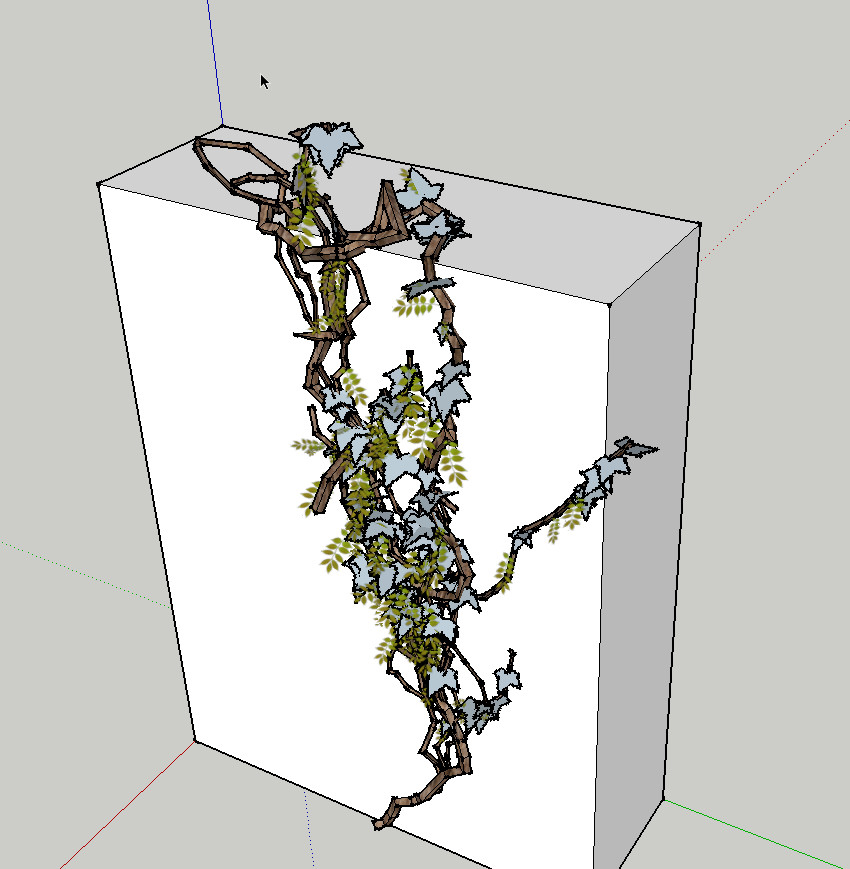

                                2011-11-27_142944.jpg


                                2011-11-27_143650.jpg

                                He who makes no mistakes, makes nothing

                                1 條回覆 最後回覆 回覆 引用 0
                                • romboutR 離線
                                  rombout
                                  最後由 編輯

                                  I do have a couple of those installed as well. But I think it due to the sketchy physics, I installed this lately and before that it was always working. But I got it to work again after changes to lines of code (see tomasz's tips) there's one doneside on that. I hardly renders leaves know!? So I think I need to take a closer look now.
                                  What's also weird is that io never got your version to work in iether su7 or 8, I would only work in su6.

                                  1 條回覆 最後回覆 回覆 引用 0
                                  • D 離線
                                    driven
                                    最後由 編輯

                                    Charley,
                                    are the Materials showing up in the browser when you launch Ivy?
                                    and does the script have Tigs mod??
                                    john

                                    learn from the mistakes of others, you may not live long enough to make them all yourself...

                                    1 條回覆 最後回覆 回覆 引用 0
                                    • charly2008C 離線
                                      charly2008
                                      最後由 編輯

                                      Hi John,

                                      no, only the material for the tribe. Yes I have installed the "TIG mod".
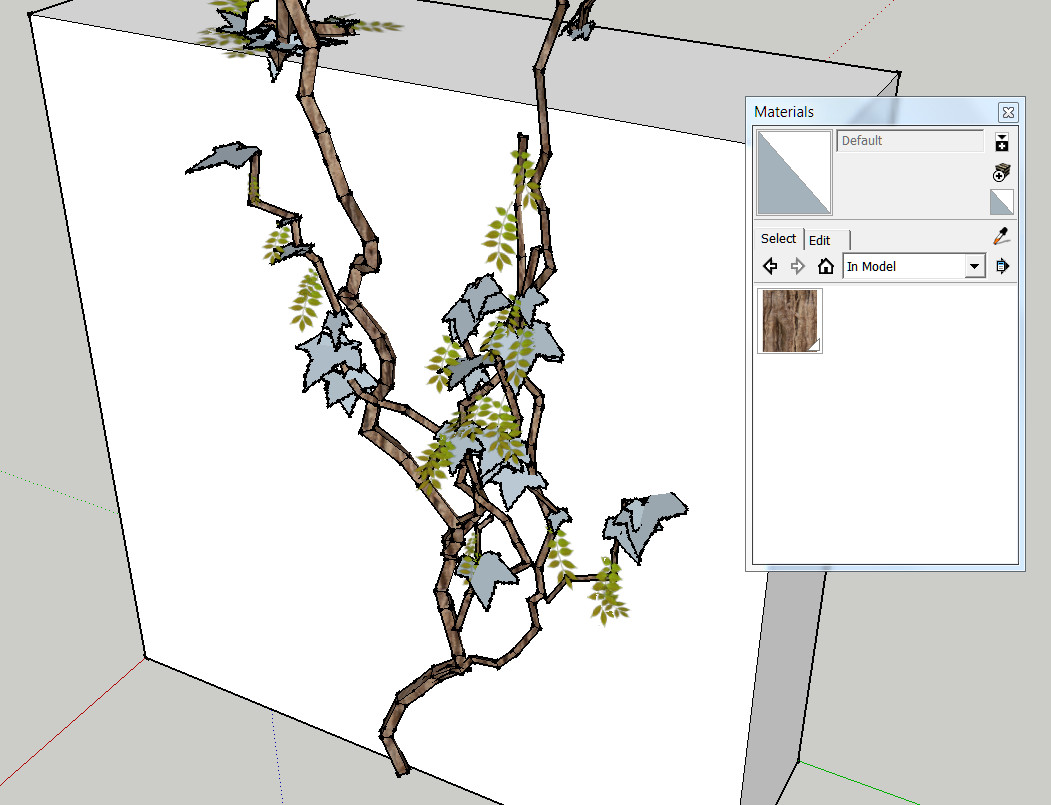

                                      2011-11-27_142944.jpg

                                      He who makes no mistakes, makes nothing

                                      1 條回覆 最後回覆 回覆 引用 0
                                      • D 離線
                                        driven
                                        最後由 編輯

                                        did you try it without the mod... john

                                        learn from the mistakes of others, you may not live long enough to make them all yourself...

                                        1 條回覆 最後回覆 回覆 引用 0
                                        • charly2008C 離線
                                          charly2008
                                          最後由 編輯

                                          John,

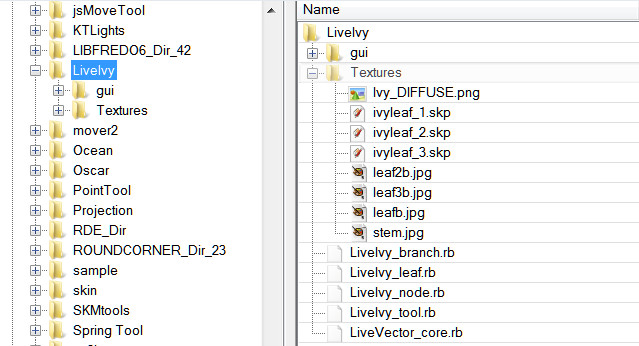
                                          yes i did. I have looked again at the contents of the texture folder (see pictures below). Can it be that something is missing here?
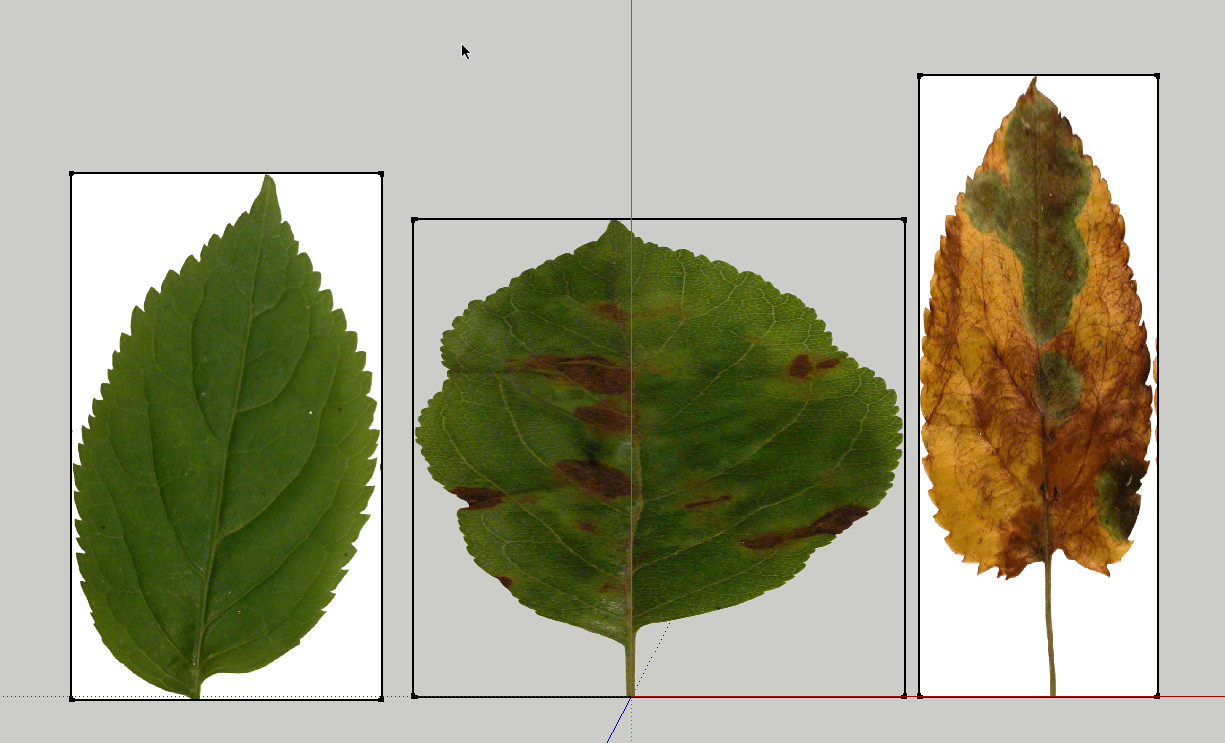

                                          SKP-Files


                                          Texture Files

                                          He who makes no mistakes, makes nothing

                                          1 條回覆 最後回覆 回覆 引用 0
                                          • D 離線
                                            driven
                                            最後由 編輯

                                            I think it's to do with the image file name, I remember re-naming a complete set to replace the originals when I was playing with it.

                                            early in the thread someone supplied a modified Textures folder [with different leafs], maybe look at that...

                                            john

                                            learn from the mistakes of others, you may not live long enough to make them all yourself...

                                            1 條回覆 最後回覆 回覆 引用 0
                                            • 1
                                            • 2
                                            • 3
                                            • 4
                                            • 5
                                            • 36
                                            • 37
                                            • 3 / 37
                                            • 第一個貼文
                                              最後的貼文
                                            Buy SketchPlus
                                            Buy SUbD
                                            Buy WrapR
                                            Buy eBook
                                            Buy Modelur
                                            Buy Vertex Tools
                                            Buy SketchCuisine
                                            Buy FormFonts

                                            Advertisement