[Plugin] Sketchup Ivy
-
@pierreden said:
@gaonirico said:
I installed the version 0.5.4 but from the previous version 0.3 the menu not shows correctly and function the change of parameters. Happens because my monitor functions only to 800x600? or I must have installed some update of internet explorer?
@gaonarico: I dont know im afraid. It might be a javascript issue, if so, updating you IExplorer might help. But this problem is noted and i really hope to solve it soon.
I resolved the problem. The cause went for some spyware or badware. I decided create a new account of user which solved also other errors in my pc
-
All it needs now is a parameter to add bunches of grapes...and the designers of Greek tavernas will be very happy.

-
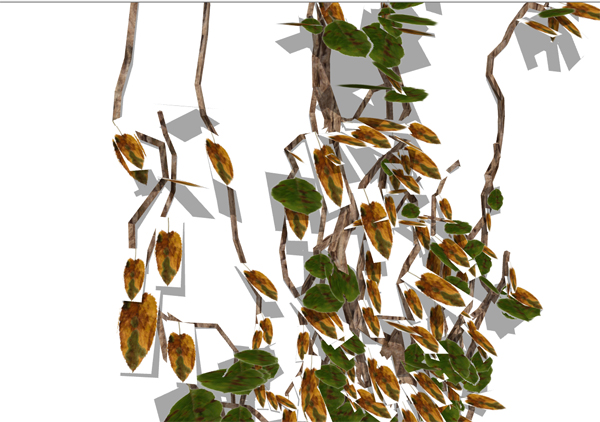
Any idea what I'm doing wrong?
My ivy leafs appear with borders?
(Thanks to Earthmover for answering previous question).
-
What render engine?
The answer is because they are jpg and have no alpha channel, they need to be .png or you need to have the alpha mask in the right slot.
-
Just playing with SU output at the moment, Solo.
-
hi
question for the experts?
I'm going out to the garden to collect some english dog rose stem, leafs, buds and flowers to make up a set.
what would be the best size, resolution, etc... to use with this. The originals seem huge to me, is that necessary?
Obviously transparent background png's
john
-
@leedeetee said:
Just playing with SU output at the moment, Solo.
Looked so to me as well, nonetheless, you need to use png-files where the white parts are actually transparent as Solo already have pointed out...
If you don't have one, you can play with this ivy leaf EarthMover posted earlier... -
@frederik said:
@leedeetee said:
Just playing with SU output at the moment, Solo.
Looked so to me as well, nonetheless, you need to use png-files where the white parts are actually transparent as Solo already have pointed out...
If you don't have one, you can play with this ivy leaf EarthMover posted earlier...Super, thanks, and thank-you Solo.
-
@driven said:
hi
question for the experts?
I'm going out to the garden to collect some english dog rose stem, leafs, buds and flowers to make up a set.
what would be the best size, resolution, etc... to use with this. The originals seem huge to me, is that necessary?
Obviously transparent background png's
johnThat depends on how close the camera will be. A general rule is to use sizes such as 256x256 pixels, 512x512 etc. since they use the least amount of memory compared to it's size.
-
@solo said:
Oh yes,I agree the leaves need to be .png's with alpha channel, especially for render purposes, I'd like to have something similar to fur plugin that I can choose what to use as leaves if possible.
Face me would be awesome.
I don't know where all this **"png with alpha channel"**stuff is coming from, certainly one can do a precise cutout using PS and SU only, that's how I make the new Ivy leaves I posted in my rar file. Granted its a little more work. Also everyone in the photo-reproduction industry I know, is NOT a .png fan, and will always ask to convert to .jpg before printing.
If you use my .jpg ivy files they will also load easily into the fur plugin. -
Tomot, the reason I insist in .png is because for ivy you going to have a lot of geometry with the branches, now using your jpg cut out leaves will add 112 edges per leaf as opposed to 4. So imagine having 1000 leaves. I was more concerned with the huge geometry than the shadows in SU as I would be rendering anyway.
-
@solo said:
So imagine having 1000 leaves. I was more concerned with the huge geometry than the shadows in SU as I would be rendering anyway.
Good point Solo.
Regards
-
@solo said:
I was more concerned with the huge geometry than the shadows in SU as I would be rendering anyway.
fair comment! I very rarely use Vray rendered images for presentations, I'm more a fan of the Dennis presentation technique hence I want leaves without borders. I suppose that's the trade-off
-
@tomot said:
fair comment! I very rarely use Vray rendered images for presentations, I'm more a fan of the Dennis presentation technique hence I want leaves without borders. I suppose that's the trade-off
Sorry, you are rigth, I was thinking only in the render process. I'm also denni's tech fan.
-
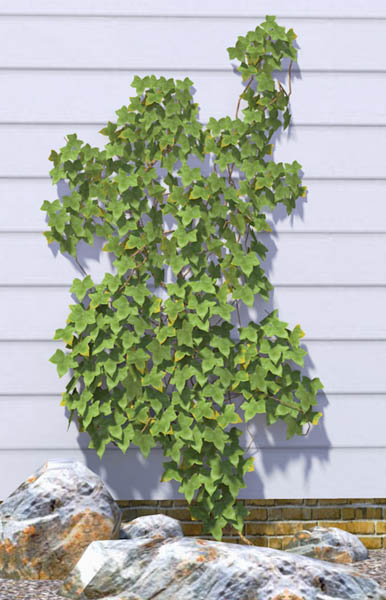
Is there a way to change the parameters of the number of segments in the stems? To be honest, I don't think it's necessary to be using hexagonal stems metres off the ground. You could probably start with a square cross section and quickly move to triangular(as in earlier releases) without any visible difference...especially as most stems will be hidden behind leaves.
This plugin is looking really good.
-
It looks like an awesome Plugin, unfortunately as previously mentioned it's not working on Mac Sketchup 8.
Hope you resolve it as it would be fantastic to use on an upcoming project.
Tx
Justin -
@justinplunkett said:
It looks like an awesome Plugin, unfortunately as previously mentioned it's not working on Mac Sketchup 8.
Hope you resolve it as it would be fantastic to use on an upcoming project.
Tx
JustinHi Justin,
it does work on Mac with SU version 8, but I need to load it after startup from ruby console, or with as_pluginloader.rb.
to use with either method of loading, I would suggest the following-
go to LiveIvy.rb (in your plugins folder) >> right click and color it green >> drag it into LiveIvy Folder >> start SU >> open Ruby Console >> type load "LiveIvy/LiveIvy.rb" hit return >> draw or select a surface/shape/group... >> last item in plugins menu should be Ivy.
or use plugin loader to do the same, navigate to then select the green file... that's why I color it...
the standard image files can be improved by editing the .skp's in the folder, and I haven't got my head around all the settings yet.
but they do work.
john
-
Just a quicky test with others leafs


-
Here are a spanish translate from version 0.5.4. I'm going to translate version 0.6.x when is more stable.
-
Thanks for the great Plugin!






Hello! It looks like you're interested in this conversation, but you don't have an account yet.
Getting fed up of having to scroll through the same posts each visit? When you register for an account, you'll always come back to exactly where you were before, and choose to be notified of new replies (either via email, or push notification). You'll also be able to save bookmarks and upvote posts to show your appreciation to other community members.
With your input, this post could be even better 💗
Register Login


Advertisement