[Plugin] Sketchup Ivy
-
@tomot said:
v.0.5.4 : only produces one statement in the Ruby Console after it installs the Ivy leaves.
quietly_force_sync_mats_cb just calledbut otherwise works flawlessly.
That is generated by V-Ray for SketchUp.
-
@jamalito said:
hi guyz
how is it do this plugin ?
I downloaded it but can not use it
is anyone tell me how is this work ?
-
extract the rar file (http://www.win-rar.com/) into your Sketchup Plugin folder, located in the Google program files: Both LiveIvy.rb and the directory LiveIvy should be directly in the Plugin folder. Restart sketchup, select the faces you wish the ivy to grow on and access the plugin the the dropdown menu "Plugins" The GUI should appear, click the tab Usage for a full explanation of ...usage.
btw: Pierreden - this is my favorite GUI of any sketchup plugin, bravo

-
I thought I would be able to add a 4th leaf to the LiveIvy.tool.rb script.
Having made a new ivyleaf_4.skp file and adding the following code paragraphunless ;;Pdn;;LiveIvy;;Definitions.present?("ivyleaf_4") #path = File.join(pathname, 'Textures/ivyleaf_4.skp') pathname = Sketchup.find_support_file "ivyleaf_4.skp", "Plugins/LiveIvy/Textures/" definitions.load pathname endI thought would have worked ......it did not!
 any ideas what else needs to be changed to accept a 4th leaf? I also made the leaves into actual cutouts, the procedure is similar to making "face me components". I will post the new revised leaves soon.
-
Oh yes,I agree the leaves need to be .png's with alpha channel, especially for render purposes, I'd like to have something similar to fur plugin that I can choose what to use as leaves if possible.
Face me would be awesome.
-
@solo said:
Oh yes,I agree the leaves need to be .png's with alpha channel, especially for render purposes, I'd like to have something similar to fur plugin that I can choose what to use as leaves if possible.
Face me would be awesome.
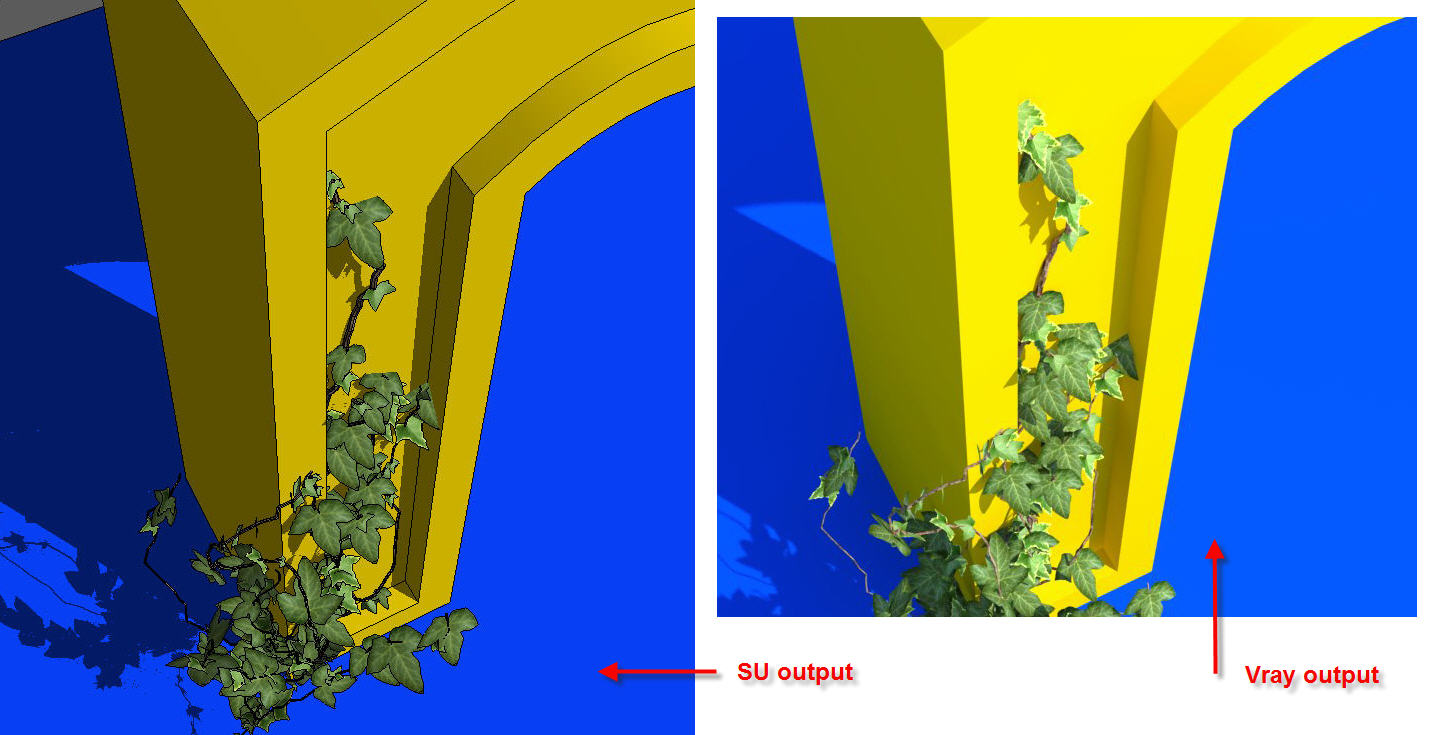
have a look at the attached Texture folder, it contains the Ivy shown above.
let me know how it works!
(if you only have winzip just rename texture.rar to texture.zip and open it with winzip)
-
0.6.3 is the version I'm using now... The ivy is not closing on shift + click. Was playing with 0.5.4 earlier and it worked perfectly. I've playing trying it out on sketchup 8. (yes i deleted the previous version) Just reporting... No complaints..
 great work on the plugin mate..!
 -
first of all thanks for this pluggin. its wonderful. I have the following request.
-
two skp files were done in su8, its better if they are done in SU6, they can be opened in su7 and su8. if they were done in SU 8 then it has error in SU7 and SU6.
-
Please make the leaf textures as png file with background as transparent. its easier to render. instead of tiff or jpg
-
HOw is the possibility where user can load its own skp files. rather than depending on the three skp file leaves.
again my honest to goodness thanks to you pierre.
-
-
This is just a workaround IMHO. There are 3 skp files in the rubies folder these are the 3 leaves each... you can save your own png textures instead of these leaves, but i'd recommend you place them on the same position as the existing leaf as it might affect leaf position otherwise. (you can save these in the skp format you use)
As solo and a few others have also said it would be definitely great to have some control as to what components to use as "instances" for the leaves like we have in the make fur plugin. It would add more control as to the kind of things we can make with this wonderful plugin... ( FRUIT LADEN TREES is definitely something i might play with
) -
is an excellent plugin from the beginning was working fine....but now it seems not work properly.....I got this console ruby ivy version 0.6.3
Error: #<Errno::EDOM: Domain error - acos>
C:/Program Files (x86)/Google/Google SketchUp 8/Plugins/LiveIvy/LiveIvy_branch.rb:35:inacos' C:/Program Files (x86)/Google/Google SketchUp 8/Plugins/LiveIvy/LiveIvy_branch.rb:35:ingrow_stem'
C:/Program Files (x86)/Google/Google SketchUp 8/Plugins/LiveIvy/LiveIvy_tool.rb:204:ingrow_stem' C:/Program Files (x86)/Google/Google SketchUp 8/Plugins/LiveIvy/LiveIvy_tool.rb:203:ineach'
C:/Program Files (x86)/Google/Google SketchUp 8/Plugins/LiveIvy/LiveIvy_tool.rb:203:ingrow_stem' C:/Program Files (x86)/Google/Google SketchUp 8/Plugins/LiveIvy/LiveIvy_tool.rb:202:intimes'
C:/Program Files (x86)/Google/Google SketchUp 8/Plugins/LiveIvy/LiveIvy_tool.rb:202:ingrow_stem' C:/Program Files (x86)/Google/Google SketchUp 8/Plugins/LiveIvy/LiveIvy_tool.rb:90:inonLButtonUp' -
@pierreden said:
@gaonirico said:
I installed the version 0.5.4 but from the previous version 0.3 the menu not shows correctly and function the change of parameters. Happens because my monitor functions only to 800x600? or I must have installed some update of internet explorer?
@gaonarico: I dont know im afraid. It might be a javascript issue, if so, updating you IExplorer might help. But this problem is noted and i really hope to solve it soon.
I resolved the problem. The cause went for some spyware or badware. I decided create a new account of user which solved also other errors in my pc
-
All it needs now is a parameter to add bunches of grapes...and the designers of Greek tavernas will be very happy.
-
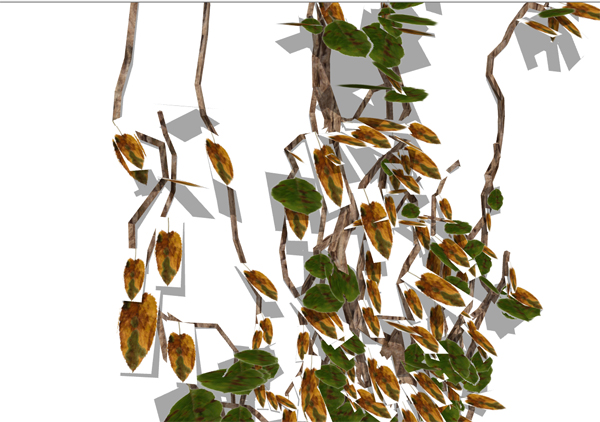
Any idea what I'm doing wrong?
My ivy leafs appear with borders?
(Thanks to Earthmover for answering previous question).
-
What render engine?
The answer is because they are jpg and have no alpha channel, they need to be .png or you need to have the alpha mask in the right slot.
-
Just playing with SU output at the moment, Solo.
-
hi
question for the experts?
I'm going out to the garden to collect some english dog rose stem, leafs, buds and flowers to make up a set.
what would be the best size, resolution, etc... to use with this. The originals seem huge to me, is that necessary?
Obviously transparent background png's
john
-
@leedeetee said:
Just playing with SU output at the moment, Solo.
Looked so to me as well, nonetheless, you need to use png-files where the white parts are actually transparent as Solo already have pointed out...
If you don't have one, you can play with this ivy leaf EarthMover posted earlier... -
@frederik said:
@leedeetee said:
Just playing with SU output at the moment, Solo.
Looked so to me as well, nonetheless, you need to use png-files where the white parts are actually transparent as Solo already have pointed out...
If you don't have one, you can play with this ivy leaf EarthMover posted earlier...Super, thanks, and thank-you Solo.
-
@driven said:
hi
question for the experts?
I'm going out to the garden to collect some english dog rose stem, leafs, buds and flowers to make up a set.
what would be the best size, resolution, etc... to use with this. The originals seem huge to me, is that necessary?
Obviously transparent background png's
johnThat depends on how close the camera will be. A general rule is to use sizes such as 256x256 pixels, 512x512 etc. since they use the least amount of memory compared to it's size.
-
@solo said:
Oh yes,I agree the leaves need to be .png's with alpha channel, especially for render purposes, I'd like to have something similar to fur plugin that I can choose what to use as leaves if possible.
Face me would be awesome.
I don't know where all this **"png with alpha channel"**stuff is coming from, certainly one can do a precise cutout using PS and SU only, that's how I make the new Ivy leaves I posted in my rar file. Granted its a little more work. Also everyone in the photo-reproduction industry I know, is NOT a .png fan, and will always ask to convert to .jpg before printing.
If you use my .jpg ivy files they will also load easily into the fur plugin.









Advertisement