sketchucation logo sketchucation
    • 登入
    Oops, your profile's looking a bit empty! To help us tailor your experience, please fill in key details like your SketchUp version, skill level, operating system, and more. Update and save your info on your profile page today!
    🔌 Smart Spline | Fluid way to handle splines for furniture design and complex structures. Download

    [Plugin] Sketchup Ivy

    已排程 已置頂 已鎖定 已移動 Plugins
    732 貼文 172 Posters 315.5k 瀏覽 172 Watching
    正在載入更多貼文
    • 從舊到新
    • 從新到舊
    • 最多點贊
    回覆
    • 在新貼文中回覆
    登入後回覆
    此主題已被刪除。只有擁有主題管理權限的使用者可以查看。
    • OxerO 離線
      Oxer
      最後由 編輯

      Hi,
      I have probed 0.6.2 beta on Mac and don't works, i have uninstall all plugins perhaps there was some conflict and it don't works.
      The previous version 0.6.beta works on Mac but the leaf are very small and i don't know change the size of the leaves.
      One question, on Pc the "i" key is = 73 but on Mac "i" key is =105, can you make a different between "i" key on Mac and Pc.
      Thanks Pierreden for your incredible work!! 👍
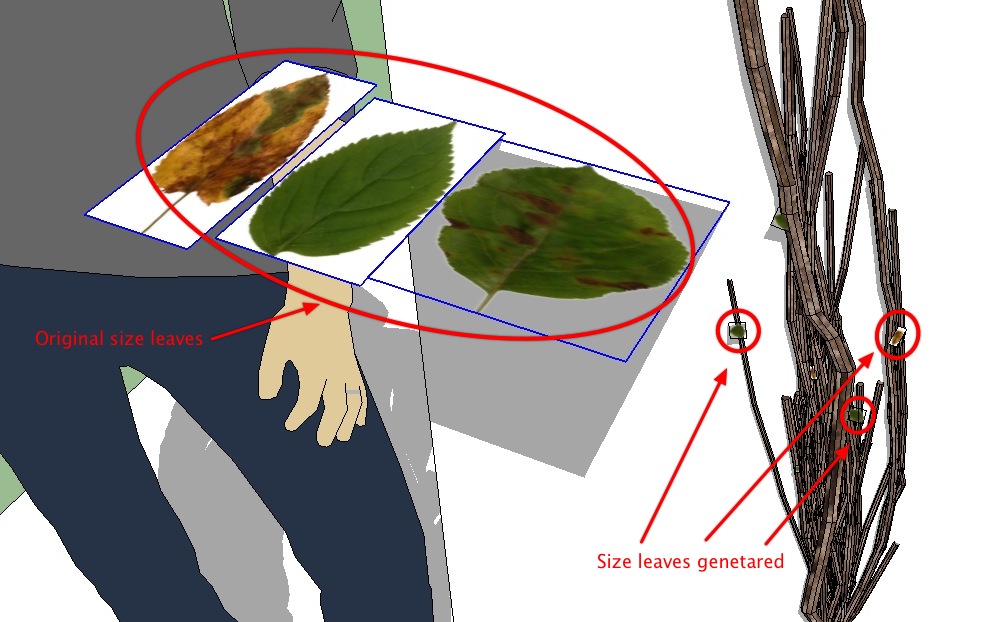
      Problem with size leaves on Mac

      "The result is the end what is important is the process" by Oxer
      http://www.oxervision.blogspot.com/

      1 條回覆 最後回覆 回覆 引用 0
      • A 離線
        autarchos
        最後由 編輯

        shift+click does not finish here in SU8 Windows...

        also having a hard time getting ivy to grow with successive clicks, sometimes it appears, sometimes it disappears, sometimes it grows "inside" boxes, usually doesn't grow past two or three clicks.

        nevertheless, the plugin is looking great and keep up the fantastic work!

        1 條回覆 最後回覆 回覆 引用 0
        • PixeroP 離線
          Pixero
          最後由 編輯

          I just tried on a different computer and it's the same. Doesn't finish. SU 8 Windows 7.
          I also have another problem, and that is that even if I click several times it still wont branch.
          Just one single "curve". Also it disappears completely after some clicks.
          Didn't have a problem with earlier versions.

          1 條回覆 最後回覆 回覆 引用 0
          • soloS 離線
            solo
            最後由 編輯

            Jeff, can you send me the SU model and let me try.

            Pixero, I installed new update and I get exactly same as you, it won't finish, only one branch shows.

            http://www.solos-art.com

            If you see a toilet in your dreams do not use it.

            1 條回覆 最後回覆 回覆 引用 0
            • EscapeArtistE 離線
              EscapeArtist
              最後由 編輯

              Ahhh, dangit. I just closed the window and didn't save it. I'll post a reproduction if it works.

              EDIT: Go figure. I can't reproduce the half-scattered effect. Still want the model?

              1 條回覆 最後回覆 回覆 引用 0
              • EscapeArtistE 離線
                EscapeArtist
                最後由 編輯

                @solo said:

                Thea users: uncheck 'export as components' before exporting.

                Did that, and still have leaves all over the place. SU 8, Win 7 64 Bit, Thea 1.0.9

                Here's the really weird thing; Exploding the ivy completely solves the problem, BUT, only for the ivy in the viewable area. In other words, if half the ivy is off the top of the screen when the exploding is done only the leaves in the viewport will remain attached to the vines/branches, the rest of the leaves are scattered when exported. (Disregard, couldn't reproduce the effect)

                Zooming out so that all ivy is visible and exploding the component completely before export to Thea is the workaround for now.
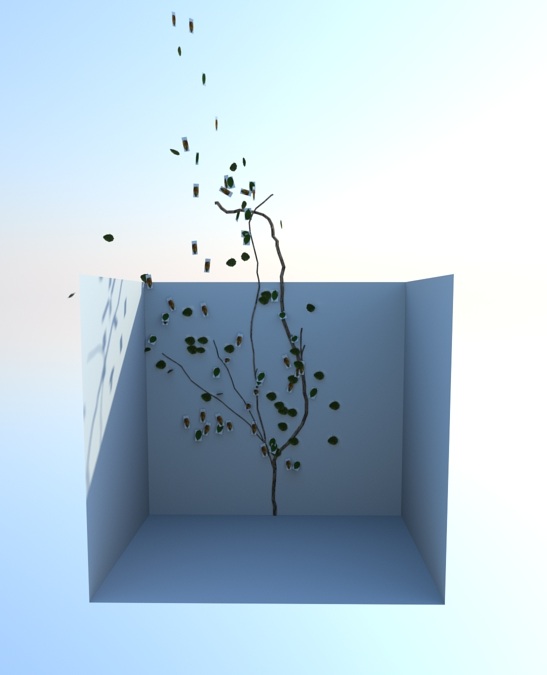
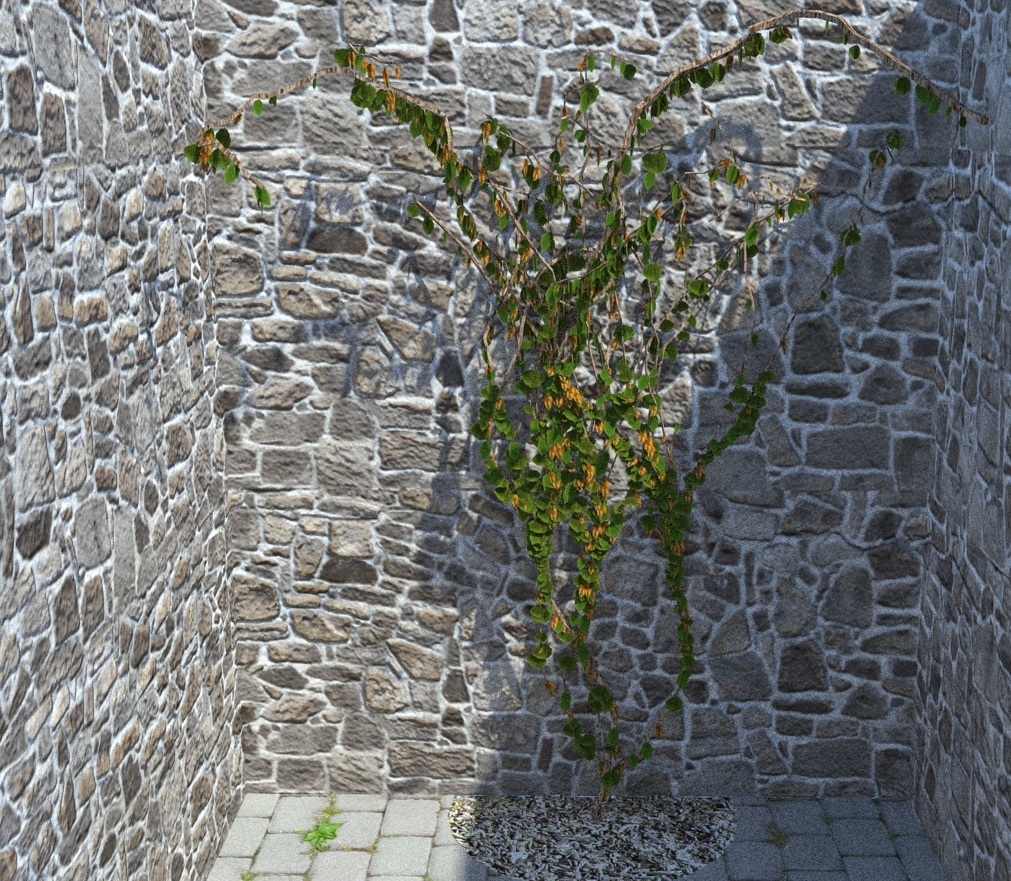
                unexploded

                Looks kinda hot and wilted.  Maybe needs water?

                Really liking this plugin and where it's going! 👍 👍

                1 條回覆 最後回覆 回覆 引用 0
                • srxS 離線
                  srx
                  最後由 編輯

                  @unknownuser said:

                  shift+click does not finish here in SU8 Windows...

                  also having a hard time getting ivy to grow with successive clicks, sometimes it appears, sometimes it disappears, sometimes it grows "inside" boxes, usually doesn't grow past two or three clicks.

                  That means it doesn't depends on SU version, but works without other plugins, otherwise doesn't ...which means conflict with some of them. Which?

                  www.saurus.rs

                  1 條回覆 最後回覆 回覆 引用 0
                  • EarthMoverE 離線
                    EarthMover
                    最後由 編輯

                    Newest build working fine for me on Win 7 SU 8.

                    Here's a quick play. Swapped the dead looking default leaves for some Wisteria leaves and blooms. Amazing plugin!
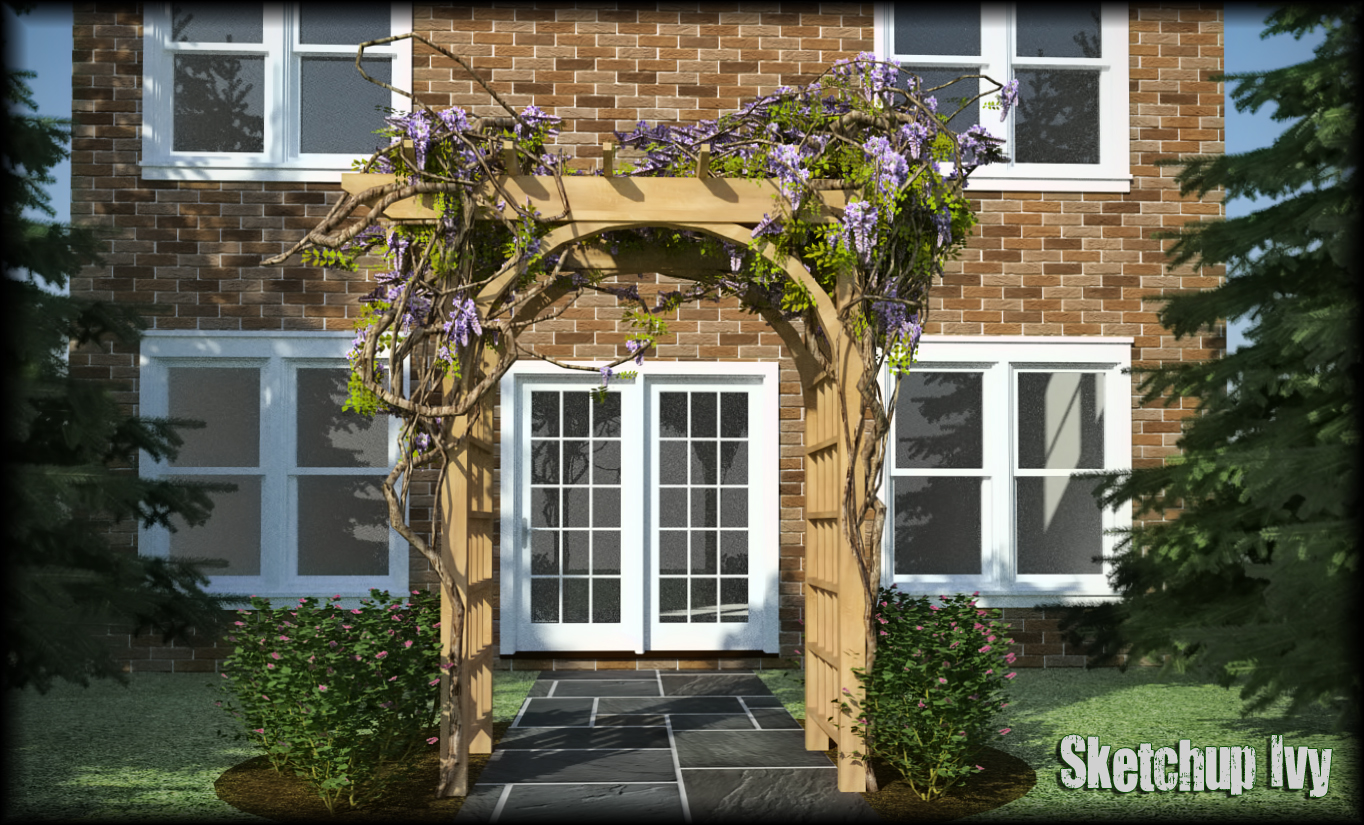


                    SU Ivy Wisteria.jpg


                    Wisteria Bloom.png


                    Wisteria Leaf.png

                    3D Artist at Clearstory 3D Imaging
                    Guide Tool at Winning With Sketchup
                    Content Creator at Skapeup

                    1 條回覆 最後回覆 回覆 引用 0
                    • soloS 離線
                      solo
                      最後由 編輯

                      BRAVO!! 👍

                      Wisteria, brilliant, and thanks for sharing the mats.

                      When I get time I'll attempt a grape vine using fur plugin

                      http://www.solos-art.com

                      If you see a toilet in your dreams do not use it.

                      1 條回覆 最後回覆 回覆 引用 0
                      • EarthMoverE 離線
                        EarthMover
                        最後由 編輯

                        Here is a copy of the arbor with Wisteria. I have a nice climbing hydrangea in my garden that would make for a good test subject. I'd like to do a rose next though. I'm thinking Chris Fullmer's Components on to Faces plugin might be perfect to scatter 3D blooms across a set of leaves and then delete the leaves. I definitely need more hours in the day, strictly dedicated to "play" time.


                        Arbor_Wisteria.zip

                        3D Artist at Clearstory 3D Imaging
                        Guide Tool at Winning With Sketchup
                        Content Creator at Skapeup

                        1 條回覆 最後回覆 回覆 引用 0
                        • EscapeArtistE 離線
                          EscapeArtist
                          最後由 編輯

                          Well done!

                          1 條回覆 最後回覆 回覆 引用 0
                          • R 離線
                            robert111
                            最後由 編輯

                            good work earthmover
                            but can you say how to increase the thickness ofr your ivy plz?

                            1 條回覆 最後回覆 回覆 引用 0
                            • soloS 離線
                              solo
                              最後由 編輯

                              The "i" does not work for me, yes I'm an IE user.

                              http://www.solos-art.com

                              If you see a toilet in your dreams do not use it.

                              1 條回覆 最後回覆 回覆 引用 0
                              • EarthMoverE 離線
                                EarthMover
                                最後由 編輯

                                @robert111 said:

                                good work earthmover
                                but can you say how to increase the thickness ofr your ivy plz?

                                Not really sure. I left all the settings as default and what you see was my first quick attempt. I did scale the foliage up a little but the vine itself is on default settings using the 0.6.2 beta build with imperial units.

                                3D Artist at Clearstory 3D Imaging
                                Guide Tool at Winning With Sketchup
                                Content Creator at Skapeup

                                1 條回覆 最後回覆 回覆 引用 0
                                • D 離線
                                  driven
                                  最後由 編輯

                                  Solo,
                                  oxer pointed out that it needs to be

                                  key == 73 on PC's and key ==105 on Mac's

                                  but it was changed to that for 6.0.2 so if your using 6.0.2 then maybe 73 is the spanish keycode for i.

                                  I don't have a PC to check.

                                  you can change line number 69 in Liveivy_tool.rb to whatever you know works, it was 82 for [r]...

                                  Also it was previously on line number 73, so maybe there was a typo...

                                  john

                                  learn from the mistakes of others, you may not live long enough to make them all yourself...

                                  1 條回覆 最後回覆 回覆 引用 0
                                  • D 離線
                                    driven
                                    最後由 編輯

                                    hi all,

                                    I should have at least tweaked the current version... ahhh

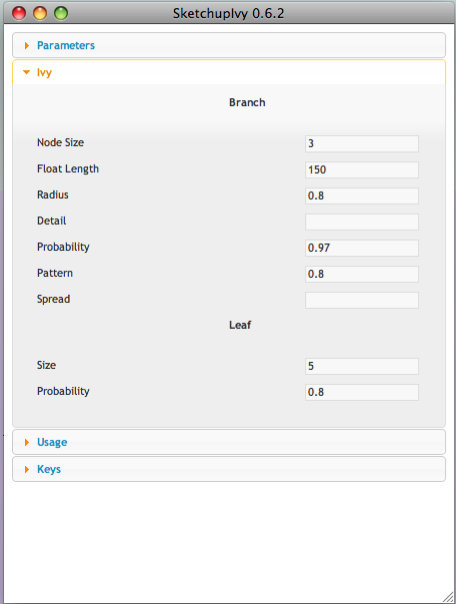
                                    the <h4> headers need to be tweaked as well to be bold and centered

                                    <span style="margin-left; 50%; font-weight;900" class="label">Branch</span>
                                    

                                    NB: this may just be for safari...


                                    0.6.2

                                    learn from the mistakes of others, you may not live long enough to make them all yourself...

                                    1 條回覆 最後回覆 回覆 引用 0
                                    • D 離線
                                      driven
                                      最後由 編輯

                                      hi
                                      sorry if the 'i' caused havoc for IE users,
                                      maybe someone can see if this breaks anything first,

                                      the formating in the main.html is broken in safari, which makes it hard to change settings.

                                      it's easily fixed by adding breaks between the list items, but I'm not sure what that does in IE...
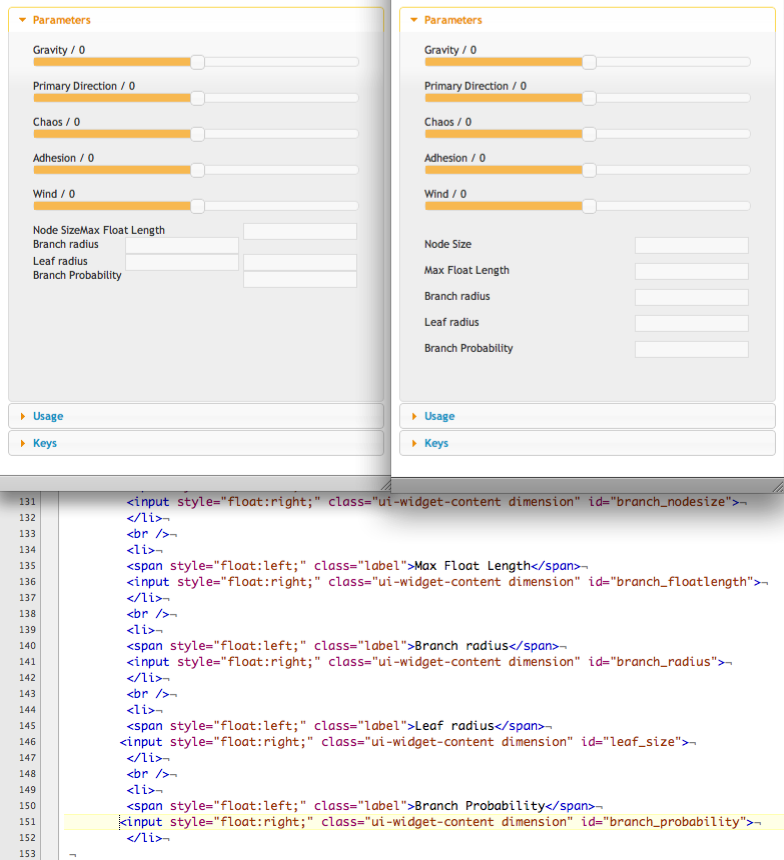
                                      this may be just a safari thing,,,

                                      also can show_modal for mac return, I use a snippet I nicked that I believe works for both

                                      snippet REMOVED not working properly, will investigate???

                                      great work

                                      john

                                      learn from the mistakes of others, you may not live long enough to make them all yourself...

                                      1 條回覆 最後回覆 回覆 引用 0
                                      • sadyoS 離線
                                        sadyo
                                        最後由 編輯

                                        Nice Plugin,but just for the report...

                                        When i trying v0.6.2,
                                        All feature inside Parameters it seem appearing and worked properly.
                                        Ctrl+click and Alt+click worked fine

                                        But when i try shift+click, nothing happen, so i cannot see the leaf 😢

                                        I Hope this problem would be solved on the next release

                                        Thanks in advance


                                        I,m Using SU 8 M1 Pro and Win7 64bit

                                        1 條回覆 最後回覆 回覆 引用 0
                                        • rodrigonotorR 離線
                                          rodrigonotor
                                          最後由 編輯

                                          Hi, i want to say: great plugin!, I try it and this is the result:

                                          http://img846.imageshack.us/img846/6592/ivyz.jpg

                                          Also, I translate to spanish, here are the file, only rename to main.html

                                          Me he tomado la libertad de traducirlo al español, solo hay que renombrar el archivo a main.html
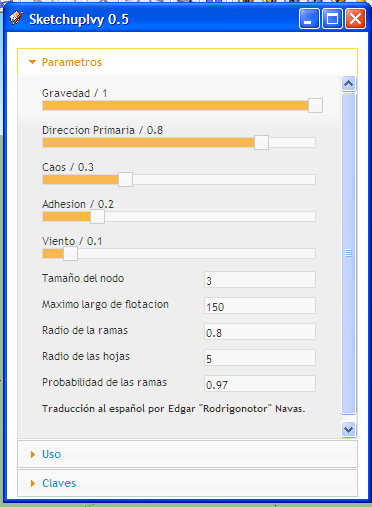
                                          main_es.rar

                                          12-05-2011 10-39-36 PM.png

                                          • Sketchando.net • www.arqcad.net •

                                          1 條回覆 最後回覆 回覆 引用 0
                                          • srxS 離線
                                            srx
                                            最後由 編輯

                                            When I start SU it begins with this:
                                            Error Loading File LiveIvy.rb
                                            Can't insert empty component.

                                            This is solved with replacing version 8 leaf components with version 7 in Textures folder...
                                            but still not working:

                                            Error: #<NoMethodError: undefined method -' for nil:NilClass> C:/Program Files (x86)/Google/Google SketchUp 7/Plugins/LiveIvy/LiveIvy_tool.rb:241:in birth_stem'
                                            C:/Program Files (x86)/Google/Google SketchUp 7/Plugins/LiveIvy/LiveIvy_tool.rb:234:in each' C:/Program Files (x86)/Google/Google SketchUp 7/Plugins/LiveIvy/LiveIvy_tool.rb:234:in birth_stem'
                                            C:/Program Files (x86)/Google/Google SketchUp 7/Plugins/LiveIvy/LiveIvy_tool.rb:223:in birth' C:/Program Files (x86)/Google/Google SketchUp 7/Plugins/LiveIvy/LiveIvy_tool.rb:99:in onLButtonDown'
                                            C:/Program Files (x86)/Google/Google SketchUp 7/Plugins/LiveIvy/LiveIvy_tool.rb:234

                                            www.saurus.rs

                                            1 條回覆 最後回覆 回覆 引用 0
                                            • 1
                                            • 2
                                            • 27
                                            • 28
                                            • 29
                                            • 30
                                            • 31
                                            • 36
                                            • 37
                                            • 29 / 37
                                            • 第一個貼文
                                              最後的貼文
                                            Buy SketchPlus
                                            Buy SUbD
                                            Buy WrapR
                                            Buy eBook
                                            Buy Modelur
                                            Buy Vertex Tools
                                            Buy SketchCuisine
                                            Buy FormFonts

                                            Advertisement