sketchucation logo sketchucation
    • 登入
    Oops, your profile's looking a bit empty! To help us tailor your experience, please fill in key details like your SketchUp version, skill level, operating system, and more. Update and save your info on your profile page today!
    🔌 Smart Spline | Fluid way to handle splines for furniture design and complex structures. Download

    [Plugin] CameraKeyMaker 1.0 (Update 2011-04-09)

    已排程 已置頂 已鎖定 已移動 Plugins
    118 貼文 53 Posters 143.9k 瀏覽 53 Watching
    正在載入更多貼文
    • 從舊到新
    • 從新到舊
    • 最多點贊
    回覆
    • 在新貼文中回覆
    登入後回覆
    此主題已被刪除。只有擁有主題管理權限的使用者可以查看。
    • M 離線
      macgile
      最後由 編輯

      @tig said:

      Using keys that might be mapped by others to do stuff [I already use Alt+Q to orient-faces] is a bad idea... use just modifiers like Alt or Cmd or Shift etc that can't be used as shortcuts otherwise...

      Thank you for your reply TIG
      Yes I do not know why I picked the keys complicated.

      1 條回覆 最後回覆 回覆 引用 0
      • T 離線
        Tiggz1
        最後由 編輯

        Awesome feature - Thankyou!!
        One question - forgive me if I missed it. How do I delete the Camera Key path so I can start from scratch?

        1 條回覆 最後回覆 回覆 引用 0
        • E 離線
          Ecuadorian
          最後由 編輯

          This looks like exactly what I need to smooth out the motion in my LightUp animations.

          Thank you! 😛

          -Miguel Lescano
          Subscribe to my house plans YouTube channel! (30K+ subs)

          1 條回覆 最後回覆 回覆 引用 0
          • M 離線
            macgile
            最後由 編輯

            @tiggz1 said:

            Awesome feature - Thankyou!!
            One question - forgive me if I missed it. How do I delete the Camera Key path so I can start from scratch?

            Thank for reply Tiggz1 😄

            just delete path in background layers.

            best regard 😄

            1 條回覆 最後回覆 回覆 引用 0
            • W 離線
              wwwyoose
              最後由 編輯

              hi

              I am trying this plugin and it dont work whit the short cut. alt+q.
              I have mac are ther some diffrent short cut?

              Best Achim

              1 條回覆 最後回覆 回覆 引用 0
              • M 離線
                macgile
                最後由 編輯

                @wwwyoose said:

                hi

                I am trying this plugin and it dont work whit the short cut. alt+q.
                I have mac are ther some diffrent short cut?

                Best Achim

                Thank's wwwyoose 😄

                This bug is fixed in the next version with many other improvements
                comming soon!

                best regard

                1 條回覆 最後回覆 回覆 引用 0
                • V 離線
                  vidy
                  最後由 編輯

                  @macgile said:

                  This bug is fixed in the next version with many other improvements
                  comming soon!
                  best regard

                  👍 🎉 😍

                  still so much to learn..

                  1 條回覆 最後回覆 回覆 引用 0
                  • lele_poggiL 離線
                    lele_poggi
                    最後由 編輯

                    Very good application.
                    I have a only one problem: when i do a render animation with vray it starts slowly and i have to wait a long time. 😢
                    This happens only with a simple cube
                    Anyone have this problem?

                    gsa | Gabriele Sacchi architetto
                    http://www.gs-a.it

                    1 條回覆 最後回覆 回覆 引用 0
                    • M 離線
                      macgile
                      最後由 編輯

                      @lele_poggi said:

                      Very good application.
                      I have a only one problem: when i do a render animation with vray it starts slowly and i have to wait a long time. 😢
                      This happens only with a simple cube
                      Anyone have this problem?

                      hi lele_poggi

                      try to reduce the number of frames between of keys.
                      because vray render each frame interpoled by sketchup between scenes.

                      best regard 😄

                      1 條回覆 最後回覆 回覆 引用 0
                      • I 離線
                        isda
                        最後由 編輯

                        @dbalex said:

                        yes I thought of that also so I installed bezier.rb again with no results.. will try it on my other computer when I have time and will let you know if it works on that one. Thanks!

                        dbalex, have you had any success with this plugin? I have experience the same problem and tried doing everything that was suggested also (reset all my shortcuts to default, tried a number of bezier scripts from original to thomthom's bezier and I am also using SU8 and Windows 7) but still could not make it work... a very good plugin if only we could make it work... HELP please!!!

                        1 條回覆 最後回覆 回覆 引用 0
                        • D 離線
                          dbalex
                          最後由 編輯

                          No it still only works partially for me but I didn't try the new version, I will do it soon and reply here. We should wait for the next release when bezier.rb will not be needed anymore, maybe that will make it work for us..

                          http://www.bocostudio.com

                          1 條回覆 最後回覆 回覆 引用 0
                          • M 離線
                            macgile
                            最後由 編輯

                            @dbalex said:

                            No it still only works partially for me but I didn't try the new version, I will do it soon and reply here. We should wait for the next release when bezier.rb will not be needed anymore, maybe that will make it work for us..

                            Hi dbalex 😄

                            Currently I am looking for a way not to use Bezier curves.
                            I test the natural cubic spline and B-spline.
                            The cubic spline requires too much precision in their adjustment to smooth the path.
                            The B-spline is my preference because it is more accurate than Beziers and less than the Cubic Spline.
                            But the algorithm is very greedy for the moment.
                            So maybe I'll use both.

                            To correct the bug in edit mode:
                            I used the old pick_point_to_move method of bezier.rb
                            This method has been corrected in the new version (see http://forums.sketchucation.com/viewtopic.php?f=323&t=30973)
                            Thank's TT and Fredo

                            you can make the following changes
                            in file camera_key_maker.rb:

                            in
                            def pick_point_to_move (x, y, view)

                            change:

                            if ph.pick_segment @points_eye
                             path       = "eye"
                             @selection = ph.pick_segment @points_eye
                            elsif ph.pick_segment @points_target
                             path       = "target"
                             @selection = ph.pick_segment @points_target
                            end
                            

                            by :

                            if ph.pick_segment(@points_eye, x, y)
                            path = "eye"
                            @selection = ph.pick_segment(@points_eye, x, y)
                            elsif ph.pick_segment(@points_target, x, y)
                            path = "target"
                            @selection = ph.pick_segment(@points_target, x, y)
                            end

                            Best Regard 😄

                            1 條回覆 最後回覆 回覆 引用 0
                            • D 離線
                              dbalex
                              最後由 編輯

                              perfect! it's fully working now! thanks for this incredible plugin macgile! finally some decent animation in sketchup!

                              http://www.bocostudio.com

                              1 條回覆 最後回覆 回覆 引用 0
                              • I 離線
                                isda
                                最後由 編輯

                                macgile, i have edited the script as you suggested and it's working fine with me, too. thanks very much, i can now move the camera keys from all views now. I have another question... have you tried using this on a walkthrough? I seem to lose the camera angle even if I edit the camera path and the target to make sure that I see my models as I glide through them. the line between the key and the target does not seem to be what it is supposed to be when I hit up button..

                                going around a single model is a breeze but zigzagging through different models is a different story.

                                hope this script really develops into a plugin all of us cannot do without... keep it up, sir. thanks much!!!

                                1 條回覆 最後回覆 回覆 引用 0
                                • M 離線
                                  macgile
                                  最後由 編輯

                                  @isda said:

                                  macgile, i have edited the script as you suggested and it's working fine with me, too. thanks very much, i can now move the camera keys from all views now. I have another question... have you tried using this on a walkthrough? I seem to lose the camera angle even if I edit the camera path and the target to make sure that I see my models as I glide through them. the line between the key and the target does not seem to be what it is supposed to be when I hit up button..

                                  going around a single model is a breeze but zigzagging through different models is a different story.

                                  hope this script really develops into a plugin all of us cannot do without... keep it up, sir. thanks much!!!

                                  hi isda 😄

                                  The final path of the eye and the target is smoothed by Bezier interpolation.
                                  you can see into view because they are drawn dashed.
                                  Consider the offset between keys and smoothed path to adjust the control keys.

                                  In the next version this offset will be smaller, and higher accuracy.

                                  I also added the ability to move around the target (the locked or not)
                                  or rotate the eye of the camera.
                                  This should facilitate the zigzagging between objects.

                                  Your suggestions are welcomed 😄

                                  1 條回覆 最後回覆 回覆 引用 0
                                  • D 離線
                                    driven
                                    最後由 編輯

                                    this is basically working on the mac using ShiftQ, and mac arrow keycodes, the html needs some work as you need to right click after the dialog appears to load the page content, but then it works.

                                    is it possible to loop over an object, the camera rotates twice with this path [see pic]

                                    cheers

                                    john
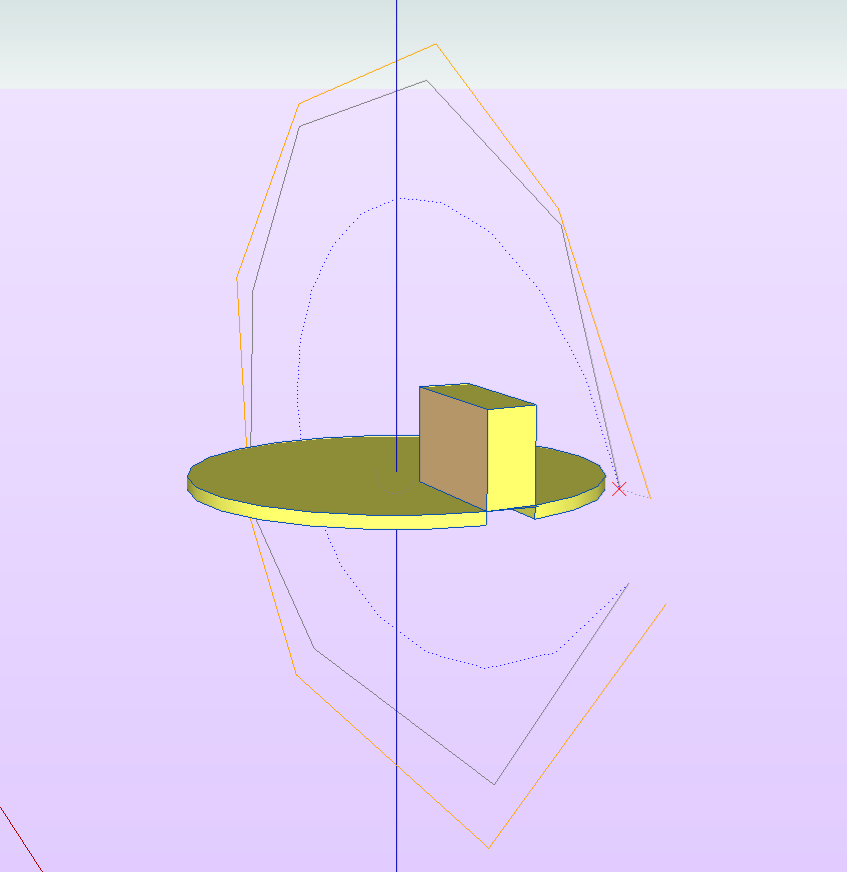
                                    can this be made to work?

                                    learn from the mistakes of others, you may not live long enough to make them all yourself...

                                    1 條回覆 最後回覆 回覆 引用 0
                                    • M 離線
                                      macgile
                                      最後由 編輯

                                      @driven said:

                                      this is basically working on the mac using ShiftQ, and mac arrow keycodes, the html needs some work as you need to right click after the dialog appears to load the page content, but then it works.

                                      is it possible to loop over an object, the camera rotates twice with this path [see pic]

                                      cheers

                                      john
                                      [attachment=0:2glsdkjl]<!-- ia0 -->loopAnim.png<!-- ia0 -->[/attachment:2glsdkjl]

                                      hi driven 😄
                                      I don't understand what you want?
                                      in the picture the camera rotates around object but look to outside!!!!

                                      1 條回覆 最後回覆 回覆 引用 0
                                      • D 離線
                                        driven
                                        最後由 編輯

                                        hi macgile

                                        sorry that path pic was me trying to edit out the camera rotate,
                                        on this simple version the camera rotates on scene 4.

                                        johnloop over cube

                                        learn from the mistakes of others, you may not live long enough to make them all yourself...

                                        1 條回覆 最後回覆 回覆 引用 0
                                        • I 離線
                                          isda
                                          最後由 編輯

                                          In the next version this offset will be smaller, and higher accuracy.

                                          I also added the ability to move around the target (the locked or not)
                                          or rotate the eye of the camera.
                                          This should facilitate the zigzagging between objects.

                                          Hi Macgile,

                                          Can't wait to try the next version (I don't mean to pressure you by this.. haha (= ). God bless you in your pursuit to excellence.

                                          The ability to rotate the eye of the camera is a great idea, as well.

                                          I don't know if I am pushing the limit but I remember one 3D software where you can see the camera on the path and being able to see (from the top view) in what direction the cam is facing much like the AdvanceCameraTool... but anyways, as it is, I believe this plugin is great already.. kudos to you.

                                          1 條回覆 最後回覆 回覆 引用 0
                                          • M 離線
                                            macgile
                                            最後由 編輯

                                            @isda said:

                                            In the next version this offset will be smaller, and higher accuracy.

                                            I also added the ability to move around the target (the locked or not)
                                            or rotate the eye of the camera.
                                            This should facilitate the zigzagging between objects.

                                            Hi Macgile,

                                            Can't wait to try the next version (I don't mean to pressure you by this.. haha (= ). God bless you in your pursuit to excellence.

                                            The ability to rotate the eye of the camera is a great idea, as well.

                                            I don't know if I am pushing the limit but I remember one 3D software where you can see the camera on the path and being able to see (from the top view) in what direction the cam is facing much like the AdvanceCameraTool... but anyways, as it is, I believe this plugin is great already.. kudos to you.

                                            hi isda
                                            yes drarq already suggesting this improvement.
                                            but it will be for a future release.
                                            now I made ​​a version that works for everyone (PC and MAC OS)
                                            I fix bugs and improve the design.

                                            best regards

                                            1 條回覆 最後回覆 回覆 引用 0
                                            • 1
                                            • 2
                                            • 3
                                            • 4
                                            • 5
                                            • 6
                                            • 5 / 6
                                            • 第一個貼文
                                              最後的貼文
                                            Buy SketchPlus
                                            Buy SUbD
                                            Buy WrapR
                                            Buy eBook
                                            Buy Modelur
                                            Buy Vertex Tools
                                            Buy SketchCuisine
                                            Buy FormFonts

                                            Advertisement