Skydome No Shadow
-
I created my own skydome to use in conceptual presentations landscaping.
Its simply a massive half-dome with a sky projected across it.
The main problem I have, is that when I turn shadows on or use sun settings, it casts a shadow across my whole landscape.
I have done some research and the only suggestions were to make it transparent, but if I do that, you won't see the pretty sky.
I have also tried telling the group/component to NOT cast shadows, but still have the same problem because it blocks the sunlight.
So does anyone know of a plugin or setting that will allow a skydome but somehow it ignores the sun or does not cast shadows? -
Make the outside faces of the dome transparent by painting a transparent material on it. The inside surface will have your sky painted on it.
Here's a quick example with a model I am working on at the moment. I don't have a sky so I used stone for the inside.

-
ooh, interesting idea. So create a transparent PNG, make it a material and apply it to the outside of the dome?
Then leave my sky material on the inside?
I will definitely try that!
thank you -
You don't need to make a transparent PNG, just paint it with anything and edit that materials transparency.
-
oh, so use the slider on the material and make it 0%
got it -
For my example I just applied the gray translucent material. I left it so you could that there was something there but you could certainly slide it all the way to transparent.
-
Or you can select the sky dome, go to Entity Info and uncheck "Cast Shadows".
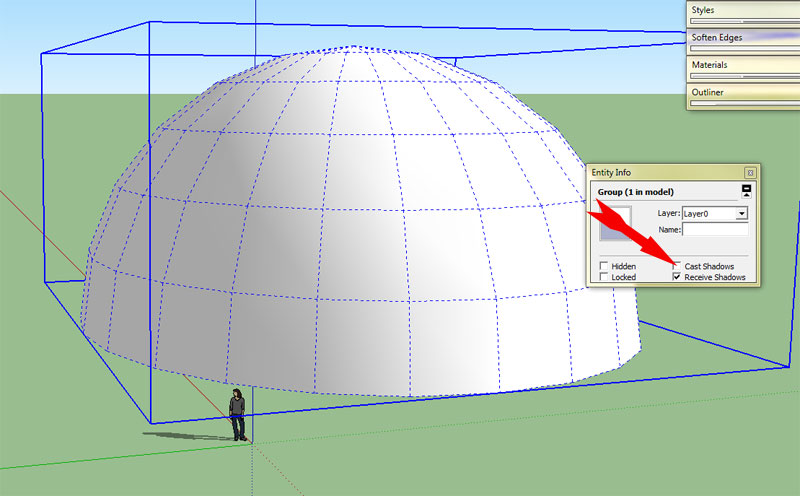
-
I tried that too, but it still seemed to block the sun and NOT cast a shadow.
I'll try the transparent material idea when I get to work today.



Hello! It looks like you're interested in this conversation, but you don't have an account yet.
Getting fed up of having to scroll through the same posts each visit? When you register for an account, you'll always come back to exactly where you were before, and choose to be notified of new replies (either via email, or push notification). You'll also be able to save bookmarks and upvote posts to show your appreciation to other community members.
With your input, this post could be even better 💗
Register Login


Advertisement