sketchucation logo sketchucation
    • 登入
    Oops, your profile's looking a bit empty! To help us tailor your experience, please fill in key details like your SketchUp version, skill level, operating system, and more. Update and save your info on your profile page today!
    🔌 Smart Spline | Fluid way to handle splines for furniture design and complex structures. Download

    [Plugin]T2H_BuildingStructureTools2.2.4 in20141207

    已排程 已置頂 已鎖定 已移動 Plugins
    337 貼文 108 Posters 476.7k 瀏覽 108 Watching
    正在載入更多貼文
    • 從舊到新
    • 從新到舊
    • 最多點贊
    回覆
    • 在新貼文中回覆
    登入後回覆
    此主題已被刪除。只有擁有主題管理權限的使用者可以查看。
    • D 離線
      DavidATCW
      最後由 編輯

      Hi TAK2HTA,

      Thanks for the reply.

      I presume modifying CSV file allows new sizes for existing profile to be added. This is not what I want to do.

      Like CTMan I would like to add new profile shape for beams, similar to CTMan's PFC profiles. Instrucion on how to this would be apprecated. We need to be able to customise to get the most out of this realy useful plugin.

      Thanks

      1 條回覆 最後回覆 回覆 引用 0
      • beginnerB 離線
        beginner
        最後由 編輯

        Hi Guys,
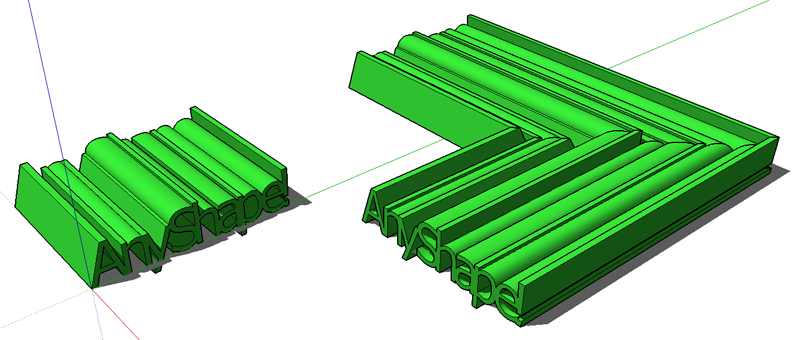
        I would like to draw your attention to the 'shapes' in tak2hata's plugin - look at the Class SHAPE and the profiles defined as *.SKP files.

        You can draw any complex shape as long is contained within single face - sample below.

        20120905-Tak2HataShapes.png

        Regards, SU 'beginner'

        1 條回覆 最後回覆 回覆 引用 0
        • sumasterS 離線
          sumaster
          最後由 編輯

          @tak2hata said:

          Hi,Sumaster.
          Adding toolbar like previous version has not done well yet.
          I gave priority to correction of a bug and update.
          wait while.

          Hi Tak2hata,

          wow nice update . . . . 👍

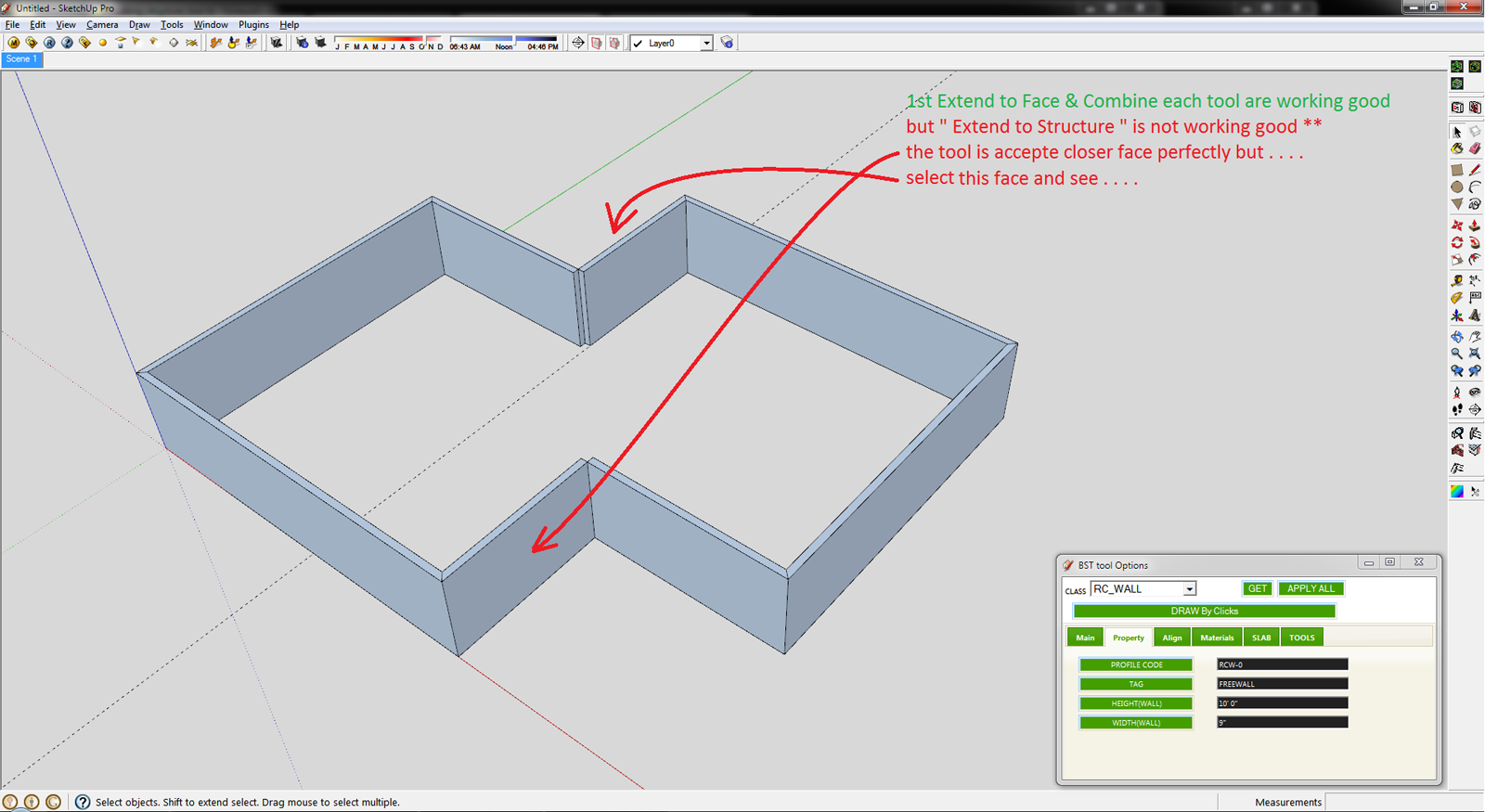
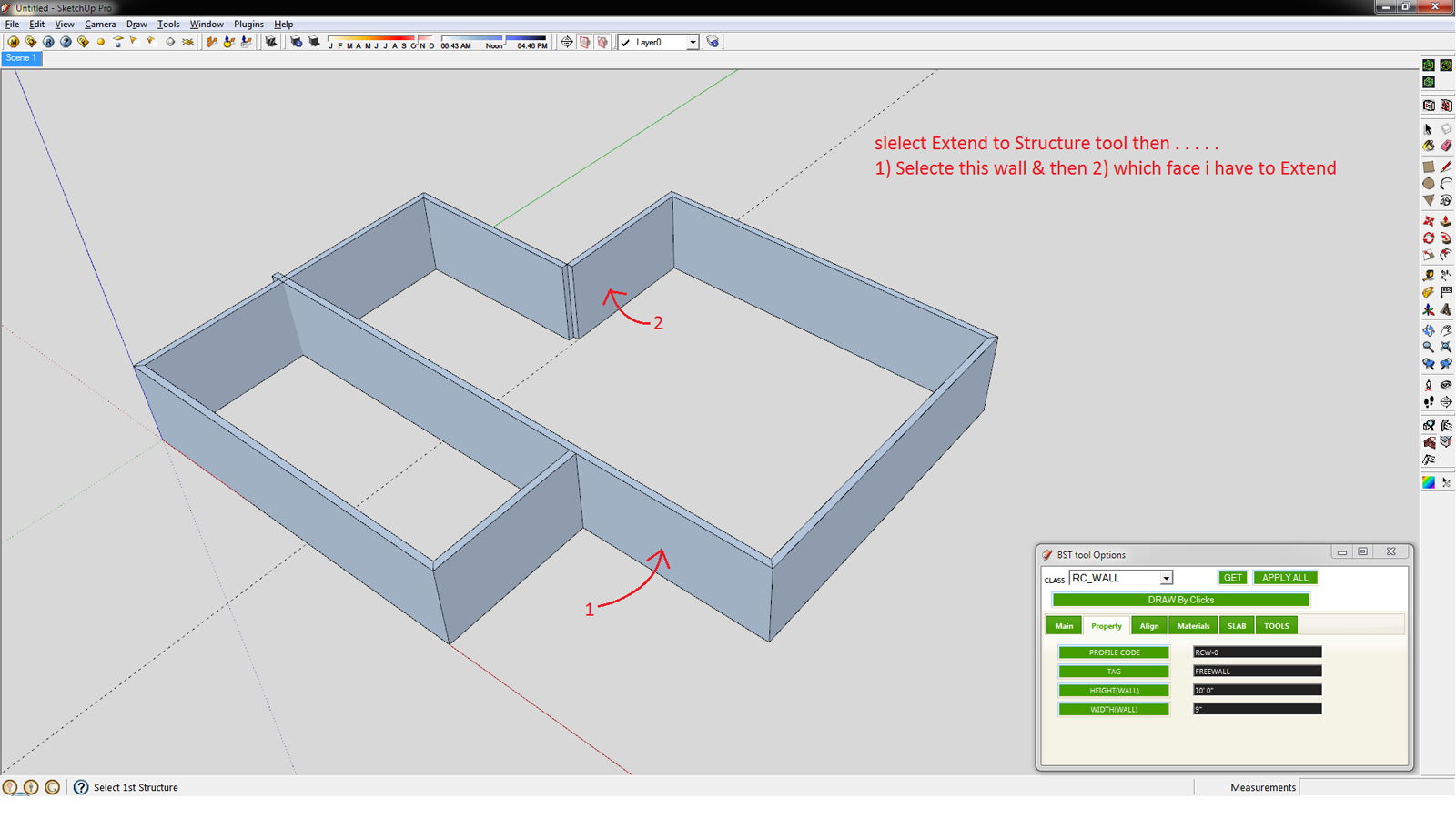
          Extend to Face tool is working perfectly . . . . but
          Extend to Structure is not working properly . . .

          CHK

          1.png

          2.png

          3.png

          4.png

          5.png

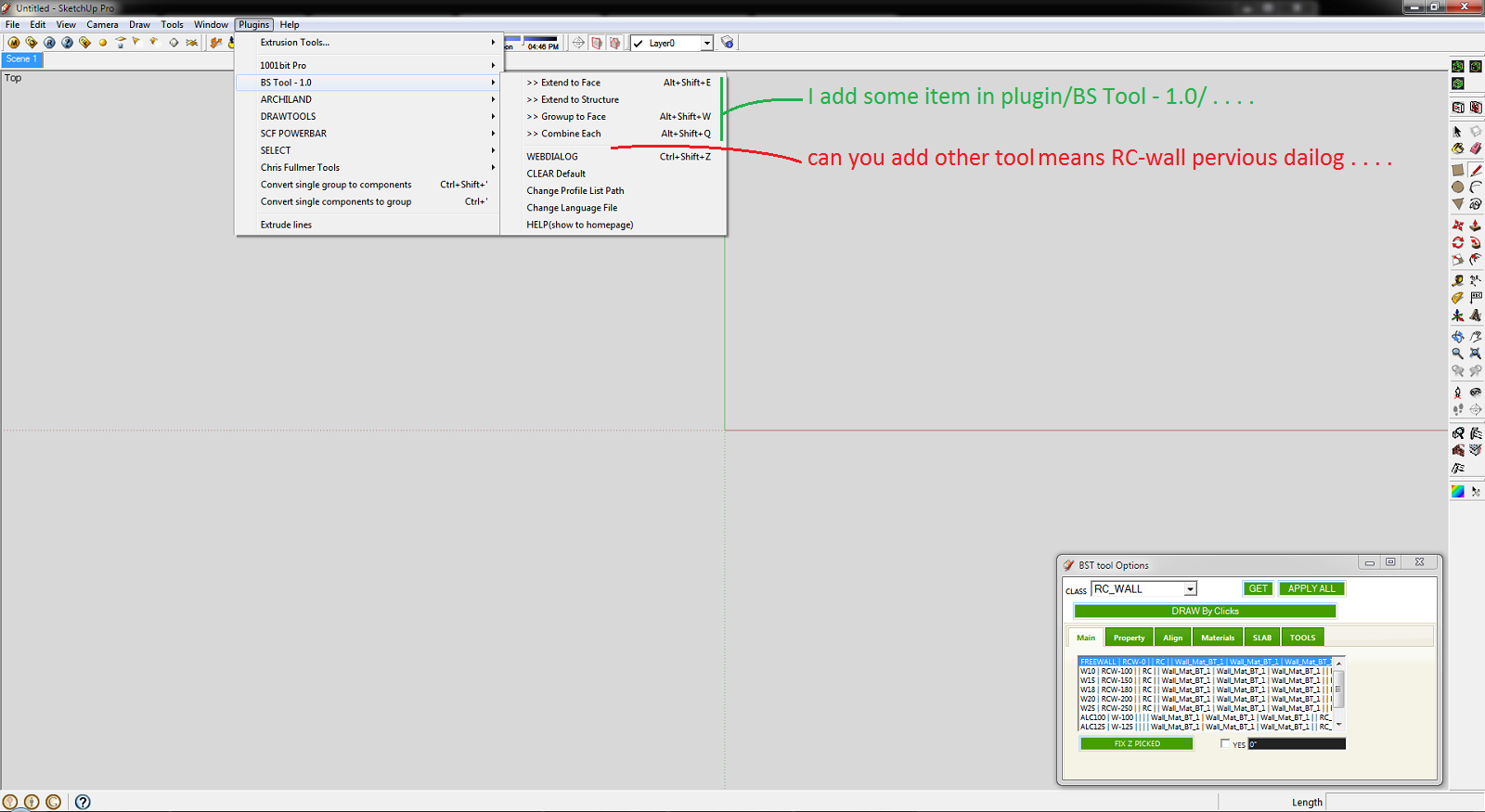
          I add some items in plugin menu . . . 😉
          please add all previous item in plugin menu

          
          tst_main_menu = UI.menu("Plugins").add_submenu("#{langconv( 'BS Tool - 1.0' )}")
          tst_main_menu.add_item("#{langconv('>> Extend to Face')}") { Sketchup.active_model.select_tool TST1_class_extend_face.new( false ) }
          tst_main_menu.add_item("#{langconv('>> Extend to Structure')}") { Sketchup.active_model.select_tool TST1_class_extend_str.new }
          tst_main_menu.add_item("#{langconv('>> Growup to Face')}") { Sketchup.active_model.select_tool TST1_class_grow_face.new( false ) }
          tst_main_menu.add_item("#{langconv('>> Combine Each')}") { Sketchup.active_model.select_tool TST1_class_chamfer.new }
          tst_main_menu.add_separator


          6.png

          And thank you so much for this plugin . . . . 😄
          i use your plugin daily . . . .
          its save my basic modeling time . . . too good . . . .

          Thank you,
          SUmaster

          1 條回覆 最後回覆 回覆 引用 0
          • V 離線
            victor hugo
            最後由 編輯

            Does anyone know where to find more RC_WALL options for the BST, when I installed it (which is very useful BTW) it only shows 4 options?

            Thanks.

            1 條回覆 最後回覆 回覆 引用 0
            • C 離線
              CTMan
              最後由 編輯

              @tak2hata said:

              Hi,CTman.
              You are welcome!
              If you upload the PFC profile file here , I will create link to your post in top of thread.
              Your PFC profile file will help users of BST!

              Hello Tak2hata - please find attached csv file for British Steel Beams and Columns

              Hi,Sumaster.
              I also checked the bug.
              I will fix the problem within several days.
              And I will update here.

              Thanks.


              British Steel Beams and Columns

              1 條回覆 最後回覆 回覆 引用 0
              • T 離線
                tak2hata
                最後由 編輯

                Hi,CTMan.
                I add link to your reply in the top of thread.
                Thanks a lot for uploading your profile list of UK STEEL.

                Channel([) have tapered flanges when the schema is like "[-100x50x5x7.5x8x4"
                Channel([) have not tapered flanges when the schema is like "[-100x50x5x7.5"
                So If you want to not tapered flange Channel,the schema is like "[-AxBxCxD".

                Hi,sumaster.
                "Extend to structure" tool works extending the structure to the other structure.not to face.
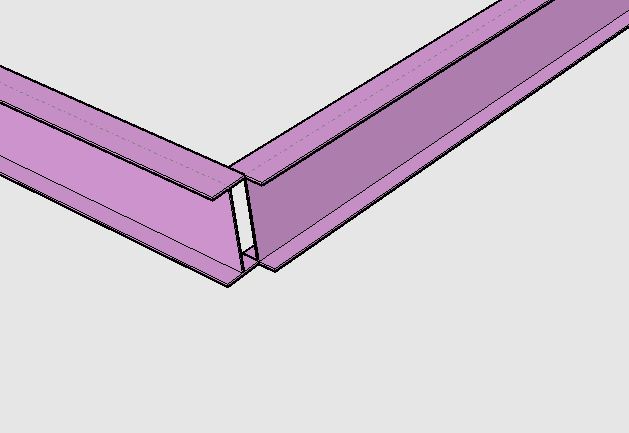
                extending to structure.
                Using "Extending to Face" to extend like this picture takes time and effort.
                So "Extend to Structure" exists for that purpose.

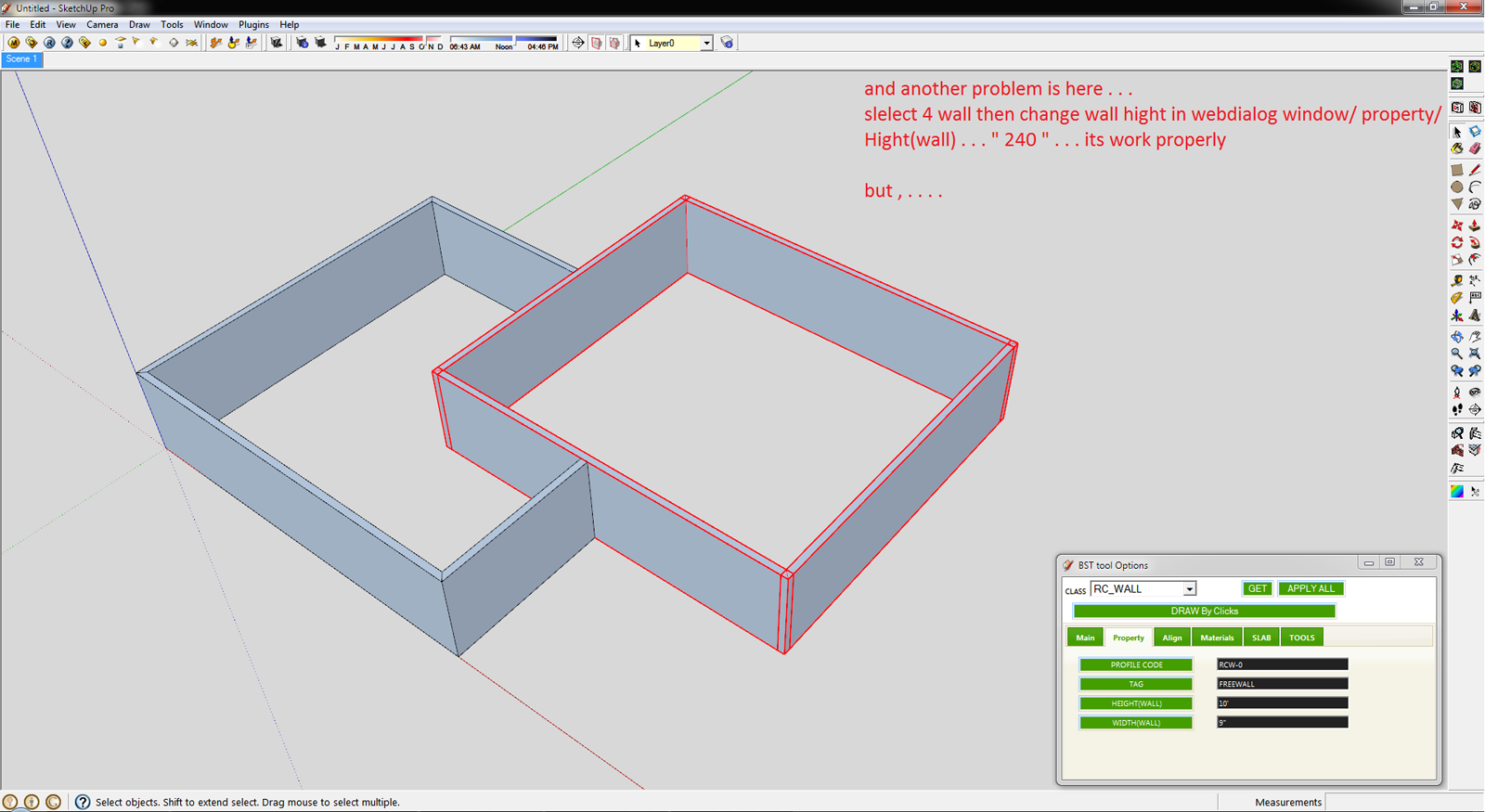
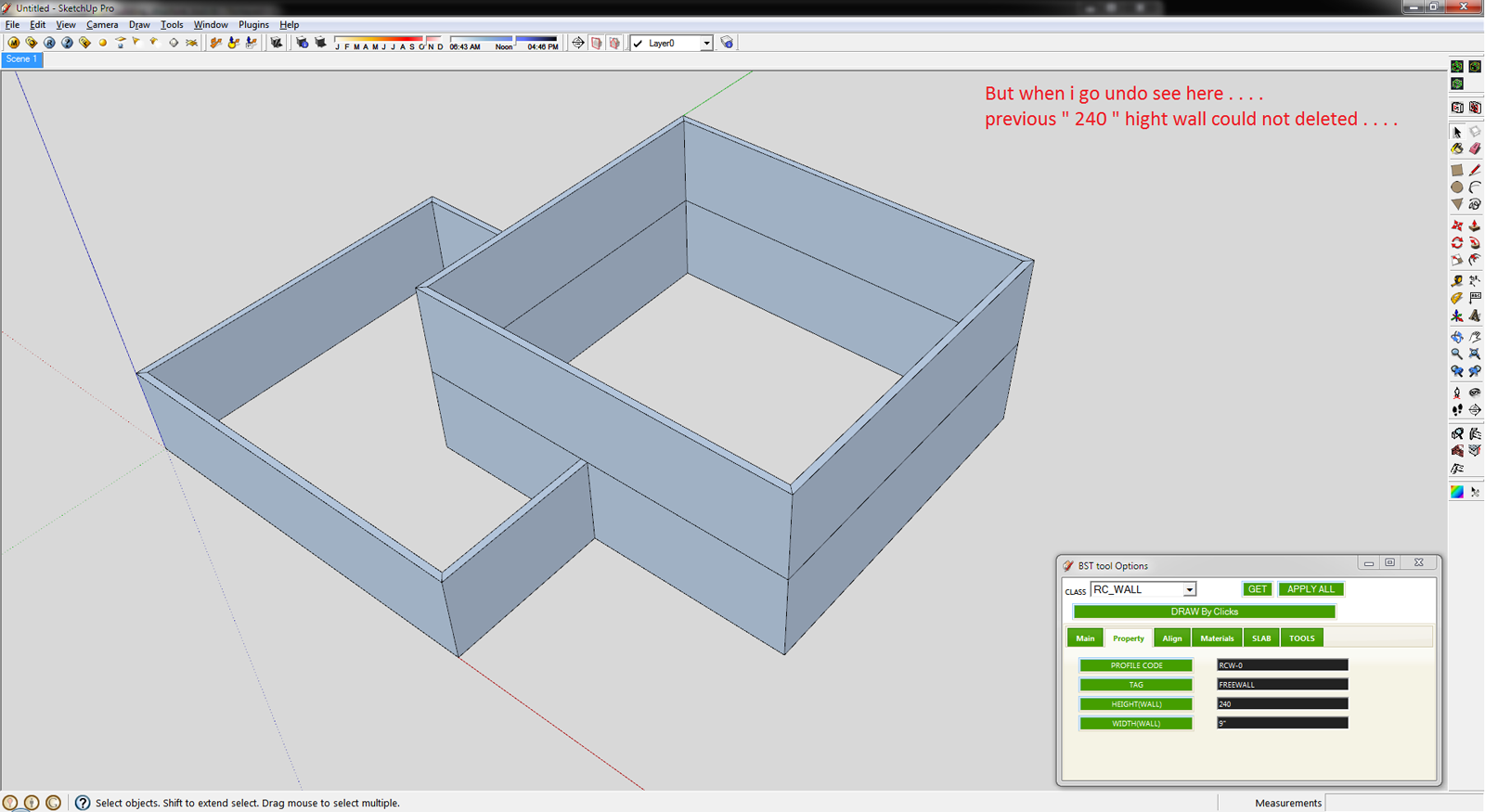
                I see the "undo" problem.
                I will fix it few days.

                Thanks.


                by TAK2HATA

                1 條回覆 最後回覆 回覆 引用 0
                • sumasterS 離線
                  sumaster
                  最後由 編輯

                  @tak2hata said:

                  Hi,CTMan.
                  I add link to your reply in the top of thread.
                  Thanks a lot for uploading your profile list of UK STEEL.

                  Channel([) have tapered flanges when the schema is like "[-100x50x5x7.5x8x4"
                  Channel([) have not tapered flanges when the schema is like "[-100x50x5x7.5"
                  So If you want to not tapered flange Channel,the schema is like "[-AxBxCxD".

                  Hi,sumaster.
                  "Extend to structure" tool works extending the structure to the other structure.not to face.
                  [attachment=0:165mbbk2]<!-- ia0 -->extending_to_structure.JPG<!-- ia0 -->[/attachment:165mbbk2]
                  Using "Extending to Face" to extend like this picture takes time and effort.
                  So "Extend to Structure" exists for that purpose.

                  I see the "undo" problem.
                  I will fix it few days.

                  Thanks.

                  yes

                  and another problem facing here . . .
                  i upgrade your new version but when i OPEN my OLD version file means (i was working your old BS tool) and exend to face and other 3 tools are not working good . . .

                  Pleas CHK

                  Thank you,
                  SUmaster

                  1 條回覆 最後回覆 回覆 引用 0
                  • T 離線
                    tak2hata
                    最後由 編輯

                    @sumaster said:

                    yes

                    and another problem facing here . . .
                    i upgrade your new version but when i OPEN my OLD version file means (i was working your old BS tool) and exend to face and other 3 tools are not working good . . .

                    Pleas CHK

                    Hi,Please upload your data include problems.
                    The part to limit the problem entities.


                    by TAK2HATA

                    1 條回覆 最後回覆 回覆 引用 0
                    • sumasterS 離線
                      sumaster
                      最後由 編輯

                      @tak2hata said:

                      @sumaster said:

                      yes

                      and another problem facing here . . .
                      i upgrade your new version but when i OPEN my OLD version file means (i was working your old BS tool) and exend to face and other 3 tools are not working good . . .

                      Pleas CHK

                      Hi,Please upload your data include problems.
                      The part to limit the problem entities.

                      Yes . . .

                      Please CHK the Compound wall . .

                      Sept11 2012 _3 (For Tak2hata) .skp

                      Thank you,
                      SUmaster

                      1 條回覆 最後回覆 回覆 引用 0
                      • T 離線
                        tak2hata
                        最後由 編輯

                        Hi,All.
                        I update to version1.2. in Sep17,2012.
                        v1.2:2012.09.17:
                        Bugs? fixed.and Improves.
                        #Fix:Undo when Multi(Extend/Chamfer/Grow).
                        #Fix:Undo when change properties of many entities.
                        #Fix:(Extend/Chamfer/Grow) Structure entity which have devided side by user.
                        #Improve about create slab.

                        Hi,Sumaster.
                        In your file ,there was no compound wall.
                        But the wall's edge was cutted by your manipulation.It do not good for "Extend tool" in previous version.
                        It was improved in this ver.

                        Thanks.


                        by TAK2HATA

                        1 條回覆 最後回覆 回覆 引用 0
                        • sumasterS 離線
                          sumaster
                          最後由 編輯

                          @tak2hata said:

                          Hi,All.
                          I update to version1.2. in Sep17,2012.
                          v1.2:2012.09.17:
                          Bugs? fixed.and Improves.
                          #Fix:Undo when Multi(Extend/Chamfer/Grow).
                          #Fix:Undo when change properties of many entities.
                          #Fix:(Extend/Chamfer/Grow) Structure entity which have devided side by user.
                          #Improve about create slab.

                          Thanks.

                          Hi Tak2hata

                          Thanks you 👍 😉
                          And I'm CHKing Now

                          @tak2hata said:

                          Hi,Sumaster.
                          In your file ,there was no compound wall.
                          But the wall's edge was cutted by your manipulation.It do not good for "Extend tool" in previous version.
                          It was improved in this ver.

                          Thanks.

                          Oh. . . .

                          and here the new tool get random color
                          how i fix the color means ( Walls get White, Steel Member get Medium Red, . . etc )

                          Thank you,
                          SUmaster

                          1 條回覆 最後回覆 回覆 引用 0
                          • T 離線
                            tak2hata
                            最後由 編輯

                            Hi,all.
                            I attach CTMan's UK Steel pflist file on top of this thread.

                            It will helps Building structure tool users.

                            Thanks.


                            by TAK2HATA

                            1 條回覆 最後回覆 回覆 引用 0
                            • S 離線
                              SUFractal
                              最後由 編輯

                              I just upgraded to the latest version, but am no longer able to access "steel columns" in the North American List? Other elements appear to work fine.

                              1 條回覆 最後回覆 回覆 引用 0
                              • T 離線
                                tak2hata
                                最後由 編輯

                                @sufractal said:

                                I just upgraded to the latest version, but am no longer able to access "steel columns" in the North American List? Other elements appear to work fine.

                                Hi,Sufractal.
                                In my enviroment,"Steel Column" shown from "North American pflist" no problem.
                                Check the line include "##" in the csv file, If you edited it.
                                "##STEEL_COLUMN" is needed.

                                so, send to me your profile list or upload here it.
                                and I will look it.

                                Thanks.


                                by TAK2HATA

                                1 條回覆 最後回覆 回覆 引用 0
                                • sumasterS 離線
                                  sumaster
                                  最後由 編輯

                                  HI ,

                                  How i fix the color of BST wall . . . ?

                                  now its get random color . . .

                                  Thank you,
                                  SUmaster

                                  1 條回覆 最後回覆 回覆 引用 0
                                  • S 離線
                                    SUFractal
                                    最後由 編輯

                                    @tak2hata said:

                                    @sufractal said:

                                    I just upgraded to the latest version, but am no longer able to access "steel columns" in the North American List? Other elements appear to work fine.

                                    Hi,Sufractal.
                                    In my enviroment,"Steel Column" shown from "North American pflist" no problem.
                                    Check the line include "##" in the csv file, If you edited it.
                                    "##STEEL_COLUMN" is needed.

                                    so, send to me your profile list or upload here it.
                                    and I will look it.

                                    Thanks.

                                    i believe I used the correct text in the file?
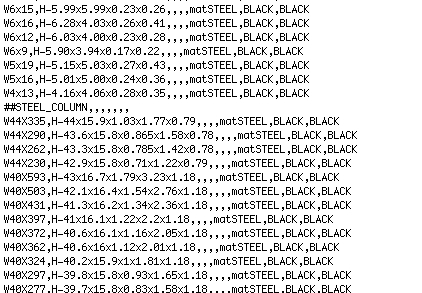

                                    North american.jpg

                                    1 條回覆 最後回覆 回覆 引用 0
                                    • T 離線
                                      tak2hata
                                      最後由 編輯

                                      @sufractal said:

                                      @tak2hata said:

                                      @sufractal said:

                                      I just upgraded to the latest version, but am no longer able to access "steel columns" in the North American List? Other elements appear to work fine.

                                      Hi,Sufractal.
                                      In my enviroment,"Steel Column" shown from "North American pflist" no problem.
                                      Check the line include "##" in the csv file, If you edited it.
                                      "##STEEL_COLUMN" is needed.

                                      so, send to me your profile list or upload here it.
                                      and I will look it.

                                      Thanks.

                                      i believe I used the correct text in the file?

                                      Hi,
                                      I tested it working fine.
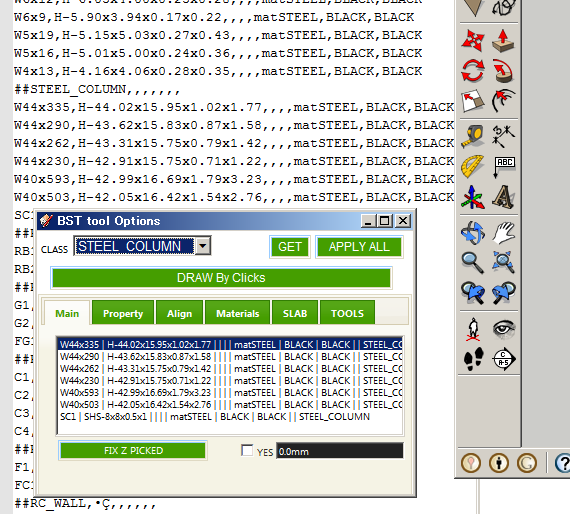
                                      Steel Column shown fine.
                                      I judge that it is fine by looking only that picture.
                                      The last advice I say is "Change Profile list path" and select it again.

                                      The information about this problem is too small.
                                      Is there anyone had same problem?
                                      and please reply here.

                                      Thanks.


                                      by TAK2HATA

                                      1 條回覆 最後回覆 回覆 引用 0
                                      • H 離線
                                        hygicell
                                        最後由 編輯

                                        excellent tool, but not (yet) working for me:
                                        I cannot find an installation manual
                                        nor a user manual
                                        and where do I put the .csv files?
                                        please help
                                        Frank

                                        1 條回覆 最後回覆 回覆 引用 0
                                        • MasterhandM 離線
                                          Masterhand
                                          最後由 編輯

                                          Excellent tool. I worked great.
                                          Does anyone know if there is a plugin that allows easily verify whether a modulation structure, or structure, if feasible or still standing?.
                                          To just have a quick overview or a quick sample of what model can work it without having to do the entire calculation of the structure (which will be done later).
                                          So, I mean, for example: look, without calculating it yet, I can show that it may be feasible or holds

                                          1 條回覆 最後回覆 回覆 引用 0
                                          • T 離線
                                            tak2hata
                                            最後由 編輯

                                            @hygicell said:

                                            excellent tool, but not (yet) working for me:
                                            I cannot find an installation manual
                                            nor a user manual
                                            and where do I put the .csv files?
                                            please help
                                            Frank

                                            Hi, hygicell.
                                            Please puts ".csv"file to folder you like.but windows special folder is not recommended.
                                            The windows special folder is like "C:\program files" "C:\Windows".
                                            Mac user do not mind this.

                                            After puts it,You must "Change profile list path" from plugins menu.
                                            and select the file.

                                            Hi,Mastarhand.
                                            Me,too.

                                            Hi,all.
                                            I will update this script after few days.

                                            Thanks.


                                            by TAK2HATA

                                            1 條回覆 最後回覆 回覆 引用 0
                                            • 1
                                            • 2
                                            • 3
                                            • 4
                                            • 5
                                            • 6
                                            • 7
                                            • 8
                                            • 16
                                            • 17
                                            • 6 / 17
                                            • 第一個貼文
                                              最後的貼文
                                            Buy SketchPlus
                                            Buy SUbD
                                            Buy WrapR
                                            Buy eBook
                                            Buy Modelur
                                            Buy Vertex Tools
                                            Buy SketchCuisine
                                            Buy FormFonts

                                            Advertisement