sketchucation logo sketchucation
    • 登入
    Oops, your profile's looking a bit empty! To help us tailor your experience, please fill in key details like your SketchUp version, skill level, operating system, and more. Update and save your info on your profile page today!
    🔌 Smart Spline | Fluid way to handle splines for furniture design and complex structures. Download

    [Plugin]T2H_BuildingStructureTools2.2.4 in20141207

    已排程 已置頂 已鎖定 已移動 Plugins
    337 貼文 108 Posters 476.7k 瀏覽 108 Watching
    正在載入更多貼文
    • 從舊到新
    • 從新到舊
    • 最多點贊
    回覆
    • 在新貼文中回覆
    登入後回覆
    此主題已被刪除。只有擁有主題管理權限的使用者可以查看。
    • T 離線
      tak2hata
      最後由 編輯

      @unknownuser said:

      Dear tak2hata:
      This my test,please try it again !
      Your this plugin already very powerful,I wish it change more powerful 👍
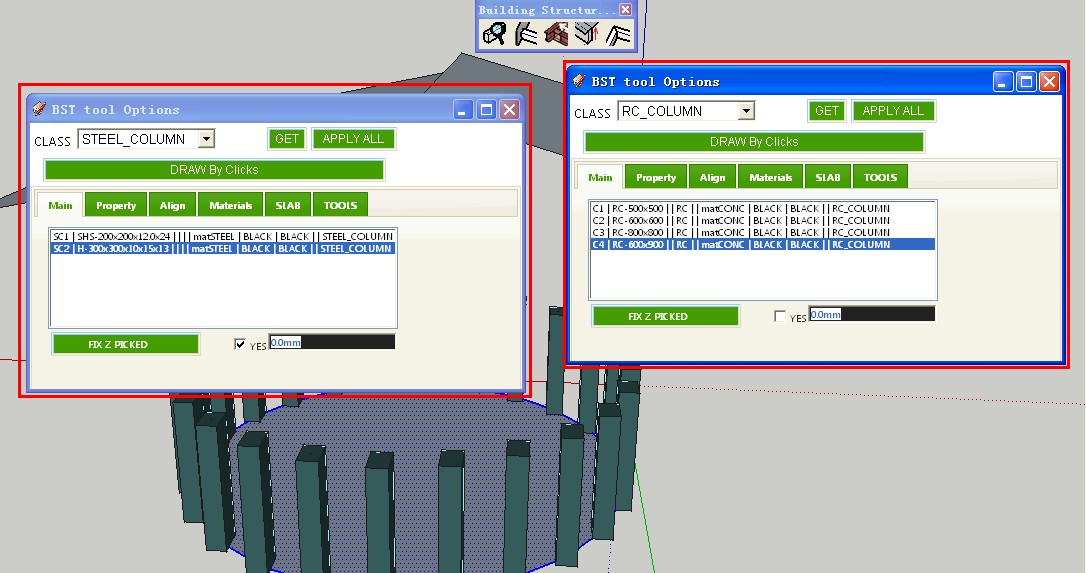
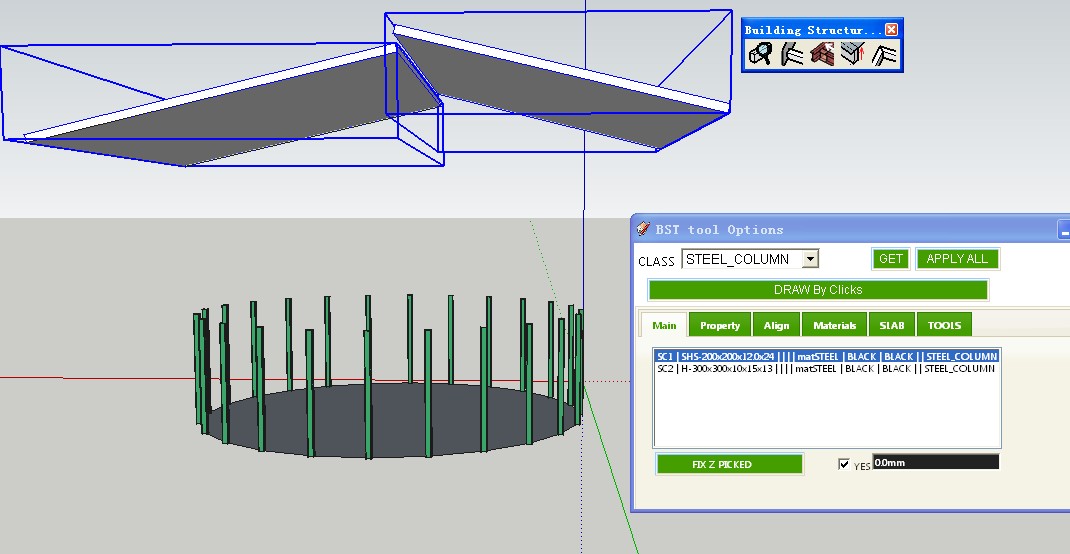
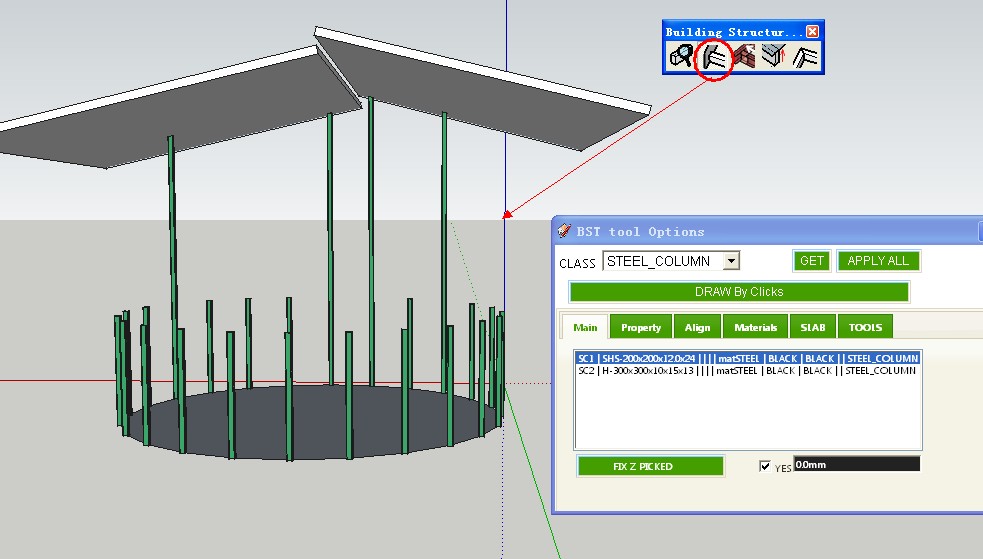
      [attachment=3:22lfhpqk]<!-- ia3 -->c01.jpg<!-- ia3 -->[/attachment:22lfhpqk][attachment=2:22lfhpqk]<!-- ia2 -->c02.jpg<!-- ia2 -->[/attachment:22lfhpqk][attachment=1:22lfhpqk]<!-- ia1 -->c03.jpg<!-- ia1 -->[/attachment:22lfhpqk][attachment=0:22lfhpqk]<!-- ia0 -->c04.jpg<!-- ia0 -->[/attachment:22lfhpqk]

        thanks again!
      

      Hi,zfrps.
      "MWALL" is not able to create automatically from curves.
      I will test "COLUMN" auto create.

      @unknownuser said:

      tak2hata:
      about create nothing when clicks points as Vertical,
      in v1.1d not clear,
      please try one times it

      Does this reply mean this problem?

      Thnx.


      by TAK2HATA

      1 條回覆 最後回覆 回覆 引用 0
      • Z 離線
        ZFRPS
        最後由 編輯

        Dear tak2hata:
        Yes!
        Especially about automatically created "column ";before it's nice,now it need strengthen.

        Thanks!
        ☀

        sketchup is bim

        1 條回覆 最後回覆 回覆 引用 0
        • T 離線
          tak2hata
          最後由 編輯

          Hi,zfrps and all.
          I update BST version to 1.1e.
          Bugfix about auto creating columns.
          And improves.

          BST becomes nice tool step by steps.

          Thanks.


          by TAK2HATA

          1 條回覆 最後回覆 回覆 引用 0
          • Z 離線
            ZFRPS
            最後由 編輯

            tak2hata:
            k01.jpg

            Maybe only need keep one of dialog box!
            

            sketchup is bim

            1 條回覆 最後回覆 回覆 引用 0
            • Z 離線
              ZFRPS
              最後由 編輯

              tak2hata:
              k02.jpgK03.jpg
              now, a times only can choose one entity or face,Whether it can be a much choose?

              moreover, have extend to face already,so maybe show to face no need !?

              Thanks!

              sketchup is bim

              1 條回覆 最後回覆 回覆 引用 0
              • Z 離線
                ZFRPS
                最後由 編輯

                Dear tak2hata:
                However,I still have some ideas to speak out,Because I love too the plugin,I believe that your this plugin will produce very big help to BIM.

                1. **grow to face** only useful for "Z",but for **MWALL** is invalid;
                2. The shape of the face for ladder;**grow** or **extend** is invalid too;
                3. One-time much choose can greatly improve the efficiency of the modeling.
                ....
                

                THANKS AGAIN !

                sketchup is bim

                1 條回覆 最後回覆 回覆 引用 0
                • H 離線
                  Heven7_floor
                  最後由 編輯

                  👍 👍 👍 👍

                  @unknownuser said:

                  Very powerfull tool, this very very usefully for construction with sketchup, Thanks Tak2hata, your creative brough the good things come to other
                  👍 👍 👍

                  1 條回覆 最後回覆 回覆 引用 0
                  • S 離線
                    SUFractal
                    最後由 編輯

                    tak2hata:

                    I have what I hope is a simple question. How do I change the color of any beam, column, etc. before placing/drawing it? In the webdialog box, the option default is black. No matter which color I type into the box, the color remains a light blue color.

                    Thanks,

                    SUfractal

                    1 條回覆 最後回覆 回覆 引用 0
                    • T 離線
                      tak2hata
                      最後由 編輯

                      Hi,
                      I am too busy.So I can not improve my plugins.

                      Multiple "Grow to face" will be added.

                      I will consider applying "Grow" for "MWALL".

                      @sufractal said:

                      tak2hata:

                      I have what I hope is a simple question. How do I change the color of any beam, column, etc. before placing/drawing it? In the webdialog box, the option default is black. No matter which color I type into the box, the color remains a light blue color.

                      The color is material.
                      Beams material is created from "FRONT FACE MATERIAL" and "BACK FACE MATERIAL".
                      It appears random color when the materialnames in "FRONT FACE MATERIAL" and "BACK FACE MATERIAL" is not existed in sketchup model.

                      So you may set sketchup templete with the materials.

                      Thanks.


                      by TAK2HATA

                      1 條回覆 最後回覆 回覆 引用 0
                      • S 離線
                        SUFractal
                        最後由 編輯

                        That makes sense!

                        Thanks.

                        @sufractal said:

                        tak2hata:

                        I have what I hope is a simple question. How do I change the color of any beam, column, etc. before placing/drawing it? In the webdialog box, the option default is black. No matter which color I type into the box, the color remains a light blue color.

                        The color is material.
                        Beams material is created from "FRONT FACE MATERIAL" and "BACK FACE MATERIAL".
                        It appears random color when the materialnames in "FRONT FACE MATERIAL" and "BACK FACE MATERIAL" is not existed in sketchup model.

                        So you may set sketchup templete with the materials.

                        Thanks.[/quote]

                        1 條回覆 最後回覆 回覆 引用 0
                        • Z 離線
                          ZFRPS
                          最後由 編輯

                          Dear tak2hata:
                          We all love you always,Life is the most important,Wish you need not too busy work!

                          THANKS AGAIN!
                          

                          sketchup is bim

                          1 條回覆 最後回覆 回覆 引用 0
                          • C 離線
                            Conan8717
                            最後由 編輯

                            good~~i like it!

                            1 條回覆 最後回覆 回覆 引用 0
                            • irwanwrI 離線
                              irwanwr
                              最後由 編輯

                              Arigatou gozaimasu. ありがとうございます。
                              👍 this is one of my "must have" plugin.

                              1 條回覆 最後回覆 回覆 引用 0
                              • V 離線
                                victor hugo
                                最後由 編輯

                                Hello.

                                I installed the tools and when i select the slab class i get the attached error.

                                Can anyone tell me how to fix this?

                                Gracias.
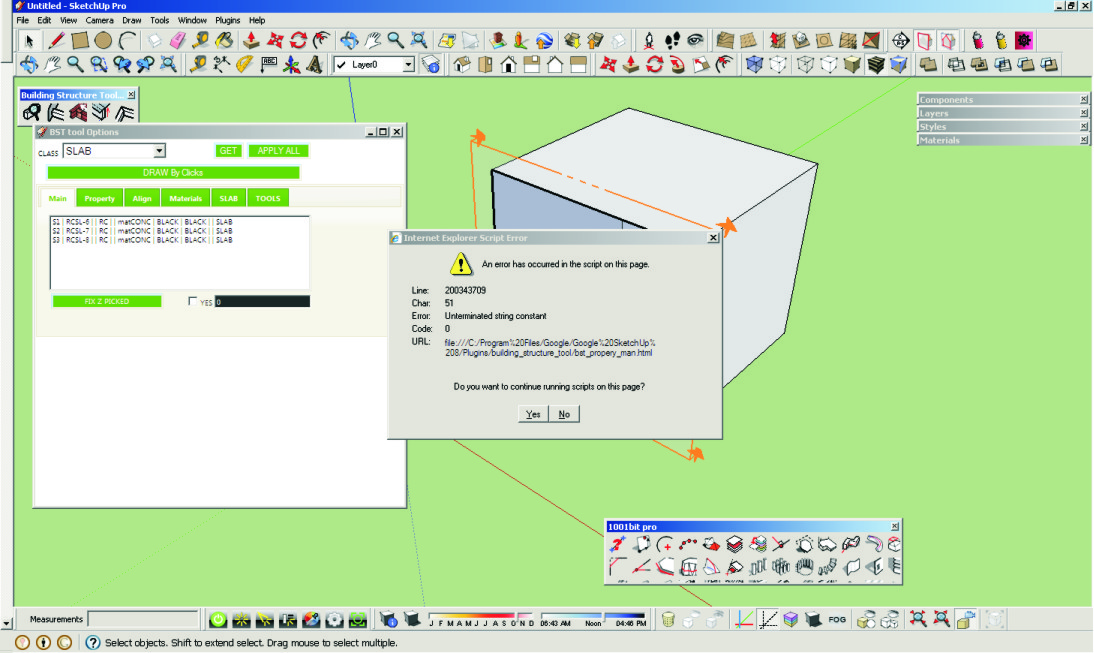

                                STRUCTURE TOOLS PROBLEM.jpg

                                1 條回覆 最後回覆 回覆 引用 0
                                • mitcorbM 離線
                                  mitcorb
                                  最後由 編輯

                                  I do not know for sure, but could there be a conflict between BST1.1e and 1001BitTools?

                                  I take the slow, deliberate approach in my aimless wandering.

                                  1 條回覆 最後回覆 回覆 引用 0
                                  • T 離線
                                    tak2hata
                                    最後由 編輯

                                    Hi,hugo , mitcorb and everybody.

                                    It is bug,and I fixed it.
                                    It happened according to sending double quotation in webdialog.
                                    The length is shown with double quotation.When sketchup "units" is "Architecture" or etc.

                                    And I re-add function "extending" multiple walls to face."growing" also.

                                    Thanks.


                                    by TAK2HATA

                                    1 條回覆 最後回覆 回覆 引用 0
                                    • J 離線
                                      juliogonz
                                      最後由 編輯

                                      tak2hata

                                      This is awesome! thank u!

                                      1 條回覆 最後回覆 回覆 引用 0
                                      • sumasterS 離線
                                        sumaster
                                        最後由 編輯

                                        Hi,

                                        First thank you for made this plugin . . . . ,

                                        how i add previous toolbar . . . . ?
                                        its very Helpful. . . .

                                        Thank you,
                                        SUmaster

                                        1 條回覆 最後回覆 回覆 引用 0
                                        • T 離線
                                          tak2hata
                                          最後由 編輯

                                          @sumaster said:

                                          Hi,

                                          First thank you for made this plugin . . . . ,

                                          how i add previous toolbar . . . . ?
                                          its very Helpful. . . .

                                          Hi,sumaster.

                                          I changed all dialogs to one webdialog in version1.0+.

                                          So I worried many icons in the toolbar become obstructive.

                                          And older dialogs is not valid now.

                                          I can create toolbar with many icons like older.
                                          It will open webdialog with specified class(ex. STEEL_COLUMN,RC_GIRDER,etc).

                                          Please wait.

                                          Thanks.


                                          by TAK2HATA

                                          1 條回覆 最後回覆 回覆 引用 0
                                          • C 離線
                                            CTMan
                                            最後由 編輯

                                            Hi Tak2hata

                                            Thanks for you Building Structures Tools - it's a very useful plug-in

                                            I'm putting the UK steel sections into the CSV file which works very well for UBs and UCs

                                            Channels ( [ ) have tapered flanges on your PROFILE NAME SCHEMA

                                            Is there a way to put PFC profiles into the database

                                            Thanks Again for your great Plugins

                                            CTMan
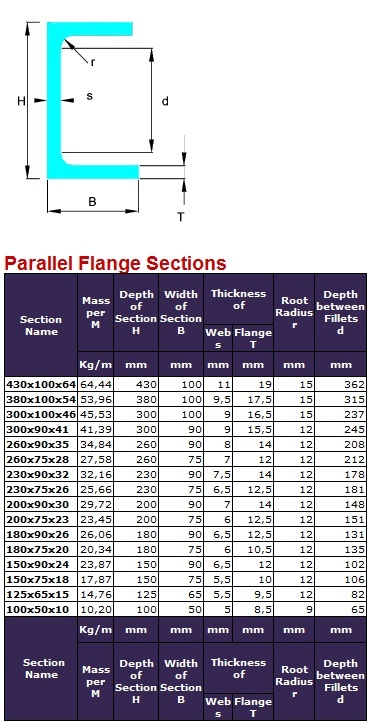

                                            Parallel Falnge Channels

                                            1 條回覆 最後回覆 回覆 引用 0
                                            • 1
                                            • 2
                                            • 11
                                            • 12
                                            • 13
                                            • 14
                                            • 15
                                            • 16
                                            • 17
                                            • 13 / 17
                                            • 第一個貼文
                                              最後的貼文
                                            Buy SketchPlus
                                            Buy SUbD
                                            Buy WrapR
                                            Buy eBook
                                            Buy Modelur
                                            Buy Vertex Tools
                                            Buy SketchCuisine
                                            Buy FormFonts

                                            Advertisement