[Plugin] Camera Recorder (Pixero update)
-
Here is my (sanctioned) update to Chris Fullmers Camera Recorder Script that has been gathering dust since last summer.

Added Reload Curve so that it is possible to edit the curve and then reload it into memory.Workflow:
- Walk or rotate the scene while recording with camera recorder.
- Create curve
- If there's need for it, modify the curve with tools like Thomthoms vertex tools, Fredos Bezier tools or ctrlpnts.rb by kirill.
If using Bezier tools. Right click on curve and choose convert to polyline.
Since the curves vertices already represents each frame of animation you shouldn't convert to anything else as that would change the timing. (Maybe only for a slow motion effect.)
Then select and move vertices, using the arrow keys to constrain movement to one axis.
If using vertex tools use smooth selection to move a larger portion of the curve in a smooth way.
If adding or deleting vertices you must add the same amount to both curves.
I've modified the script so that it creates a curve along with the cpoints.
Both in their own group so that they dont interfere with each other when editing.
The cpoints are good to have as they give a visual feedback to where the original position was. - select the two groups and press update curve. Move or delete the edited curves. If needed redraw the updated curves.
- Make scenes and use my "changeTransitionTimes" script to match the transition times of the created scenes with the choosen framerate.
- Render the smoooothest animation ever.
-
Thanks again

-
This seems great, is there anyway to get a tutorial on it or a visual explanation of what it is doing? I think TIG one shot(jpg) tuts are great and might work in this situation? Anyone?
-
@jsteacy said:
This seems great, is there anyway to get a tutorial on it or a visual explanation of what it is doing? I think TIG one shot(jpg) tuts are great and might work in this situation? Anyone?
Sorry, I'm on a tight deadline right now so you'll have to live with my brief explanation if no one else feels he wants to make one.
-
Hey I can appreciate the impact of deadlines on life, no worries, hopefully another SketchUp master can step in, if not I'll eventually get it with some effort, thanks again!
-
Nice work, haven't tested it yet but this script deserved an update, and the vertex editing options sound quite awesome to say the least.
-
Very useful tool, Is it possible to resize the scene transition timer window? Is the size of the pop up window fixed? how can i get to the bottom of the scene list in the window?
thanks -
My Change transition times script sets the transition time for all scenes at once.
Since the camera recorder script makes one scene per frame there is really no need for setting different times for different scenes.
You simply specify what frame rate your movie will have and it sets the transition times to match that.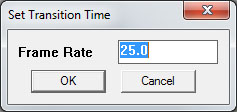
There are other scripts for setting transition times for each scene are you thinking of one of them?
Mine is located under the menu: Camera-> JS Change Transition Times. -
I must mistaken yours to the other plug-in script. For some scene that require extra attention to get the message across, The ability to change the time span for those scene is useful. I'll check into the other plug in. thank you for the great tool.
-
Has anyone tried this with the rendering packages available?
-
It should work with all packages that let you render every scene in your model, because this plugin will create a scene for each frame of the recording. So you would want to set it up to render 1 scene per frame. If you want 24 frames per second, render 24 scenes per second. Soit should work pretty well with most renderers.
-
I'm excited about this plugin- but I'm having trouble with exporting to images. It gets hung up on random shots. Any ideas? Ahhh... figured it out...if you click off of the sketchup window, to work somewhere else, the update count in the bottom left freezes, but the program keeps outputting to the background.
-
Hi,
I was looking for a way to capture a 3d walkthrough from sketchup
and stumbled across the Chris' way cool clf_camera_recorder. I added a few
lines of code to the "export_images" section so that it creates
the left eye view from the captured datapoints. This means when it
generates the images, it will actually create twice as many and will take
twice as long. The left sided images all begin with "left_".After the images have been created, you can convert it to a video stream
using quicktime pro, or with the opensource program ffmpeg. For example,
if my images were called "imagexxxxx.png", then use:ffmpeg.exe -i image%05d.png -vcodec png right_image.mov
ffmpeg.exe -i left_image%05d.png -vcodec png left_image.movYou can then view it using your favorite 3d viewer. I use the one
available from 3dtv.at.Enjoy!
-Robert
-
Hello all,
I haven't tried this plugin yet, could you please let me know if it is able to create "natural" camera movement like this :
-
beginning of the path : high frame rate = slow start
-
main path : 25 fps = normal camera speed
-
end of the path : high frame rate = slow finish
that would be great !
Bertier
-
-
Probably not by itself, with the walk tool if your good at it but probably better with an additional plugin that works like a FPS. (Sorry I can't share mine.)
LightUp's Tourtool has a great smooth realtime flythrough that could work together with it with some editing afterwards.
Then there is also the Camera key maker script that works a little different by drawing a curve for the animation. http://forums.sketchucation.com/viewtopic.php?t=36430 -
thanks
-
I've tried to install it but nothing happened
coppied the extracted files in my pluggins folder but nothing happened
can somebody help me out ?? -
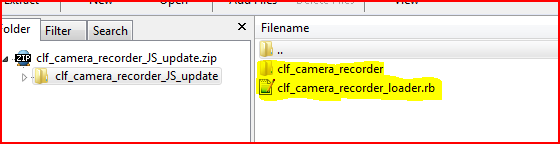 You have to put the two highlighted items into Plugins, NOT the 'containing-folder' OR the contents of the subfolder separately either - just those two - the .rb file and a subfolder of other files...
You can also put the separately linked .rb file into Plugins... -
I was seeking a camera tool that saw this, really amazing tool, thanx mate , but rotates the camera with no good reason. and a bit hart to use.
I was tryng flightpath, on SU6 but it doesn't work with SU8 -
Majid, it is supposed to capature camera movements in real time, and then be able to replay them. Are you saying it is adding additional tail to the camera? Is that automatically, or only after a camera path?







Advertisement