Why is lathe extrusion not solid?
-
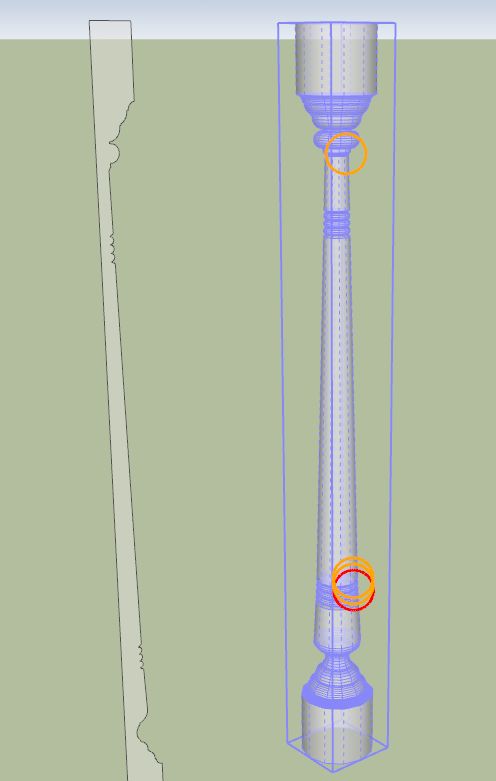
Greetings! I am trying to reproduce an ornamental column (see attached). The column was made by taking a square cross-section column and turning it on a lathe. At the top and bottom of the column, the cylindrical turnings move through the outer surface of the square column, making a decorative intersection. I thought I could create a lathe extrusion solid and then intersect it with a square column to get the same shape. But my lathe extrusion isn't a solid, so I can't use the intersect tool. What did I do wrong? Is there another approach to accomplishing this?
-
Use this plugin to check it - http://forums.sketchucation.com/viewtopic.php?f=323&t=30504
-
I simply selected all of the edges and made sure none were hidden/smoothed/softened [Entity Info has check boxes for this]... then I used EEbyLathe on it... it made a good form which reports as a 'Solid' Group...

-
Thomas,
Thanks for your reply. I downloaded the plugin, and also the prerequisite library. Now I get about 30 or 40 error messages when I open SketchUp (variable not initialized, etc.), I no longer have access to the plugins that were previously available, and I only have read-only access to the model I'm working on. ???
-
Tom, I got it figured out. Very nice tool. Thanks. J

Hello! It looks like you're interested in this conversation, but you don't have an account yet.
Getting fed up of having to scroll through the same posts each visit? When you register for an account, you'll always come back to exactly where you were before, and choose to be notified of new replies (either via email, or push notification). You'll also be able to save bookmarks and upvote posts to show your appreciation to other community members.
With your input, this post could be even better 💗
Register Login


Advertisement