[Plugin] ImageTrimmer
-
I have tried a couple times of creating image trimmer of TIG's plugin and still does not work. If anyone already uses it and know how to do it could you please create a short video tutorial that would be great! This plugin is so great I hope someone have a time to do it.Thanks a lot

-
[flash=400,318:18u3oz90]http://blip.tv/play/gYhbgpfpGQA[/flash:18u3oz90]
Does this help?
-
@dave r said:
[flash=400,318:owonrm97]http://blip.tv/play/gYhbgpfpGQA[/flash:owonrm97]
Does this help?
Dave,
Thanks for posting vid tut but something is still missing in my TrimmedImages folder?? There is only one png file created and no edge file, it should be two isn't it? No idea what is wrong with that?? -
hgdn
Something is stopping the EdgeDetector.jar file working properly...
Do you have full access rights to the SKMtools folder with in Plugins?
The tool needs to write from.ini and to.ini files into that folder.
Check if they are there - they are auto-deleted if the tool works OK but if it fails they might be there?
The from.ini contains the full path to the ../TrimmedImages/xxx.png file ['xxx' being the image file name], the to.ini is similar but without a file-extension ../TrimmedImages/xxx
If these don't exist try making them [use Notepad.exe to edit them] - note there should be no 'return' at the end of the one line of text in each of them.
If you make these ini files... and the xxx.png file is in the TrimmedImages folder, then double-clicking on the EdgeDetector.jar icon inside the SKMtools folder should read the two ini files and make the xxx[Edges].png and xxx[Edges].dat files.
If it does I can't see what the [i:2uqgfm3t]Ruby[/i:2uqgfm3t] calling the '[i:2uqgfm3t]jar[/i:2uqgfm3t]' is failing
If it doesn't work do you get any errors ?? -
@tig said:
hgdn
Something is stopping the EdgeDetector.jar file working properly...
Do you have full access rights to the SKMtools folder with in Plugins?
The tool needs to write from.ini and to.ini files into that folder.
Check if they are there - they are auto-deleted if the tool works OK but if it fails they might be there?
The from.ini contains the full path to the ../TrimmedImages/xxx.png file ['xxx' being the image file name], the to.ini is similar but without a file-extension ../TrimmedImages/xxx
If these don't exist try making them [use Notepad.exe to edit them] - note there should be no 'return' at the end of the one line of text in each of them.
If you make these ini files... and the xxx.png file is in the TrimmedImages folder, then double-clicking on the EdgeDetector.jar icon inside the SKMtools folder should read the two ini files and make the xxx[Edges].png and xxx[Edges].dat files.
If it does I can't see what the [i:2tth50ys]Ruby[/i:2tth50ys] calling the '[i:2tth50ys]jar[/i:2tth50ys]' is failing
If it doesn't work do you get any errors ??TIG,
There is no to.ini file in folder SKMtools, and from.ini file contains the path C:\Temp\x\AB.skm
Strange may be my computer system won't let it saves directly!! I'll spend more time closely and follow your instructions and hope find the problem soon!
Thanks for explainations and Happy New Year! -
hgdn
That from.ini is a 'left-over' file from some testing that I've accidentally left in the folder when zipping it - IF the tool worked OK it'd delete it on completion anyway!
So for some reason your Ruby is making the from/to.ini files ???
Try making them with appropriate entries as I directed and see if the jar makes the two new [Edges] files...
I suspect that you need to change the access rights to the Plugins folder and/or SKMtools sub-folder so you have full read/write/execute|change access... -
@tig said:
hgdn
That from.ini is a 'left-over' file from some testing that I've accidentally left in the folder when zipping it - IF the tool worked OK it'd delete it on completion anyway!
So for some reason your Ruby is making the from/to.ini files ???
Try making them with appropriate entries as I directed and see if the jar makes the two new [Edges] files...
I suspect that you need to change the access rights to the Plugins folder and/or SKMtools sub-folder so you have full read/write/execute|change access...TIG,
What do you mean of changing access rights to the Plugins and sub folder? Could you give me more details of how to change that?
I don't have any problem of installations any plugins before. I got so confused! -
@hgdn said:
@tig said:
hgdn
That from.ini is a 'left-over' file from some testing that I've accidentally left in the folder when zipping it - IF the tool worked OK it'd delete it on completion anyway!
So for some reason your Ruby is making the from/to.ini files ???
Try making them with appropriate entries as I directed and see if the jar makes the two new [Edges] files...
I suspect that you need to change the access rights to the Plugins folder and/or SKMtools sub-folder so you have full read/write/execute|change access...TIG,
What do you mean of changing access rights to the Plugins and sub folder? Could you give me more details of how to change that?
I don't have any problem of installations any plugins before. I got so confused!OK when you move plugins to the Plugins folder do you get prompted to allow this ?
If so you have limited permissions.
Perhaps your system is stopping the temporary files being written into the ../Plugins/SKMtools folder.
To check the permissions highlight the SKMtools folder icon, right-click and get then 'Properties' from the context-menu...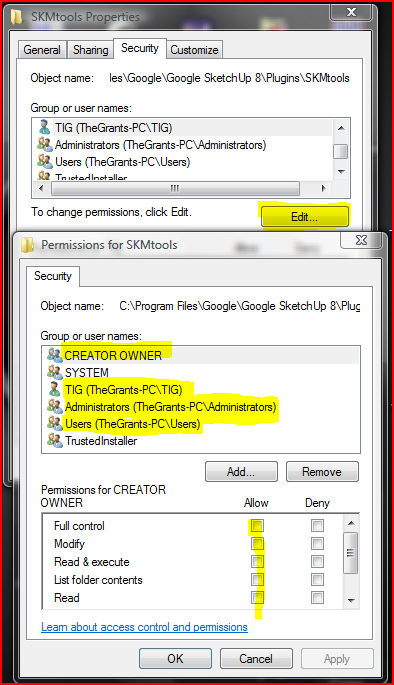 then open the security tab and edit the settings - ensure all listed 'users' have ticks in all 'Allow' boxes... You might have to be an administrator to do this ? The illustration is Vista BUT XP is essentially the same...
 -
TIG,
What do you mean of changing access rights to the Plugins and sub folder? Could you give me more details of how to change that?
I don't have any problem of installations any plugins before. I got so confused![/quote]
OK when you move plugins to the Plugins folder do you get prompted to allow this ?
If so you have limited permissions.
Perhaps your system is stopping the temporary files being written into the ../Plugins/SKMtools folder.
To check the permissions highlight the SKMtools folder icon, right-click and get then 'Properties' from the context-menu...[attachment=0:81qclo16]<!-- ia0 -->Capture.PNG<!-- ia0 -->[/attachment:81qclo16] then open the security tab and edit the settings - ensure all listed 'users' have ticks in all 'Allow' boxes... You might have to be an administrator to do this ? The illustration is Vista BUT XP is essentially the same...[/quote]Something is out of my head as I've tried the ways you showed me but still not get it. Too bad I have not had a chance to try it out!
Sorry for spending your precious time! -
All I want you o do is check that the access rights [security] settings to the installed folder 'SKMtools' inside ../Plugins allows all users full access - i.e. all of the 'Allow' boxes are ticked for everyone. To do this follow the instructions in my last post...
Highlight the 'SKMtools' folder's icon and right-click to get a context-menu and select 'Properties'.
Pick the 'Security' tab and under the list of users etc check that all have full-rights allowed.
If not pick 'Edit' and update the settings...
Apply/OK and close.
Now retry my tool... -
hgdn, your profile indicates you have XP so there'll be no Security tab when you look at the folder properties. To help TIG sort out your problem, try ticking the box for Share this folder... but do not require a password for access. You might also check to see if you have administrative rights on your computer. I don't know whether or not that makes any difference. I have always had those rights so I don't have experience running any plugins without thoem.
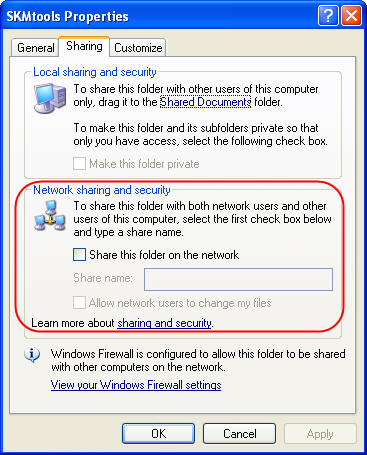
I also have XP and I'm having no difficulty with SKM Tools. The problems I did have were due to the PNG images I chose to test with.
If there's no change in behavior, I would suggest following TIG's instructions about making the .INI files and testing JAR to see if it can work.
Good luck.
-
So it WAS a permissions issue!.................

Glad it's resolved!
-
I'm glad it is resolved, too. HGDN, now get busy and trim some images!
-
I think in my case it is a permission issue as well or the fact that in my plugin folder I also have a folder called compatibility files and thats where it places your plugin. I also tried running SU as the administrator but a lot other things happened and I no longer have the imagetrimer in the tool menu at all. The last up date runs the imagetrimer but places a folder with the same image on my desktop in it and seems to lock-up SU all together. Its not that big of a deal since you have everyone else s working good cause its more than likely something with this computer or something I'm doing wrong. All your other plugins work great and thanks for them!
-
oh la la...TIG and DAVE!
I found the other way around to get it worked by openning SU run as administrator and ...fine!
As I tried to tick all boxes as TIG and changed security box as Dave said, some of them changed but not creator owner wouldn't let me change or save??? I am not deep enough to understand the system!
And I found out when unzipping file to its'location program I got errors...and had to save it somewhere and copy and paste in plugins folder.
Anyway many tries and errors and finally it works so great. Such an amazing plugin TIG!
Thanks a lot to you guys and Nice Holidays! -
@unknownuser said:
I think in my case it is a permission issue as well or the fact that in my plugin folder I also have a folder called compatibility files and thats where it places your plugin. I also tried running SU as the administrator but a lot other things happened and I no longer have the imagetrimer in the tool menu at all. The last up date runs the imagetrimer but places a folder with the same image on my desktop in it and seems to lock-up SU all together. Its not that big of a deal since you have everyone else's working good cause its more than likely something with this computer or something I'm doing wrong. All your other plugins work great and thanks for them!
I suggest you make yourself an administrator under the Users control panel and that you change the permissions on the Plugins folder and all subfolders to allow 'everything' to 'everyone'. Vista has this annoying habit of putting files into this compatibility files folder without telling you - then you can't run the tools as expected. You do need to address the issue as above and move everything out of that compatibility folder into the right place... If you don't have permission to read/write/execute files in the SKMtools subfolder then the tool won't complete as it needs to do stuff in that folder as well as the 'TrimmedImages' folder that is made with your SKP file...
-
Has anyone had success with image trimmer on trees? I keep bug splating.
-
Post one of your tree PNGs.
-
Thought I had it fixed, I finally got all the plugins out of the folder called compatibility files and in the right place. Used the .png file you made for Dave R I think and everything started out good with no errors. Then Sketchup stopped responding and had to cancel it but it still made three files in a folder on my desktop called ImageTrimmer. One was the original .png I think, one was what looked like the outline of the image in .png for mat and the other was a .dat file.
-
@unknownuser said:
Thought I had it fixed, I finally got all the plugins out of the folder called compatibility files and in the right place. Used the .png file you made for Dave R I think and everything started out good with no errors. Then Sketchup stopped responding and had to cancel it but it still made three files in a folder on my desktop called ImageTrimmer. One was the original .png I think, one was what looked like the outline of the image in .png for mat and the other was a .dat file.
Good at least it's making the files...
It should then be processing the 'dat' file into the trimmed form...
Were there any error messages in the Ruby Console or elsewhere ?
How long did you wait - SUP WILL always stop responding with any tool than is intensive... BUT often complete given a chnace ???
How big [pixels] was the Image?
Can you zip/post or PM the three files... For an independent test.......





Advertisement