[Plugin] ImageTrimmer
-
@oxer said:
I have downloaded the revision and the error persists.
[attachment=0:3hofwgns]<!-- ia0 -->Ruby Console.jpg<!-- ia0 -->[/attachment:3hofwgns]Oxer can you test the ideas outlined in my last post, regarding access and if the 'jar' will 'execute' - adjust the 'Temp' folder and 'plain-text editor' to the MAC's equivalents...

-
Hi TIG,
I have updated to the most recent version of the plugin and tried running it on my PC. I get the following in the Ruby console and it appears the plugin quietly exits.
Error; #<NoMethodError; undefined method `length' for nil;NilClass> C;/Program Files/Google/Google SketchUp 8/Plugins/SKMtools/ImageTrimmer.rb;241;in `add_edges' C;/Program Files/Google/Google SketchUp 8/Plugins/SKMtools/ImageTrimmer.rb;220;in `make_edges' C;/Program Files/Google/Google SketchUp 8/Plugins/SKMtools/ImageTrimmer.rb;170;in `process_image' C;/Program Files/Google/Google SketchUp 8/Plugins/SKMtools/ImageTrimmer.rb;147;in `initialize' C;/Program Files/Google/Google SketchUp 8/Plugins/SKMtools/ImageTrimmer.rb;618;in `new' C;/Program Files/Google/Google SketchUp 8/Plugins/SKMtools/ImageTrimmer.rb;618 C;/Program Files/Google/Google SketchUp 8/Plugins/SKMtools/image_class.rb;946;in `call' C;/Program Files/Google/Google SketchUp 8/Plugins/SKMtools/image_class.rb;946 -
@dave r said:
Hi TIG,
I have updated to the most recent version of the plugin and tried running it on my PC. I get the following in the Ruby console and it appears the plugin quietly exits.Error; #<NoMethodError; undefined method `length' for nil;NilClass> > C;/Program Files/Google/Google SketchUp 8/Plugins/SKMtools/ImageTrimmer.rb;241;in `add_edges' > C;/Program Files/Google/Google SketchUp 8/Plugins/SKMtools/ImageTrimmer.rb;220;in `make_edges' > C;/Program Files/Google/Google SketchUp 8/Plugins/SKMtools/ImageTrimmer.rb;170;in `process_image' > C;/Program Files/Google/Google SketchUp 8/Plugins/SKMtools/ImageTrimmer.rb;147;in `initialize' > C;/Program Files/Google/Google SketchUp 8/Plugins/SKMtools/ImageTrimmer.rb;618;in `new' > C;/Program Files/Google/Google SketchUp 8/Plugins/SKMtools/ImageTrimmer.rb;618 > C;/Program Files/Google/Google SketchUp 8/Plugins/SKMtools/image_class.rb;946;in `call' > C;/Program Files/Google/Google SketchUp 8/Plugins/SKMtools/image_class.rb;946The error shows that Nil lines were read from the
your_image[Edges].datfile.
First test - is it writing the original image fileyour_image.png, andyour_image[Edges].pngandyour_image[Edges].datfiles into a folder called 'TrimmedImages' in your Model's folder ?
Second test - if it is can you 'read' all of them ?
Open the .dat with a plain-text-editor and see if it has 01s in it...
Does the Image you are processing have transparent areas?
Even if it did not it should still make a .dat file [just random ideas at the moment]...
Do you have appropriate permissions to read/write to the SKMtools folder and Model's folder ?
Do you have 'from.ini' and 'to.ini' files left in your ../Plugins/SKMtools folder?
If so read them with a plain-text-editor does the first saypath_to_model_folder\TrimmedImages\your_image.pngand the secondpath_to_model_folder\TrimmedImages\your_image?
If not edit them to suit, if they don't exist make them containing appropriate paths [one line - no 'carriage-return'].
Also ensure there's a folder called 'TrimmedImages' on the specified path.
If you have the two '[Edges]' 'image' files mentioned above move them out of that folder.
However, you must havepath_to_model_folder\TrimmedImages\your_image.pngin there.
Now double-click on 'EdgeDetector.jar' in the ../Plugins/SKMtools folder - does it make the two files from the in the
'your_image.png' ??

Please test and report back... -
FWIW, When I reported the problem it was on my PC at home. I tried it here at work on this machine (also XP) and got the same results.
First test - is it writing the original image file your_image.png, and your_image[Edges].png and your_image[Edges].dat files into a folder called 'TrimmedImages' in your Model's folder ?
Yes it does do those things.
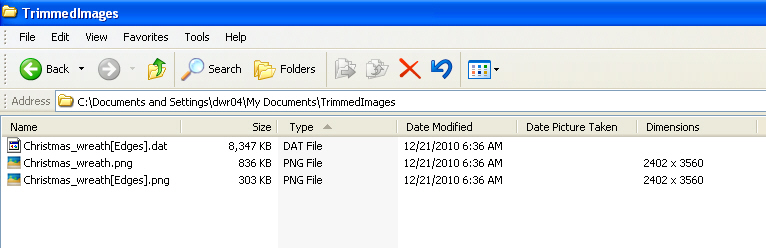
Second test - if it is can you 'read' all of them ?
Open the .dat with a plain-text-editor and see if it has 01s in it...
Yes. I can read all of the files and the .DAT file contains a lot of 0s and a few 1s.
Does the Image you are processing have transparent areas?
Yes. At least I can see the axes through the transparent areas.
Even if it did not it should still make a .dat file [just random ideas at the moment]...
Do you have appropriate permissions to read/write to the SKMtools folder and Model's folder ?It's XP and I have admin rights. An earlier version of the plugin worked fine.
Do you have 'from.ini' and 'to.ini' files left in your ../Plugins/SKMtools folder?
No. those files aren't there.
If so read them with a plain-text-editor does the first say path_to_model_folder\TrimmedImages\your_image.png and the second path_to_model_folder\TrimmedImages\your_image ?
If not edit them to suit, if they don't exist make them containing appropriate paths [one line - no 'carriage-return'].**Uh.... Can I do this in NotePad? Type, "path_to_model_folder\TrimmedImages\your_image.png" and save it as from.ini?
For the to.ini file is there an extension on your_image?[b]
Also ensure there's a folder called 'TrimmedImages' on the specified path.
If you have the two '[Edges]' 'image' files mentioned above move them out of that folder.
However, you must have path_to_model_folder\TrimmedImages\your_image.png in there.[b]The .dat file stays or goes? I've moved the one image file with [Edges] in the name out of the folder but haven't continued because I need to make the INI files.**
-
I beg to report that I tried with a different PNG image and it work. There must be something wrong with the other image I used. Is there a way to tell what that something is?
-
@unknownuser said:
To see if anything is messing with .jar files double-click on ../Plugins/EdgeDetector.jar and see what happens - if it opens with say 'WinRar' then edit that App's options to NOT open jar files... 'Jar' files should 'open' [execute] with Java...
It doesn't do anything once I click on it.@unknownuser said:
Can you edit the permissions to that folder to allow you full access.
By everything I can tell I have full permission to the folders. Far as for all the other, I'm not sure I've done it right but nothing happens. -
@tig said:
First test - is it writing the original image file
your_image.png, andyour_image[Edges].pngandyour_image[Edges].datfiles into a folder called 'TrimmedImages' in your Model's folder ?
Second test - if it is can you 'read' all of them ?
Open the .dat with a plain-text-editor and see if it has 01s in it...
Does the Image you are processing have transparent areas?
Even if it did not it should still make a .dat file [just random ideas at the moment]...
Do you have appropriate permissions to read/write to the SKMtools folder and Model's folder ?
Do you have 'from.ini' and 'to.ini' files left in your ../Plugins/SKMtools folder?
If so read them with a plain-text-editor does the first saypath_to_model_folder\TrimmedImages\your_image.pngand the secondpath_to_model_folder\TrimmedImages\your_image?
If not edit them to suit, if they don't exist make them containing appropriate paths [one line - no 'carriage-return'].
Also ensure there's a folder called 'TrimmedImages' on the specified path.
If you have the two '[Edges]' 'image' files mentioned above move them out of that folder.
However, you must havepath_to_model_folder\TrimmedImages\your_image.pngin there.
Now double-click on 'EdgeDetector.jar' in the ../Plugins/SKMtools folder - does it make the two files from the in the
'your_image.png' ??
Please test and report back...Hi TIG again,
I have probed the before instructions and now the two files ( my_image[Edges].dat & my_image[Edges].png) appear into TrimmedImages folder with the original image my_image.png, what i do now?
Thanks TIG. -
@oxer said:
@tig said:
First test - is it writing the original image file
your_image.png, andyour_image[Edges].pngandyour_image[Edges].datfiles into a folder called 'TrimmedImages' in your Model's folder ?
Second test - if it is can you 'read' all of them ?
Open the .dat with a plain-text-editor and see if it has 01s in it...
Does the Image you are processing have transparent areas?
Even if it did not it should still make a .dat file [just random ideas at the moment]...
Do you have appropriate permissions to read/write to the SKMtools folder and Model's folder ?
Do you have 'from.ini' and 'to.ini' files left in your ../Plugins/SKMtools folder?
If so read them with a plain-text-editor does the first saypath_to_model_folder\TrimmedImages\your_image.pngand the secondpath_to_model_folder\TrimmedImages\your_image?
If not edit them to suit, if they don't exist make them containing appropriate paths [one line - no 'carriage-return'].
Also ensure there's a folder called 'TrimmedImages' on the specified path.
If you have the two '[Edges]' 'image' files mentioned above move them out of that folder.
However, you must havepath_to_model_folder\TrimmedImages\your_image.pngin there.
Now double-click on 'EdgeDetector.jar' in the ../Plugins/SKMtools folder - does it make the two files from the in the
'your_image.png' ??
Please test and report back...Hi TIG again,
I have probed the before instructions and now the two files ( my_image[Edges].dat & my_image[Edges].png) appear into TrimmedImages folder with the original image my_image.png, what i do now?
Thanks TIG.OK... so we now know that the '
EdgeDetector.jar' file IS working when it's double-clicked - as it does 'execute' and it makes the files we need.
We now need to find why it isn't 'executing' withUI.openURL()like it should.
Please try this in the Ruby Console...
Move the two '..[Edges].png' and ..[Edges]'.dat' files out of the 'TrimmedImages' folder temporarily.
To get a file to 'execute' on a MAC it's usual to change to the appropriate directory first - type
Dir.chdir(path_to_SKMtools)[you add the full path to the SKM folder]
To check where you are typeDir.pwd- it should now show you are 'in' the 'SKMtools' folder.
and then use
jar="EdgeDetector.jar" File.chmod(0777, jar)- to make sure it is 'executable'.
then type
UI.openURL("file:///"+jar)
The jar should 'open' - execute - and make the two '[Edges]' files we need.
If not can you try other options like
UI.openURL(jar)
or
UI.openURL(full_path_to_SKMtools/EdgeDetetcor.jar)
where the 'path' is the 'full path' to the required jar-file in the SKMtools folder...
any other permutations you can think of for trying to 'run' the 'EdgeDetetcor.jar' file would be appreciated...I am a bit at a loss to sort out MAC problems like this direct - I don't have access to a MAC... BUT if you can help resolve this I'm sure lots of other MAC users will be grateful, as will I...

-
@dave r said:
I beg to report that I tried with a different PNG image and it work. There must be something wrong with the other image I used. Is there a way to tell what that something is?
There's a 'time-out' for making the two 'Edges' files so it might simply be taking too long and exiting - I tweaked the time-out so that it waits longer [60secs] before giving up - please try this alternative with the problem file and see if it helps... http://forums.sketchucation.com/viewtopic.php?p=293677#p293677
Any one else getting the files made but the tool not completing try this new version...
-
@unknownuser said:
@unknownuser said:
To see if anything is messing with .jar files double-click on ../Plugins/EdgeDetector.jar and see what happens - if it opens with say 'WinRar' then edit that App's options to NOT open jar files... 'Jar' files should 'open' [execute] with Java...
It doesn't do anything once I click on it.@unknownuser said:
Can you edit the permissions to that folder to allow you full access.
By everything I can tell I have full permission to the folders. Far as for all the other, I'm not sure I've done it right but nothing happens.Please try the newest version and report back http://forums.sketchucation.com/viewtopic.php?p=293677#p293677
-
@unknownuser said:
Please try the newest version and report back
Does the same as before. It adds a folder on my desktop called trimmedimages with the image I imported into SU in it but nothing has been done to it and I still get those two messages with nothing being done to the image in SU.
-
@unknownuser said:
@unknownuser said:
Please try the newest version and report back
Does the same as before. It adds a folder on my desktop called trimmedimages with the image I imported into SU in it but nothing has been done to it and I still get those two messages with nothing being done to the image in SU.
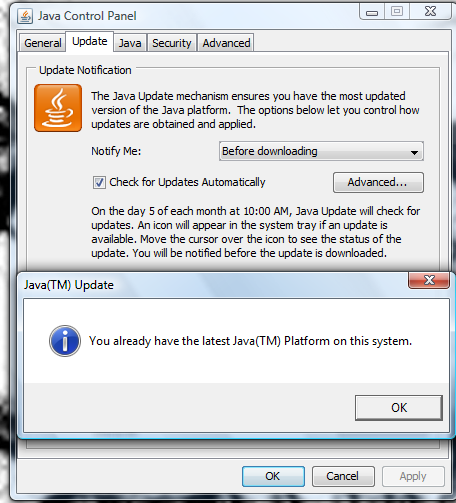
Your 'Java' installation can't access the 'jar' file... Have you tried updating your Java installation ? It might be 'old'...
-
@tig said:
There's a 'time-out' for making the two 'Edges' files so it might simply be taking too long and exiting - I tweaked the time-out so that it waits longer [60secs] before giving up - please try this alternative with the problem file and see if it helps... http://forums.sketchucation.com/viewtopic.php?p=293677#p293677
Any one else getting the files made but the tool not completing try this new version...
I downloaded your updated file and gave it a try. Still no go with that image file. And it was much less than 60 seconds before it quit so I doubt it is a timeout issue. Curiously, I downloaded another and much simpler PNG with a transparent background and had the same problem. Then I tried it with an SU toolbar icon PNG and it worked perfectly. There must be something wrong with some PNG files.
-
@dave r said:
@tig said:
There's a 'time-out' for making the two 'Edges' files so it might simply be taking too long and exiting - I tweaked the time-out so that it waits longer [60secs] before giving up - please try this alternative with the problem file and see if it helps... http://forums.sketchucation.com/viewtopic.php?p=293677#p293677
Any one else getting the files made but the tool not completing try this new version...I downloaded your updated file and gave it a try. Still no go with that image file. And it was much less than 60 seconds before it quit so I doubt it is a timeout issue. Curiously, I downloaded another and much simpler PNG with a transparent background and had the same problem. Then I tried it with an SU toolbar icon PNG and it worked perfectly. There must be something wrong with some PNG files.
The 'transparent' areas need to be 100% transparent and the 'solid' areas need to be 100% solid ?
Can you post a problem png image - or PM it if it's 'sensitive'.....
-
Here's the second PNG I tried that didn't work. The other one is too large pixel-wise so I put it here instead.

-
FWIW, I opened the wreath PNG (the one in the link) in my image editor, selected the background and made it transparent. I couldn't see any difference in the image, though. I got the same results with the revised version as I did before.
-
@unknownuser said:
Your 'Java' installation can't access the 'jar' file... Have you tried updating your Java installation ? It might be 'old'...
I am using vista so who knows?
-
Hi TIG,
I have probe different combinations and to make it works this is the process in Ruby Console:- Type jar="EdgeDetector.jar"
- Type UI.openURL("file:/Users/Oxer/Library/Application Support/Google SketchUp 8/SketchUp/plugins/SKMtools/"+jar)
With these two commands EdgeDetector runs and creates the 2 files into TrimmedImages folder.
Note that the path to EdgeDetector is to my User Account, on Mac you can place the Sketchup plugins in two locations:
a) /Users/User Name*/Library/Application Support/Google SketchUp/SketchUp/plugins
or
b) Library/Application Support/Google SketchUp/SketchUp/plugins
I hope this help you.
-
@unknownuser said:
@unknownuser said:
Your 'Java' installation can't access the 'jar' file... Have you tried updating your Java installation ? It might be 'old'...
I am using vista so who knows?
Strange I too run Vista with that version of Java... and have no problems!
Can you post screen-shots of your 'Java settings'...
Do you have full read/write/execute access-rights to the SKMtools folder and its contents?
I have a fix for a MAC problem that I'll post asap - this might also help you... watch this space... -
Here's an update - http://forums.sketchucation.com/viewtopic.php?p=293677#p293677 - it addresses some glitches with the MAC file paths [I hope! Thanks for the assistance Oxer et al]...






Advertisement