sketchucation logo sketchucation
    • Log Masuk
    Oops, your profile's looking a bit empty! To help us tailor your experience, please fill in key details like your SketchUp version, skill level, operating system, and more. Update and save your info on your profile page today!
    πŸ”Œ Smart Spline | Fluid way to handle splines for furniture design and complex structures. Download

    [Plugin] ImageTrimmer

    Scheduled Pinned Kunci Moved Plugins
    364 Kiriman 58 Posters 256.0k Lihat 58 Watching
    Memuatkan lagi kiriman
    • Lama ke Baru
    • Baru ke Lama
    • Most Votes
    Balas
    • Reply as topic
    Log masuk untuk balas
    Topik ini telah dipadam. Hanya pengguna dengan kuasa pengurusan boleh melihatnya.
    • T Luar talian
      Tallkoala
      last edited by

      I did try that (with a couple of different converters) but the image I got didn't have clean lines. I tried exploding the resulting model and then making joining lines in shapes I wanted to be solid but I couldn't get it to work.

      See attached screenshots and close up...
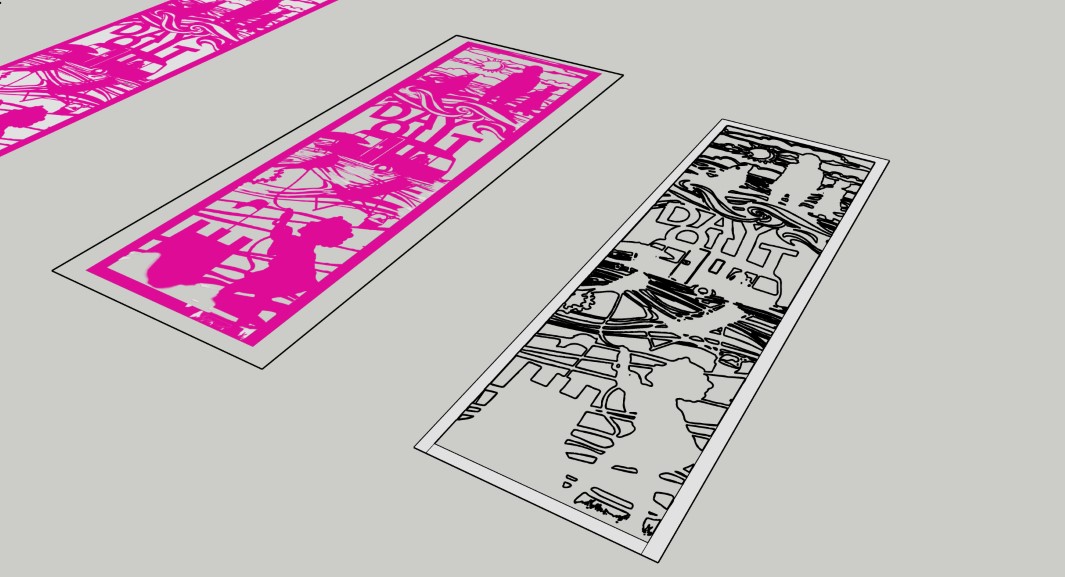

      External Finger Post Shaping1.jpg


      External Finger Post Shaping2.jpg

      1 Reply Last reply Balas Petikan 0
      • Dave RD Luar talian
        Dave R
        last edited by

        With the images you've supplied, Image Trimmer isn't going to be much better. It's tying up my computer for a long time. I may have to kill it so I can get some other stuff done.

        Etaoin Shrdlu

        %

        (THERE'S NO PLACE LIKE)

        G28 X0.0 Y0.0 Z0.0

        M30

        %

        1 Reply Last reply Balas Petikan 0
        • T Luar talian
          Tallkoala
          last edited by

          ok no problem, thanks for trying anyway...

          1 Reply Last reply Balas Petikan 0
          • Didier BurD Luar talian
            Didier Bur
            last edited by

            Hi all,

            Again about my problem (Java not working as expected):
            Here is the message I get after jar is launched:

            Error; #<Errno;;ENOENT; No such file or directory @ rb_sysopen - C;\Users\DBUR\Documents\TrimmedImages\Penture_033[Edges].dat>
            C;/Users/DBUR/AppData/Roaming/SketchUp/SketchUp 2023/SketchUp/Plugins/SKMtools/ImageTrimmer.rb;277;in `readlines'
            C;/Users/DBUR/AppData/Roaming/SketchUp/SketchUp 2023/SketchUp/Plugins/SKMtools/ImageTrimmer.rb;277;in `make_edges'
            C;/Users/DBUR/AppData/Roaming/SketchUp/SketchUp 2023/SketchUp/Plugins/SKMtools/ImageTrimmer.rb;201;in `process_image'
            C;/Users/DBUR/AppData/Roaming/SketchUp/SketchUp 2023/SketchUp/Plugins/SKMtools/ImageTrimmer.rb;170;in `initialize'
            C;/Users/DBUR/AppData/Roaming/SketchUp/SketchUp 2023/SketchUp/Plugins/SKMtools/ImageTrimmer.rb;834;in `new'
            C;/Users/DBUR/AppData/Roaming/SketchUp/SketchUp 2023/SketchUp/Plugins/SKMtools/ImageTrimmer.rb;834;in `block in <top (required)>'
            

            I have the png image file in the model's folder, but no 'Penture_033[Edges].dat' file πŸ˜•
            All the rights (read/write etc...) are set for this folder.

            As it is said in the comments in ImageTrimmer.rb:

            @unknownuser said:

            There is a temporary 'data' file 'StandingMan1[Edges].dat' which contains
            '01' data used to construct the Sketchup Edges - this should be auto-erased
            whatever option you choose.

            Is this file a template, sort of ?

            Regards,

            DB

            1 Reply Last reply Balas Petikan 0
            • 1
            • 2
            • 15
            • 16
            • 17
            • 18
            • 19
            • 19 / 19
            • First post
              Last post
            Buy SketchPlus
            Buy SUbD
            Buy WrapR
            Buy eBook
            Buy Modelur
            Buy Vertex Tools
            Buy SketchCuisine
            Buy FormFonts

            Advertisement