Align the axis to a VIEW
-
sketchup8 / win xp pro
Hi, many times in 3d I have to draw something "non orthogonal",or perpendicular to the screen with the model twisted in some obscure direction.
Autocad (and maybe others) have a "user coordinate system" (UCS). With this you can be looking at your model from any direct and use the UCS/view command and the axis will snap to the view. Not a face or edge or anything else, just the view.
Maybe PRO has this I don't know.
Thanks,
Rick -
Hi,
with tools|axes you can define your own axes and save them in your scenes ...
I guess that's what your looking for ? -
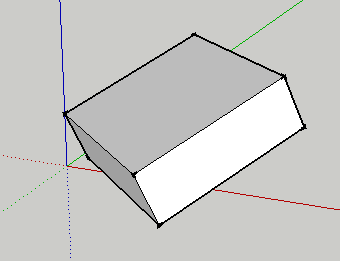
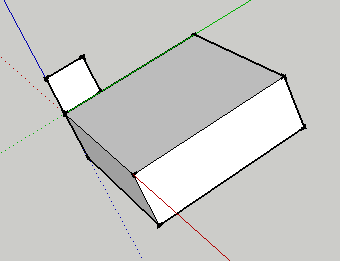
I too have always lamented the ability to create a "user coordinate system", and never thought to use axis to accomplish this. All that required to to place the axis on the surface you wish to model on, and WaLa! a "user coordinate system" to which the sketch tools apply themselves to. In the images below, I first created a component rotated on the SU world axis, the placed the axis on the top face where it intersects with the zaxis (blue line). Then drawing a rectangular face on the top of the rotated face was "no problem". Boy do I feel stupid>_<
-
But that only works if you draw guidelines (X,Ya dnZ axes) to define the original co-ordinate system first, as there is no way of automatically reverting back to the previous co-ordinate system after using the axes tool, or am I missing something. A UCS plugin would be extremely useful.
Kind regards,
Bob -
Bob, If you create a scene of each, you can flip back and forth as necessary.
-
Another trick is to use the Section Tool, as follows:
- 'cut' the geometry;
- map the rectangular cutting plane to any orientation by rotating successively as desired; and,
- with the rectangular cutting plane selected, Right-Click and choose the option to "Align View"
It's a work-around but it does what's necessary.
Cheers,
. Diego.

Hello! It looks like you're interested in this conversation, but you don't have an account yet.
Getting fed up of having to scroll through the same posts each visit? When you register for an account, you'll always come back to exactly where you were before, and choose to be notified of new replies (either via email, or push notification). You'll also be able to save bookmarks and upvote posts to show your appreciation to other community members.
With your input, this post could be even better 💗
Register Login


Advertisement