[Plugin][Code]SKMtools,Material/ImageTools
-
Here's an update http://forums.sketchucation.com/viewtopic.php?p=293677#p293677
Following the inclusion of mew methods in SUp's v8-M1...
Material.class extensions - aliases added for save_thumbnail()==.write_thumbnail() and .delete==.remove. The .name='' and .delete methods now match SUp >=v8-M1 returned values.
To allow the methods to work in pre-v8-M1 SUp versions... with the new SUp method names / syntax. -
Here's another update http://forums.sketchucation.com/viewtopic.php?p=293677#p293677
Following the inclusion of mew methods in SUp's v8-M1...
Material.class extensions - aliases added for save_thumbnail()==.write_thumbnail() and .delete==.remove. The .name='' and .delete methods now match SUp >=v8-M1 returned values.
To allow the methods to work in pre-v8-M1 SUp versions... with the new SUp method names / syntax.
The 'aliases' have be slightly recast to avoid removing the new methods. -
Here's an update http://forums.sketchucation.com/viewtopic.php?p=293677#p293677
The ImageTrimmer tool has an added option to 'flatten' the new materia's texture PNG [i.e. remove its transparency] so that it will then receive shadows.
Note that there is also a new jar FlattenPNG.jar that is used to do this. -
Here's an update http://forums.sketchucation.com/viewtopic.php?p=293677#p293677
A new tool has been added 'pngwhite2transparent.rb' and its matching jar file.
See its new thread for more details... -
Thanks alot TIG!
-
Here's an minor update http://forums.sketchucation.com/viewtopic.php?p=293677#p293677
The new tool 'pngwhite2transparent.rb' transparent color made by the .jar file is now 'white' [although you don't see it!].
See its new thread for more details... -
Here's an minor update http://forums.sketchucation.com/viewtopic.php?p=293677#p293677
For ImageTrimmer - 'Simplified image' - a rare error on delete edge is now trapped. -
Here's a major update http://forums.sketchucation.com/viewtopic.php?p=293677#p293677
The MAC execution of the jar files has been addressed - it affects most tools/methods.
You need Java installed/enabled and appropriate permissions to execute files and read/write to the ../Plugins/SKMtools folder. On a MAC you might be prompted to allow a jar file to run - if so answer 'yes' - this should only get asked the once for each jar-type...
-
Here's an update http://forums.sketchucation.com/viewtopic.php?p=293677#p293677 which fixes a minor glitch with the ImageAnimationAppObserver - it was working OK but could sometimes give spurious error messages in an open Ruby Console until this fix...
-
Hi!
Congrats on an amazing plugin, but there is one major issue I have.
When I decide to undo the previous action (Ctrl+Z or Edit->Undo), in the place where animation was I now have all pictures tiled next to each other.Thanks,
Adam -
Rather than try to undo Image Animations you must just stop all animations.
To get back to an original Imgage's start-frame you need to start that individual Image's animation... angd then stop it when the frame you want appears... -
hey everyone. I am new to this forum so please be gentle.
i just built my first maker-bot and it is working great printing all my 3d models.i have installed google sketchup, free version, v8
i installed the plugin, and everything is fine so far. i have the image trimmer menu item under the tools dropdown.so i want to create a 3d model of a 2d image.
i import a greyscale .png file with transparencies, then i run the IMAGE TRIMMER plugin.
when i do this, i get the notifications on the bottom saying 'making edges files'
the dots scroll as it processes ...............then that's it, the process finishes and nothing happens.
i am running on a win7 machine 64bit.does anyone have any ideas that can point me in the right direction?
thanks again
bill -
Billberet
Read back through the posts... esp. about ensuring Java, and thereby .jar files, are enabled, AND that the .jar extension isn't hijacked by a compression app.
Also see a recent post about how a PNG Image must have solid and transparent areas - otherwise semi-transparent areas are taken as transparent too... -
thanks,
just had to right click, run as administrator!!!
then poof, i had access to the jar files!!!!thanks again
-bb -
Hi,
Trimmer appears in the tools menu. I use the french version. I import a PNG image "use as image" (Utiliser comme image) in sketchup 8.
While the image still selected I select "Trimmer" but nothing seems to happen.
Any help welcome,
Kind regards
Marc
-
Have you installed all of the files in the subfolder as they come packaged in the zip file ?
The imported Image MUST be a PNG file, and have a transparent background [note semi-transparent pixels within the image are regarded as 'to be removed' too... so edit the image file before importing it; flatten it, add a transparent layer back, pick the background color[s] using a magic-wand and delete those pixels so the background shows as fully transparent, tidy up loose pixels, very thing parts etc, save it and import!].
The PNG Image needs to be a reasonable size...
Do you get error messages in the Ruby Console.
Is Java properly enabled on your computer [Control-panel > Java] ?
Are .jar files set to be be allowed to execute locally ?
Are .jar files associated with Java and not erroneously with some 'Compression' software ?
Do you have full-permissions to your Plugins folder and all of its subfolders ?
Do you have access-permissions to execute the '.jar' files needed to process the image ?
Is anything made in a subfolder in the folder with the SKP - if so what ?
Have you tried running Sketchup as administrator ?

There are many possibilities.
If you real the posts in this thread you will see the list of mess ups. and how fixing the issues, that has allowed every user to get things working properly [eventually]...
-
I tried to make Java the default program to open .jar files. Got an error message.
I tried to open Sketchup as administrator. The trimmer seemed to fail once but did work the second time ? Anyway it did work!

Thank you very much for your help
Marchorg
-
I wonder if anyone can tell what I am doing wrong with Image Trimmer.
If I run the image in the attached SU file. I get a component. Image Trimmer seems to complete all operations. But the component is just a few scattered dots. The rest of the image is gone.
-
It's useful if you supply the original Image file too...
For some reason it's failing to make a proper loop of the main 'face' - there a one pixel gap in the crook of her arm/hand [also a non-transparent white gap between the hands that needs sorting]...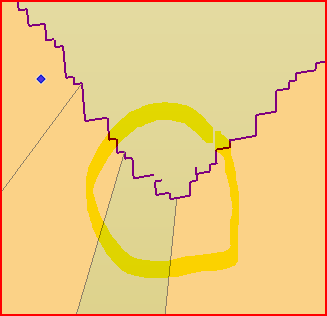 To fix this, edit the component.
Edit > Select-All
Entity Info > untick 'hidden' so that all edges are now visible.
Draw in some large diagonals and make faces [as above].
You can quickly zoom into the problem area.
Add in the missing edge to heal that gap and make all needed faces.
To tidy up, use a 'DeleteCoplanarEdges' tool to remove the diagonal lines you've just added - or Erase them.
Now open the Material Browser and find the image-material.
Paint it onto the front AND back faces of the now-faced cutout.
Select-All again, and deselect the Faces - either using a 'SelectionTool' or by holding ctrl+shift and clicking on the face[s].
Use the Context-menu to Hide the still selected Edges.
I'm unsure as to why it can't cope with this particular image - that one pixel seems to have scuppered it ! Perhaps editing the Image in Gimp osa would reveal an odd combo of solid and transparent pixels around this area - the simpler the PNG Image's outline is then the less prone ImageTrimmer is to errors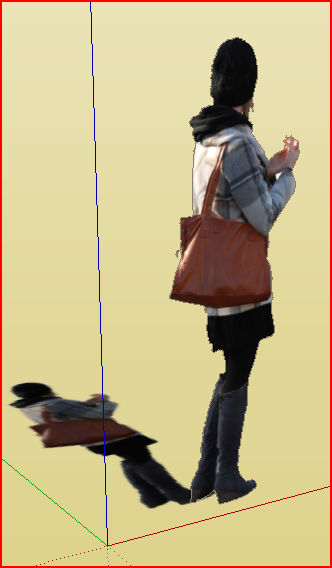 Shown here with all edges still unhidden for clarity...
EDIT:
I've edited the exported Image and made that 'crook' less sharp, also tidied up hair/hands, cropped it to optimize its size etc; Re-imported it etc...
Now it ImageTrims quickly and faultlessly...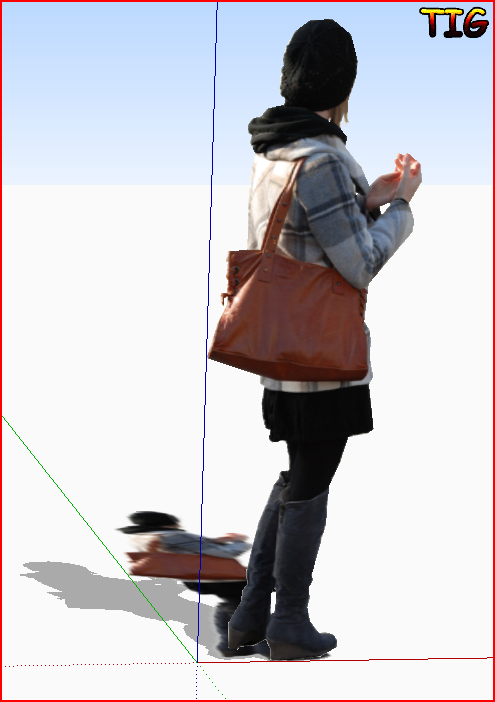 ImgTrimRedo.skp
 -
TIG,
Thank you so much for the explanation. I thought it was something more basically wrong with my usage. I did see that some of the shape could close and not other parts, and applied the texture but it looked wrong and I felt I was going the wrong direction with this.
After previous tries I took the image into GIMP and applied a solid mask of the shape,looked for holes and flattened, trimmed again, and still got the result you saw. I now know that it WILL work but may need to reprocess some shapes further. The original image had a lot of translucent pixels in that crook area. Some GIMP process to make hard and simplified edges would help. I see you were able to put back in some of the holes, which I had filled, thinking they were part of the problem.
Excellent plugin! Sorry I was such a bother.
Peter



Advertisement