Unwanted lines
-
Hi all,
How to get rid of unwanted lines (edges)?
Wrench downloaded at http://archive3d.net/--- format *.3ds.I would like to delete a lot of lines, not just hide them.
Is any plugin to do that by one operation?
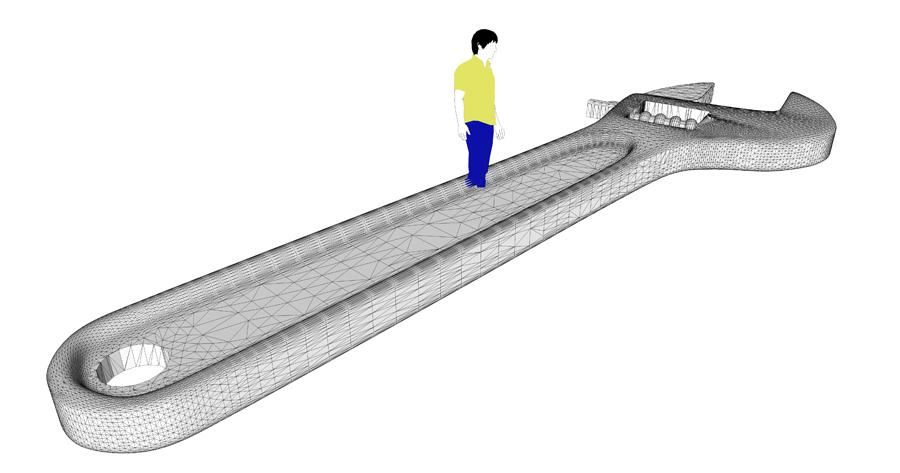
-
Select the entire object and choose 'smooth edges' from the menu. Play with the slider to get the best result.
-
http://forums.sketchucation.com/viewtopic.php?t=22920 by ThomThom (for instance).
But please, jarynzlesa, only ask questions when my wife is not around (you know, she is fond of kittens, too...)

-
@gaieus said:
http://forums.sketchucation.com/viewtopic.php?t=22920 by ThomThom (for instance).
But please, jarynzlesa, only ask questions when my wife is not around (you know, she is fond of kittens, too...)
Sorry for bothering your wife, I just couldn't remember the name of plugin
 thx.
thx.Best regards to your wife - if she is not around then call at her.
-
It appears from your OP post you have the 3ds file. If so try importing to mesh lab and you can then reduce the number of vertices. Do it 1/2 at each step and take a look at the model to see if it is of the quality you'll accept
Select re-mesh simplification and reconstruction
Quadratic edge collapse decimiation
Select optimal position of simplified vertices, post simplification cleaning , quality to 1
Note you can input the number you want


Hello! It looks like you're interested in this conversation, but you don't have an account yet.
Getting fed up of having to scroll through the same posts each visit? When you register for an account, you'll always come back to exactly where you were before, and choose to be notified of new replies (either via email, or push notification). You'll also be able to save bookmarks and upvote posts to show your appreciation to other community members.
With your input, this post could be even better 💗
Register Login


Advertisement