sketchucation logo sketchucation
    • Login
    Oops, your profile's looking a bit empty! To help us tailor your experience, please fill in key details like your SketchUp version, skill level, operating system, and more. Update and save your info on your profile page today!
    ⚠️ Update | Sketchucation Tools 5.0.8 released with licensing improvements and bugfixes Download

    Rotate picture within frame

    Scheduled Pinned Locked Moved Newbie Forum
    sketchup
    8 Posts 3 Posters 654 Views 3 Watching
    Loading More Posts
    • Oldest to Newest
    • Newest to Oldest
    • Most Votes
    Reply
    • Reply as topic
    Log in to reply
    This topic has been deleted. Only users with topic management privileges can see it.
    • J
      jhearcht
      last edited by

      SU8.0 on Windows XP

      In SU6 I placed my model onto a "matched photo". The model axes are in alignment with objects in the photo. But the photo itself is slightly misaligned with the frame, which makes the world appear to be tilted. Since the model is a tower and is taller than surrounding buildings, the leaning tower of Pisa effect is annoying to me.

      Now in SU8, I want to rotate the model and photo around the Y axis by one or two degrees, so that the Z axis will align with the vertical frame edges. In other words, I want to rotate the picture relative to the frame. But I haven't found a way to do that. Any suggestions?

      1 Reply Last reply
      Reply Quote 0
      • GaieusG
        Gaieus
        last edited by

        Could you attach the model, pleas. It is hard to exactly imagine what's going on (especially with a PM'd model)

        Gai...

        1 Reply Last reply
        Reply Quote 0
        • J
          jhearcht
          last edited by

          @gaieus said:

          Could you attach the model, pleas. It is hard to exactly imagine what's going on (especially with a PM'd model)

          The mostly horizontal background image looks OK within the border/frame. But the vertical tower looks askew, even though the model is aligned with background buildings. At first I told myself it was just an artifact of perspective. But the added lines prove it's just a fact. πŸ˜‰

          The whole thing needs to rotate counterclockwise about one or two degrees relative to the frame. I'm hoping I don't have to recreate the model match again from scratch. 😒

          http://home.mindspring.com/~gnomon/Rotate tower axis in frame.jpg

          1 Reply Last reply
          Reply Quote 0
          • GaieusG
            Gaieus
            last edited by

            Is the model correct otherwise? You could rotate the whole, ready model to be vertical then.

            Gai...

            1 Reply Last reply
            Reply Quote 0
            • Dave RD
              Dave R
              last edited by

              Could you just rotate the image after exporting it?
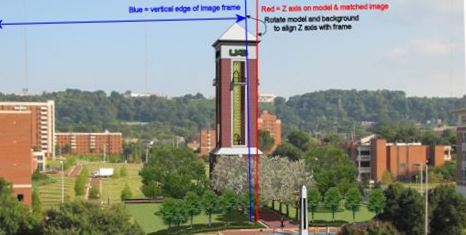

              Rotate tower axis in frame.jpg

              Etaoin Shrdlu

              %

              (THERE'S NO PLACE LIKE)

              G28 X0.0 Y0.0 Z0.0

              M30

              %

              1 Reply Last reply
              Reply Quote 0
              • J
                jhearcht
                last edited by

                @gaieus said:

                Is the model correct otherwise? You could rotate the whole, ready model to be vertical then.

                Rotating the model is not the problem. I want to rotate model and background at the same time, which doesn't seem to be possible in SU8---unless I'm missing something.

                I have tried to rotate the model & image after exporting to Layout. Then I planned to use a mask to crop the border back to square. I was able to rotate the image by 1 degree, but don't find a way to use a rectangle as a Clip Mask. The Split tool doesn't seem to work on the image, so now the Tower is erect, but image borders are askew.

                Are you suggesting I use Photoshop?

                1 Reply Last reply
                Reply Quote 0
                • Dave RD
                  Dave R
                  last edited by

                  I used the Rotate and Crop tools in Picasa. I should have cropped a little closer on the right.

                  In Photoshop you should be able to do the same thing.

                  Etaoin Shrdlu

                  %

                  (THERE'S NO PLACE LIKE)

                  G28 X0.0 Y0.0 Z0.0

                  M30

                  %

                  1 Reply Last reply
                  Reply Quote 0
                  • GaieusG
                    Gaieus
                    last edited by

                    Well, PS can be good then (you can also export the image this way from LO for PostProcess)

                    Gai...

                    1 Reply Last reply
                    Reply Quote 0

                    Hello! It looks like you're interested in this conversation, but you don't have an account yet.

                    Getting fed up of having to scroll through the same posts each visit? When you register for an account, you'll always come back to exactly where you were before, and choose to be notified of new replies (either via email, or push notification). You'll also be able to save bookmarks and upvote posts to show your appreciation to other community members.

                    With your input, this post could be even better πŸ’—

                    Register Login
                    • 1 / 1
                    • First post
                      Last post
                    Buy SketchPlus
                    Buy SUbD
                    Buy WrapR
                    Buy eBook
                    Buy Modelur
                    Buy Vertex Tools
                    Buy SketchCuisine
                    Buy FormFonts

                    Advertisement
