sketchucation logo sketchucation
    • Login
    Oops, your profile's looking a bit empty! To help us tailor your experience, please fill in key details like your SketchUp version, skill level, operating system, and more. Update and save your info on your profile page today!
    ⚠️ Update | Sketchucation Tools 5.0.8 released with licensing improvements and bugfixes Download

    Better Quality of Exporting Images

    Scheduled Pinned Locked Moved SketchUp Discussions
    sketchup
    21 Posts 12 Posters 2.0k Views 12 Watching
    Loading More Posts
    • Oldest to Newest
    • Newest to Oldest
    • Most Votes
    Reply
    • Reply as topic
    Log in to reply
    This topic has been deleted. Only users with topic management privileges can see it.
    • soloS
      solo
      last edited by

      Yes, that's normally what i do when I need an SU image, I export around 7000x7000 and reduce to 1000x1000 and it's crisp.

      http://www.solos-art.com

      If you see a toilet in your dreams do not use it.

      1 Reply Last reply
      Reply Quote 0
      • charly2008C
        charly2008
        last edited by

        Hi,

        an alternative could be the Snipping Tool.

        Charly
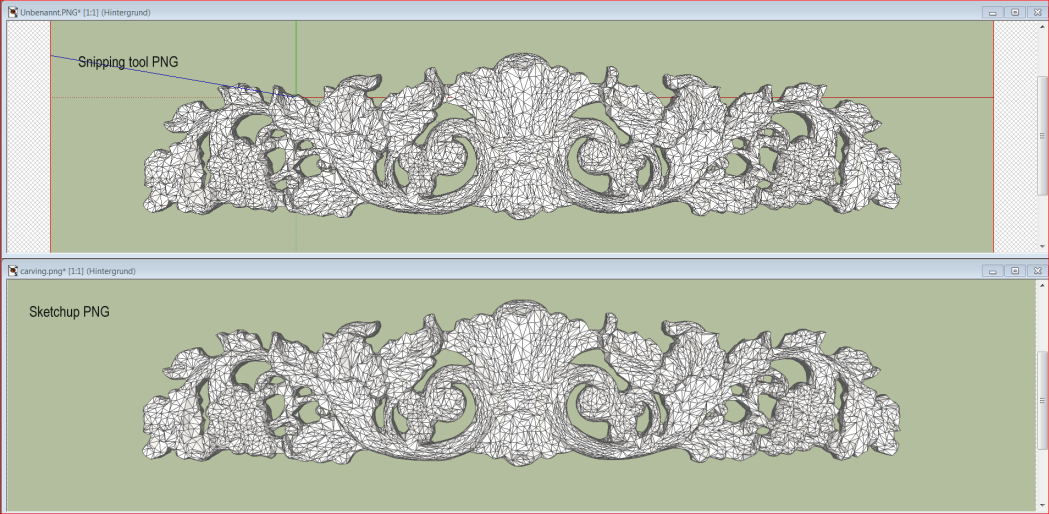

        Unbenannt.PNG

        He who makes no mistakes, makes nothing

        1 Reply Last reply
        Reply Quote 0
        • HieruH
          Hieru
          last edited by

          That's a good tip.

          A snipping tool (or alternatively Print Screen) is the only option when it comes to large models that cause SU to crash when you try to export large 2D images.

          www.davidhier.co.uk

          1 Reply Last reply
          Reply Quote 0
          • jason_marantoJ
            jason_maranto
            last edited by

            You could also use Layout to get much better exports.

            Best,
            Jason.

            I create video tutorial series about several 2D & 3D graphics programs.

            1 Reply Last reply
            Reply Quote 0
            • C
              c0nfused2
              last edited by

              is the snipping tool alrdy in sketchup or is it a plugin?

              1 Reply Last reply
              Reply Quote 0
              • charly2008C
                charly2008
                last edited by

                It's a Windows 7 tool

                He who makes no mistakes, makes nothing

                1 Reply Last reply
                Reply Quote 0
                • D
                  d12dozr
                  last edited by

                  Snipping tool is in Vista as well under All Programs > Accessories

                  3D Printing with SketchUp Book
                  http://goo.gl/f7ooYh

                  1 Reply Last reply
                  Reply Quote 0
                  • C
                    c0nfused2
                    last edited by

                    thanks much all

                    1 Reply Last reply
                    Reply Quote 0
                    • Chris FullmerC
                      Chris Fullmer
                      last edited by

                      What is the advantage of the snipping tool? Quality looks the same as the sketchup export to me.

                      Lately you've been tan, suspicious for the winter.
                      All my Plugins I've written

                      1 Reply Last reply
                      Reply Quote 0
                      • S
                        SketchUpNoobie
                        last edited by

                        @solo said:

                        Yes, that's normally what i do when I need an SU image, I export around 7000x7000 and reduce to 1000x1000 and it's crisp.

                        What if we don't have PhotoShop? 🎉

                        --

                        SketchUpNoobie: the complete noob in all things SketchUp.

                        1 Reply Last reply
                        Reply Quote 0
                        • Chris FullmerC
                          Chris Fullmer
                          last edited by

                          You can use GiMP which is free. Even Picasa would probably do a good enough job just down sizing the image.

                          Lately you've been tan, suspicious for the winter.
                          All my Plugins I've written

                          1 Reply Last reply
                          Reply Quote 0
                          • M
                            mozzie
                            last edited by

                            For simple resizing and editing, Irfanview is pretty effective.
                            For example, it offers a number of algorithms for resizing.
                            And it's free. http://www.irfanview.com/

                            1 Reply Last reply
                            Reply Quote 0
                            • PixeroP
                              Pixero
                              last edited by

                              @solo said:

                              Yes, that's normally what i do when I need an SU image, I export around 7000x7000 and reduce to 1000x1000 and it's crisp.

                              Do you export with antialiasing at 7000 pixels or without?
                              I've never could export antialiased more than some 4500 pixels. 😢

                              1 Reply Last reply
                              Reply Quote 0
                              • GaieusG
                                Gaieus
                                last edited by

                                I guess it's withOUT as when you resample the image, you can set antialiasing anyway.

                                Gai...

                                1 Reply Last reply
                                Reply Quote 0
                                • Chris FullmerC
                                  Chris Fullmer
                                  last edited by

                                  I export oversize images like Solo suggested also, and I always do no antialising. I feel Photoshop (or the others) do a better job with the anti-aliasing than SU does anyhow.

                                  Chris

                                  Lately you've been tan, suspicious for the winter.
                                  All my Plugins I've written

                                  1 Reply Last reply
                                  Reply Quote 0
                                  • GaieusG
                                    Gaieus
                                    last edited by

                                    Andfaster andless memory sensitive...

                                    Gai...

                                    1 Reply Last reply
                                    Reply Quote 0
                                    • PixeroP
                                      Pixero
                                      last edited by

                                      Hmmm... I might have to try without AA again.
                                      In the past when I have exported without AA, sometimes lines were skipped and it looked really ugly even when reduced in size.

                                      1 Reply Last reply
                                      Reply Quote 0
                                      • jeff hammondJ
                                        jeff hammond
                                        last edited by

                                        i'm wondering if su8 is somehow allowing bigger exports..
                                        i just exported a 10k entity model to 19,500 px wide with AA off and jpg compression set to best. (14 seconds with shadows off.. 24secs with them on)
                                        iirc, i used to only be able to go to around 15000px.
                                        anyone else seeing similar improvements?

                                        dotdotdot

                                        1 Reply Last reply
                                        Reply Quote 0

                                        Hello! It looks like you're interested in this conversation, but you don't have an account yet.

                                        Getting fed up of having to scroll through the same posts each visit? When you register for an account, you'll always come back to exactly where you were before, and choose to be notified of new replies (either via email, or push notification). You'll also be able to save bookmarks and upvote posts to show your appreciation to other community members.

                                        With your input, this post could be even better 💗

                                        Register Login
                                        • 1
                                        • 2
                                        • 1 / 2
                                        • First post
                                          Last post
                                        Buy SketchPlus
                                        Buy SUbD
                                        Buy WrapR
                                        Buy eBook
                                        Buy Modelur
                                        Buy Vertex Tools
                                        Buy SketchCuisine
                                        Buy FormFonts

                                        Advertisement