sketchucation logo sketchucation
    • Login
    Oops, your profile's looking a bit empty! To help us tailor your experience, please fill in key details like your SketchUp version, skill level, operating system, and more. Update and save your info on your profile page today!
    ⚠️ Update | Sketchucation Tools 5.0.8 released with licensing improvements and bugfixes Download

    Drape tool half works?!

    Scheduled Pinned Locked Moved SketchUp Discussions
    sketchup
    8 Posts 3 Posters 502 Views 3 Watching
    Loading More Posts
    • Oldest to Newest
    • Newest to Oldest
    • Most Votes
    Reply
    • Reply as topic
    Log in to reply
    This topic has been deleted. Only users with topic management privileges can see it.
    • A
      andyviv
      last edited by

      Hi

      I have to model a new street layout onto a terrain model I've created from spot levels. However, when I use the drape tool to place the lines on the the terrain I'm coming across an issue. They get placed on to the terrain, but only some of them create isolated areas which I can paste a material too. When I click the others it simply selects the whole of the terrain. I've attached a jpg to try and explain what I'm on about! The area on the left can't be selected, yet the area on the left can.

      Has anyone else come across this problem before? Does anyone know if this is an issue with the lines I'm using to drape, or a problem with the terrain model I've created?

      Cheers

      Andy
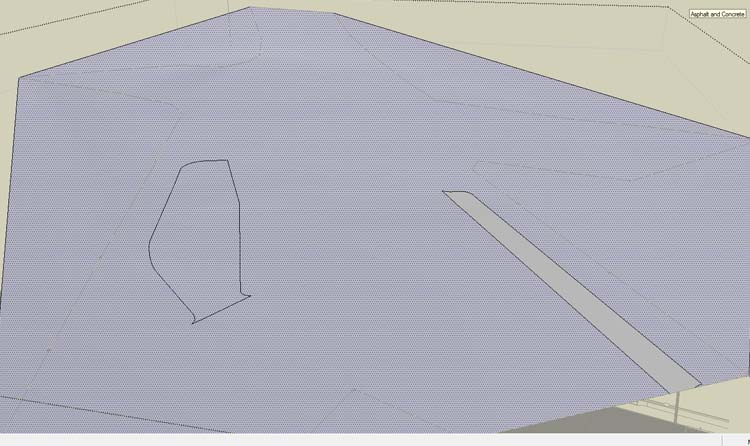

      drape image.jpg

      1 Reply Last reply
      Reply Quote 0
      • thomthomT
        thomthom
        last edited by

        Are all the edges properly connected? Most likely it's some gap somewhere. Could be that Drape tried to create a very small edge, in which case SU fails due to it's tolerance of 1/1000".

        Thomas Thomassen — SketchUp Monkey & Coding addict
        List of my plugins and link to the CookieWare fund

        1 Reply Last reply
        Reply Quote 0
        • A
          andyviv
          last edited by

          I can't see that there would be a gap as I have a flat version of the whole layout modelled directly above the terrain and all the surfaces have had materials added to them. It is this flat version of model I am trying to drape on to the terrain. If there was a gap it wouldn't have created the face for me to apply the material to.

          1 Reply Last reply
          Reply Quote 0
          • thomthomT
            thomthom
            last edited by

            The Drape command might have create a gap with the draped geometry...

            Thomas Thomassen — SketchUp Monkey & Coding addict
            List of my plugins and link to the CookieWare fund

            1 Reply Last reply
            Reply Quote 0
            • A
              andyviv
              last edited by

              Ok, thanks for your help. I guess the only way to solve this is to go around the edge and check if there is a gap?

              1 Reply Last reply
              Reply Quote 0
              • thomthomT
                thomthom
                last edited by

                You can use this plugin to help you out: http://www.smustard.com/script/StrayLines

                Thomas Thomassen — SketchUp Monkey & Coding addict
                List of my plugins and link to the CookieWare fund

                1 Reply Last reply
                Reply Quote 0
                • A
                  andyviv
                  last edited by

                  Thank you

                  1 Reply Last reply
                  Reply Quote 0
                  • GaieusG
                    Gaieus
                    last edited by

                    Also instead of going all around, you can halve the whole shape by connecting opposite endpoints that halve the remaining offending face etc. until you quickly isolate the problematic area. Then just delete the unnecessary edges inside.

                    Gai...

                    1 Reply Last reply
                    Reply Quote 0

                    Hello! It looks like you're interested in this conversation, but you don't have an account yet.

                    Getting fed up of having to scroll through the same posts each visit? When you register for an account, you'll always come back to exactly where you were before, and choose to be notified of new replies (either via email, or push notification). You'll also be able to save bookmarks and upvote posts to show your appreciation to other community members.

                    With your input, this post could be even better 💗

                    Register Login
                    • 1 / 1
                    • First post
                      Last post
                    Buy SketchPlus
                    Buy SUbD
                    Buy WrapR
                    Buy eBook
                    Buy Modelur
                    Buy Vertex Tools
                    Buy SketchCuisine
                    Buy FormFonts

                    Advertisement