sketchucation logo sketchucation
    • 登入
    Oops, your profile's looking a bit empty! To help us tailor your experience, please fill in key details like your SketchUp version, skill level, operating system, and more. Update and save your info on your profile page today!
    ⚠️ Important | Libfredo 15.8b introduces important bugfixes for Fredo's Extensions Update

    [Plugin] Select by Material, and Hide All Unselected

    已排程 已置頂 已鎖定 已移動 Plugins
    31 貼文 15 Posters 48.1k 瀏覽 15 Watching
    正在載入更多貼文
    • 從舊到新
    • 從新到舊
    • 最多點贊
    回覆
    • 在新貼文中回覆
    登入後回覆
    此主題已被刪除。只有擁有主題管理權限的使用者可以查看。
    • K 離線
      kwalkerman
      最後由 編輯

      This is my first plugin, so go easy on me.

      It has 3 basic functions:

      1. It will select all entities within the active workspace that are painted with the current material. If the current material is the default, it will select all basic entities (but not groups or component instances). For now, the plugin doesn't look at UV, just material. Unlike the built-in SU tool, it also looks in sub-groups.

      2. Hides all unselected items. This is handy if you only want to look at the items that are painted with a specific material.

      Let me know how it works for you!

      --
      Karen


      material_selection.rb

      1 條回覆 最後回覆 回覆 引用 0
      • EarthMoverE 離線
        EarthMover
        最後由 編輯

        Nice work. Thanks Karen! 👍

        3D Artist at Clearstory 3D Imaging
        Guide Tool at Winning With Sketchup
        Content Creator at Skapeup

        1 條回覆 最後回覆 回覆 引用 0
        • CadFatherC 離線
          CadFather
          最後由 編輯

          Thank you Karen, funny how one's first plugin is often simple and so good. 👍

          one suggestion.. have you thought of a way of 'getting' the material under the cursor?

          1 條回覆 最後回覆 回覆 引用 0
          • Bob JamesB 離線
            Bob James
            最後由 編輯

            This is exactly the tool I've been looking for 👍

            BUT: I selected a material (clicked on it to make it the current material), clicked on "Material Selection" in the Plugins drop-down list....but nothing happens 😲
            The material I selected was within a group: is that the problem?

            i7-4930K 3.4Ghz, 2x GTX780 6GB, 32GB DDR3-1600 ECC, OCZ Vertex 4 500GB, WD Black 3TB, 32TB NAS, 4x 27" Monitors, SpaceMouse Pro, X-keys XK-60

            1 條回覆 最後回覆 回覆 引用 0
            • CadFatherC 離線
              CadFather
              最後由 編輯

              Bob, make the material active in the material browser

              1 條回覆 最後回覆 回覆 引用 0
              • GaieusG 離線
                Gaieus
                最後由 編輯

                👍
                It can be ver useful when someone is modelling for GE for instance, too (like in this topic).
                Models sometimes get rejected for "incomplete texturing" when the modeller misses to texture a face or two somewhere in the model.

                Gai...

                1 條回覆 最後回覆 回覆 引用 0
                • K 離線
                  kwalkerman
                  最後由 編輯

                  Thanks for all the positive feedback.

                  Bob - the tool should work to select materials within groups. However, if you are currently in component or group edit mode, it will only look at entities within the current workspace. Try exiting all components and running the plugin again. If this doesn't work, try it on a simple model... and let me know how it goes.

                  CadFather - I can add something like this... Just give me a few days. Weekends are for construction.

                  --
                  Karen

                  1 條回覆 最後回覆 回覆 引用 0
                  • CadFatherC 離線
                    CadFather
                    最後由 編輯

                    thanks Karen and take your time..

                    1 條回覆 最後回覆 回覆 引用 0
                    • Bob JamesB 離線
                      Bob James
                      最後由 編輯

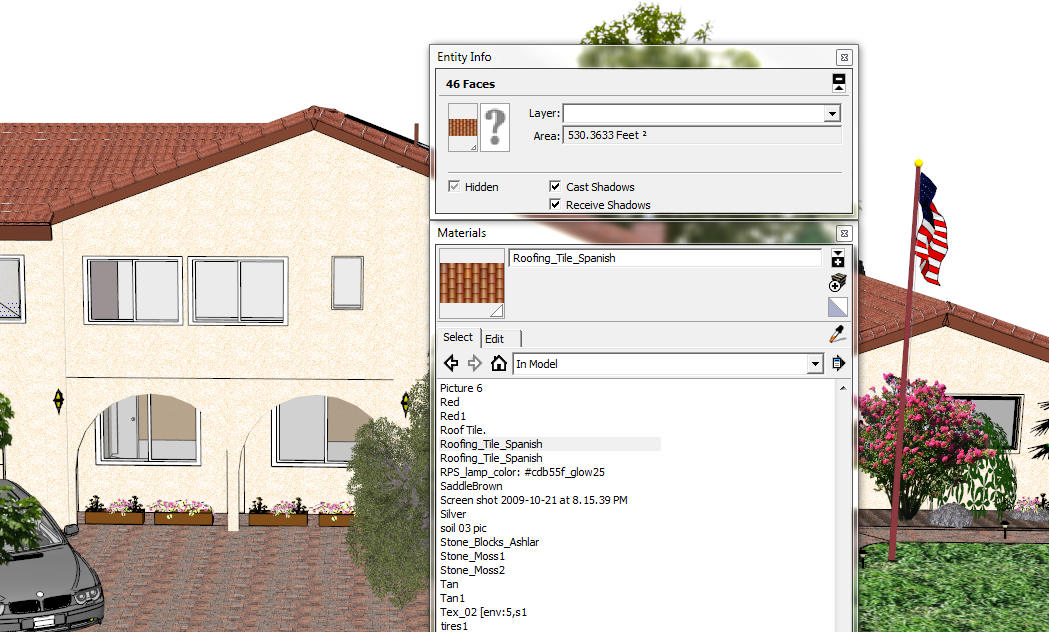
                      In the attached picture I have:

                      1. Clicked on the tile material in the model
                      2. Noted that there are 46 faces with this material
                      3. Clicked on the tile material in the Material Editor
                      4. Clicked on Material Selection in the Plug-ins

                      Nothing selected-nothing hidden ❓


                      Material Selection.png

                      i7-4930K 3.4Ghz, 2x GTX780 6GB, 32GB DDR3-1600 ECC, OCZ Vertex 4 500GB, WD Black 3TB, 32TB NAS, 4x 27" Monitors, SpaceMouse Pro, X-keys XK-60

                      1 條回覆 最後回覆 回覆 引用 0
                      • CadFatherC 離線
                        CadFather
                        最後由 編輯

                        there are 2 menus in the plugins, one to select and one to hide - they don't work together at once

                        but it all works fine on my SU8, WinXP

                        1 條回覆 最後回覆 回覆 引用 0
                        • K 離線
                          kwalkerman
                          最後由 編輯

                          The more I think about the option to 'get' the material under the cursor, the less it makes sense to me to add it into the plugin. I really like the fact that you can choose a material from the materials browser for selection. This way, you can choose to select something that you don't want in your model (or can't find), such as unpainted surfaces.

                          If you left the current functionality, and added the ability to get the material under the cursor, this would add a step to the process, which makes it no better than doing the following:

                          1. Pick a material with the built-in SU picker
                          2. Select materials

                          Let me know what you think.

                          --
                          Karen

                          1 條回覆 最後回覆 回覆 引用 0
                          • CadFatherC 離線
                            CadFather
                            最後由 編輯

                            Hi Karen, i was thinking it could be fast right-clicking and select by material - though this way works just fine

                            1 條回覆 最後回覆 回覆 引用 0
                            • K 離線
                              kwalkerman
                              最後由 編輯

                              Bob - I sent you a PM, asking to see the model you are having difficulty with. Did you get everything figured out?

                              --
                              Karen

                              1 條回覆 最後回覆 回覆 引用 0
                              • B 離線
                                Ben Ritter
                                最後由 編輯

                                Karen, thank you. Great!

                                1 條回覆 最後回覆 回覆 引用 0
                                • B 離線
                                  Ben Ritter
                                  最後由 編輯

                                  Karen,

                                  I have the same problem as Bob. Other materials are not hiding. I'm using version 8. I tried it with the default entity Susan. Ben

                                  1 條回覆 最後回覆 回覆 引用 0
                                  • Bob JamesB 離線
                                    Bob James
                                    最後由 編輯

                                    Karen,
                                    Thanks for the offer to look at my model, but I think I have it now:
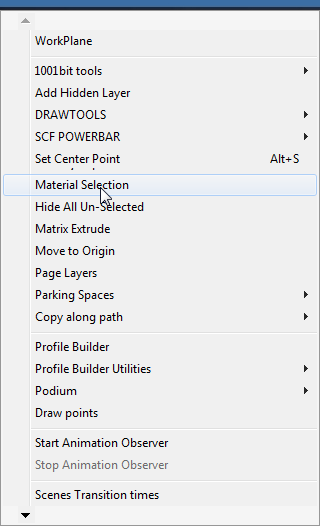
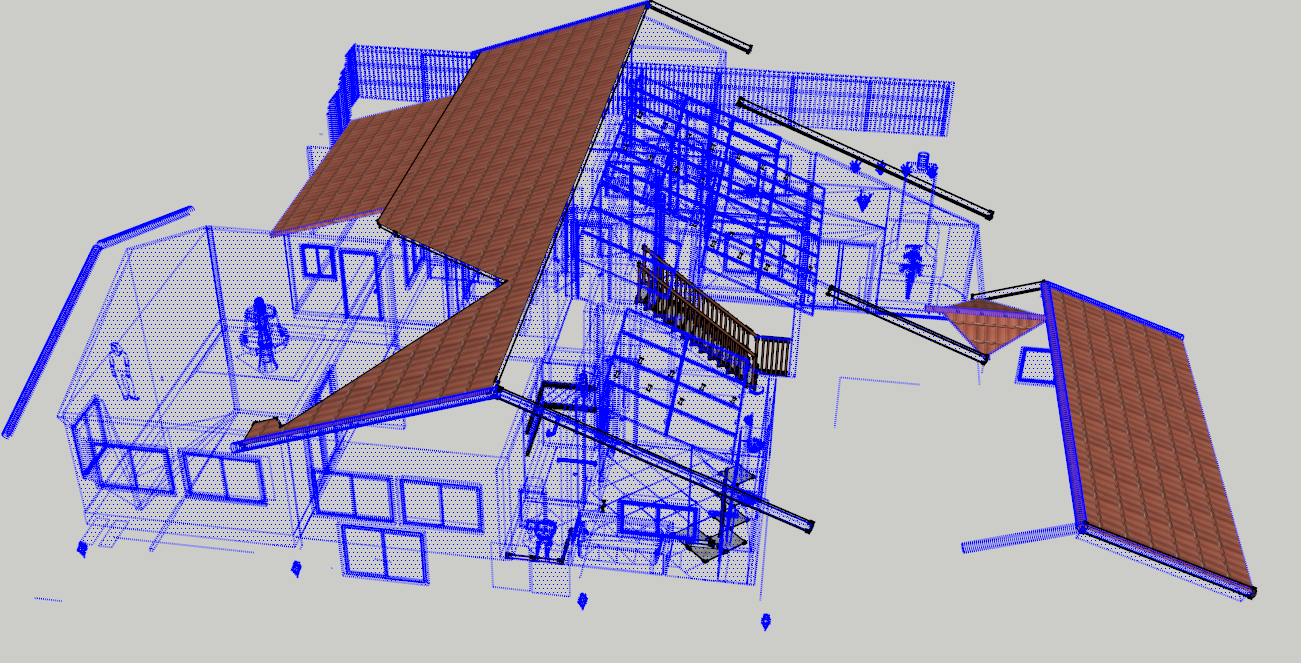
                                    So the sequence is to make the material active, use "Material Selection" and then use "Hide All Un-selected".

                                    CadFather: I did not see the other entry in the plugin list: "Hide All Un-selected".

                                    That's sort of an unusual approach. I would suggest that the "Material Selection" entry have a fly-out menu for the Hide option.
                                    Plugins-Material Selection.png


                                    Plugins-Material Selection.png

                                    i7-4930K 3.4Ghz, 2x GTX780 6GB, 32GB DDR3-1600 ECC, OCZ Vertex 4 500GB, WD Black 3TB, 32TB NAS, 4x 27" Monitors, SpaceMouse Pro, X-keys XK-60

                                    1 條回覆 最後回覆 回覆 引用 0
                                    • K 離線
                                      kwalkerman
                                      最後由 編輯

                                      Bob (and CadFather),

                                      I wanted to leave them separate because I thought 'hide all unselected' could be useful for other applications... But I think I can figure out a fly-out.

                                      --
                                      Karen

                                      1 條回覆 最後回覆 回覆 引用 0
                                      • CadFatherC 離線
                                        CadFather
                                        最後由 編輯

                                        i for one prefer them separate

                                        1 條回覆 最後回覆 回覆 引用 0
                                        • McGyverM 離線
                                          McGyver
                                          最後由 編輯

                                          You rock!! I'm finishing up a huge model and just this morning I was thinking I wonder if there is anything that could... well, do what this ruby does!! THANK YOU!!

                                          [Visit My ShareCG Freebie Gallery](http://www.ShareCG.com/pf/full_uploads.php?pf_user_name)

                                          1 條回覆 最後回覆 回覆 引用 0
                                          • Bob JamesB 離線
                                            Bob James
                                            最後由 編輯

                                            @cadfather said:

                                            i for one prefer them separate

                                            I yield to the power 😄 (As long as they stay together in the plugin list)

                                            i7-4930K 3.4Ghz, 2x GTX780 6GB, 32GB DDR3-1600 ECC, OCZ Vertex 4 500GB, WD Black 3TB, 32TB NAS, 4x 27" Monitors, SpaceMouse Pro, X-keys XK-60

                                            1 條回覆 最後回覆 回覆 引用 0
                                            • 1
                                            • 2
                                            • 1 / 2
                                            • 第一個貼文
                                              最後的貼文
                                            Buy SketchPlus
                                            Buy SUbD
                                            Buy WrapR
                                            Buy eBook
                                            Buy Modelur
                                            Buy Vertex Tools
                                            Buy SketchCuisine
                                            Buy FormFonts

                                            Advertisement