sketchucation logo sketchucation
    • Login
    Oops, your profile's looking a bit empty! To help us tailor your experience, please fill in key details like your SketchUp version, skill level, operating system, and more. Update and save your info on your profile page today!
    Mac User? | Join the Rayscaper Beta for Mac Learn More

    [Plugin] Bitmap To Mesh

    Scheduled Pinned Locked Moved Plugins
    264 Posts 75 Posters 517.1k Views 75 Watching
    Loading More Posts
    • Oldest to Newest
    • Newest to Oldest
    • Most Votes
    Reply
    • Reply as topic
    Log in to reply
    This topic has been deleted. Only users with topic management privileges can see it.
    • ichiI
      ichi
      last edited by

      Thanks for the update thomthom,it's one of my favorite plugins πŸ˜„


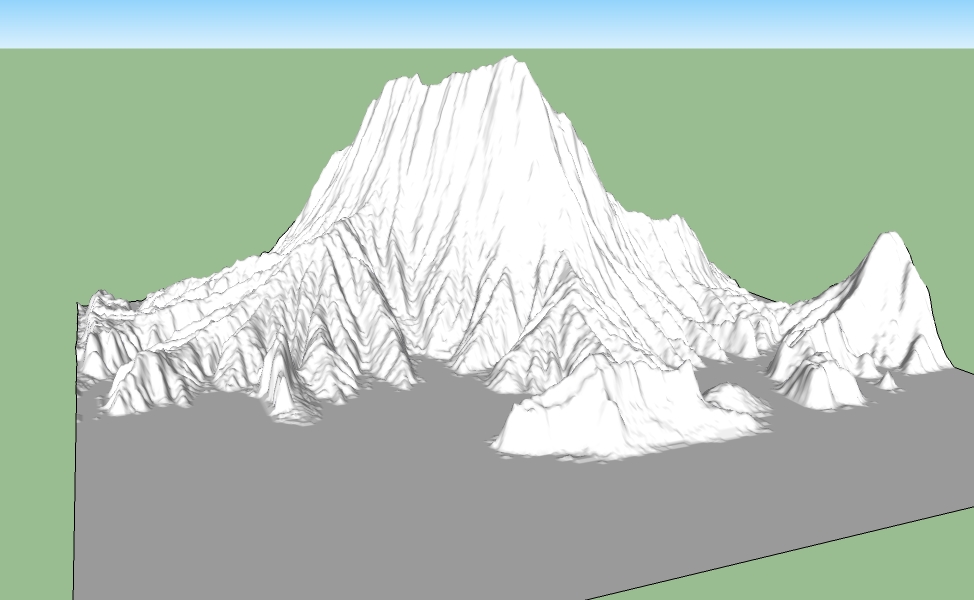
      mount.jpg

      Blog

      1 Reply Last reply
      Reply Quote 0
      • 66searcher6
        66searcher
        last edited by

        @ TT : well done ! it's great plugin . πŸ‘

        http://hamidtoliat.deviantart.com/

        1 Reply Last reply
        Reply Quote 0
        • Y
          yuchunGong
          last edited by

          1 Reply Last reply
          Reply Quote 0
          • D
            daveydave
            last edited by

            thanks, works in verion 6 too.

            1 Reply Last reply
            Reply Quote 0
            • K
              kgregorian
              last edited by

              Hey everyone, I am new to these forums and I have a quick question, I'm sorry in advance if it's already been answered. I just downloaded this plugin, and placed it in the right location...I have a Mac, so I wen to my internal hdd>app support>google sketchup 8>sketchup>plugins. Yet when I open sketchup it says the following: 'Error Loading File tt_bitmap2mesh.rb no such file to load -- TT_Lib2/core.rb'. This happened to me before, what I did to correct it. Any help would be appreciated. Thanks!

              1 Reply Last reply
              Reply Quote 0
              • GaieusG
                Gaieus
                last edited by

                You have missed the "Requirements" in the first post:
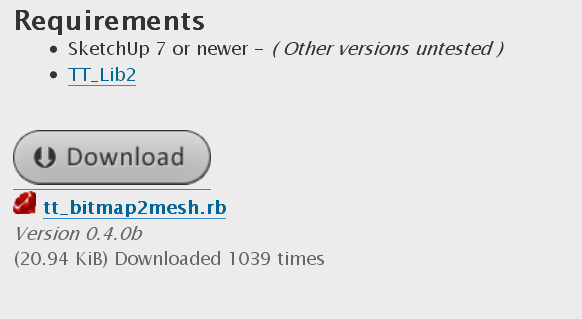
                tt-lib.png
                You also need this plugin:
                http://forums.sketchucation.com/download/file.php?id=63393

                Gai...

                1 Reply Last reply
                Reply Quote 0
                • K
                  kgregorian
                  last edited by

                  @gaieus said:

                  You have missed the "Requirements" in the first post:

                  [attachment=0:2ey2mpwh]<!-- ia0 -->tt-lib.png<!-- ia0 -->[/attachment:2ey2mpwh]
                  You also need this plugin:
                  http://forums.sketchucation.com/download/file.php?id=63393

                  Oh ok that makes sense, thanks for the help!

                  1 Reply Last reply
                  Reply Quote 0
                  • M
                    marcomartim
                    last edited by

                    I've downloaded and
                    put the two files in the folder plugin (SU)

                    does not work (in SU7 and SU8)

                    I've downloaded tt_bitmap2mesh and TT_Lib2 - 2.5.8 (also tested TT_Lib)
                    put the 2 files in the folder plugin

                    does not work (in SU7 and SU8)

                    I've used this plugin often with WinXP on the old PC, I am now using Win7 64

                    Thanks a solution.

                    1 Reply Last reply
                    Reply Quote 0
                    • Dave RD
                      Dave R
                      last edited by

                      Could you post a screen shot of the plugins folder showing the files?

                      Etaoin Shrdlu

                      %

                      (THERE'S NO PLACE LIKE)

                      G28 X0.0 Y0.0 Z0.0

                      M30

                      %

                      1 Reply Last reply
                      Reply Quote 0
                      • TIGT
                        TIG Moderator
                        last edited by

                        @marcomartim said:

                        I've downloaded and
                        put the two files in the folder plugin (SU)
                        does not work (in SU7 and SU8)
                        I've downloaded tt_bitmap2mesh and TT_Lib2 - 2.5.8 (also tested TT_Lib)
                        put the 2 files in the folder plugin
                        does not work (in SU7 and SU8)
                        I've used this plugin often with WinXP on the old PC, I am now using Win7 64
                        Thanks a solution.

                        What 'two files' ? πŸ˜•
                        You should have tt_bitmap2mesh.rb that downloads as it is and that goes into the Plugins folder.
                        Then you need to get the required TT_Lib2 set - it downloads in a zip file [currently named TT_Lib2 - 2.5.8.zip], you MUST extract the folder that's in that zip file. That folder us called TT_Lib2 and it goes into the Plugins folder. It should contain lots of files and some subfolders inside it after the extraction, just as they are in the zip file when you view its contents... πŸ˜•
                        When correctly installed it should work on all OSs and v7 or v8...
                        Check that you have full access rights to add files/folders into the Plugins folder - Windows might let you think you have done so but it can surreptitiously move them into a 'compatibility files' folder pending someone in authority OKing it - you need to be an Admin and have proper rights to do this...
                        After a restart of Sketchup... The menus are:
                        Draw > Mesh From Heightmap Context Menu > Mesh From Heightmap Context Menu > Mesh From Bitmap

                        TIG

                        1 Reply Last reply
                        Reply Quote 0
                        • M
                          marcomartim
                          last edited by

                          @dave r said:

                          Could you post a screen shot of the plugins folder showing the files?

                          http://img593.imageshack.us/img593/5576/su7d.jpg

                          http://img577.imageshack.us/img577/7910/su8g.jpg

                          1 Reply Last reply
                          Reply Quote 0
                          • TIGT
                            TIG Moderator
                            last edited by

                            What's inside the TT_Lib2 folder ?
                            When you say, 'It does not work...', what do you mean ?
                            For example...
                            Are there no menu items visible ? [see my recent post for detail of these]
                            Or do the menu items seem to do nothing ?
                            Are there are error messages displayed in the Window > Ruby Console when you run it ?
                            If you type [or copy+paste] this
                            TT::Plugins::BitmapToMesh.bitmap_to_mesh_tool()

                            • <enter> in the Ruby Console what happens ?
                              It it works recheck the menu items I mentioned... πŸ˜’

                            TIG

                            1 Reply Last reply
                            Reply Quote 0
                            • M
                              marcomartim
                              last edited by

                              Test File (bimap)
                              quadrado.bmp

                              http://img26.imageshack.us/img26/8451/quadradoi.png

                              1 Reply Last reply
                              Reply Quote 0
                              • M
                                marcomartim
                                last edited by

                                @tig said:

                                That folder us called TT_Lib2 and it goes into the Plugins folder. It should contain lots of files and some subfolders inside it after the extraction, just as they are in the zip file when you view its contents... πŸ˜•

                                I know the plugin and its installation.; Used often
                                Everything is correct, the files are all present, but for some reason does not work.

                                tested with various BMP 100x100 pixels.

                                It does not work, nothing happens.

                                1 Reply Last reply
                                Reply Quote 0
                                • M
                                  marcomartim
                                  last edited by

                                  @tig said:

                                  If you type [or copy+paste] this
                                  TT::Plugins::BitmapToMesh.bitmap_to_mesh_tool()

                                  • <enter> in the Ruby Console what happens ?:

                                  He opens the window to call the bimap,
                                  made the selection BMP + enter​​,
                                  window appears after the figure:

                                  http://img840.imageshack.us/img840/882/erro2d.jpg

                                  1 Reply Last reply
                                  Reply Quote 0
                                  • TIGT
                                    TIG Moderator
                                    last edited by

                                    I can see a problem πŸ’­ - accented-characters in file-paths can cause problems in some Ruby functions - like File reading and checking.
                                    When you moved the bitmap file to C:/quadrado.bmp it worked because there were no accents in the path, BUT Usu**Γ‘**rio [your name!] has the accent in the path to the file on your Desktop!
                                    Try renaming your account to Usu**a**rio and it should then work!
                                    So the lesson is avoid accented-characters in folder-names and file-names that might be needed in Ruby code...
                                    πŸ˜’

                                    TIG

                                    1 Reply Last reply
                                    Reply Quote 0
                                    • M
                                      marcomartim
                                      last edited by

                                      @tig said:

                                      I can see a problem πŸ’­ - accented-characters in file-paths can cause problems in some Ruby functions - like File reading and checking.
                                      When you moved the bitmap file to C:/quadrado.bmp it worked because there were no accents in the path, BUT Usu**Γ‘**rio [your name!] has the accent in the path to the file on your Desktop!
                                      Try renaming your account to Usu**a**rio and it should then work!
                                      So the lesson is avoid accented-characters in folder-names and file-names that might be needed in Ruby code...
                                      πŸ˜’

                                      These folder names are standard Windows version in Portuguese, rename it can cause problems in other software

                                      Probably, other users have the same problem and without discovering the cause, leave this excellent plugin, at least if they read these posts will know why.

                                      Thank you, hugs ...

                                      1 Reply Last reply
                                      Reply Quote 0
                                      • M
                                        marcomartim
                                        last edited by

                                        I discovered what may be causing the problem

                                        I put the file "quadrado.bmp" at the root of πŸ˜„ / / and it worked.

                                        Thus probably a plugin or library has problems with Win7 versions in other languages (not find the BMP)

                                        http://img202.imageshack.us/img202/9007/workedg.jpg

                                        Thanks for the help

                                        1 Reply Last reply
                                        Reply Quote 0
                                        • TIGT
                                          TIG Moderator
                                          last edited by

                                          You misunderstood me...

                                          The user-folder path is always
                                          C:/Users/**THE_USERS_NAME**/
                                          'UsuΓ‘rio' [=='User'] is the default user-name in Portuguese.
                                          BUT if it were me it would become
                                          C:/Users/**TIG**/Desktop/quadrado.bmp
                                          So for you the account ought to be something like
                                          C:/Users/**MARCO**/Desktop/quadrado.bmp
                                          or
                                          C:/Users/**MARCOMARTIM**/Desktop/quadrado.bmp
                                          Why would you use 'User' as your account name - it's supposed to be personalized !

                                          You are NOT renaming a standard path - it's meant to be customized.

                                          All I'm saying is avoid accented letters in the folder path / file names πŸ˜’

                                          TIG

                                          1 Reply Last reply
                                          Reply Quote 0
                                          • M
                                            marcomartim
                                            last edited by

                                            @tig said:

                                            You misunderstood me...

                                            Ok!
                                            What you said makes sense.
                                            This laptop is new and has already come configured as the manufacturer, will change the user name.
                                            Thanks for everything ...
                                            1 Reply Last reply
                                            Reply Quote 0

                                            Hello! It looks like you're interested in this conversation, but you don't have an account yet.

                                            Getting fed up of having to scroll through the same posts each visit? When you register for an account, you'll always come back to exactly where you were before, and choose to be notified of new replies (either via email, or push notification). You'll also be able to save bookmarks and upvote posts to show your appreciation to other community members.

                                            With your input, this post could be even better πŸ’—

                                            Register Login
                                            • 1
                                            • 2
                                            • 9
                                            • 10
                                            • 11
                                            • 12
                                            • 13
                                            • 14
                                            • 11 / 14
                                            • First post
                                              Last post
                                            Buy SketchPlus
                                            Buy SUbD
                                            Buy WrapR
                                            Buy eBook
                                            Buy Modelur
                                            Buy Vertex Tools
                                            Buy SketchCuisine
                                            Buy FormFonts

                                            Advertisement