sketchucation logo sketchucation
    • Login
    Oops, your profile's looking a bit empty! To help us tailor your experience, please fill in key details like your SketchUp version, skill level, operating system, and more. Update and save your info on your profile page today!
    Mac User? | Join the Rayscaper Beta for Mac Learn More

    [Plugin] Work Plane

    Scheduled Pinned Locked Moved Plugins
    183 Posts 32 Posters 157.7k Views 32 Watching
    Loading More Posts
    • Oldest to Newest
    • Newest to Oldest
    • Most Votes
    Reply
    • Reply as topic
    Log in to reply
    This topic has been deleted. Only users with topic management privileges can see it.
    • T
      tspco
      last edited by

      Thanks Tig

      SU make 2017, /Twilight Render Hobby
      Windows 10,64 bit,16GB ram, quad core Athlon 3.6 gHz proc. Anything else you want to know, ask me.

      1 Reply Last reply
      Reply Quote 0
      • TIGT
        TIG Moderator
        last edited by

        I now have a working version that takes each and every units format input [5' 6 1/2" etc !]
        I'll publish it later when I get some time to encrypt it etc for the PluginStore...

        TIG

        1 Reply Last reply
        Reply Quote 0
        • TIGT
          TIG Moderator
          last edited by

          Here's v2.4 http://sketchucation.com/forums/viewtopic.php?p=274345#p274345

          It has been Module-ized.

          Inputs can now be in any units/format:
          1'6", 1 1/2", 1000mm, 100cm, 10m, 1234.5 etc...

          There is also some more 'future-proofing' behind the scenes...

          Get the latest version from the PluginStore... http://sketchucation.com/pluginstore?pln=WorkPlane

          TIG

          1 Reply Last reply
          Reply Quote 0
          • TIGT
            TIG Moderator
            last edited by

            Here's v2.5 http://sketchucation.com/forums/viewtopic.php?p=274345#p274345

            It has some minor cosmetic tweaks.
            As recently updated, inputs can now be in any units/format:
            1'6", 1 1/2", 1000mm, 100cm, 10m, 1234.5 etc...

            Get the latest version from the PluginStore... http://sketchucation.com/pluginstore?pln=WorkPlane

            TIG

            1 Reply Last reply
            Reply Quote 0
            • K
              kaas
              last edited by

              Hello TIG,

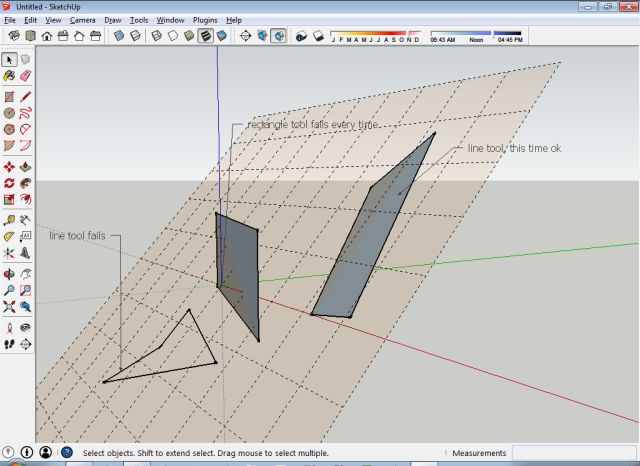
              I'm trying out Workplane in SU2014. I think it isn't always working as intended. For instance when drawing a rectangle and sometimes even simple lines on a angular workplane - they are drawn on the world-xy plane instead.

              greetings, Max

              1 Reply Last reply
              Reply Quote 0
              • TIGT
                TIG Moderator
                last edited by

                Do you make the WorkPlane big enough to draw onto ?
                It does NOT constrain the input points from other tools onto the plane, if they are OUTSIDE of the WorkPlane's perimeter... πŸ˜•

                TIG

                1 Reply Last reply
                Reply Quote 0
                • K
                  kaas
                  last edited by

                  @tig said:

                  Do you make the WorkPlane big enough to draw onto ?
                  It does NOT constrain the input points from other tools onto the plane, if they are OUTSIDE of the WorkPlane's perimeter... πŸ˜•
                  Workplane is big enough indeed. See attached file.

                  workplane.skp


                  workplane.jpg

                  1 Reply Last reply
                  Reply Quote 0
                  • TIGT
                    TIG Moderator
                    last edited by

                    When drawing onto a WorkPlane you need to watch the cursor's inferencing tooltips...
                    If it says 'On Face', 'Intersection', 'EndPoint' etc then its on the WorkPlane or probably inferencing the grid or other geometry you have just added onto it.
                    If you pull the cursor away from the WorkPlane, or accept an axial inference etc, then chances are the new line you make will NOT be on the WorkPlane.

                    You get exactly the same effects drawing onto a sloping standard Face in your model.

                    All a WorkPlane is, is a large transparent face with a guide-line grid, locked into place, to assist you in drawing in that plane - useful when you do not have faces or other geometry etc to inference onto.
                    If does not magically 'constrain' the cursor [unlike my 2dTools which limit geometry to a flat plane with a specified Z].
                    You can draw 'away' from a WorkPlane at any time - as you have found. πŸ€“

                    TIG

                    1 Reply Last reply
                    Reply Quote 0
                    • K
                      kaas
                      last edited by

                      @tig said:

                      All a WorkPlane is, is a large transparent face with a guide-line grid, locked into place, to assist you in drawing in that plane - useful when you do not have faces or other geometry etc to inference onto.
                      If does not magically 'constrain' the cursor [unlike my 2dTools which limit geometry to a flat plane with a specified Z].
                      You can draw 'away' from a WorkPlane at any time - as you have found.

                      Thanks for your reply TIG. I was mistaken and was wrongly expecting the workplane would magically 'constrain' the cursor like in your 2dTools. My fault.

                      1 Reply Last reply
                      Reply Quote 0
                      • kenK
                        ken
                        last edited by

                        TIG

                        I have downloaded the new version of Workplane. I can only set the plane in inches, no matter what my units are set too, the plane if always set in inches.

                        Ex.

                        Units, ft, set 200x200, I get a 200 inch workplane.

                        Units, m, set 200x200, I get the same 200 inch workplance.

                        Thanks in advance for you help.

                        Ken

                        Fight like your the third monkey on Noah's Ark gangway.

                        1 Reply Last reply
                        Reply Quote 0
                        • Dave RD
                          Dave R
                          last edited by

                          Ken, are you right clicking in space and setting the grid size and spacing as directed in the hints at the bottom of the screen? I just gave it a try and it picks up model units just fine.

                          Etaoin Shrdlu

                          %

                          (THERE'S NO PLACE LIKE)

                          G28 X0.0 Y0.0 Z0.0

                          M30

                          %

                          1 Reply Last reply
                          Reply Quote 0
                          • TIGT
                            TIG Moderator
                            last edited by

                            The latest version of WorkPlane ought to now work in any input units.
                            So if your Model Units are inches, then 'plain numbers' are taken as inches.
                            Or if the Model Units are feet, then 'plain numbers are taken as feet etc...
                            BUT if you want something say in feet but the Model Units are inches yhen type 1' so it's read as one foot [12"], or say 1m so it ~40" [for the meter grid in an Inch-model] ?
                            So to use units different from the Model Units just add a suffix "/'/m/cm/mm ?

                            However, while checking I do see some inconsistencies in dialog's like 'Adjust' for changing grid-width etc, so I'm investigating...

                            Thanks for the feedback though. πŸ˜„

                            TIG

                            1 Reply Last reply
                            Reply Quote 0
                            • TIGT
                              TIG Moderator
                              last edited by

                              Here's v2.6 in the PluginStore.
                              http://sketchucation.com/pluginstore?pln=WorkPlane

                              A typo in the dialog to Set/Adjust Grid-width meant the grid-width always matched the grid-height !
                              Now it works properly again and the grid's width and height can be set separately.

                              TIG

                              1 Reply Last reply
                              Reply Quote 0
                              • kenK
                                ken
                                last edited by

                                TIG, Dave

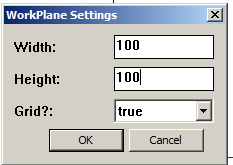
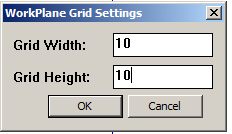
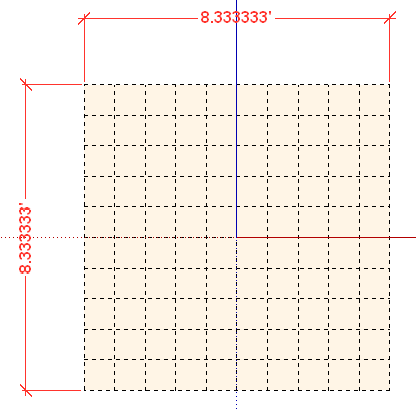
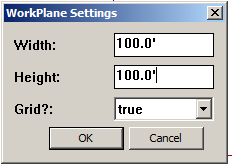
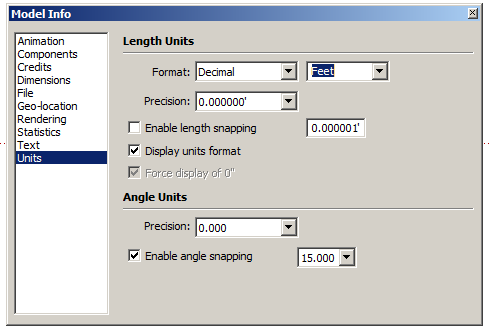
                                Here are screen shots of me trying to use feet. Note, the model units are in feet.

                                So what am I doing wrong?

                                Thanks in advance for your help.

                                Ken

                                TP #1.png


                                TP #2.png


                                TP #3.png


                                TP #4.png


                                TP 4.5.png


                                TP #5.png

                                Fight like your the third monkey on Noah's Ark gangway.

                                1 Reply Last reply
                                Reply Quote 0
                                • TIGT
                                  TIG Moderator
                                  last edited by

                                  Are you manipulating WorkPlanes made in an earlier version, or perhaps using a SKP that had the earlier WorkPlanes used previously ?
                                  These used a 'float' number, which was taken as 'meters' or 'feet' depending on your Model Units...

                                  After several requests, the latest version allows you to input the sizes in ANY units format, unfortunately these are now 'Lengths' not 'Floats'...

                                  I can trap for that... πŸ˜’
                                  I should have trapped for that !!! 😳

                                  Watch this space... πŸ˜›

                                  Meanwhile running this line of code in the Ruby Console after opening your older SKP will wipe the now incompatible stored WorkPlane details:
                                  Sketchup.active_model.attribute_dictionaries.delete("WorkPlane")

                                  I'll try and fix it tomorrow... πŸ˜•

                                  TIG

                                  1 Reply Last reply
                                  Reply Quote 0
                                  • kenK
                                    ken
                                    last edited by

                                    TIG

                                    Thanks, that did it.

                                    However, even that one line of code made me look like an idiot. So I pasted the line of code into the Ruby Console, "thinking hard, now don't mess this up", didn't press the enter key. Darn, why didn't that work. Well, I went to paste the line again, but to do that I had to hit the enter key, darn that's why it didn't work. I guess thinking while doing something that is almost automatic, gave rise to the term, "over thinking the problem".

                                    Thanks TIG

                                    Fight like your the third monkey on Noah's Ark gangway.

                                    1 Reply Last reply
                                    Reply Quote 0
                                    • O
                                      othmanalazzam
                                      last edited by

                                      wonderful, thanks, I suggest attaching this video into the original post so we can understand the plugin, I had have to search the youtube to understand it.

                                      anyways, thanks

                                      1 Reply Last reply
                                      Reply Quote 0
                                      • TIGT
                                        TIG Moderator
                                        last edited by

                                        Version v2.7 is now available in the PluginStore.
                                        http://sketchucation.com/pluginstore?pln=WorkPlane

                                        It fixes the glitch when you tried to use the new version in an older SKP that had previously setup WorkPlanes in the old format - old floats v. new lengths.
                                        Now of you use such a SKP it's assumed that the previous float settings were lengths - so you may need to reset for new WorkPlanes if you were using meters... [right-click in open space or using the 'Adjust' context-menu option...]

                                        TIG

                                        1 Reply Last reply
                                        Reply Quote 0
                                        • kenK
                                          ken
                                          last edited by

                                          TIG

                                          Good morning.

                                          Well got up and installed v2.7 from the store, over my other installed Workplane. This install behaved just like the last install. The dimensions did not change from inches to feet as I changed the units in Sketchup.

                                          So if this install was to clean out all the previous left over remnants, it didn't seem to accomplish this task.

                                          I went into the plugin directory, removed all Workplane info, rb files, and directory. Re-installed v2.7 from the store. Plugin works correctly now.

                                          Just letting you know.

                                          Ken

                                          Fight like your the third monkey on Noah's Ark gangway.

                                          1 Reply Last reply
                                          Reply Quote 0
                                          • E
                                            engineer10122
                                            last edited by

                                            Is work plane.rb supported in 2014 SU Pro?
                                            It doesn't seem to install the plugin.
                                            err what am I doing wrong.
                                            Thanks.
                                            sg

                                            1 Reply Last reply
                                            Reply Quote 0

                                            Hello! It looks like you're interested in this conversation, but you don't have an account yet.

                                            Getting fed up of having to scroll through the same posts each visit? When you register for an account, you'll always come back to exactly where you were before, and choose to be notified of new replies (either via email, or push notification). You'll also be able to save bookmarks and upvote posts to show your appreciation to other community members.

                                            With your input, this post could be even better πŸ’—

                                            Register Login
                                            • 1
                                            • 2
                                            • 3
                                            • 4
                                            • 5
                                            • 9
                                            • 10
                                            • 1 / 10
                                            • First post
                                              Last post
                                            Buy SketchPlus
                                            Buy SUbD
                                            Buy WrapR
                                            Buy eBook
                                            Buy Modelur
                                            Buy Vertex Tools
                                            Buy SketchCuisine
                                            Buy FormFonts

                                            Advertisement