sketchucation logo sketchucation
    • Login
    Oops, your profile's looking a bit empty! To help us tailor your experience, please fill in key details like your SketchUp version, skill level, operating system, and more. Update and save your info on your profile page today!
    Mac User? | Join the Rayscaper Beta for Mac Learn More

    [Plugin] Dxf_In v2.2 20110517 Dxf2Skp

    Scheduled Pinned Locked Moved Plugins
    200 Posts 41 Posters 316.3k Views 41 Watching
    Loading More Posts
    • Oldest to Newest
    • Newest to Oldest
    • Most Votes
    Reply
    • Reply as topic
    Log in to reply
    This topic has been deleted. Only users with topic management privileges can see it.
    • F
      freeWilly
      last edited by

      I took the file posted on page one of this thread (ALBA.zip), because I wanted to be sure that it's not a problem of my data.
      It starts to count up in the status line until 5 and aborts then.

      1 Reply Last reply
      Reply Quote 0
      • TIGT
        TIG Moderator
        last edited by

        I'm on PC.
        I've just [re]tried Alba.dxf.
        Used 'centimeters' as the units - did you ?
        It works; but did take a while to complete ['whiting-out' in the process... BUT still processing away nevertheless] AND also it does appear ~66.6m from the origin [but's that's where it is stupidly located in the DXF!].
        Comparing the result from the equivalent Pro DXF import... it is missing a few of small lines around a lip and it takes 100x longer! BUT it works and the result is readily usable/fixupable...

        TIG

        1 Reply Last reply
        Reply Quote 0
        • F
          freeWilly
          last edited by

          yes, I tried various options (including centimeter). And it run for quite a while, but with all tries it finally aborted.
          I have SketchUp 8.0.11751 for Mac (Intel).

          Rolf

          1 Reply Last reply
          Reply Quote 0
          • TIGT
            TIG Moderator
            last edited by

            Strange - as I say the PC version is slow but works eventually...
            Are there any MAC users out there who have this working OK ?

            TIG

            1 Reply Last reply
            Reply Quote 0
            • F
              freeWilly
              last edited by

              is there a kind of a debug mode?
              To see when, what, why?

              1 Reply Last reply
              Reply Quote 0
              • TIGT
                TIG Moderator
                last edited by

                Running it with the Ruby Console open is the best there is - there's not coded-in debugging that I can see...

                TIG

                1 Reply Last reply
                Reply Quote 0
                • S
                  shrubman
                  last edited by

                  @freewilly said:

                  I installed the plugin on my Mac.
                  I see it in the file menu, and can start an import.
                  But after a certain time it aborts an I get an error window "<error> or empty File".
                  I have tried different DXF-Files.

                  What do I do wrong?

                  Rolf

                  I'm having the same problem. No matter what I do to prepare the file in illustrator, the import dxf dialog in sketchup gives me that error window and quits the import.

                  1 Reply Last reply
                  Reply Quote 0
                  • C
                    Chrisn2011
                    last edited by

                    This may be too late for you but I had used earlier versions of this on an iMac and found that there were sometimes problems which seem to relate to how the file is saved, some operating systems use carriage return -linefeed to denote the end of a line others just used one. I made a mod which allowed it to work on the iMac (see my post of Thu Feb 17, 2011 12:29 am), it may be worth trying it on the new version
                    I edited the files using Textedit on the mac, just be careful that it doesn't add a .txt extension

                    To help I have listed the suggested change below

                    Find the following bit of code in the.rb file

                    #get all block names, save them along with their location
                    begin
                    	aFile=File.open(chosen_file, "r")
                    rescue
                    	result=UI.messagebox "<Error> The DriveName\\Path\\FileName.dxf may not\nbe standard ASCII characters. If so, place the Dxf file\nin a ASCII named folder before accessing that file.", MB_OK
                    end
                    aFile.each_line do |line|						
                    	count=count +1
                    	if count==odd_number					#strip dxf tags thanks to TIG
                    		odd_number=odd_number + 2
                    		line=line.strip
                    	end
                    
                    	last_line=this_line							#save last line data
                    	this_line=line
                    

                    and insert the line
                    line=line.chomp+"\n"
                    after
                    aFile.each_line do |line|
                    it should ensure that all the data read in is terminated in a way that ruby scripts accept, and it shouldn't affect the way they run under windows either.

                    1 Reply Last reply
                    Reply Quote 0
                    • L
                      ltorresgdcllc
                      last edited by

                      Thank you!!!

                      1 Reply Last reply
                      Reply Quote 0
                      • A
                        ANewBeat
                        last edited by

                        @shrubman said:

                        @freewilly said:

                        I installed the plugin on my Mac.
                        I see it in the file menu, and can start an import.
                        But after a certain time it aborts an I get an error window "<error> or empty File".
                        I have tried different DXF-Files.

                        What do I do wrong?

                        Rolf

                        I'm having the same problem. No matter what I do to prepare the file in illustrator, the import dxf dialog in sketchup gives me that error window and quits the import.

                        Same here: "<Error> or Empty File"
                        Mac OS X 10.6.8
                        Sketchup 8.0.16845

                        1 Reply Last reply
                        Reply Quote 0
                        • Dave RD
                          Dave R
                          last edited by

                          Did you read the next post? Maybe it will help since it seems to answer the question.

                          The best option would be to use the Pro version of SketchUp. πŸ˜’

                          Etaoin Shrdlu

                          %

                          (THERE'S NO PLACE LIKE)

                          G28 X0.0 Y0.0 Z0.0

                          M30

                          %

                          1 Reply Last reply
                          Reply Quote 0
                          • A
                            ANewBeat
                            last edited by

                            OK, so I added the line=line.chomp+"\n" as described. What does the error message "Database contains Unsupported Entitys: SPLINE" mean? After receiving the message the file continued to import properly.

                            1 Reply Last reply
                            Reply Quote 0
                            • A
                              ANewBeat
                              last edited by

                              Upon further inspection my file did not import correctly. It seams to be having trouble with the curves. I've attached the DXF file, a screenshot of the original artwork in Illustrator CS4

                              Screenshot of paths in Illustrator CS4

                              and a screenshot of the resulting import into Sketchup 8.
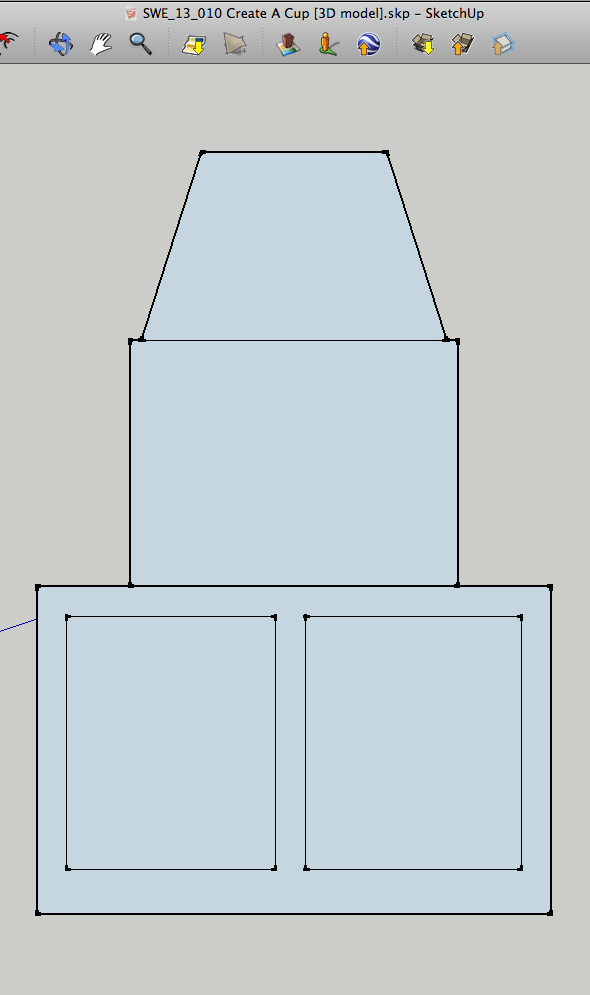
                              Screen shot of resulting import in Sketchup8


                              DXF exported from Illustrator CS4

                              1 Reply Last reply
                              Reply Quote 0
                              • Dave RD
                                Dave R
                                last edited by

                                Works flawlessly with SketchUp's native DXF installer.
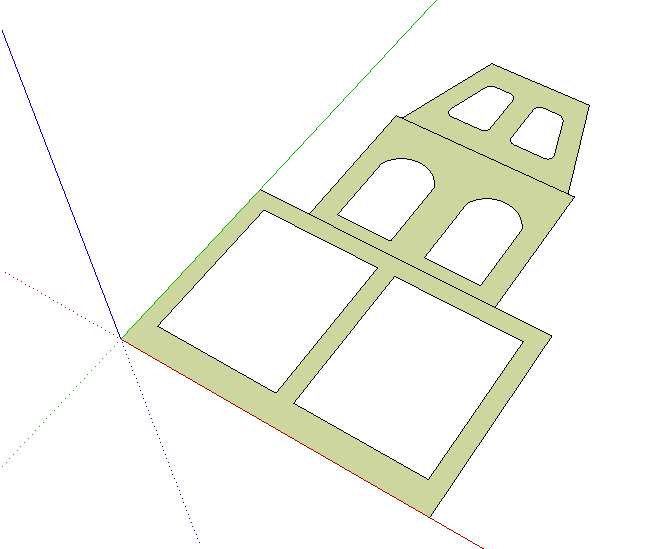
                                DXF in.png

                                Etaoin Shrdlu

                                %

                                (THERE'S NO PLACE LIKE)

                                G28 X0.0 Y0.0 Z0.0

                                M30

                                %

                                1 Reply Last reply
                                Reply Quote 0
                                • J
                                  Jim
                                  last edited by

                                  @anewbeat said:

                                  OK, so I added the line=line.chomp+"\n" as described. What does the error message "Database contains Unsupported Entitys: SPLINE" mean? After receiving the message the file continued to import properly.

                                  That means SPLINES are not supported in the plugin, and the arcs in your .dxf are made using splines.

                                  You could covert the file to an older .dxf version using the Teigha converter, and try importing the converted file. Use dxf version R13 or earlier. There will be more cleanup required, but it should convert the splines to a supported entity.

                                  http://www.opendesign.com/guestfiles/TeighaFileConverter

                                  Hi

                                  1 Reply Last reply
                                  Reply Quote 0
                                  • A
                                    ANewBeat
                                    last edited by

                                    @jim said:

                                    Use dxf version R13 or earlier. There will be more cleanup required, but it should convert the splines to a supported entity.

                                    When I export from Illustrator as R13 I get this error message: "*Block U1 contains a unsupported mesh". These are extremely simple paths made up of simple arcs and line segments. Why don't the arcs remain arcs after export?

                                    1 Reply Last reply
                                    Reply Quote 0
                                    • Dave RD
                                      Dave R
                                      last edited by

                                      Sounds like a question for the Illustrator people. Do they have a support forum?

                                      Etaoin Shrdlu

                                      %

                                      (THERE'S NO PLACE LIKE)

                                      G28 X0.0 Y0.0 Z0.0

                                      M30

                                      %

                                      1 Reply Last reply
                                      Reply Quote 0
                                      • J
                                        Jim
                                        last edited by

                                        @dave r said:

                                        Sounds like a question for the Illustrator people. Do they have a support forum?

                                        The error is from the Dxf_in plugin.

                                        Try FreeDXF: http://sketchucation.com/forums/viewtopic.php?t=22199

                                        FreeDXF does a somewhat better import although still not perfect. These dxf importers are written by amateurs and hobbyists. If you need a Pro importer, your best option is to buy SketchUp Pro or get a commercial importer for SketchUp Free.

                                        Hi

                                        1 Reply Last reply
                                        Reply Quote 0
                                        • A
                                          ANewBeat
                                          last edited by

                                          As a work-around, I tried exporting the DXF from a different program (which allows "Save as Arcs" as an option) from my PC and I'm back to the "<Error> or Empty File" message. Ugh.

                                          1 Reply Last reply
                                          Reply Quote 0
                                          • A
                                            ANewBeat
                                            last edited by

                                            I finally got it to work. I had to export the DXF from FlexiSIGN with "Save as Arcs" checked, then convert to R12 via the converter mentioned above. A little convoluted, but I would typically build these types of shapes in FlexiSIGN anyway. When I simply converted the DXF exported from Illustrator I got a few errors and it segmented the arcs. Whew.


                                            1 Reply Last reply
                                            Reply Quote 0

                                            Hello! It looks like you're interested in this conversation, but you don't have an account yet.

                                            Getting fed up of having to scroll through the same posts each visit? When you register for an account, you'll always come back to exactly where you were before, and choose to be notified of new replies (either via email, or push notification). You'll also be able to save bookmarks and upvote posts to show your appreciation to other community members.

                                            With your input, this post could be even better πŸ’—

                                            Register Login
                                            • 1
                                            • 2
                                            • 3
                                            • 4
                                            • 5
                                            • 9
                                            • 10
                                            • 3 / 10
                                            • First post
                                              Last post
                                            Buy SketchPlus
                                            Buy SUbD
                                            Buy WrapR
                                            Buy eBook
                                            Buy Modelur
                                            Buy Vertex Tools
                                            Buy SketchCuisine
                                            Buy FormFonts

                                            Advertisement