sketchucation logo sketchucation
    • 登入
    Oops, your profile's looking a bit empty! To help us tailor your experience, please fill in key details like your SketchUp version, skill level, operating system, and more. Update and save your info on your profile page today!
    🔌 Easy Offset | Offset selected faces in SketchUp in positive and negative offsets. Download

    [Plugin] Hole Punching Tool

    已排程 已置頂 已鎖定 已移動 Plugins
    200 貼文 43 Posters 226.8k 瀏覽 43 Watching
    正在載入更多貼文
    • 從舊到新
    • 從新到舊
    • 最多點贊
    回覆
    • 在新貼文中回覆
    登入後回覆
    此主題已被刪除。只有擁有主題管理權限的使用者可以查看。
    • mariochaM 離線
      mariocha
      最後由 編輯

      Hey thanks. I will try that.
      One precision though. I forgot to say that the reversed back and the stray lines appeared after asking to punch. Before that it was a brand new file with brand new wall and frame, no mess up. 😄
      edit;
      So the loop must be made out of uninterrupted segments. No other line can butt to any one segment.
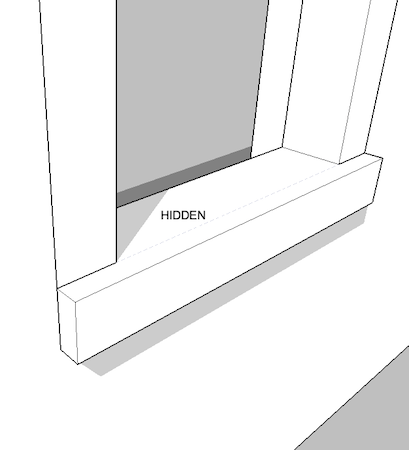
      Offsetting the sill sides is not practical, kills the Punch time saving. So I made the sill a group and it works. Hiding the "seam" lines helps making the frame and sill look as a whole.
      Hoping the script can be further enhanced to manage colinear lines on the cutting loop.
      i]edit-bis[/i];sill grouped.png
      Worrying about inset windows, made me further investigate and find the easy way to do any frames. Make the whole frame a group (so it can have any shape, protrusions, insets) then make the loop at the wall face position, select everything an make component. Punches very well.
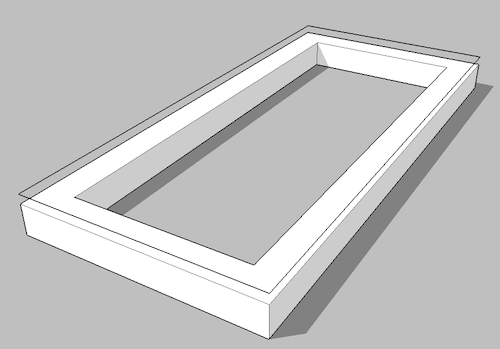
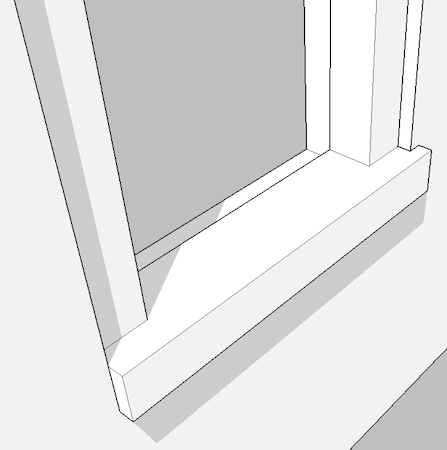
      inset group and loop.png


      any frame.png

      %(#008000)[Mario C.
      Every rule has exceptions, but some.]

      1 條回覆 最後回覆 回覆 引用 0
      • TIGT 離線
        TIG Moderator
        最後由 編輯

        Here's v1.8 http://forums.sketchucation.com/viewtopic.php?p=271170#p271170
        Algorithm improved to find the Cutting-Component's 'cutting-loop[s]' vertices - to use for the matching with Punched-hole - this avoids glitches if multiple edges in the Z=0 plane - like projecting sill parts etc etc...
        [ 😉 Mariocha - not need to fiddle with the geometry now...]

        TIG

        1 條回覆 最後回覆 回覆 引用 0
        • mariochaM 離線
          mariocha
          最後由 編輯

          Wow ! I knew you could do it. !! 😄

          %(#008000)[Mario C.
          Every rule has exceptions, but some.]

          1 條回覆 最後回覆 回覆 引用 0
          • TIGT 離線
            TIG Moderator
            最後由 編輯

            @mariocha said:

            Wow ! I knew you could do it. !! 😄

            I have completely recast the algorithm to work out the cutting >> punching 'hole[s]' edges - I thinks it's quicker AND now it should always 'punch' a hole the same shape as the 'cut' hole... 😄

            TIG

            1 條回覆 最後回覆 回覆 引用 0
            • mariochaM 離線
              mariocha
              最後由 編輯

              Nice !
              The edges of the cutting loop are still needed, right ?
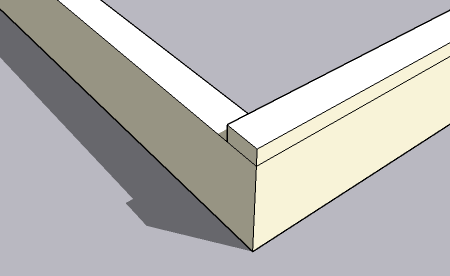

              loop still.png

              %(#008000)[Mario C.
              Every rule has exceptions, but some.]

              1 條回覆 最後回覆 回覆 引用 0
              • TIGT 離線
                TIG Moderator
                最後由 編輯

                The cutting-component needs its cutting-edges defining, so that SUp knows what part of the cut-face to hide.
                The hole punching simply mimics that set of cutting-edges, ignoring unneeded internal edges - just as SUp does when cutting...

                TIG

                1 條回覆 最後回覆 回覆 引用 0
                • TIGT 離線
                  TIG Moderator
                  最後由 編輯

                  Hot on the heels... 😄 here's v1.9 http://forums.sketchucation.com/viewtopic.php?p=271170#p271170
                  The Context-menu code has been completely recast to avoid exacerbating the 'grayed-out items issue', that can occur when too many tools load/unload in/out of it. Now the tool only 'loads' once and it enables/disables its items depending on the selection - e.g. you always get 'Set Depth' enabled, you only get 'Punch' enabled [i.e. not grayed-out] if the selection contains suitable Component[s] and so on... 🤓

                  TIG

                  1 條回覆 最後回覆 回覆 引用 0
                  • mariochaM 離線
                    mariocha
                    最後由 編輯

                    Glad I donated. 👍
                    But this new version makes things clearer to me.
                    I'd say there are 2 purposes for this pluging;
                    1-Punch holes in parts, like metal punching i.e. the case where compo shape = hole shape
                    2-Punch holes in walls, like for window openings i.e. where in some cases, the compo shape does not = hole shape.
                    Like in the case of a window in a wooden wall, the sill comes with the frame and should be included in the punch hole but in the case of a brick wall, the sill is part of the masonry and should not punch at all (but we need it to be part of the compo). An earlier version permitted that by not considering groups inside the compo for calculation.
                    The following is not right.
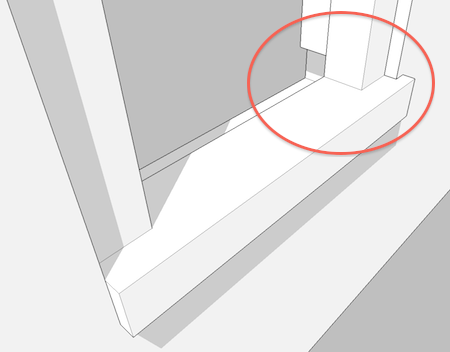

                    to sill or not.png

                    %(#008000)[Mario C.
                    Every rule has exceptions, but some.]

                    1 條回覆 最後回覆 回覆 引用 0
                    • TIGT 離線
                      TIG Moderator
                      最後由 編輯

                      Mario

                      If you look at the rear of a normally cut-component that is what the hole-punch duplicates.
                      In the case of a sill with projecting 'horns' IF these are a z=0 in the component definition they will cut a hole ?
                      If you move the 'horns' ~1mm in front of the wall face line they won't cut and then they won't punch ?
                      See this...HolePunchSill.PNGHolePunchSill.skp
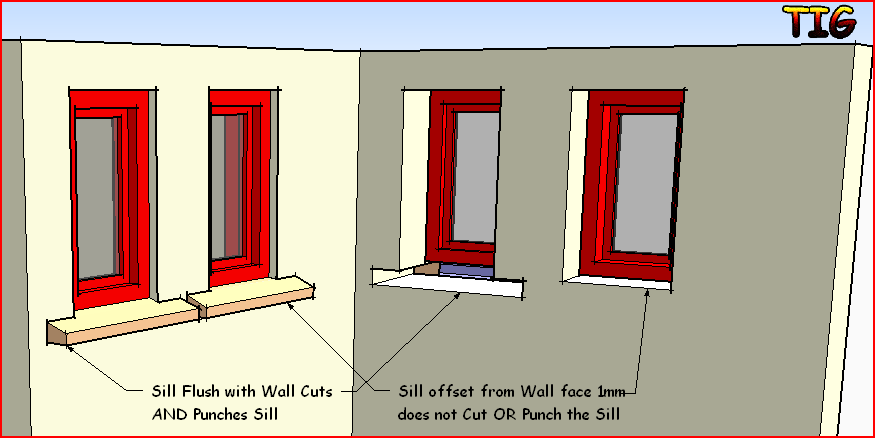
                      TIG

                      1 條回覆 最後回覆 回覆 引用 0
                      • TIGT 離線
                        TIG Moderator
                        最後由 編輯

                        WARNING!

                        Someone noticed that if you select punching components from the Outliner the matching reveals don't auto-select with them - unlike if you do the selection manually ! It seems the 'observer' for the selection is broken in the API [not specifically this tool!] when the Outliner is used this way. Therefore if you want to select the punched-components and their reveals don't use the Outliner!

                        TIG

                        1 條回覆 最後回覆 回覆 引用 0
                        • GaieusG 離線
                          Gaieus
                          最後由 編輯

                          I've had really weird results lately - but I know my openings are also weird. I could fix them though and was in too much in a hurry to report here but once I have the time, I will collect them to (hopefully) improve the plugin.

                          Great tool! 👍

                          Gai...

                          1 條回覆 最後回覆 回覆 引用 0
                          • mariochaM 離線
                            mariocha
                            最後由 編輯

                            @unknownuser said:

                            move the 'horns' ~1mm in front of the wall face line they won't cut and then they won't punch

                            Ok, that should do just fine then. Thx.

                            %(#008000)[Mario C.
                            Every rule has exceptions, but some.]

                            1 條回覆 最後回覆 回覆 引用 0
                            • M 離線
                              MartinK
                              最後由 編輯

                              Very helpful plugin. Thanks

                              1 條回覆 最後回覆 回覆 引用 0
                              • C 離線
                                compadre.lucas
                                最後由 編輯

                                This plugin caused me a very strange bug.
                                I discovered that the DeBabelizer.rb causes sketchup to shut down when using the tool "paste in place".
                                I don't know much about programing so I wouln't know what caused what. I have not been able to use this script, and so I wondor if anybody else had this problem?

                                1 條回覆 最後回覆 回覆 引用 0
                                • TIGT 離線
                                  TIG Moderator
                                  最後由 編輯

                                  @compadre.lucas said:

                                  This plugin caused me a very strange bug.
                                  I discovered that the DeBabelizer.rb causes Sketchup to shut down when using the tool "paste in place".
                                  I don't know much about programing so I wouln't know what caused what. I have not been able to use this script, and so I wonder if anybody else had this problem?

                                  Debabelizer is used by many of my tools to translate text to a locale.
                                  How do you know it is DeBabelizer that is causing the crash ? If it has crashed ??
                                  Do you mean the crash happens with Edit > Paste_in_Place ?
                                  Do you have Ruby Console error messages you can share...
                                  This problem has never been reported before... the DeBabelizer tool clearly doesn't have anything to do with the Edit menu items anyway..... all it does is translate text strings in the file if the phrase has an entry in that tool's 'lingvo' file for your locale...
                                  Do you use any of my other tools that also have lingvos ?

                                  TIG

                                  1 條回覆 最後回覆 回覆 引用 0
                                  • Dave RD 離線
                                    Dave R
                                    最後由 編輯

                                    I use Paste in Place frequently and have Debabelizer installed. Never had SketchUp shut down due to either.

                                    Etaoin Shrdlu

                                    %

                                    (THERE'S NO PLACE LIKE)

                                    G28 X0.0 Y0.0 Z0.0

                                    M30

                                    %

                                    1 條回覆 最後回覆 回覆 引用 0
                                    • TIGT 離線
                                      TIG Moderator
                                      最後由 編輯

                                      Here's v2.0 http://forums.sketchucation.com/viewtopic.php?p=271170#p271170
                                      The Punched hole algorithm has been improved to cope with cutting-components that contain nested groups/components.

                                      TIG

                                      1 條回覆 最後回覆 回覆 引用 0
                                      • D 離線
                                        dbalex
                                        最後由 編輯

                                        Just the plugin I needed, great work once more TIG!

                                        http://www.bocostudio.com

                                        1 條回覆 最後回覆 回覆 引用 0
                                        • D 離線
                                          dbalex
                                          最後由 編輯

                                          It certainly something I'm doing wrong but I can't seem to make it work on this model again, first it worked with that component but after some time I have a grey menu for hole punching, I don't know what I'm doing wrong...
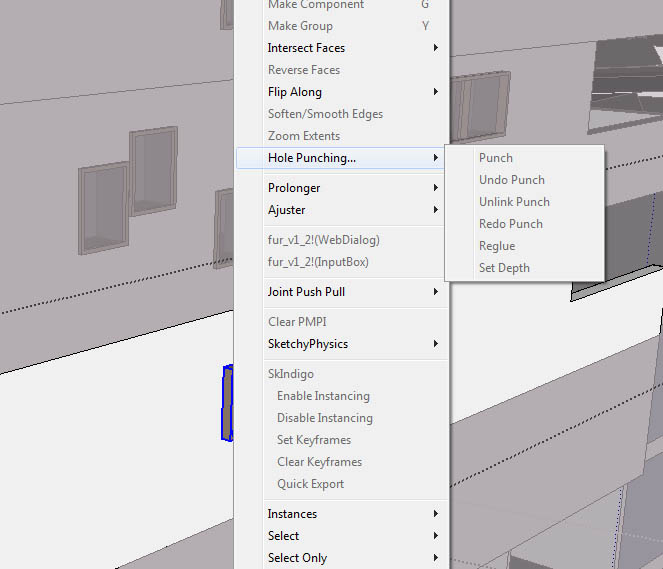

                                          Untitled-1.jpg

                                          http://www.bocostudio.com

                                          1 條回覆 最後回覆 回覆 引用 0
                                          • D 離線
                                            dbalex
                                            最後由 編輯

                                            I have found the solution; just closed and opened sketchup and it worked like before, sorry for my stupid question 😆

                                            TIG you really save me a lot of time with this plugin! thanks again!

                                            http://www.bocostudio.com

                                            1 條回覆 最後回覆 回覆 引用 0
                                            • 1
                                            • 2
                                            • 3
                                            • 4
                                            • 5
                                            • 6
                                            • 9
                                            • 10
                                            • 4 / 10
                                            • 第一個貼文
                                              最後的貼文
                                            Buy SketchPlus
                                            Buy SUbD
                                            Buy WrapR
                                            Buy eBook
                                            Buy Modelur
                                            Buy Vertex Tools
                                            Buy SketchCuisine
                                            Buy FormFonts

                                            Advertisement

