sketchucation logo sketchucation
    • Login
    Oops, your profile's looking a bit empty! To help us tailor your experience, please fill in key details like your SketchUp version, skill level, operating system, and more. Update and save your info on your profile page today!
    Mac User? | Join the Rayscaper Beta for Mac Learn More

    [Plugin] Export 2d with Alpha

    Scheduled Pinned Locked Moved Plugins
    148 Posts 42 Posters 143.9k Views 42 Watching
    Loading More Posts
    • Oldest to Newest
    • Newest to Oldest
    • Most Votes
    Reply
    • Reply as topic
    Log in to reply
    This topic has been deleted. Only users with topic management privileges can see it.
    • CadFatherC
      CadFather
      last edited by

      Master Thom Thom strikes again! 😲 (a true gem)

      now i know why the name: it's two of you!! thank you, thank you

      1 Reply Last reply
      Reply Quote 0
      • JClementsJ
        JClements
        last edited by

        Thomas, if you could just display the aspect ratio that would be helpful. I could manually enter values using a calculator.

        John

        John | Illustrator | Beaverton, Oregon

        1 Reply Last reply
        Reply Quote 0
        • EscapeArtistE
          EscapeArtist
          last edited by

          Great! I needed something like this last week, how did you know?

          Thanks for another useful plugin! πŸ‘

          1 Reply Last reply
          Reply Quote 0
          • thomthomT
            thomthom
            last edited by

            @jclements said:

            Thomas, if you could just display the aspect ratio that would be helpful. I could manually enter values using a calculator.

            John

            I'll see what I can do. I am currently working on a system to make advanced inputboxes easier to make.

            Thomas Thomassen β€” SketchUp Monkey & Coding addict
            List of my plugins and link to the CookieWare fund

            1 Reply Last reply
            Reply Quote 0
            • JClementsJ
              JClements
              last edited by

              Thomas. Not urgent by any means.

              John | Illustrator | Beaverton, Oregon

              1 Reply Last reply
              Reply Quote 0
              • PixeroP
                Pixero
                last edited by

                @thomthom said:

                β€’SketchUp 7 or newer

                @thomthom said:

                Added with the SU8 API.

                So...how do I get this to work with SU 7.1?
                It exports without transparency and always the whole model.

                1 Reply Last reply
                Reply Quote 0
                • thomthomT
                  thomthom
                  last edited by

                  @pixero said:

                  So...how do I get this to work with SU 7.1?
                  Transparency? You can't.

                  @pixero said:

                  and always the whole model.

                  hmm, not on my machine - remember to Hide Rest of Model. WYSIWYG.

                  Thomas Thomassen β€” SketchUp Monkey & Coding addict
                  List of my plugins and link to the CookieWare fund

                  1 Reply Last reply
                  Reply Quote 0
                  • R
                    rv1974
                    last edited by

                    Is there some way to separate shadows pass?

                    1 Reply Last reply
                    Reply Quote 0
                    • PixeroP
                      Pixero
                      last edited by

                      @thomthom said:

                      @pixero said:

                      So...how do I get this to work with SU 7.1?

                      @thomthom said:

                      Transparency? You can't.

                      😒

                      1 Reply Last reply
                      Reply Quote 0
                      • thomthomT
                        thomthom
                        last edited by

                        No - I have no control of how it's generated. As you see from the sample I posted the shadows even comes from the whole model, not just what is visible.

                        Thomas Thomassen β€” SketchUp Monkey & Coding addict
                        List of my plugins and link to the CookieWare fund

                        1 Reply Last reply
                        Reply Quote 0
                        • PixeroP
                          Pixero
                          last edited by

                          @thomthom said:

                          No - I have no control of how it's generated. As you see from the sample I posted the shadows even comes from the whole model, not just what is visible.

                          This can help for a shadow pass: http://rhin.crai.archi.fr/RubyLibraryDepot/download.php?file=displaytemplate.rb

                          And maybe a modification of my Shadow control script (http://www.pixero.com/downloads_sketchup.html) could be made to set everything not selected to: e.casts_shadows = false

                          1 Reply Last reply
                          Reply Quote 0
                          • A
                            archworks
                            last edited by

                            Congratulations - one of the best for su 2d app

                            1 Reply Last reply
                            Reply Quote 0
                            • GaieusG
                              Gaieus
                              last edited by

                              Hey, I did not see this, great plugin, thanks Thom! πŸ‘ πŸ‘ πŸ‘


                              Edit; to me, it does not export with transparent background... Nor does it export only the active context. 😞

                              test.png

                              Gai...

                              1 Reply Last reply
                              Reply Quote 0
                              • thomthomT
                                thomthom
                                last edited by

                                @gaieus said:

                                Edit; to me, it does not export with transparent background... Nor does it export only the active context. 😞
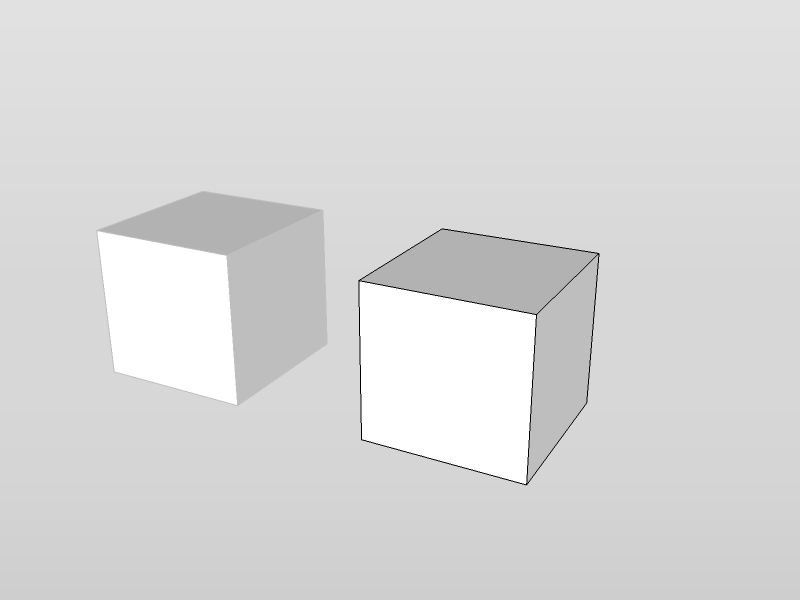
                                What version of SU did you use?
                                Got a screencapture?

                                Thomas Thomassen β€” SketchUp Monkey & Coding addict
                                List of my plugins and link to the CookieWare fund

                                1 Reply Last reply
                                Reply Quote 0
                                • HumpmetwiceH
                                  Humpmetwice
                                  last edited by

                                  Have I put something in the wrong spot or something cause when I go to view/export 2D the settings comes up but then it doesn't give me a file type to save it as?

                                  1 Reply Last reply
                                  Reply Quote 0
                                  • thomthomT
                                    thomthom
                                    last edited by

                                    @unknownuser said:

                                    Have I put something in the wrong spot or something cause when I go to view/export 2D the settings comes up but then it doesn't give me a file type to save it as?

                                    After the Settings window and you click OK you should get a File Dialog asking you what name to give the file. You must specify the file extension yourself.

                                    Thomas Thomassen β€” SketchUp Monkey & Coding addict
                                    List of my plugins and link to the CookieWare fund

                                    1 Reply Last reply
                                    Reply Quote 0
                                    • HumpmetwiceH
                                      Humpmetwice
                                      last edited by

                                      @thomthom said:

                                      After the Settings window and you click OK you should get a File Dialog asking you what name to give the file. You must specify the file extension yourself.

                                      I know and it doesn't give me any file type to save it as at all.

                                      1 Reply Last reply
                                      Reply Quote 0
                                      • thomthomT
                                        thomthom
                                        last edited by

                                        You have to type the file type yourself - there is no list of file types because the SketchUp Ruby API doesn't let me provide one.

                                        So if you want to save a jpg file just enter "myfile.jpg" in the file dialog.
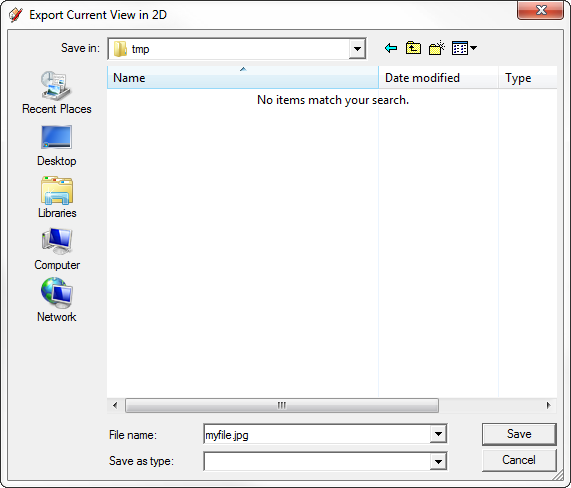
                                        filedialog.png

                                        Thomas Thomassen β€” SketchUp Monkey & Coding addict
                                        List of my plugins and link to the CookieWare fund

                                        1 Reply Last reply
                                        Reply Quote 0
                                        • GaieusG
                                          Gaieus
                                          last edited by

                                          @thomthom said:

                                          @gaieus said:

                                          Edit; to me, it does not export with transparent background... Nor does it export only the active context. 😞

                                          What version of SU did you use?
                                          Got a screencapture?

                                          The most recent one; SU 8.

                                          Here is a screen capture; now with a different codec than the one you could not open the other day if you remember...


                                          test2.avi

                                          Gai...

                                          1 Reply Last reply
                                          Reply Quote 0
                                          • thomthomT
                                            thomthom
                                            last edited by

                                            That baffles me. I have no idea why this happens. Exactly the same works for me... ❓ πŸ˜• ❓


                                            test1.zip

                                            Thomas Thomassen β€” SketchUp Monkey & Coding addict
                                            List of my plugins and link to the CookieWare fund

                                            1 Reply Last reply
                                            Reply Quote 0

                                            Hello! It looks like you're interested in this conversation, but you don't have an account yet.

                                            Getting fed up of having to scroll through the same posts each visit? When you register for an account, you'll always come back to exactly where you were before, and choose to be notified of new replies (either via email, or push notification). You'll also be able to save bookmarks and upvote posts to show your appreciation to other community members.

                                            With your input, this post could be even better πŸ’—

                                            Register Login
                                            • 1
                                            • 2
                                            • 3
                                            • 4
                                            • 5
                                            • 6
                                            • 7
                                            • 8
                                            • 3 / 8
                                            • First post
                                              Last post
                                            Buy SketchPlus
                                            Buy SUbD
                                            Buy WrapR
                                            Buy eBook
                                            Buy Modelur
                                            Buy Vertex Tools
                                            Buy SketchCuisine
                                            Buy FormFonts

                                            Advertisement