sketchucation logo sketchucation
    • 登入
    Oops, your profile's looking a bit empty! To help us tailor your experience, please fill in key details like your SketchUp version, skill level, operating system, and more. Update and save your info on your profile page today!
    🔌 Smart Spline | Fluid way to handle splines for furniture design and complex structures. Download

    [Plugin] Export 2d with Alpha

    已排程 已置頂 已鎖定 已移動 Plugins
    148 貼文 42 Posters 125.4k 瀏覽 42 Watching
    正在載入更多貼文
    • 從舊到新
    • 從新到舊
    • 最多點贊
    回覆
    • 在新貼文中回覆
    登入後回覆
    此主題已被刪除。只有擁有主題管理權限的使用者可以查看。
    • R 離線
      raineysky
      最後由 編輯

      @thomthom said:

      I have an update coming up soon. Not ready yet though.

      Add mindreader to your list of skills. I just did a two hour search of the forums regarding transparent backgrounds and came across this. THANK YOU!!!

      1 條回覆 最後回覆 回覆 引用 0
      • R 離線
        RichardU
        最後由 編輯

        @thomthom said:

        I have an update coming up soon. Not ready yet though.

        I'm looking forward to it. Thanks.

        1 條回覆 最後回覆 回覆 引用 0
        • R 離線
          RichardU
          最後由 編輯

          Cookieware donation sent. I don't know how you plan to update this, but it is very useful as is.

          Thanks,

          Richard

          1 條回覆 最後回覆 回覆 引用 0
          • thomthomT 離線
            thomthom
            最後由 編輯

            @richardu said:

            Cookieware donation sent. I don't know how you plan to update this, but it is very useful as is.

            Thank you! 😄

            I have an update in development - more of a merge, transformation with V-Ray Tools (Don't worry, no V-Ray needed.)
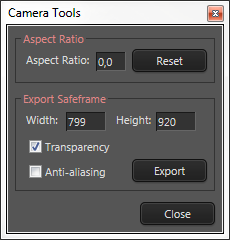
            CameraTools.png

            Important new feature is that it tries to make up for the camera shifting that occurs when you set the aspect ratio.

            Thomas Thomassen — SketchUp Monkey & Coding addict
            List of my plugins and link to the CookieWare fund

            1 條回覆 最後回覆 回覆 引用 0
            • G 離線
              GIphil
              最後由 編輯

              Excellent Plugin! The export values are a bit strange but I am just being picky! Thanks for your hard work!

              1 條回覆 最後回覆 回覆 引用 0
              • thomthomT 離線
                thomthom
                最後由 編輯

                Strange values?

                Thomas Thomassen — SketchUp Monkey & Coding addict
                List of my plugins and link to the CookieWare fund

                1 條回覆 最後回覆 回覆 引用 0
                • FrederikF 離線
                  Frederik
                  最後由 編輯

                  Lately I've experienced that when I export a scene with transparency, in a resolution 4000x3000, I can see the transparency using the standard Windows Image viewer, however, I'm unable to open the png-file in PhotoShop...
                  It's just saying that it's unable to parse the file... 😕
                  Also... I can't see the image if I try to use XnView...

                  Cheers
                  Kim Frederik

                  1 條回覆 最後回覆 回覆 引用 0
                  • thomthomT 離線
                    thomthom
                    最後由 編輯

                    Sample file?

                    Thomas Thomassen — SketchUp Monkey & Coding addict
                    List of my plugins and link to the CookieWare fund

                    1 條回覆 最後回覆 回覆 引用 0
                    • FrederikF 離線
                      Frederik
                      最後由 編輯

                      Here you go... 😄
                      (NB! 37.8Mb) https://dl.dropbox.com/u/9887081/Test-for-Thomthom.png

                      Like I said, I'm able to open and see it with the standard Windows Image browser and I can open it in i.e. Firefox as well, but not in Adobe PhotoShop CS5.1 and XnView also have an issue when trying to see it... 😐

                      Cheers
                      Kim Frederik

                      1 條回覆 最後回覆 回覆 引用 0
                      • FrederikF 離線
                        Frederik
                        最後由 編輯

                        OK...
                        I found a way to make it work...
                        Open the file with Microsoft Office Picture Manager and export it to a new png-file...
                        The size will reduce from 37.8Mb to 1.58Mb and I can't see any quality loss... 😒
                        Check this https://dl.dropbox.com/u/9887081/Test4Thomthom2.png
                        I'm able to open the new file in PhotoShop...

                        Edit: Well... It seem that I need to do something before it works, like use the crop tool and then export it...
                        The result is that the file size reduces significantly and then I'm able to open it in PhotoShop without any quality loss...
                        https://dl.dropbox.com/u/9887081/Test4Thomthom3.png
                        Strange... 😕

                        Cheers
                        Kim Frederik

                        1 條回覆 最後回覆 回覆 引用 0
                        • thomthomT 離線
                          thomthom
                          最後由 編輯

                          37.8MB for a 4400x2250px PNG image??? That ain't right.

                          Inspecting your file in a hex editor and it's full of NULL bytes. :s
                          The plugin leaves the writing for the image to SketchUp. And I've never seen this before.

                          My first thoughts are that this is a issue local to your machine. Are you for instance saving to a network drive etc?

                          Thomas Thomassen — SketchUp Monkey & Coding addict
                          List of my plugins and link to the CookieWare fund

                          1 條回覆 最後回覆 回覆 引用 0
                          • thomthomT 離線
                            thomthom
                            最後由 編輯

                            I don't know what it is to be honest.
                            Does it happen to all models?
                            Do you have another computer nearby where you can try?

                            Thomas Thomassen — SketchUp Monkey & Coding addict
                            List of my plugins and link to the CookieWare fund

                            1 條回覆 最後回覆 回覆 引用 0
                            • FrederikF 離線
                              Frederik
                              最後由 編輯

                              @thomthom said:

                              My first thoughts are that this is a issue local to your machine. Are you for instance saving to a network drive etc?

                              Well... In case it's something with my 'puter I wonder what's causing this, cause I've never experienced this before...
                              I'm just saving the image on my desktop, not on any network drive or another strange location...
                              Like I said... Very strange... 😕

                              Edit: I've now tried to save the png-file to some other locations (eg. a folder on the C-drive, on the desktop, on a network drive), but the result remain identical... 😞

                              Cheers
                              Kim Frederik

                              1 條回覆 最後回覆 回覆 引用 0
                              • FrederikF 離線
                                Frederik
                                最後由 編輯

                                @thomthom said:

                                Does it happen to all models?
                                Do you have another computer nearby where you can try?

                                Just did and it's the same... 😞

                                If I save in resolution 800x600px it works fine and I can open it in Photoshop...
                                The file size is 1.83Mb in this resolution, but I also set the compression to 0...

                                Cheers
                                Kim Frederik

                                1 條回覆 最後回覆 回覆 引用 0
                                • thomthomT 離線
                                  thomthom
                                  最後由 編輯

                                  Compression should only apply to JPEG.

                                  If you export a similar 2D image from File > Export 2D?

                                  Thomas Thomassen — SketchUp Monkey & Coding addict
                                  List of my plugins and link to the CookieWare fund

                                  1 條回覆 最後回覆 回覆 引用 0
                                  • FrederikF 離線
                                    Frederik
                                    最後由 編輯

                                    @frederik said:

                                    ...but I also set the compression to 0...

                                    Looking for a smiley banging the head into the wall...
                                    Seem that this was causing the issue... 😳
                                    If I leave the compression at 0.9, I'm able to open the file in res. 4400x2250px in Photoshop and the file size is 2.76Mb, which seem reasonable...

                                    Perhaps you should lock the compresion to a specific value or make sure that it can't be set to 0 (read: zero)... 💭

                                    Cheers
                                    Kim Frederik

                                    1 條回覆 最後回覆 回覆 引用 0
                                    • FrederikF 離線
                                      Frederik
                                      最後由 編輯

                                      @thomthom said:

                                      Compression should only apply to JPEG.

                                      Then it should - by default - be "in-active" when saving to png IMO...

                                      @thomthom said:

                                      If you export a similar 2D image from File > Export 2D?

                                      No problem, but then I can't get the transparency I need... 😉

                                      Cheers
                                      Kim Frederik

                                      1 條回覆 最後回覆 回覆 引用 0
                                      • thomthomT 離線
                                        thomthom
                                        最後由 編輯

                                        I had no idea it would cause oddities for PNG files... :s
                                        The documentation (roll eyes) says:

                                        @unknownuser said:

                                        (optional) Float compression factor for JPEG images, between 0.0 and 1.0

                                        http://www.sketchup.com/intl/en/developer/docs/ourdoc/view#write_image

                                        So I figured there was no need to disable/enable depending on filetype - which I have no means of obtaining either as the filedialog comes after the options (SketchUp API limitation). And 0.0 is a valid value for JPEG - at least according to the API... though I've never tried to set it that low.

                                        This sounds like a SketchUp bug - or very poor API documentation.
                                        Unfortunately there isn't a whole lot I can do to address this.

                                        Thomas Thomassen — SketchUp Monkey & Coding addict
                                        List of my plugins and link to the CookieWare fund

                                        1 條回覆 最後回覆 回覆 引用 0
                                        • thomthomT 離線
                                          thomthom
                                          最後由 編輯

                                          hm... looking at the docs again, 1.0 is best quality - 0.0 is worst. Compression is probably incorrect label (I just inherited the API argument name) - Quality is probably a better label.

                                          Thomas Thomassen — SketchUp Monkey & Coding addict
                                          List of my plugins and link to the CookieWare fund

                                          1 條回覆 最後回覆 回覆 引用 0
                                          • FrederikF 離線
                                            Frederik
                                            最後由 編輯

                                            @thomthom said:

                                            This sounds like a SketchUp bug - or very poor API documentation.
                                            Unfortunately there isn't a whole lot I can do to address this.

                                            No worries, Thomas...
                                            You have my deepest respect regardless of this... 😄
                                            At least I found the reason and know what to do to avoid this in the future... 👍

                                            Cheers
                                            Kim Frederik

                                            1 條回覆 最後回覆 回覆 引用 0
                                            • 1
                                            • 2
                                            • 3
                                            • 4
                                            • 5
                                            • 6
                                            • 7
                                            • 8
                                            • 1 / 8
                                            • 第一個貼文
                                              最後的貼文
                                            Buy SketchPlus
                                            Buy SUbD
                                            Buy WrapR
                                            Buy eBook
                                            Buy Modelur
                                            Buy Vertex Tools
                                            Buy SketchCuisine
                                            Buy FormFonts

                                            Advertisement
