sketchucation logo sketchucation
    • 登入
    Oops, your profile's looking a bit empty! To help us tailor your experience, please fill in key details like your SketchUp version, skill level, operating system, and more. Update and save your info on your profile page today!
    ⚠️ Important | Libfredo 15.6b introduces important bugfixes for Fredo's Extensions Update

    [Plugin] Raytracer

    已排程 已置頂 已鎖定 已移動 Plugins
    60 貼文 18 Posters 62.6k 瀏覽 18 Watching
    正在載入更多貼文
    • 從舊到新
    • 從新到舊
    • 最多點贊
    回覆
    • 在新貼文中回覆
    登入後回覆
    此主題已被刪除。只有擁有主題管理權限的使用者可以查看。
    • A 離線
      AcesHigh
      最後由 編輯

      Thank you Box. Any slight idea why Raytracer, Drop At Intersection, etc, are not working?

      1 條回覆 最後回覆 回覆 引用 0
      • BoxB 離線
        Box
        最後由 編輯

        Sorry, I don't know the ins and outs of either plugin. Which is why I went for throw to. I can look tomorrow if nobody else does.

        1 條回覆 最後回覆 回覆 引用 0
        • tt_suT 離線
          tt_su
          最後由 編輯

          It appear to be because the ray traced hit the component it tried to drop. Apparently I forgot to make it ignore itself. If I moved the axis to the bottom of the component it worked fine.

          1 條回覆 最後回覆 回覆 引用 0
          • tt_suT 離線
            tt_su
            最後由 編輯

            Filed issue: https://bitbucket.org/thomthom/raytracer/issue/1/ignore-the-components-being-dropped

            1 條回覆 最後回覆 回覆 引用 0
            • A 離線
              AcesHigh
              最後由 編輯

              I see. Thanks ThomThom, for looking at the issue.

              1 條回覆 最後回覆 回覆 引用 0
              • M 離線
                mlefevre
                最後由 編輯

                @tt_su said:

                No idea without test screenshots or preferable a test model.

                I can send you a screenshot, but basically I'm having the same issue as one of the prior post with the car crashes.

                1 條回覆 最後回覆 回覆 引用 0
                • tt_suT 離線
                  tt_su
                  最後由 編輯

                  @mlefevre said:

                  I can send you a screenshot, but basically I'm having the same issue as one of the prior post with the car crashes.

                  SketchUp crashes?
                  What version of SketchUp are you using (full exact version please) and what OS?
                  Got a sample model and step by step description of what you do to reproduce it?

                  1 條回覆 最後回覆 回覆 引用 0
                  • D 離線
                    DCorral
                    最後由 編輯

                    I'm new on sketchup and seem to not understand this plugin. I did a toposurface and modeled all the constructions on a big area. Now im trying to drop the components (i'm guessing it's going to be a lot of work but I'm fine with that) and I can't seem to be able to drop them into the terrain... They keep floating.. want to try raytracing but i dont understand that function.

                    Could you help me? Thanks a lot.

                    1 條回覆 最後回覆 回覆 引用 0
                    • P 離線
                      Panga
                      最後由 編輯

                      DCorral,

                      One thing you have to verify is the position of your axes inside the component. The origin of axes must be at the bottom of the geometry in order that the drop works.

                      Hope it helps.

                      Regards.

                      1 條回覆 最後回覆 回覆 引用 0
                      • pilouP 離線
                        pilou
                        最後由 編輯

                        Always cool! 😄

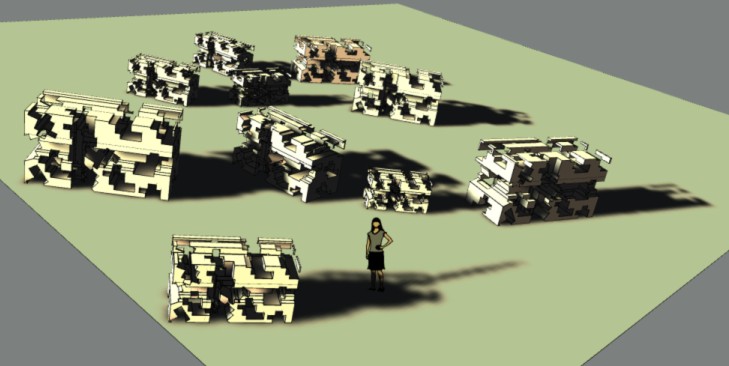
                        drop.jpg

                        Frenchy Pilou
                        Is beautiful that please without concept!
                        My Little site :)

                        1 條回覆 最後回覆 回覆 引用 0
                        • E 離線
                          eph
                          最後由 編輯

                          Hey Thomthom,
                          Spraycan crashes my SU every time I use it.. 😐
                          I'm on OS X 10.9.5, latest SU 2014.

                          Really easy to reproduce: open a new SKP (I work in mm or cm), draw a rectangle on the ground plane, select the default component ("Sophie") and spray her on the surface (radius 250 cm). Crashes every time... Of course it also happens in more complicated models.

                          Could you please check / fix?
                          Thanks in advance!!

                          1 條回覆 最後回覆 回覆 引用 0
                          • tt_suT 離線
                            tt_su
                            最後由 編輯

                            Hm..
                            Did you submit the BugSplats?
                            If you did, did you enter any info in the description or name that I can use to look it up? If you didn't, can you submit one and add some info I can use to look it up in the database?

                            1 條回覆 最後回覆 回覆 引用 0
                            • E 離線
                              eph
                              最後由 編輯

                              @tt_su said:

                              Hm..
                              Did you submit the BugSplats?
                              If you did, did you enter any info in the description or name that I can use to look it up? If you didn't, can you submit one and add some info I can use to look it up in the database?

                              Hey Thomthom, just did. Mentionned Raytracer in the description, filed under the name "eph".
                              Thanks for the quick reaction 😄

                              1 條回覆 最後回覆 回覆 引用 0
                              • tt_suT 離線
                                tt_su
                                最後由 編輯

                                Found it! I'll inspect. Thanks.

                                1 條回覆 最後回覆 回覆 引用 0
                                • tt_suT 離線
                                  tt_su
                                  最後由 編輯

                                  By the way, what version of Raytracer and TT_Lib do you have installed? (Can you verify with full version numbers reported under Preferences > Extensions please?)

                                  1 條回覆 最後回覆 回覆 引用 0
                                  • E 離線
                                    eph
                                    最後由 編輯

                                    Up to date on the Sketchucation Plugin Store:
                                    TTLib2 v2.9.13, Raytracer v1.3.0.

                                    1 條回覆 最後回覆 回覆 引用 0
                                    • tt_suT 離線
                                      tt_su
                                      最後由 編輯

                                      @duanekemp said:

                                      Is there a possibility that Drop Components by Bounds may not be working in SU2015?

                                      It's working. If you have problems, please post a sample model.

                                      1 條回覆 最後回覆 回覆 引用 0
                                      • duanekempD 離線
                                        duanekemp
                                        最後由 編輯

                                        Is there a possibility that Drop Components by Bounds may not be working in SU2015?

                                        Duane Kemp

                                        Kemp Productions
                                        Puidoux, Switzerland
                                        Gallery:
                                        https://duanekemp.artstation.com/

                                        1 條回覆 最後回覆 回覆 引用 0
                                        • duanekempD 離線
                                          duanekemp
                                          最後由 編輯

                                          ok... I discovered my issue with the Drop Components by Bounds . The proxies I was dropping were overlapping. By editing the proxy to a small square (since discovering that a single line won't smart drop), all proxies dropped in the vertical and correctly against the face's plane. Once dropped, edit the proxy again to it's original size... and voila... it worked. Took some time to get to this point... but... now, the work around for grass group proxies worked.

                                          I love this (even though it takes a step or two for overlapping groups) for dropping a single object where it needs to be. Car dropping is with ease as well as other non overlapping instances.

                                          Congratulations and THANK YOU!

                                          Thomas, You rock!

                                          Duane Kemp

                                          Kemp Productions
                                          Puidoux, Switzerland
                                          Gallery:
                                          https://duanekemp.artstation.com/

                                          1 條回覆 最後回覆 回覆 引用 0
                                          • H 離線
                                            hygicell
                                            最後由 編輯

                                            Hi Thomthom,
                                            I am trying to design thermoformable objects which can be stacked, destacked, nested and denested easily.
                                            Stacking and nesting is no problem for two same objects, but destacking and denesting can become problematic if the surfaces are too close to each other.
                                            To check this, I simulate the nesting of 2 objects in X-ray mode. I can then see the distance between the surfaces.

                                            For days now I have been inspecting and testing every "drop" group/components plugin I could find, but to no avail.
                                            Invariably all "drop" group/components plugins either drop part of the object through the surface or change it's orientation.
                                            I was getting very frustrated until this afternoon, when I found your Raytracer plugin.
                                            Using the "Drop Components by Geometry" I get a number of rays going straight down to the surface.
                                            With the camera on Parallel Projection and in X-ray mode, and by clicking on front, back and side views, I can now try and find the shortest ray, as that is where both objects will first touch.
                                            Then I can move the object down along that ray.
                                            Works like a whistle.
                                            But with complex objects there are so many rays it is not easy to find the shortest one.
                                            When I click on a ray, the entity info only mentions "guide", but not the length of the ray.
                                            Is there a way you could highlight the shortest ray, so I can quicky delete all others?
                                            Would save me heaps of time.
                                            Greetings
                                            Frank


                                            nestable pots test.skp

                                            1 條回覆 最後回覆 回覆 引用 0
                                            • 1
                                            • 2
                                            • 3
                                            • 3 / 3
                                            • 第一個貼文
                                              最後的貼文
                                            Buy SketchPlus
                                            Buy SUbD
                                            Buy WrapR
                                            Buy eBook
                                            Buy Modelur
                                            Buy Vertex Tools
                                            Buy SketchCuisine
                                            Buy FormFonts

                                            Advertisement