sketchucation logo sketchucation
    • 登入
    Oops, your profile's looking a bit empty! To help us tailor your experience, please fill in key details like your SketchUp version, skill level, operating system, and more. Update and save your info on your profile page today!
    ⚠️ Important | Libfredo 15.6b introduces important bugfixes for Fredo's Extensions Update

    [Plugin] Raytracer

    已排程 已置頂 已鎖定 已移動 Plugins
    60 貼文 18 Posters 62.6k 瀏覽 18 Watching
    正在載入更多貼文
    • 從舊到新
    • 從新到舊
    • 最多點贊
    回覆
    • 在新貼文中回覆
    登入後回覆
    此主題已被刪除。只有擁有主題管理權限的使用者可以查看。
    • thomthomT 離線
      thomthom
      最後由 thomthom 編輯

      Overview
      Collection of small snippets I made during my work on projects at the office. I just named it Raytracer as all the methods involved tracing rays around the model - mostly to detect the ground surface. These dropping methods do not stop on entities that are hidden or on hidden layers.

      http://forums.sketchucation.com/download/file.php?id=53906
      Bug Alert!
      There is a bug in the first release of SketchUp 8 where the ray tracing is not working correctly when there is CPoint in the current context. Ensure you have updated SketchUp 8

      Access
      Plugins > Raytracer

      Features
      Drop CPoints
      Drops the selected constructions points down onto the surface below.
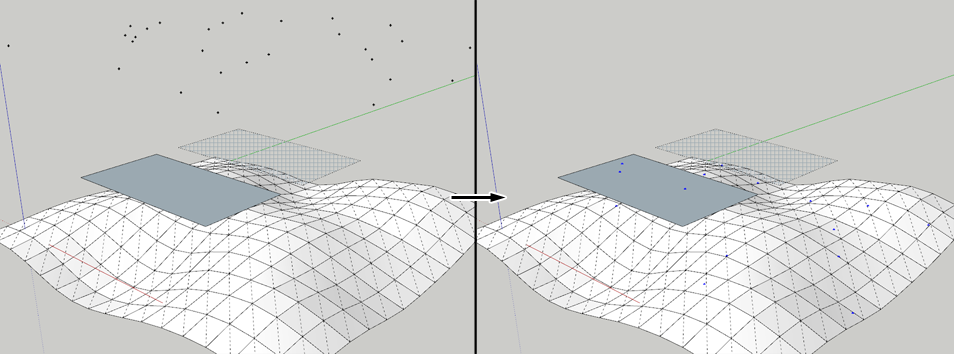
      DropCPoints.png

      Drop CPoints (Trace)
      Adds a construction point on the surface below the selected construction point and adds a construction line between them.
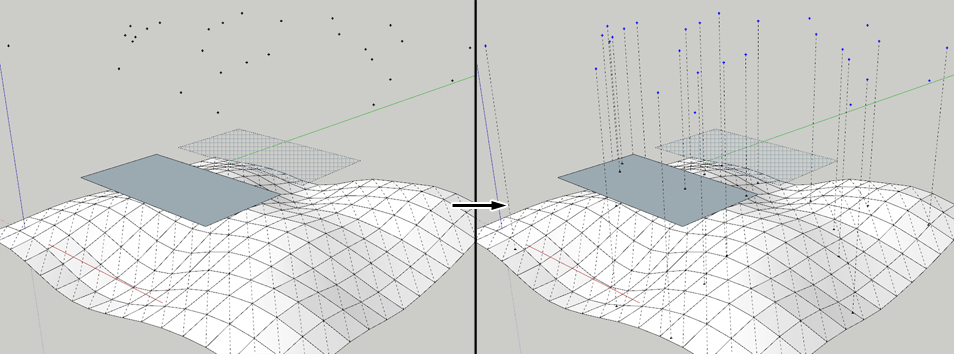
      TraceCPoints.png

      Drop Components
      Drops the selected groups/components down onto the surface below by their axis origin.
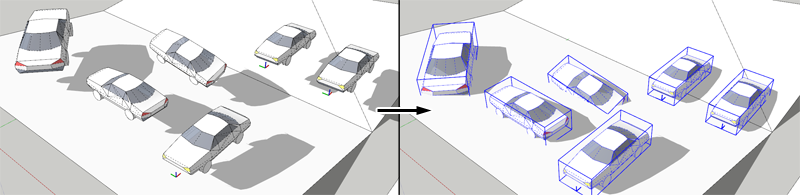
      DropComps.png

      Drop Components by Bounds
      Drops the selected groups/components down onto the surface below by the corners of the bounding box' bottom.
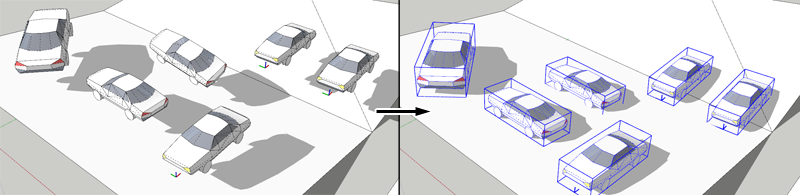
      DropCompsByBounds.png

      Drop Components by Geometry (WIP)
      Work in progress.

      Grow Components from CPoints

      1. Select a set of components.
      2. Activate the command.
      3. From the window that appear, enter a comma or pipe separated list of layers containing construction point
      4. When clicking OK, all construction points on the given layers will be traced down to the surface below and an random instance of the selected components will be inserted between the surface and the construction point.
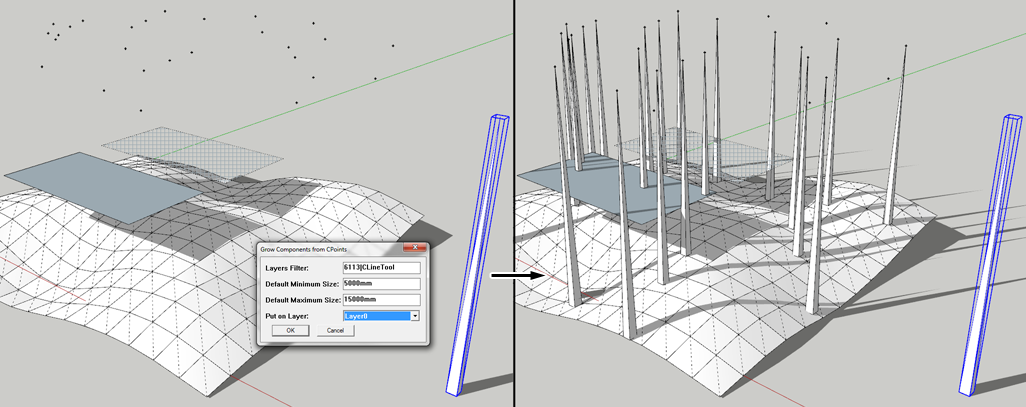
        GrowComponentsFromCPoints.png

      Trace Ray Spray from CPoints
      Shoots a user-determined number of rays in every direction from every CPoint in the selection. The rays that hits something will be traced by a CLine and CPoint, grouped.
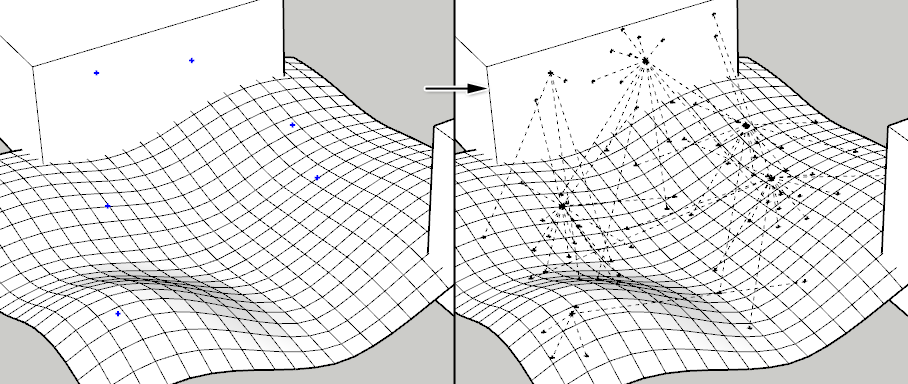
      TraceSprayRay.png

      Rays Stops at Ground Plane
      Check this item to make rays stop at the virtual ground plane in SketchUp.

      Requirements

      • SketchUp 7 or newer - ( Other versions untested )
      • TT_Lib2 (2.1.0)

      Link Preview Image
      SketchUp Plugins | PluginStore | SketchUcation

      SketchUp Plugin and Extension Store by SketchUcation provides free downloads of hundreds of SketchUp extensions and plugins

      favicon

      (sketchucation.com)

      Footprint

      http://forums.sketchucation.com/download/file.php?id=53762
      <Sketchup>/Plugins/
      +-
      http://forums.sketchucation.com/download/file.php?id=53763
      tt_raytracer.rb

      http://forums.sketchucation.com/download/file.php?id=53761

      Thomas Thomassen — SketchUp Monkey & Coding addict
      List of my plugins and link to the CookieWare fund

      1 條回覆 最後回覆 回覆 引用 0
      • FrederikF 離線
        Frederik
        最後由 編輯

        Thanks a lot, Thomas...!!
        Just tested it with SU8 and it seem to be working excellent...! 😄
        (I'll remember to drop a cookie soon... 😉 )

        Cheers
        Kim Frederik

        1 條回覆 最後回覆 回覆 引用 0
        • EarthMoverE 離線
          EarthMover
          最後由 編輯

          Nice bro. You are on FIRE today!!! I look forward to when you get the drop by geometry working!

          3D Artist at Clearstory 3D Imaging
          Guide Tool at Winning With Sketchup
          Content Creator at Skapeup

          1 條回覆 最後回覆 回覆 引用 0
          • thomthomT 離線
            thomthom
            最後由 編輯

            You and me both. That is turning out to be a brain twister.

            Thomas Thomassen — SketchUp Monkey & Coding addict
            List of my plugins and link to the CookieWare fund

            1 條回覆 最後回覆 回覆 引用 0
            • P 離線
              Panga
              最後由 編輯

              Thanks a lot Thomthom, exactly what I requested a month ago for evaluating covisibility on a terrain !!

              1 條回覆 最後回覆 回覆 引用 0
              • olisheaO 離線
                olishea
                最後由 編輯

                can you post an example of how this works please? just couple of images will do......pretty please ☀

                oli

                1 條回覆 最後回覆 回覆 引用 0
                • thomthomT 離線
                  thomthom
                  最後由 編輯

                  @olishea said:

                  can you post an example of how this works please? just couple of images will do......pretty please ☀

                  Done.

                  I found a bug in my plugin - so you want to update it and TT_Lib2.

                  I also found there is a nasty bug in SU8 that cause bogus results in the ray-tracing. I'm looking into this one - trying to work out way to work around it.

                  Thomas Thomassen — SketchUp Monkey & Coding addict
                  List of my plugins and link to the CookieWare fund

                  1 條回覆 最後回覆 回覆 引用 0
                  • thomthomT 離線
                    thomthom
                    最後由 編輯

                    Found a workaround. Please update TT_Lib2 to version 2.1.1.

                    Thomas Thomassen — SketchUp Monkey & Coding addict
                    List of my plugins and link to the CookieWare fund

                    1 條回覆 最後回覆 回覆 引用 0
                    • P 離線
                      Panga
                      最後由 編輯

                      Thomthom,

                      Thanks again for this plugin, but can I suggest you another function for this script. I need to make a raytrace from on point in every direction in order to see where rays intersect a terrain for example. I know that could generates a lot of rays and calculation, but It would be nice to have this function with maybe an option where we can choose the number of rays like : 1 to 10 rays / 10 o 100 rays / 100 to 1 000 rays. If it's possible, the rays should be drawn as guidelines, and a guide point could be automatically drawn on each intersection with the rest of the model.

                      I don't know if you can do that...just and idea for my workflow that can be helpfull for others maybe.

                      Thanks.

                      1 條回覆 最後回覆 回覆 引用 0
                      • thomthomT 離線
                        thomthom
                        最後由 編輯

                        @panga said:

                        I need to make a raytrace from on point in every direction

                        😲

                        @unknownuser said:

                        I know that could generates a lot of rays and calculation, but It would be nice to have this function with maybe an option where we can choose the number of rays like : 1 to 10 rays / 10 o 100 rays / 100 to 1 000 rays.

                        I say, yes, it'd be a whole lot of rays. So, would it be like sub-dividing a sphere and shoot a ray for every segment?

                        @panga said:

                        If it's possible, the rays should be drawn as guidelines, and a guide point could be automatically drawn on each intersection with the rest of the model.

                        YEs, can draw them a guidelines, yes. But how many points of origins are we talking about? There'd a huge amount of CLines. Would there be a limit to how far they reached? Would it be ok to draw only the rays that hit something?
                        Do the rays need to ignore other geometry other than the target group/component?

                        Thomas Thomassen — SketchUp Monkey & Coding addict
                        List of my plugins and link to the CookieWare fund

                        1 條回覆 最後回覆 回覆 引用 0
                        • P 離線
                          Panga
                          最後由 編輯

                          @unknownuser said:

                          YEs, can draw them a guidelines, yes. But how many points of origins are we talking about?

                          For my specific usage, there's two possibilities and the first one of them could be already fanstastic:

                          1. From one point at time
                          2. From one complex object (component or group)

                          @unknownuser said:

                          There'd a huge amount of CLines. Would there be a limit to how far they reached? Would it be ok to draw only the rays that hit something?
                          Do the rays need to ignore other geometry other than the target group/component?

                          Yes, Yes and Yes. In fact I only need to evaluate "covisibility". So I could select a point on my model (or a complex object) and the plugin draw a certain number of rays only where there's intersections with the model, or with a specific component/group if it's easier to implement/calculate.

                          @unknownuser said:

                          So, would it be like sub-dividing a sphere and shoot a ray for every segment?

                          This could be a good solution with a sphere that surrounds the whole model.

                          Thanks for your answer.

                          Regards.

                          1 條回覆 最後回覆 回覆 引用 0
                          • thomthomT 離線
                            thomthom
                            最後由 編輯

                            @panga said:

                            @unknownuser said:

                            So, would it be like sub-dividing a sphere and shoot a ray for every segment?

                            This could be a good solution with a sphere that surrounds the whole model.

                            I didn't mean to put an actual sphere in the model, just how one would determine which of the infinite possible directions the rays should be shot. What I meant by the sphere was they the ray's be evenly distributed based on how many rays one shoot.

                            Thomas Thomassen — SketchUp Monkey & Coding addict
                            List of my plugins and link to the CookieWare fund

                            1 條回覆 最後回覆 回覆 引用 0
                            • P 離線
                              Panga
                              最後由 編輯

                              @unknownuser said:

                              I didn't mean to put an actual sphere in the model, just how one would determine which of the infinite possible directions the rays should be shot. What I meant by the sphere was they the ray's be evenly distributed based on how many rays one shoot.

                              Yes I understood you. And controlling the number of segments/faces of the "virtual sphere" could help to have more or less rays. Whatever you can do for that, thanks in advance.

                              EDIT : In fact, what could be really nice is a "sun" or a omnilight that I could place wherever I want in my SU model, and with shadows activated I could see the illuminated parts of my models and the dark ones...

                              1 條回覆 最後回覆 回覆 引用 0
                              • thomthomT 離線
                                thomthom
                                最後由 編輯

                                I'm writing this down in the todo list. Will see what I can do.

                                Thomas Thomassen — SketchUp Monkey & Coding addict
                                List of my plugins and link to the CookieWare fund

                                1 條回覆 最後回覆 回覆 引用 0
                                • thomthomT 離線
                                  thomthom
                                  最後由 編輯

                                  hmm.... I'm not quite sure how to calculate the rays to shoot. Been all too long since I've done math like this...

                                  Thomas Thomassen — SketchUp Monkey & Coding addict
                                  List of my plugins and link to the CookieWare fund

                                  1 條回覆 最後回覆 回覆 引用 0
                                  • P 離線
                                    Panga
                                    最後由 編輯

                                    My knowledge in maths are very limited...so I'll not be able to help you on that. Anyway, thanks for giving it a try !! 😉

                                    1 條回覆 最後回覆 回覆 引用 0
                                    • thomthomT 離線
                                      thomthom
                                      最後由 編輯

                                      Found a solution! 😄

                                      Thomas Thomassen — SketchUp Monkey & Coding addict
                                      List of my plugins and link to the CookieWare fund

                                      1 條回覆 最後回覆 回覆 引用 0
                                      • P 離線
                                        Panga
                                        最後由 編輯

                                        I had no doubt about that !! 😉

                                        1 條回覆 最後回覆 回覆 引用 0
                                        • thomthomT 離線
                                          thomthom
                                          最後由 編輯

                                          When I say I I mean, someone smarter than me helped me out. 😉

                                          Thomas Thomassen — SketchUp Monkey & Coding addict
                                          List of my plugins and link to the CookieWare fund

                                          1 條回覆 最後回覆 回覆 引用 0
                                          • P 離線
                                            Panga
                                            最後由 編輯

                                            Whatever if someone helped you or not, you were the one looking for the solution...so you found it ! 😛

                                            1 條回覆 最後回覆 回覆 引用 0
                                            • 1
                                            • 2
                                            • 3
                                            • 1 / 3
                                            • 第一個貼文
                                              最後的貼文
                                            Buy SketchPlus
                                            Buy SUbD
                                            Buy WrapR
                                            Buy eBook
                                            Buy Modelur
                                            Buy Vertex Tools
                                            Buy SketchCuisine
                                            Buy FormFonts

                                            Advertisement



