sketchucation logo sketchucation
    • 登入
    Oops, your profile's looking a bit empty! To help us tailor your experience, please fill in key details like your SketchUp version, skill level, operating system, and more. Update and save your info on your profile page today!
    🔌 Smart Spline | Fluid way to handle splines for furniture design and complex structures. Download

    [Plugin] Axes Tools

    已排程 已置頂 已鎖定 已移動 Plugins
    63 貼文 20 Posters 87.8k 瀏覽 20 Watching
    正在載入更多貼文
    • 從舊到新
    • 從新到舊
    • 最多點贊
    回覆
    • 在新貼文中回覆
    登入後回覆
    此主題已被刪除。只有擁有主題管理權限的使用者可以查看。
    • thomthomT 離線
      thomthom
      最後由 編輯

      @rv1974 said:

      1. Axes to the component's bottom center;

      Yup, on the todo list to be able to choose which part of the boundingbox.

      @rv1974 said:

      1. Add CPoint at pivot (there's no snap to pivot in SU unfortunatly)

      Can do that, yes. But I'll add it to Guide Tools.

      Thomas Thomassen — SketchUp Monkey & Coding addict
      List of my plugins and link to the CookieWare fund

      1 條回覆 最後回覆 回覆 引用 0
      • R 離線
        rv1974
        最後由 編輯

        1.Fine but could bottom center be default value? Or at least make script to remember last preference.
        2.Wouldn't it be smarter not split into 2 commands?
        P.S. Not concerned to the topic:
        You made some nice ruby 'groups to components'. But After the procedure it deselects the new born component. Could it keep the selection on?

        1 條回覆 最後回覆 回覆 引用 0
        • thomthomT 離線
          thomthom
          最後由 編輯

          @rv1974 said:

          1.Fine but could bottom center be default value? Or at least make script to remember last preference.

          It'd remember the last used setting.

          @rv1974 said:

          2.Wouldn't it be smarter not split into 2 commands?

          It'd not be between center or bottom center, it's be between any corner, and center of each of the bounding box sides. So it'd be a lot more options than just two.

          @rv1974 said:

          You made some nice ruby 'groups to components'. But After the procedure it deselects the new born component. Could it keep the selection on?

          http://forums.sketchucation.com/viewtopic.php?f=323&t=29462 ?
          Yea - easy enough.

          Thomas Thomassen — SketchUp Monkey & Coding addict
          List of my plugins and link to the CookieWare fund

          1 條回覆 最後回覆 回覆 引用 0
          • R 離線
            rv1974
            最後由 編輯

            @rv1974 said:

            2.Wouldn't it be smarter not split into 2 commands?

            It'd not be between center or bottom center, it's be between any corner, and center of each of the bounding box sides. So it'd be a lot more options than just two.[/quote]


            I'm afraid I don't unerstand you. Anyhow what I mean is moving pivot to bottom center + placing cpoint
            to the same bottom center within one ruby (command) would be better.

            1 條回覆 最後回覆 回覆 引用 0
            • thomthomT 離線
              thomthom
              最後由 編輯

              Some may not want to add a cpoint and some may not want to adjust the axis. Keep them separated and people can choose.

              Thomas Thomassen — SketchUp Monkey & Coding addict
              List of my plugins and link to the CookieWare fund

              1 條回覆 最後回覆 回覆 引用 0
              • R 離線
                rv1974
                最後由 編輯

                You decide (though I see a bunch of rubies that do insert here and there cpoints without too much''people"
                protest). The main thing for me that cpoint at pivot would be a part of given component.

                1 條回覆 最後回覆 回覆 引用 0
                • thomthomT 離線
                  thomthom
                  最後由 編輯

                  Ah - I can see uses for inside and outside.
                  Will make a note of that.

                  Thomas Thomassen — SketchUp Monkey & Coding addict
                  List of my plugins and link to the CookieWare fund

                  1 條回覆 最後回覆 回覆 引用 0
                  • thomthomT 離線
                    thomthom
                    最後由 編輯

                    Added CPoint at Insertion Point to Guide Tools: http://forums.sketchucation.com/viewtopic.php?f=323&t=30506

                    Thomas Thomassen — SketchUp Monkey & Coding addict
                    List of my plugins and link to the CookieWare fund

                    1 條回覆 最後回覆 回覆 引用 0
                    • thomthomT 離線
                      thomthom
                      最後由 編輯

                      Version 1.1.0

                      • Requires TT_Lib2 (v2.2.0)
                      • Replaced the old menus with Set Insertion Point

                      Thomas Thomassen — SketchUp Monkey & Coding addict
                      List of my plugins and link to the CookieWare fund

                      1 條回覆 最後回覆 回覆 引用 0
                      • R 離線
                        rv1974
                        最後由 編輯

                        I wish you were SU product manager it'd be entirely different world.

                        1 條回覆 最後回覆 回覆 引用 0
                        • R 離線
                          rv1974
                          最後由 編輯

                          One more thing:
                          Could this script stick to the current model axes not absolute world?

                          1 條回覆 最後回覆 回覆 引用 0
                          • thomthomT 離線
                            thomthom
                            最後由 編輯

                            @rv1974 said:

                            One more thing:
                            Could this script stick to the current model axes not absolute world?

                            ?
                            It doesn't rotate the axis, it simply moves the origin of the components - the insertion point.

                            Though, it could be made to also rotate the axis to match the current model axis.

                            Thomas Thomassen — SketchUp Monkey & Coding addict
                            List of my plugins and link to the CookieWare fund

                            1 條回覆 最後回覆 回覆 引用 0
                            • R 離線
                              rv1974
                              最後由 編輯

                              @thomthom said:

                              Though, it could be made to also rotate the axis to match the current model axis.

                              That's exactly what I meant

                              1 條回覆 最後回覆 回覆 引用 0
                              • D 離線
                                diegog321
                                最後由 編輯

                                thank you thom

                                This plugin saved my life about five minutes ago!

                                Diego

                                1 條回覆 最後回覆 回覆 引用 0
                                • D 離線
                                  daniel266
                                  最後由 編輯

                                  OHH my GOD !! GEnius i have a dwg file that moves all along the place and i need to explode to make it stop this just solved everything!!
                                  SO much THX!

                                  1 條回覆 最後回覆 回覆 引用 0
                                  • R 離線
                                    Ruturaj
                                    最後由 編輯

                                    Hello sir,

                                    This plugin is very good & handful .....

                                    but when i was applying following Settings :

                                    X (Red) : Right
                                    y (Green): Back
                                    z (Blue): Top

                                    selected any group or component its work

                                    but when i was applying again it on another group or component, it will not reset to the default settings ....?

                                    I was changing default MODULE

                                    ### MODULE VARIABLES ### -------------------------------------------------
                                    
                                    	# Preference
                                    	@settings = TT;;Settings.new('Axes editor tool')
                                    	@settings[;x, 'Left']
                                    	@settings[;y, 'Front']
                                    	@settings[;z, 'Bottom']
                                    

                                    How to reset ......?

                                    Thank you,
                                    Ruturaj

                                    Thanks,
                                    RuturaJ

                                    1 條回覆 最後回覆 回覆 引用 0
                                    • thomthomT 離線
                                      thomthom
                                      最後由 編輯

                                      I remembers the last values you used. Just select what you want from the drop down menus. The "defaults" you refer to is only defaults for the very first time the plugin runs.

                                      Thomas Thomassen — SketchUp Monkey & Coding addict
                                      List of my plugins and link to the CookieWare fund

                                      1 條回覆 最後回覆 回覆 引用 0
                                      • R 離線
                                        Ruturaj
                                        最後由 編輯

                                        oh......... ok..... 👍

                                        Thanks

                                        Thanks,
                                        RuturaJ

                                        1 條回覆 最後回覆 回覆 引用 0
                                        • utilerU 離線
                                          utiler
                                          最後由 編輯

                                          Hey Thomas, love this little gem.....! So simple yet so powerful!

                                          I have a question.

                                          See the attached images of a plan view:
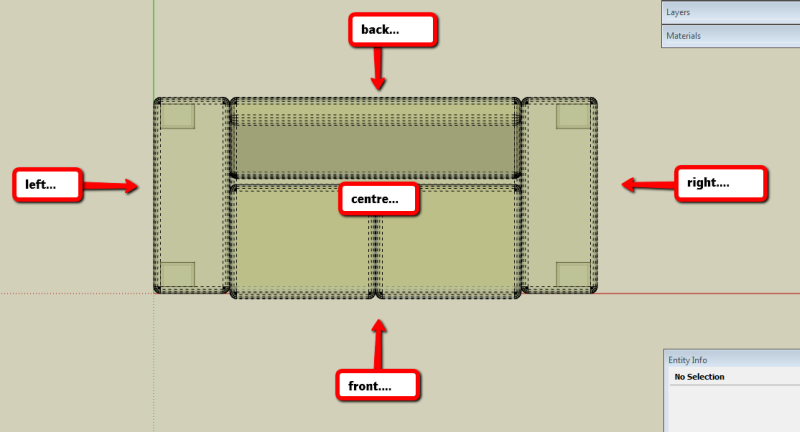
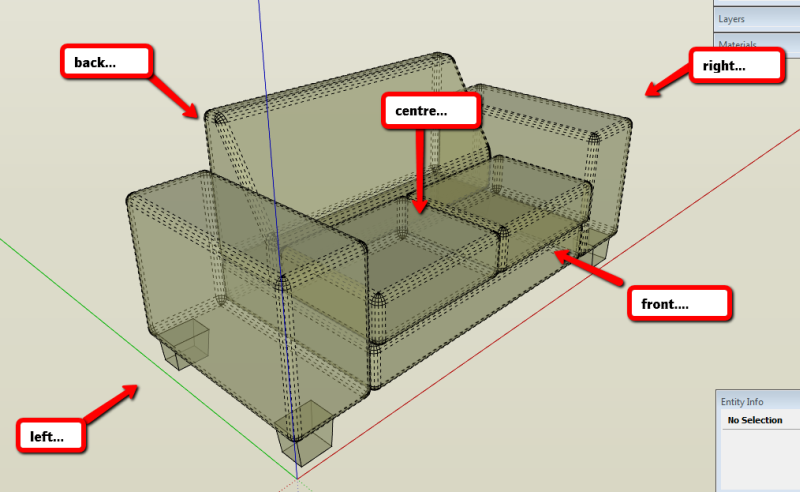
                                          Axis01.png
                                          And a perspective view:
                                          Axis02.png

                                          Say I want to set my axis to the rear of the couch, centered and at the bottom. When I followed your axis tool to achieve this I have to input these settings:
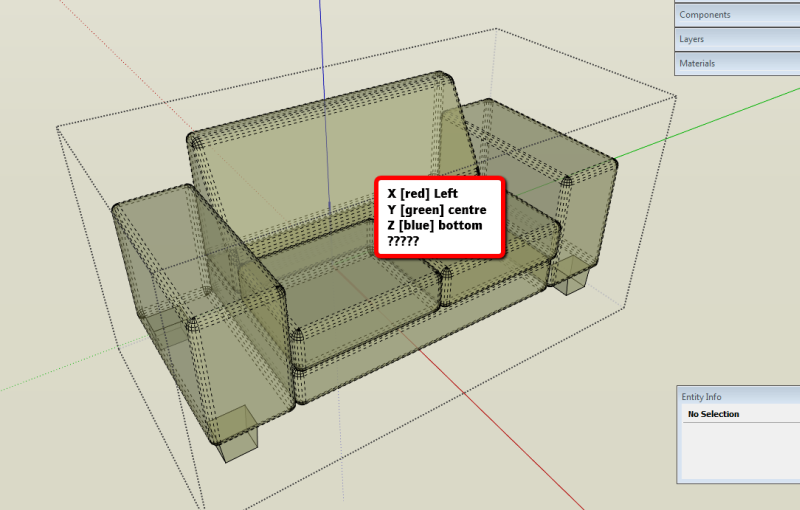
                                          Axis03.png

                                          Instead of 'X' back, 'Y' centre', 'Z' bottom.

                                          It appears that the options in the dialogue box should be reversed. Don't you think that the 'X' options should be Front/Centre/Right and 'Y' options should be Left/Centre/Right instead of the other way around? It would just make sense according to how you view a model after all from an axis green is naturally north/south or vertical on the page or screen and red is east /west or horizontal......

                                          Love your work!!

                                          PS: Skippy attached FYI.


                                          couch.skp

                                          Just Curious...

                                          1 條回覆 最後回覆 回覆 引用 0
                                          • thomthomT 離線
                                            thomthom
                                            最後由 編輯

                                            utiler: Front/Back, Left/Right, Top/Bottom is determined by the components internal axis - not the model axis.
                                            note that this plugin does not change the orientation of the component axis, but just the axis origin.


                                            Thomas Thomassen — SketchUp Monkey & Coding addict
                                            List of my plugins and link to the CookieWare fund

                                            1 條回覆 最後回覆 回覆 引用 0
                                            • 1
                                            • 2
                                            • 3
                                            • 4
                                            • 1 / 4
                                            • 第一個貼文
                                              最後的貼文
                                            Buy SketchPlus
                                            Buy SUbD
                                            Buy WrapR
                                            Buy eBook
                                            Buy Modelur
                                            Buy Vertex Tools
                                            Buy SketchCuisine
                                            Buy FormFonts

                                            Advertisement