sketchucation logo sketchucation
    • Login
    Oops, your profile's looking a bit empty! To help us tailor your experience, please fill in key details like your SketchUp version, skill level, operating system, and more. Update and save your info on your profile page today!
    Mac User? | Join the Rayscaper Beta for Mac Learn More

    [Plugin] Guide Tools (1.3.0) — 21 October 2010

    Scheduled Pinned Locked Moved Plugins
    99 Posts 34 Posters 121.3k Views 34 Watching
    Loading More Posts
    • Oldest to Newest
    • Newest to Oldest
    • Most Votes
    Reply
    • Reply as topic
    Log in to reply
    This topic has been deleted. Only users with topic management privileges can see it.
    • D
      dedmin
      last edited by

      Is it possible to add "CPoint at Insertion Point" for groups also?

      1 Reply Last reply
      Reply Quote 0
      • thomthomT
        thomthom
        last edited by

        @dedmin said:

        Is it possible to add "CPoint at Insertion Point" for groups also?

        I'll add it to the list.

        Thomas Thomassen — SketchUp Monkey & Coding addict
        List of my plugins and link to the CookieWare fund

        1 Reply Last reply
        Reply Quote 0
        • D
          dedmin
          last edited by

          🎉 🎉 🎉

          1 Reply Last reply
          Reply Quote 0
          • L
            Larsen
            last edited by

            Amazing tools!
            Thanks thomthom for your generosity.

            [Every form of thinking perish by excess of its basic principles.

            1 Reply Last reply
            Reply Quote 0
            • B
              baiduaiya
              last edited by

              thank you very much.

              1 Reply Last reply
              Reply Quote 0
              • M
                matt.gordon320
                last edited by

                Thank you so much! Amazing Tools as always...

                1 Reply Last reply
                Reply Quote 0
                • C
                  carlm
                  last edited by

                  Hi Thom-

                  Just downloaded your Guide Tools and TT Lib2; they seemed to be working fine, then I tried adding CPoints to the circles in the attached file. There's one circle that the tool refuses to work on (top, far right).

                  The odd thing is that your tool had no trouble adding a CP to the other end of the same hole (see bottom side), and I made the row of holes by drawing one circle on face, move+ x2, then pushed them through...

                  I tried both selecting the face and then using Guide Tools, and just selecting the circle and using Guide Tools, both with CPoint at Circle Center and CPoint at Arc Center.

                  Thought you'd want to see it.

                  SU8 (pro-expired)
                  MacOS 10.5.8

                  Thanks, -carl-


                  9mm backer block sketch.skp

                  1 Reply Last reply
                  Reply Quote 0
                  • C
                    carlm
                    last edited by

                    Never mind?

                    After encountering this problem, the plugin wouldn't install guide points in other files either.

                    Quit SU, reopened, seems to work fine, even on the file I just posted...

                    It does seem that SU is less stable since installing Selection Toys and TT Lib1 this morning, but could be the moon -- this is not a report yet.

                    Sorry! -carl-

                    1 Reply Last reply
                    Reply Quote 0
                    • A
                      Anton_S
                      last edited by

                      Very, useful tool... Thanks ❗

                      1 Reply Last reply
                      Reply Quote 0
                      • guanjinG
                        guanjin
                        last edited by

                        [quote="carlm"]Hi Thom-

                        Just downloaded your Guide Tools and TT Lib2; they seemed to be working fine, then I tried adding CPoints to the circles in the attached file. There's one circle that the tool refuses to work on (top, far right).

                        The odd thing is that your tool had no trouble adding a CP to the other end of the same hole (see bottom side), and I made the row of holes by drawing one circle on face, move+ x2, then pushed them through...

                        I tried both selecting the face and then using Guide Tools, and just selecting the circle and using Guide Tools, both with CPoint at Circle Center and CPoint at Arc Center.

                        You want to set the coordinates of the components
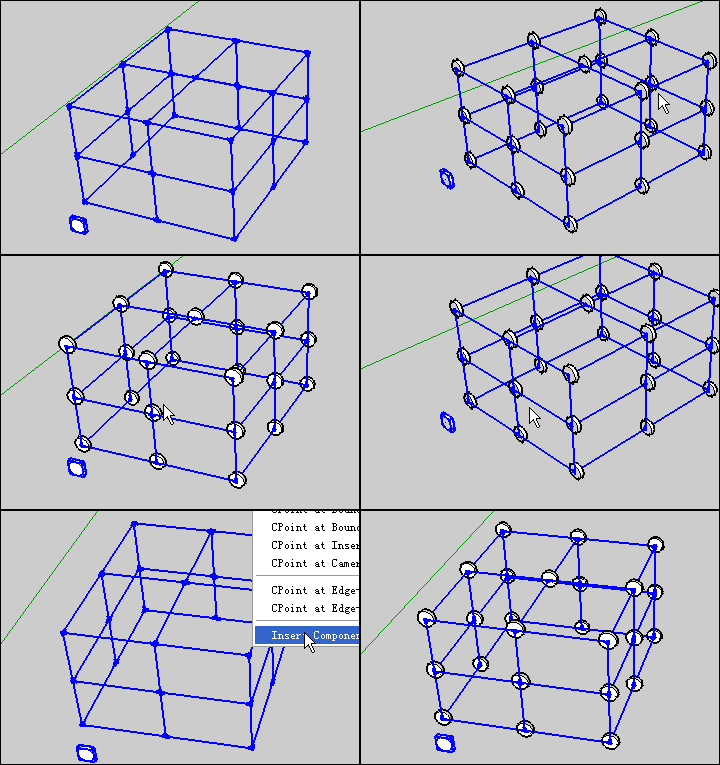
                        dian.gif

                        I come from China, is to learn

                        1 Reply Last reply
                        Reply Quote 0
                        • thomthomT
                          thomthom
                          last edited by

                          From that animation I don't see what the problem is. It seem to create CPoint where it should ... ❓ ❓

                          Thomas Thomassen — SketchUp Monkey & Coding addict
                          List of my plugins and link to the CookieWare fund

                          1 Reply Last reply
                          Reply Quote 0
                          • pilouP
                            pilou
                            last edited by

                            Hello Thomthom
                            I had given your wonderful plug Guide Tools as answer for this question 😎

                            Maybe you can add an option for give an orientation to the component ? (Insert Components at CPoints)
                            That will be very useful in a lot of cases! ☀

                            Frenchy Pilou
                            Is beautiful that please without concept!
                            My Little site :)

                            1 Reply Last reply
                            Reply Quote 0
                            • thomthomT
                              thomthom
                              last edited by

                              @unknownuser said:

                              Maybe you can add an option for give an orientation to the component ?:

                              Orientation is defined by the component axis. Or did you mean something else? Image example?

                              Thomas Thomassen — SketchUp Monkey & Coding addict
                              List of my plugins and link to the CookieWare fund

                              1 Reply Last reply
                              Reply Quote 0
                              • pilouP
                                pilou
                                last edited by

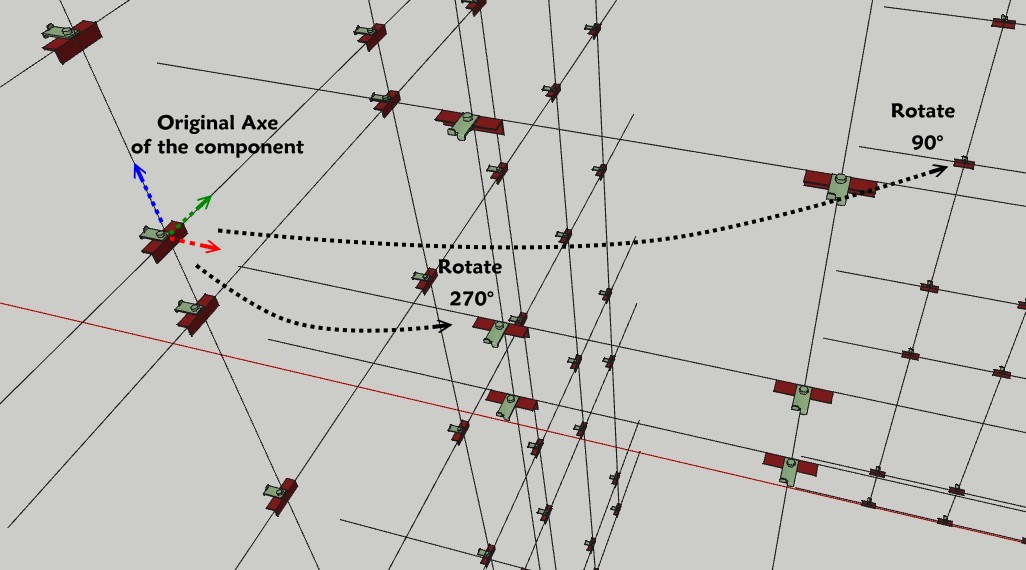
                                Assuming the original component has these axis and keep them
                                and of course that you make a different selection for each "plan" of Cpoints
                                (here 3 selections with call of the pluging at each time) the more easy to code 😉

                                The input box could be for a selection for the first result:
                                Insert Components at CPoints with
                                (No rotation so default parameters = 0°) 😄
                                Rotate Components on X = 0°
                                Rotate Components on Y = 0°
                                Rotate Components on Z = 0°

                                The input box could be for a selection for the second result:
                                Insert Components at CPoints with
                                Rotate Components on X = 0°
                                Rotate Components on Y = 0°
                                Rotate Components on Z = 270°

                                The input box could be for a selection for the third result:
                                Insert Components at CPoints with
                                Rotate Components on X = 0°
                                Rotate Components on Y = 0°
                                Rotate Components on Z = 90°

                                Seems useful no ? ☀
                                axes_thom.jpg

                                Frenchy Pilou
                                Is beautiful that please without concept!
                                My Little site :)

                                1 Reply Last reply
                                Reply Quote 0
                                • Z
                                  ZFRPS
                                  last edited by

                                  Thank you very much!
                                  your pluhins give me a lot of help!this plugin is great! wish more powerful!

                                  sketchup is bim

                                  1 Reply Last reply
                                  Reply Quote 0
                                  • S
                                    scott216
                                    last edited by

                                    Is there a way to add a guidepoint to the center of an exploded circle? I tired exploded arc and just circle tools, but neither of them worked on an exploded circle.

                                    1 Reply Last reply
                                    Reply Quote 0
                                    • thomthomT
                                      thomthom
                                      last edited by

                                      Circle or arc should not make a difference. Select two of the edges and it should work.

                                      Thomas Thomassen — SketchUp Monkey & Coding addict
                                      List of my plugins and link to the CookieWare fund

                                      1 Reply Last reply
                                      Reply Quote 0
                                      • cottyC
                                        cotty
                                        last edited by

                                        @scott216 said:

                                        Is there a way to add a guidepoint to the center of an exploded circle? I tired exploded arc and just circle tools, but neither of them worked on an exploded circle.

                                        Did you try exploded arc center point finder (Chris Fullmer)?

                                        my SketchUp gallery

                                        1 Reply Last reply
                                        Reply Quote 0
                                        • kuponoK
                                          kupono
                                          last edited by

                                          Guide_tools aren't working for me under SU Pro 2013. I deleted it and all the other TT_Lib related tools, then reinstalled all. Still not working.

                                          1 Reply Last reply
                                          Reply Quote 0
                                          • Dave RD
                                            Dave R
                                            last edited by

                                            It works for me with SU2013.

                                            You'll need to be more specific about what happens when you try to use it.

                                            Etaoin Shrdlu

                                            %

                                            (THERE'S NO PLACE LIKE)

                                            G28 X0.0 Y0.0 Z0.0

                                            M30

                                            %

                                            1 Reply Last reply
                                            Reply Quote 0

                                            Hello! It looks like you're interested in this conversation, but you don't have an account yet.

                                            Getting fed up of having to scroll through the same posts each visit? When you register for an account, you'll always come back to exactly where you were before, and choose to be notified of new replies (either via email, or push notification). You'll also be able to save bookmarks and upvote posts to show your appreciation to other community members.

                                            With your input, this post could be even better 💗

                                            Register Login
                                            • 1
                                            • 2
                                            • 3
                                            • 4
                                            • 5
                                            • 5 / 5
                                            • First post
                                              Last post
                                            Buy SketchPlus
                                            Buy SUbD
                                            Buy WrapR
                                            Buy eBook
                                            Buy Modelur
                                            Buy Vertex Tools
                                            Buy SketchCuisine
                                            Buy FormFonts

                                            Advertisement