sketchucation logo sketchucation
    • 登入
    Oops, your profile's looking a bit empty! To help us tailor your experience, please fill in key details like your SketchUp version, skill level, operating system, and more. Update and save your info on your profile page today!
    🔌 Easy Offset | Offset selected faces in SketchUp in positive and negative offsets. Download

    [Plugin] Solid Inspector

    已排程 已置頂 已鎖定 已移動 Plugins
    303 貼文 99 Posters 275.5k 瀏覽 98 Watching
    正在載入更多貼文
    • 從舊到新
    • 從新到舊
    • 最多點贊
    回覆
    • 在新貼文中回覆
    登入後回覆
    此主題已被刪除。只有擁有主題管理權限的使用者可以查看。
    • M 離線
      magazines
      最後由 編輯

      I was away for a couple of days, sorry for not keeping up. Just to say, I do not have TT_menu installed but do have bezier surface. My problem persists with solid inspector in su14 but not su15.
      It's a great plugin, I'm not totally ready to switch everything to Su15 yet, so if there is anything I can try just tell me.
      Thanks

      1 條回覆 最後回覆 回覆 引用 0
      • thomthomT 離線
        thomthom
        最後由 編輯

        Oh! ... I might have found the source of the problem. I wasn't seeing it because I'm working in a major update to Solid Inspector where this issues is fixed.

        I'll upload patches soon.

        Thomas Thomassen — SketchUp Monkey & Coding addict
        List of my plugins and link to the CookieWare fund

        1 條回覆 最後回覆 回覆 引用 0
        • thomthomT 離線
          thomthom
          最後由 編輯

          I've made an update of Solid Inspector that should ensure it loads properly. Live in the Plugin Store. Should be live on EW shortly.

          Thomas Thomassen — SketchUp Monkey & Coding addict
          List of my plugins and link to the CookieWare fund

          1 條回覆 最後回覆 回覆 引用 0
          • D 離線
            d12dozr
            最後由 編輯

            Thank you, TT. That seems to have solved it for me.

            3D Printing with SketchUp Book
            http://goo.gl/f7ooYh

            1 條回覆 最後回覆 回覆 引用 0
            • M 離線
              magazines
              最後由 編輯

              Yep, that did the trick! Thanks much.

              1 條回覆 最後回覆 回覆 引用 0
              • J 離線
                Jim
                最後由 編輯

                Here's my crazy idea for solid inspector.

                Solid Inspector is a Tool, so you need to have it active to see the problem geometry. But then when you try to fix it using the standard SketchUp tools, the Solid Tools indicators drop out.
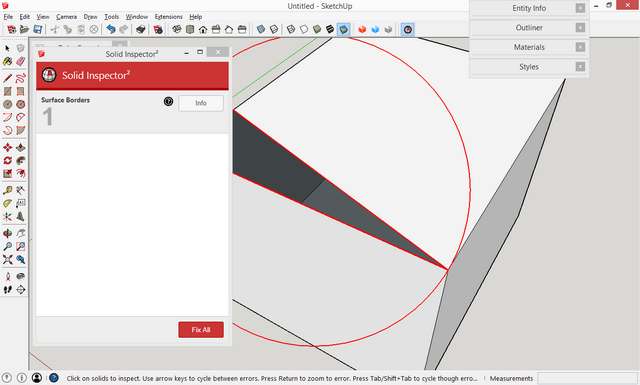
                2015-01_215.png

                So long ago I wrote a toy that cycled a material color. How about marking the problems with a animated material? Then when you drop into the normal SketchUp tools to repair the model, you can still see the problems?
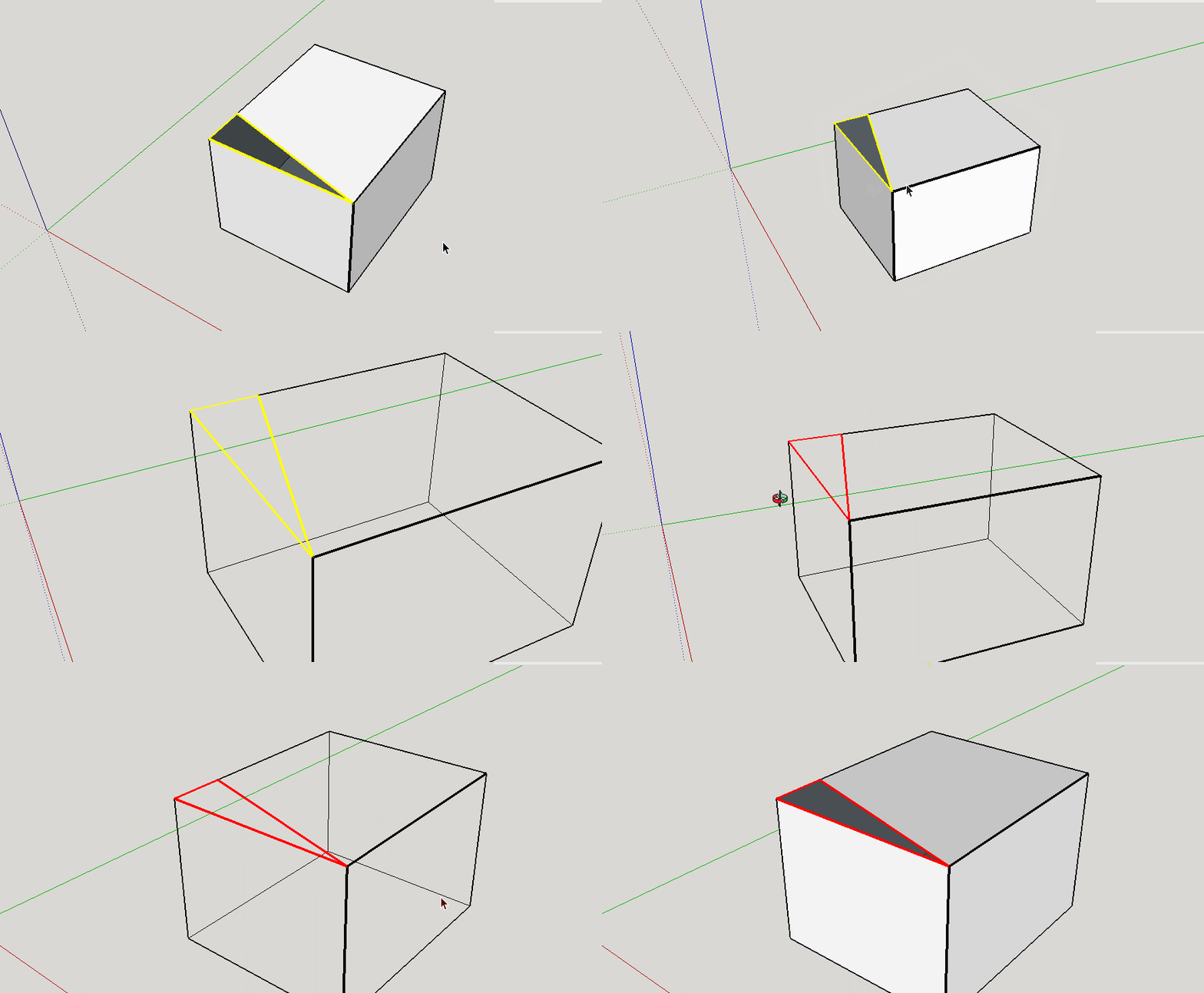
                matanim.gif

                Hi

                1 條回覆 最後回覆 回覆 引用 0
                • thomthomT 離線
                  thomthom
                  最後由 編輯

                  @jim said:

                  So long ago I wrote a toy that cycled a material color. How about marking the problems with a animated material? Then when you drop into the normal SketchUp tools to repair the model, you can still see the problems?

                  I like that idea - though it would flood the undo-stack, making it impossible to undo anything.
                  In the upcoming update to SI I've added a way to select the entities for the errors found. I could expand that to a function that will apply a material to all "error-entities". Won't have as string attention effect as flashing material, but at least it will make it visible and one can use Select by Material etc.

                  Thomas Thomassen — SketchUp Monkey & Coding addict
                  List of my plugins and link to the CookieWare fund

                  1 條回覆 最後回覆 回覆 引用 0
                  • jgbJ 離線
                    jgb
                    最後由 編輯

                    I like that idea!!!!!


                    jgb

                    1 條回覆 最後回覆 回覆 引用 0
                    • KrisidiousK 離線
                      Krisidious
                      最後由 編輯

                      had issues with this little group... could not get it to complete.

                      Group_109.skp

                      By: Kristoff Rand
                      Home DesignerUnique House Plans

                      1 條回覆 最後回覆 回覆 引用 0
                      • KrisidiousK 離線
                        Krisidious
                        最後由 編輯

                        Here's the "solution" I came to which still brings up a reversed face.

                        Group_110.skp

                        By: Kristoff Rand
                        Home DesignerUnique House Plans

                        1 條回覆 最後回覆 回覆 引用 0
                        • thomthomT 離線
                          thomthom
                          最後由 編輯

                          I have an update that is ready very soon. Both models was handled correctly with the update.

                          Thomas Thomassen — SketchUp Monkey & Coding addict
                          List of my plugins and link to the CookieWare fund

                          1 條回覆 最後回覆 回覆 引用 0
                          • KrisidiousK 離線
                            Krisidious
                            最後由 編輯

                            👍

                            By: Kristoff Rand
                            Home DesignerUnique House Plans

                            1 條回覆 最後回覆 回覆 引用 0
                            • thomthomT 離線
                              thomthom
                              最後由 編輯

                              Version 2.2.1 is now available in the Plugin Store and Extension Warehouse.

                              Thomas Thomassen — SketchUp Monkey & Coding addict
                              List of my plugins and link to the CookieWare fund

                              1 條回覆 最後回覆 回覆 引用 0
                              • KrisidiousK 離線
                                Krisidious
                                最後由 編輯

                                Used it on this group and it worked except when it came to the 11 reversed faces. it left 3 faces reversed and when I went to manually flip them I noticed there were 4 reversed faces and not just 3.


                                Group_111.skp

                                By: Kristoff Rand
                                Home DesignerUnique House Plans

                                1 條回覆 最後回覆 回覆 引用 0
                                • thomthomT 離線
                                  thomthom
                                  最後由 編輯

                                  @krisidious said:

                                  Used it on this group and it worked except when it came to the 11 reversed faces. it left 3 faces reversed and when I went to manually flip them I noticed there were 4 reversed faces and not just 3.

                                  When I opened that file I visually saw 4 reversed faces - and SI detected 4.
                                  Where are the 11 you talked about? Different model?

                                  Thomas Thomassen — SketchUp Monkey & Coding addict
                                  List of my plugins and link to the CookieWare fund

                                  1 條回覆 最後回覆 回覆 引用 0
                                  • KrisidiousK 離線
                                    Krisidious
                                    最後由 編輯

                                    Yes, this model is after I fixed the 11... I had already saved and didn't bother undoing back before it. sorry. I got 3 on mine with new version. strange. But I didn't restart SU after install? Not a big deal to me though.

                                    By: Kristoff Rand
                                    Home DesignerUnique House Plans

                                    1 條回覆 最後回覆 回覆 引用 0
                                    • thomthomT 離線
                                      thomthom
                                      最後由 編輯

                                      Can you reproduce it?
                                      If you didn't restart after updating you might be still have been using the old version.

                                      Thomas Thomassen — SketchUp Monkey & Coding addict
                                      List of my plugins and link to the CookieWare fund

                                      1 條回覆 最後回覆 回覆 引用 0
                                      • KrisidiousK 離線
                                        Krisidious
                                        最後由 編輯

                                        after restarting SU I get this... 😄

                                        group111.JPG

                                        By: Kristoff Rand
                                        Home DesignerUnique House Plans

                                        1 條回覆 最後回覆 回覆 引用 0
                                        • jgbJ 離線
                                          jgb
                                          最後由 編輯

                                          I don't know if something ain't right or what....

                                          I really like the improved SI over what I had been using in SU 8 for years.

                                          I'm now on SU-15.

                                          But I just noticed that the found errors are not highlighted with big red/yellow circles. Up until yesterday, that was not a problem, as SI fixed 100% of my errors. 👍 👍 👍

                                          But then there was a new error (can't remember exactly what) that only offered info and no fix. The problem was the line was so tiny, even in red, that it took me about an hour to find it in an object with over 4,000 lines. Only by zooming in and going over the whole thing twice (2 separate but identical errors) did I find the tiny red lines, deleting them, and all was OK.

                                          No red circle to guide me to the errors. Why?


                                          jgb

                                          1 條回覆 最後回覆 回覆 引用 0
                                          • thomthomT 離線
                                            thomthom
                                            最後由 編輯

                                            @jgb said:

                                            No red circle to guide me to the errors. Why?

                                            Did you not see a label in the viewport pointing to the edge?
                                            (got sample model or screenshot?)

                                            Thomas Thomassen — SketchUp Monkey & Coding addict
                                            List of my plugins and link to the CookieWare fund

                                            1 條回覆 最後回覆 回覆 引用 0
                                            • 1
                                            • 2
                                            • 6
                                            • 7
                                            • 8
                                            • 9
                                            • 10
                                            • 15
                                            • 16
                                            • 8 / 16
                                            • 第一個貼文
                                              最後的貼文
                                            Buy SketchPlus
                                            Buy SUbD
                                            Buy WrapR
                                            Buy eBook
                                            Buy Modelur
                                            Buy Vertex Tools
                                            Buy SketchCuisine
                                            Buy FormFonts

                                            Advertisement