sketchucation logo sketchucation
    • Login
    Oops, your profile's looking a bit empty! To help us tailor your experience, please fill in key details like your SketchUp version, skill level, operating system, and more. Update and save your info on your profile page today!
    ⚠️ Update | Sketchucation Tools 5.0.8 released with licensing improvements and bugfixes Download

    Geom::Transformation.new(pt, xaxis, yaxis)

    Scheduled Pinned Locked Moved Developers' Forum
    14 Posts 5 Posters 2.4k Views 5 Watching
    Loading More Posts
    • Oldest to Newest
    • Newest to Oldest
    • Most Votes
    Reply
    • Reply as topic
    Log in to reply
    This topic has been deleted. Only users with topic management privileges can see it.
    • Chris FullmerC
      Chris Fullmer
      last edited by

      it mgiht need to be .transformation = t. try that and I wonder if it will get more predictable results. Perhaps not the right ones, but maybe more predictable.

      Lately you've been tan, suspicious for the winter.
      All my Plugins I've written

      1 Reply Last reply
      Reply Quote 0
      • thomthomT
        thomthom
        last edited by

        yes - I tried that - but it isn't what I want though. as I want to modify the existing position, rotation and scaling - offsetting the position and rotation.

        So maybe I'm using the wrong method, but then I'd still like to understand what this one does and what it is intended for.

        Thomas Thomassen — SketchUp Monkey & Coding addict
        List of my plugins and link to the CookieWare fund

        1 Reply Last reply
        Reply Quote 0
        • C
          cjthompson
          last edited by

          I'm pretty sure it is the same as .axes, but it crosses the Z axis automatically.

          Can you tell us what you are trying to do in particular, or are you just curious?

          1 Reply Last reply
          Reply Quote 0
          • thomthomT
            thomthom
            last edited by

            I have a specific case - and I'm curious. I'll upload a case sample.

            Thomas Thomassen — SketchUp Monkey & Coding addict
            List of my plugins and link to the CookieWare fund

            1 Reply Last reply
            Reply Quote 0
            • M
              MartinRinehart
              last edited by

              Try Chapter 16. There is almost never a reason to use a Transformation directly. Just move, rotate and scale as you wish.

              Author, Edges to Rubies - The Complete SketchUp Tutorial at http://www.MartinRinehart.com/models/tutorial.

              1 Reply Last reply
              Reply Quote 0
              • thomthomT
                thomthom
                last edited by

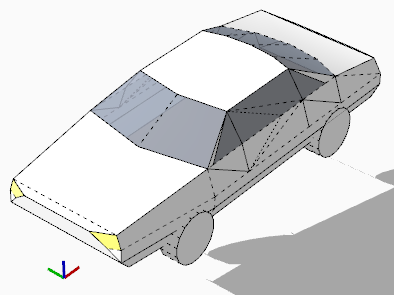
                transformation.png

                Here is what I tried: use this transformation type to place the car on the face under it.
                The data I have:

                • instance origin

                • instance x and y vector

                • new origin

                • new x and y vector

                Could this transformation be used for this?

                Thomas Thomassen — SketchUp Monkey & Coding addict
                List of my plugins and link to the CookieWare fund

                1 Reply Last reply
                Reply Quote 0
                • C
                  cjthompson
                  last edited by

                  If you don't care about scale, this should work fine, although it may flip the car upside down if the expected z axis does not correspond with the input axes:
                  instance.transformation = Geom::Transformation.new(newOrigin,newXAxis,newYaxis)

                  I would suggest using something like this (untested):

                  
                  trans = instance.transformation
                  scales = [trans.xaxis.length,trans.yaxis.length,trans.zaxis.length]
                  inputX.normalize!
                  inputY.normalize!
                  inputX = inputX * scales[0]
                  inputY = inputY * scales[1]
                  newTrans = Geom;;Transformation.axes(newOrigin,inputX,inputY,face.normal * scales[2])
                  instance.transformation = newTrans
                  
                  
                  1 Reply Last reply
                  Reply Quote 0
                  • thomthomT
                    thomthom
                    last edited by

                    @cjthompson said:

                    If you don't care about scale

                    I do. 😉

                    @cjthompson said:

                    although it may flip the car upside down if the expected z axis does not correspond with the input axes:

                    Yup - noticed this to.
                    😄

                    @cjthompson said:

                    I would suggest using something like this (untested):

                    
                    >     trans = instance.transformation
                    >     scales = [trans.xaxis.length,trans.yaxis.length,trans.zaxis.length]
                    >     inputX.normalize!
                    >     inputY.normalize!
                    >     inputX = inputX * scales[0]
                    >     inputY = inputY * scales[1]
                    >     newTrans = Geom;;Transformation.axes(newOrigin,inputX,inputY,face.normal * scales[2])
                    >     instance.transformation = newTrans
                    

                    Interesting. I was looking as the axes method, but I kept having problems with maintaining scaling.

                    Another thing: what if the component is skewed?

                    Thomas Thomassen — SketchUp Monkey & Coding addict
                    List of my plugins and link to the CookieWare fund

                    1 Reply Last reply
                    Reply Quote 0
                    • C
                      cjthompson
                      last edited by

                      Do you want the transformation to have the same properties as the original(skew, scale, etc.) in the final result, or are you asking how to prevent skewing?

                      1 Reply Last reply
                      Reply Quote 0
                      • thomthomT
                        thomthom
                        last edited by

                        No - I wondered if it preserved it.
                        I wanted to only move and rotate the object to a new plane. I wondered if this method would be an option as oppose to combining a translation and two rotation transformations.

                        Thomas Thomassen — SketchUp Monkey & Coding addict
                        List of my plugins and link to the CookieWare fund

                        1 Reply Last reply
                        Reply Quote 0
                        • C
                          cjthompson
                          last edited by

                          @thomthom said:

                          No - I wondered if it preserved it.
                          I wanted to only move and rotate the object to a new plane. I wondered if this method would be an option as oppose to combining a translation and two rotation transformations.

                          Well, first you have to determine which axis gets priority (because the angles between the axes in the original transformation may not be the same as the angles between the axes the user picked) then measure the angles between the prioritized axis and the other two, and apply the angles to the user axes (including face normal).

                          I'm pretty sure that doesn't make sense but I can't think of how else to describe it.
                          If you have any specific questions, I might be able to help a bit more.

                          1 Reply Last reply
                          Reply Quote 0

                          Hello! It looks like you're interested in this conversation, but you don't have an account yet.

                          Getting fed up of having to scroll through the same posts each visit? When you register for an account, you'll always come back to exactly where you were before, and choose to be notified of new replies (either via email, or push notification). You'll also be able to save bookmarks and upvote posts to show your appreciation to other community members.

                          With your input, this post could be even better 💗

                          Register Login
                          • 1 / 1
                          • First post
                            Last post
                          Buy SketchPlus
                          Buy SUbD
                          Buy WrapR
                          Buy eBook
                          Buy Modelur
                          Buy Vertex Tools
                          Buy SketchCuisine
                          Buy FormFonts

                          Advertisement