sketchucation logo sketchucation
    • 登入
    Oops, your profile's looking a bit empty! To help us tailor your experience, please fill in key details like your SketchUp version, skill level, operating system, and more. Update and save your info on your profile page today!
    🔌 Smart Spline | Fluid way to handle splines for furniture design and complex structures. Download

    [Plugin] Fix Reversed Face Materials

    已排程 已置頂 已鎖定 已移動 Plugins
    80 貼文 25 Posters 116.3k 瀏覽 25 Watching
    正在載入更多貼文
    • 從舊到新
    • 從新到舊
    • 最多點贊
    回覆
    • 在新貼文中回覆
    登入後回覆
    此主題已被刪除。只有擁有主題管理權限的使用者可以查看。
    • EarthMoverE 離線
      EarthMover
      最後由 編輯

      This works very well. Thanks TIG, it saved me a ton of time on a recent project where I inherited a model that was poorly built. 👍

      3D Artist at Clearstory 3D Imaging
      Guide Tool at Winning With Sketchup
      Content Creator at Skapeup

      1 條回覆 最後回覆 回覆 引用 0
      • pilouP 離線
        pilou
        最後由 編輯

        Maybe some little images for speed understand the concept ? 😄

        Frenchy Pilou
        Is beautiful that please without concept!
        My Little site :)

        1 條回覆 最後回覆 回覆 引用 0
        • TIGT 離線
          TIG Moderator
          最後由 編輯

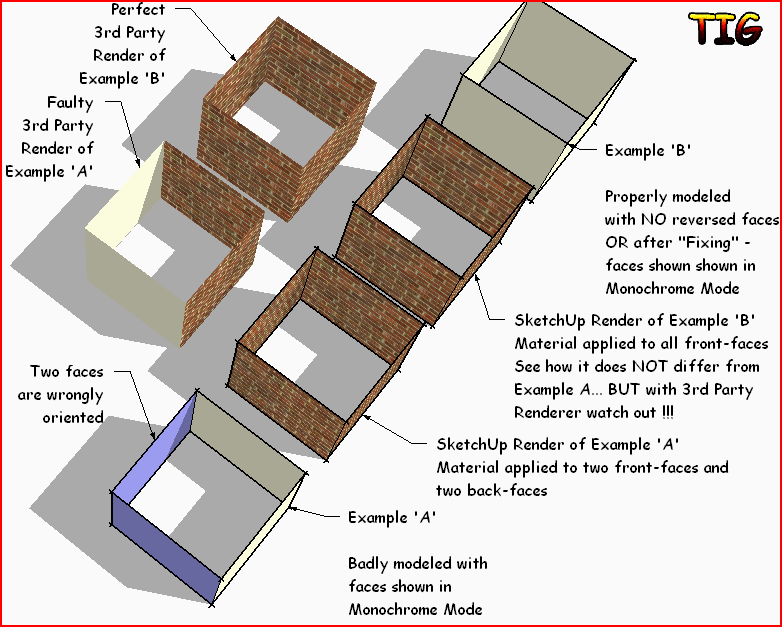
          Here's a simple exampleFixRFM.PNG

          TIG

          1 條回覆 最後回覆 回覆 引用 0
          • utilerU 離線
            utiler
            最後由 編輯

            Thanks TIG, clear as crystal now....

            Just Curious...

            1 條回覆 最後回覆 回覆 引用 0
            • pilouP 離線
              pilou
              最後由 編輯

              A black crystal 😄
              Faces are or are not well oriented 😄
              If they are false they must be reverse (material or not) 😲
              Then apply material 😄

              Maybe I miss something 💚

              Frenchy Pilou
              Is beautiful that please without concept!
              My Little site :)

              1 條回覆 最後回覆 回覆 引用 0
              • utilerU 離線
                utiler
                最後由 編輯

                @unknownuser said:

                A black crystal 😄
                Faces are or are not well oriented 😄
                If they are false they must be reverse (material or not) 😲
                Then apply material 😄

                Maybe I miss something 💚

                maybe you're just a little crazy my man..... 😉

                Just Curious...

                1 條回覆 最後回覆 回覆 引用 0
                • TIGT 離線
                  TIG Moderator
                  最後由 編輯

                  Pilou - There is no way of knowing if a particular face is 'the wrong way round'. Especially if an edge has more than two faces.
                  The built-in 'Reverse' & 'Orient' will consistently arrange faces that are 'manifold', BUT if you have applied materials to a back-face then that won't flip onto the front-face.
                  This tool simply finds all selected faces that have a back-material but no front-material - it then can assume you have modeled them 'wrongly' and it reverses the faces and flips the back-material so it becomes the front-material. keeping the UV-mapping intact etc. This is important when 3rd party applications render the image exactly as you've exported it - i.e. most of them do not render the 'back-faces' at all - rendering only the front-face materials - which in such cases will be the 'wrong' side of the face!
                  This might well often look like an 'orient' operation - in the image example all faces do end up correctly oriented too - BUT 'orient' alone would not sort out the wrongly applied materials, as this tool does.
                  The tool's 'forced' option is similar, but that works even if a selected face with aback-material that has a front-material, reversing the face and using the back-material on the front-face instead and defaulting the back-material - because it is more 'dangerous' its sphere of operation is more limited...

                  TIG

                  1 條回覆 最後回覆 回覆 引用 0
                  • pilouP 離線
                    pilou
                    最後由 編輯

                    @unknownuser said:

                    This tool simply finds all selected faces that have a back-material but no front-material

                    That the Knot 😄

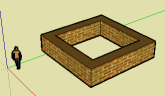
                    In your image example walls have not thick, does the plug works also with thick walls ?
                    I suppose yes but... 😄
                    wall.png

                    Frenchy Pilou
                    Is beautiful that please without concept!
                    My Little site :)

                    1 條回覆 最後回覆 回覆 引用 0
                    • TIGT 離線
                      TIG Moderator
                      最後由 編輯

                      The tool works for any faces - as long as they only have a material on the back and not the front.
                      It simply reverses the face whilst leaving the materials in the same 'location' [orientation].
                      With an 'un-fixed' face - flick between Textured Mode and Monochrome Mode to reveal faces that are 'wrongly' oriented but have their materials on the back so look OK in the SKP-render BUT will fail in the external-renderers.
                      With a face that's 'fixed' it looks the same in the SKP 'Texture Mode', but it will then render properly in renderers [the Monochrome Mode should then show all faces oriented the same]

                      TIG

                      1 條回覆 最後回覆 回覆 引用 0
                      • TIGT 離線
                        TIG Moderator
                        最後由 編輯

                        Here's v1.4 http://forums.sketchucation.com/viewtopic.php?p=264134#p264134
                        It has an additional Tool 'Reverse Faces and Materials' - this reverses faces keeping their materials with correct UV-mapping - effectively turning the form 'inside out': if it is 'brick' outside and 'wood' inside with the 'back-faces' oriented to the 'outside', then using the tool reverses the faces so that the back-faces are oriented to the 'inside', AND now the 'wood' material will be on the 'outside' and the 'brick' material will be on the 'inside' - UV-mapping will have been correctly reapplied.
                        For example I recently had an imported OBJ object that had all some objects with faces reversed ['blue' outwards] and so their materials were mapped [correctly] on their 'insides'. Simply 'reversing' the faces failed to keep the UV-mapping on the new face orientations [on 'smoothed' surfaces it's especially problematical] - but this tools now solves that problem.
                        The included lingvo files have all been updated to match the changes.

                        TIG

                        1 條回覆 最後回覆 回覆 引用 0
                        • P 離線
                          pmolsen
                          最後由 編輯

                          @tig said:

                          Note: Groups and Component-Instances that can have materials applied
                          directly onto them - then any faces within them that have the default-
                          material [front and/or back] will then appear to have that material applied
                          to them. In fact these faces within the Group/Definition will still have
                          the default-materials [front and/or back]. If you want to quickly remove
                          the appearance of this material on the back-faces within the group then
                          explode the group and immediately regroup the geometry - the group's
                          previous material will then be individually transfered to each face that
                          had the default-material. Now use this 'Delete Back-Materials' to delete
                          the unneeded back-material.

                          Excellent plugin! Exactly what I have been waiting for.

                          I think I must be missing something with your above comment though. As you say if a group or component is textured with a material without first opening the group or component, all untextured faces, including the back faces, appear to be painted with that texture.

                          To fix the problem there is no need to ungroup and regroup as stated above. Simply select the default texture (either from the materials window or by sampling an untextured front or back face) then paint the unopened group or model. All untextures faces go back to untextured the way they should be.

                          1 條回覆 最後回覆 回覆 引用 0
                          • P 離線
                            pmolsen
                            最後由 編輯

                            When I start Sketchup after installing the plugin I get the following error:

                            Error Loading File FixReversedFaceMaterials.rb
                            No such file to load -- deBabelizer.rb

                            I checked the zip file and there is no such file in it. I found a copy in the Lattice Maker plugin but it should really be in this one as well.

                            Also what is the Sketchup8 link that is installed in the subfolder?

                            1 條回覆 最後回覆 回覆 引用 0
                            • TIGT 離線
                              TIG Moderator
                              最後由 編輯

                              @pmolsen said:

                              When I start Sketchup after installing the plugin I get the following error:
                              Error Loading File FixReversedFaceMaterials.rb
                              No such file to load -- deBabelizer.rb
                              I checked the zip file and there is no such file in it.
                              I found a copy in the Lattice Maker plugin but it should really be in this one as well.
                              Also what is the Sketchup8 link that is installed in the subfolder?

                              Sorry about this... it is always the same 'deBableizer.rb' file... BUT I have now added it to the zip [ http://forums.sketchucation.com/viewtopic.php?p=264134#p264134 ] - it was packaged with the earlier zipped versions, but I missed it out of this one 😳
                              I also managed inadvertently to add a shortcut linking to my copy of SUp v8 [luckily it's all public now anyway] - but that's now gone too !!! I just had a really bad day 😒

                              TIG

                              1 條回覆 最後回覆 回覆 引用 0
                              • A 離線
                                Aerilius
                                最後由 編輯

                                No problem, that shortcut was not dangerous 😄
                                Many thanks, this is the best reversed-faces-plugin that I ever found 👍

                                I saw, maybe you'd like to have a german translation 😉
                                new german translation

                                1 條回覆 最後回覆 回覆 引用 0
                                • TIGT 離線
                                  TIG Moderator
                                  最後由 編輯

                                  Thanks for the DE lingvo.
                                  I'll include it in any future release - unless someone else wants to jump in with another version or comments...
                                  My German is not up to much [as you probably noticed!]... 😉

                                  TIG

                                  1 條回覆 最後回覆 回覆 引用 0
                                  • TIGT 離線
                                    TIG Moderator
                                    最後由 編輯

                                    Here's a tweaked German lingvo file [by Aerilius]...FixReversedFaceMaterialsDElingvo.zip

                                    TIG

                                    1 條回覆 最後回覆 回覆 引用 0
                                    • E 離線
                                      Ecuadorian
                                      最後由 編輯

                                      Thank you, TIG!

                                      This is a life saver... 👍

                                      -Miguel Lescano
                                      Subscribe to my house plans YouTube channel! (30K+ subs)

                                      1 條回覆 最後回覆 回覆 引用 0
                                      • TIGT 離線
                                        TIG Moderator
                                        最後由 編輯

                                        Here's another version of the DE lingvo [by User2012] - try them and choose which you want...FixReversedFaceMaterialsDE.zip

                                        TIG

                                        1 條回覆 最後回覆 回覆 引用 0
                                        • E 離線
                                          Eugenegoth
                                          最後由 編輯

                                          Thank you TIG!!!!

                                          1 條回覆 最後回覆 回覆 引用 0
                                          • Rich O BrienR 線上
                                            Rich O Brien Moderator
                                            最後由 編輯

                                            Any chance this could be compiled under a menu? 😕

                                            Download the free D'oh Book for SketchUp 📖

                                            1 條回覆 最後回覆 回覆 引用 0
                                            • 1
                                            • 2
                                            • 3
                                            • 4
                                            • 2 / 4
                                            • 第一個貼文
                                              最後的貼文
                                            Buy SketchPlus
                                            Buy SUbD
                                            Buy WrapR
                                            Buy eBook
                                            Buy Modelur
                                            Buy Vertex Tools
                                            Buy SketchCuisine
                                            Buy FormFonts

                                            Advertisement