sketchucation logo sketchucation
    • 登入
    Oops, your profile's looking a bit empty! To help us tailor your experience, please fill in key details like your SketchUp version, skill level, operating system, and more. Update and save your info on your profile page today!
    🔌 Smart Spline | Fluid way to handle splines for furniture design and complex structures. Download

    [Plugin][$] Vertex Tools

    已排程 已置頂 已鎖定 已移動 Plugins
    667 貼文 92 Posters 433.9k 瀏覽 92 Watching
    正在載入更多貼文
    • 從舊到新
    • 從新到舊
    • 最多點贊
    回覆
    • 在新貼文中回覆
    登入後回覆
    此主題已被刪除。只有擁有主題管理權限的使用者可以查看。
    • J 離線
      jzar_kobi
      最後由 編輯

      I can't seem to connect to the license server, yes I have unblocked with my firewall still no luck

      1 條回覆 最後回覆 回覆 引用 0
      • thomthomT 離線
        thomthom
        最後由 編輯

        @jzar_kobi said:

        I can't seem to connect to the license server, yes I have unblocked with my firewall still no luck

        What version of SketchUp are you using? What OS and OS version? (If Windows, what version of Internet Explorer is installed?)
        Is there any output in the Ruby Console if you open it before trying to activate?

        Thomas Thomassen — SketchUp Monkey & Coding addict
        List of my plugins and link to the CookieWare fund

        1 條回覆 最後回覆 回覆 引用 0
        • E 離線
          Einstein
          最後由 編輯

          Hi!
          Got a question.
          If I select some vertices using soft selection, it will also affect geometry that's not connected to selected vertices (see screenshot). Can I change this behavior so that soft selection will only affect connected vertices?

          You'd say "do grouping your geometry" but that's not the solution in my case.
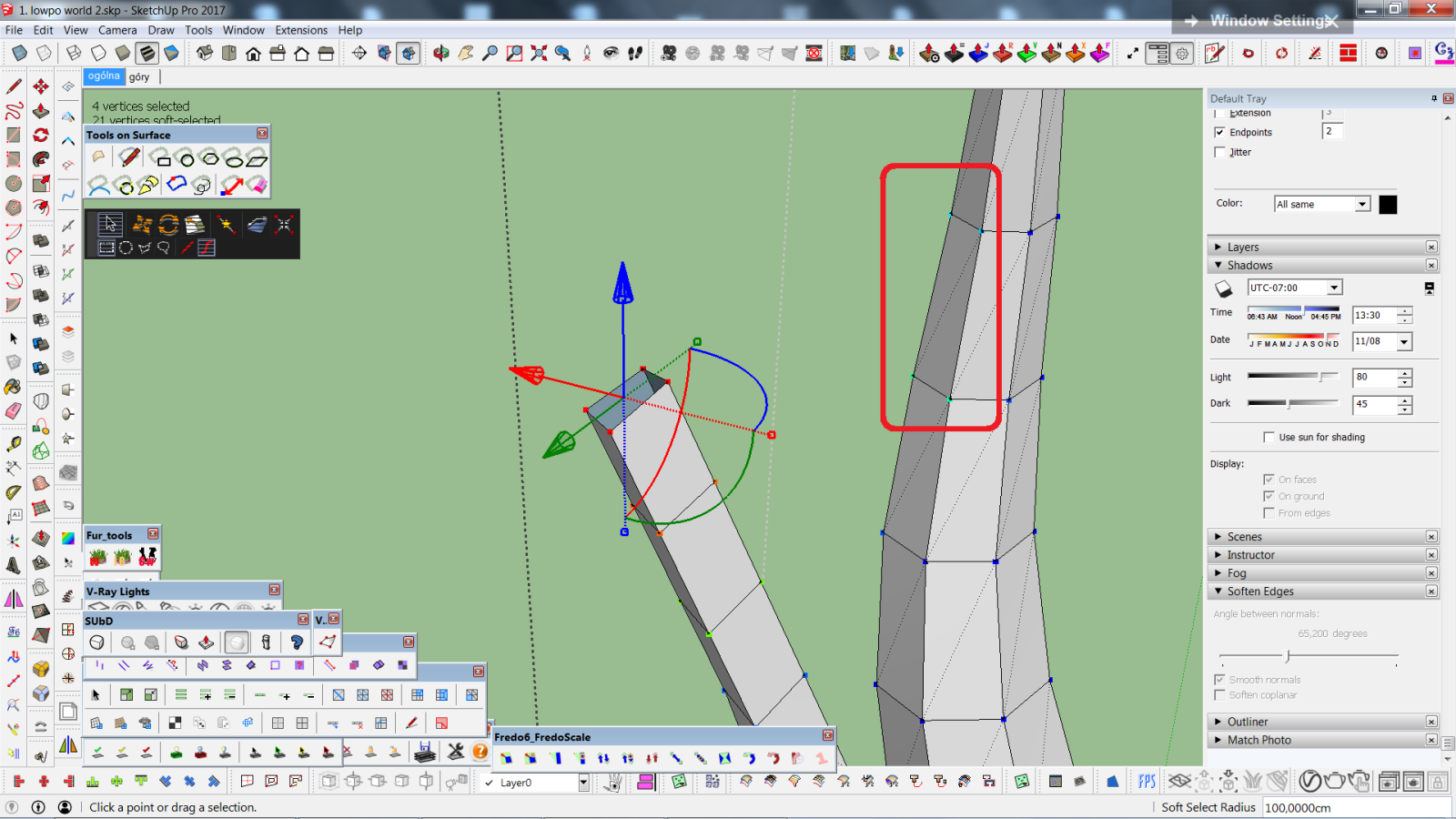

          czy da się, żeby smoothSel działał tylko na połączone vertexy.png

          1 條回覆 最後回覆 回覆 引用 0
          • E 離線
            Einstein
            最後由 編輯

            Hi!
            I'd have a suggestion for a small feature development.
            When doing soft selection we have two options of falloff - linear and cosine. What if we had more options, e.g. "pinchy" fallof shape, as illustrated below, on the left?

            I can see such idea was already posted years ago but I dared to bring it anyways, cuz it would be a fantastic improvement of already very good tool!
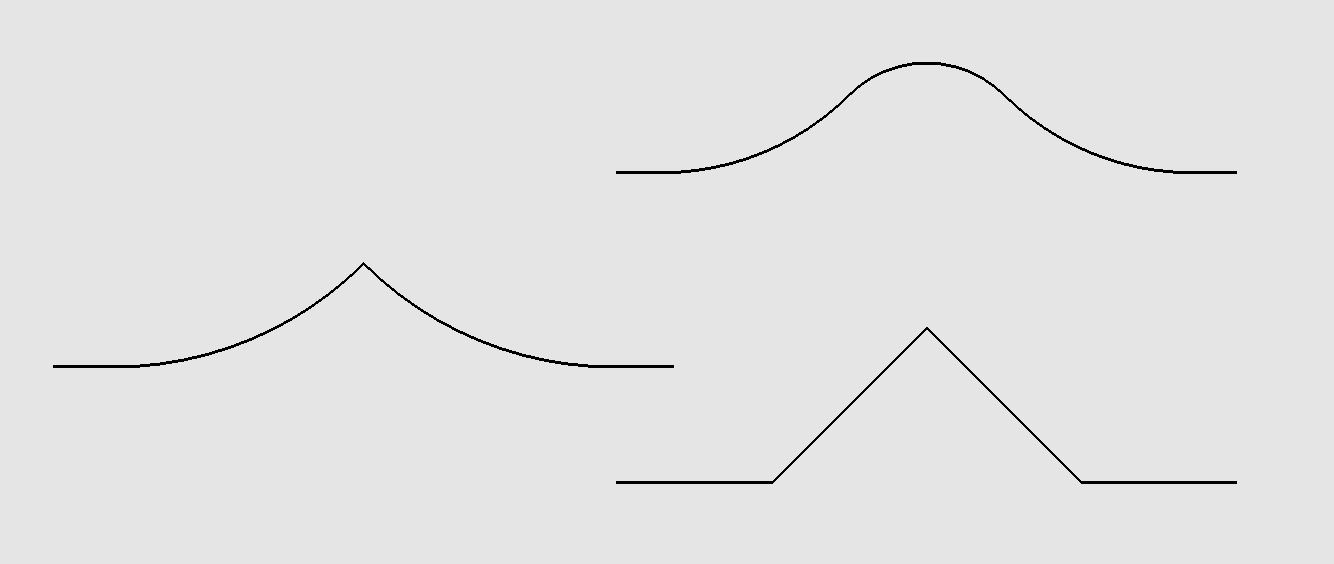

            pinchy falloff - pomysł na vertex tools.png

            1 條回覆 最後回覆 回覆 引用 0
            • thomthomT 離線
              thomthom
              最後由 編輯

              @einstein said:

              Hi!
              Got a question.
              If I select some vertices using soft selection, it will also affect geometry that's not connected to selected vertices (see screenshot). Can I change this behavior so that soft selection will only affect connected vertices?

              You'd say "do grouping your geometry" but that's not the solution in my case.

              Currently soft selection is computed by spatial distance only. I have it on my list to add a "by connected distance" option.

              Thomas Thomassen — SketchUp Monkey & Coding addict
              List of my plugins and link to the CookieWare fund

              1 條回覆 最後回覆 回覆 引用 0
              • thomthomT 離線
                thomthom
                最後由 編輯

                @einstein said:

                Hi!
                I'd have a suggestion for a small feature development.
                When doing soft selection we have two options of falloff - linear and cosine. What if we had more options, e.g. "pinchy" fallof shape, as illustrated below, on the left?

                I can see such idea was already posted years ago but I dared to bring it anyways, cuz it would be a fantastic improvement of already very good tool!

                Yes, that is also on the list. something like a pinch and bubble parameter like 3dsmax offer.

                Thomas Thomassen — SketchUp Monkey & Coding addict
                List of my plugins and link to the CookieWare fund

                1 條回覆 最後回覆 回覆 引用 0
                • R 離線
                  rv1974
                  最後由 編輯

                  I hope target weld is in that list as well

                  1 條回覆 最後回覆 回覆 引用 0
                  • thomthomT 離線
                    thomthom
                    最後由 編輯

                    @rv1974 said:

                    I hope target weld is in that list as well

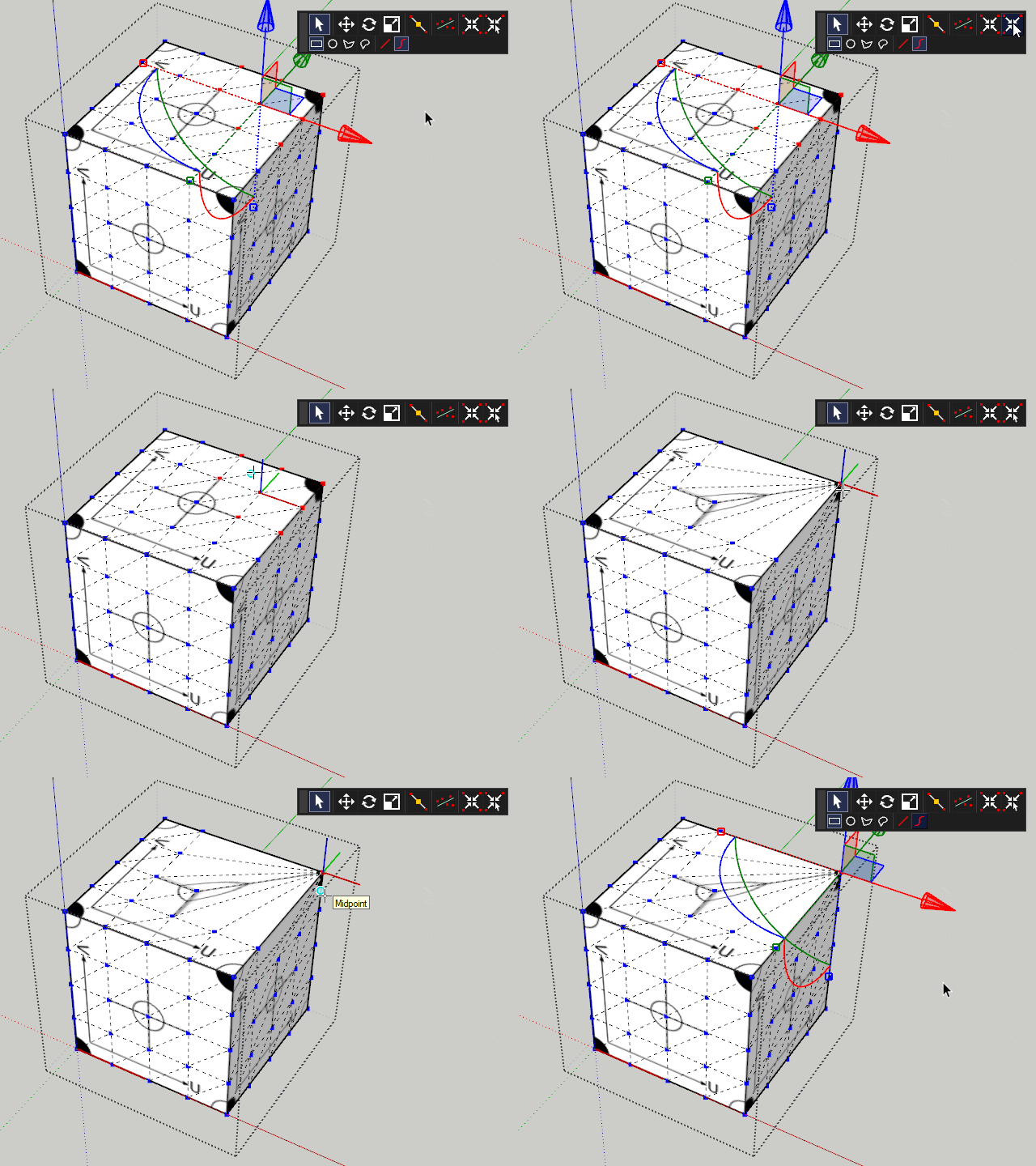
                    TargetWeld.gif

                    This ol' thing? 😛

                    Thomas Thomassen — SketchUp Monkey & Coding addict
                    List of my plugins and link to the CookieWare fund

                    1 條回覆 最後回覆 回覆 引用 0
                    • R 離線
                      rv1974
                      最後由 編輯

                      Oops.. I meant welding based distance threshhold

                      1 條回覆 最後回覆 回覆 引用 0
                      • thomthomT 離線
                        thomthom
                        最後由 編輯

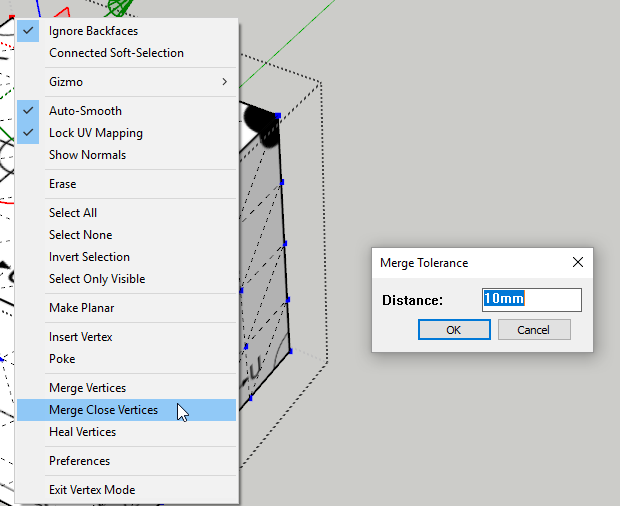
                        Like this?

                        2019-01-09_21h09_37.png

                        Thomas Thomassen — SketchUp Monkey & Coding addict
                        List of my plugins and link to the CookieWare fund

                        1 條回覆 最後回覆 回覆 引用 0
                        • R 離線
                          rv1974
                          最後由 編輯

                          Wow morning full of surprises.
                          Many thanks!
                          The only thing left to be clarified is when v2019 will be out 😄

                          1 條回覆 最後回覆 回覆 引用 0
                          • thomthomT 離線
                            thomthom
                            最後由 編輯

                            @rv1974 said:

                            The only thing left to be clarified is when v2019 will be out 😄

                            Good question. I'll make a post when I know myself. 😉

                            Thomas Thomassen — SketchUp Monkey & Coding addict
                            List of my plugins and link to the CookieWare fund

                            1 條回覆 最後回覆 回覆 引用 0
                            • thomthomT 離線
                              thomthom
                              最後由 編輯

                              @rv1974 said:

                              Wow morning full of surprises.

                              Btw, Merge Close Vertices is already included in v1: https://evilsoftwareempire.com/vertex-tools/manual/tools#merge_close_vertices

                              Thomas Thomassen — SketchUp Monkey & Coding addict
                              List of my plugins and link to the CookieWare fund

                              1 條回覆 最後回覆 回覆 引用 0
                              • R 離線
                                rv1974
                                最後由 編輯

                                @thomthom said:

                                @rv1974 said:

                                The only thing left to be clarified is when v2019 will be out 😄

                                Good question. I'll make a post when I know myself. 😉

                                If you sit by the river long enough, you will see ̶t̶h̶e̶ ̶b̶o̶d̶y̶ ̶o̶f̶ ̶y̶o̶u̶r̶ ̶e̶n̶e̶m̶y̶ ̶f̶l̶o̶a̶t̶ ̶b̶y̶ thomthom's post about v2019

                                1 條回覆 最後回覆 回覆 引用 0
                                • pbacotP 離線
                                  pbacot
                                  最後由 編輯

                                  Know thyself.

                                  MacOSX MojaveSketchUp Pro v19 Twilight v2 Thea v3 PowerCADD

                                  1 條回覆 最後回覆 回覆 引用 0
                                  • E 離線
                                    Einstein
                                    最後由 編輯

                                    Hi!
                                    I'd have another suggestion of upgrade. "Make Planar" tool would be more useful if we could specify the plane for selected vertices to be flattened to. For example, set the plane with two vectors, like TIG's Mirror does.

                                    1 條回覆 最後回覆 回覆 引用 0
                                    • BoxB 離線
                                      Box
                                      最後由 編輯

                                      @einstein said:

                                      Hi!
                                      I'd have another suggestion of upgrade. "Make Planar" tool would be more useful if we could specify the plane for selected vertices to be flattened to. For example, set the plane with two vectors, like TIG's Mirror does.

                                      Adjust the Gismo to the direction you want then Make Planer.

                                      1 條回覆 最後回覆 回覆 引用 0
                                      • thomthomT 離線
                                        thomthom
                                        最後由 編輯

                                        @einstein said:

                                        Hi!
                                        I'd have another suggestion of upgrade. "Make Planar" tool would be more useful if we could specify the plane for selected vertices to be flattened to. For example, set the plane with two vectors, like TIG's Mirror does.

                                        You can also scale to zero for the same effect in the model axis planes.

                                        Thomas Thomassen — SketchUp Monkey & Coding addict
                                        List of my plugins and link to the CookieWare fund

                                        1 條回覆 最後回覆 回覆 引用 0
                                        • E 離線
                                          Einstein
                                          最後由 編輯

                                          Wow, scaling to 0 😲 It is a game-changer I wished SketchUp had for a long time. And only now I realised FredoScale can do it as well.
                                          Curious how many more surprises are hidden in these little buttons 😄

                                          1 條回覆 最後回覆 回覆 引用 0
                                          • BoxB 離線
                                            Box
                                            最後由 編輯

                                            One of the most frustrating things about teaching is how much students don't learn. Which can be read as hear, see, retain, remember, bother to take in, have any interest in, or simply haven't been exposed to. Amongst others.
                                            Pretty much everything has already been asked, answered and argued over in these forums, much like the rest of the internet you never get to the end of it and there's not much that hasn't already gone before.

                                            1 條回覆 最後回覆 回覆 引用 0
                                            • 1
                                            • 2
                                            • 7
                                            • 8
                                            • 9
                                            • 10
                                            • 11
                                            • 33
                                            • 34
                                            • 9 / 34
                                            • 第一個貼文
                                              最後的貼文
                                            Buy SketchPlus
                                            Buy SUbD
                                            Buy WrapR
                                            Buy eBook
                                            Buy Modelur
                                            Buy Vertex Tools
                                            Buy SketchCuisine
                                            Buy FormFonts

                                            Advertisement