sketchucation logo sketchucation
    • Login
    Oops, your profile's looking a bit empty! To help us tailor your experience, please fill in key details like your SketchUp version, skill level, operating system, and more. Update and save your info on your profile page today!
    ⚠️ Important | Libfredo 15.6b introduces important bugfixes for Fredo's Extensions Update

    [Plugin]Group in Component

    Scheduled Pinned Locked Moved Plugins
    25 Posts 9 Posters 17.7k Views 9 Watching
    Loading More Posts
    • Oldest to Newest
    • Newest to Oldest
    • Most Votes
    Reply
    • Reply as topic
    Log in to reply
    This topic has been deleted. Only users with topic management privileges can see it.
    • Chris FullmerC Offline
      Chris Fullmer
      last edited by

      Any explanation what this most recent file is? Thanks!

      Lately you've been tan, suspicious for the winter.
      All my Plugins I've written

      1 Reply Last reply Reply Quote 0
      • thomthomT Offline
        thomthom
        last edited by

        From Google Translate:

        @unknownuser said:

        The script takes the group into components. The same group replaces one component.
        Here's an example file: look at the statistics

        Pech_SU5.zip
        (290.92 KiB) Not downloaded yet

        Consists of a group size of 756 kb, 155 groups
        Select all and apply the script.
        File size reduced to 500 kb

        PS: The script is not finished yet, it lacks precision, but rather did not not work.

        Thomas Thomassen — SketchUp Monkey & Coding addict
        List of my plugins and link to the CookieWare fund

        1 Reply Last reply Reply Quote 0
        • chriC Offline
          chri
          last edited by

          hi Sahi

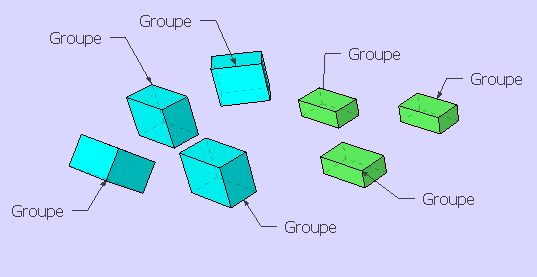
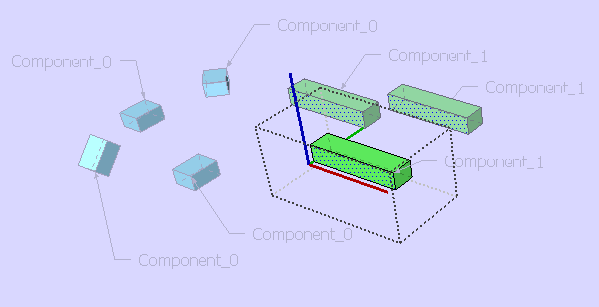
          you have done a great job 👍 👍

          seems to work with SKECHUP 8 and 2013
          Doesn't work with SKETCHUP 6 2014 2015

          Thanks again
          Chri


          BEFORE.png


          AFTER.png

          1 Reply Last reply Reply Quote 0
          • G Offline
            glro
            last edited by

            @chri said:

            hi Sahi

            you have done a great job 👍 👍

            seems to work with SKECHUP 8 and 2013
            Doesn't work with SKETCHUP 6 2014 2015

            Thanks again
            Chri

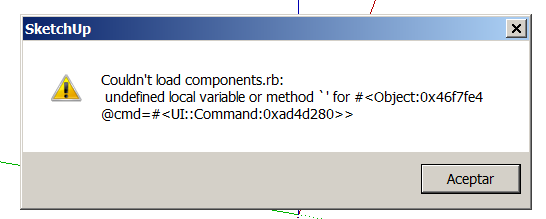
            i wish i could get the same result on my computer

            i only get an error message
            2014-12-25 13_50_09-Sans titre - SketchUp Pro.png

            1 Reply Last reply Reply Quote 0
            • chriC Offline
              chri
              last edited by

              Hi

              in english
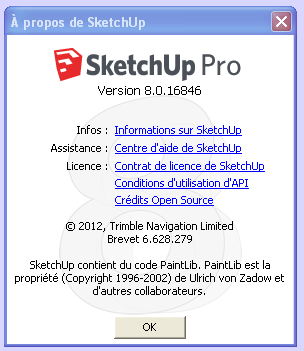
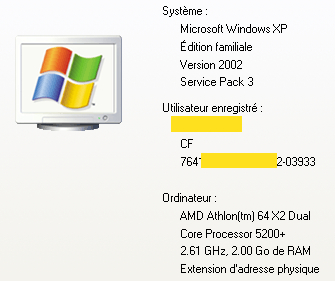
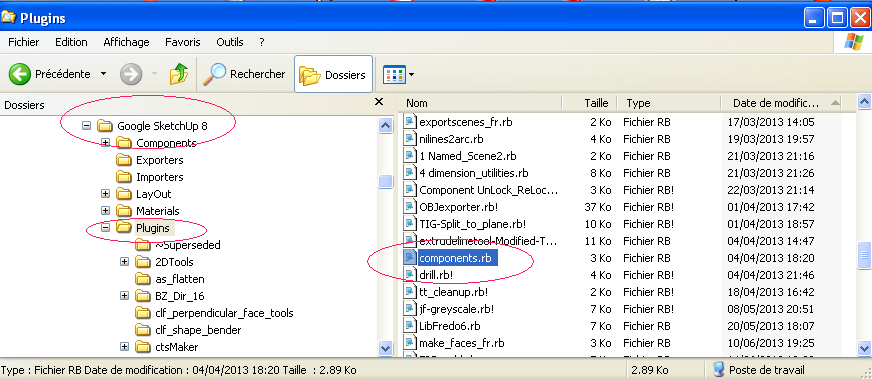
              You will find here , my system and my plugin file if it can help you .

              en français
              Bonjour
              Trouves ci-joint des images de ma configuration et le fichier ruby correspondant a notre sujet .

              Salutations

              Chri


              Image1.png


              Image2.png


              Image3.png


              components.rb

              1 Reply Last reply Reply Quote 0
              • G Offline
                glro
                last edited by

                @chri said:

                Hi

                in english
                You will find here , my system and my plugin file if it can help you .

                en français
                Bonjour
                Trouves ci-joint des images de ma configuration et le fichier ruby correspondant a notre sujet .

                Salutations

                Chri

                Thank you !

                i don't know why, but with the file you put in line, i don't get the error message

                it worked also on my computer: the plugin makes components out of groups if they are square boxes

                From the test i made, the square boxes must have been made into a group and then duplicated, before the plugin is used; otherwise the plugin doesn't recognize them as identical and makes 2 different components

                it could be possible maybe to make it work for other types of groups; by checking the distance between the corners of the bounding box, for example

                i shall try

                1 Reply Last reply Reply Quote 0
                • chriC Offline
                  chri
                  last edited by

                  Hi Giro

                  I agree with you , when you tell "... must have been made into a group and then duplicated, before the plugin is used "
                  ... but, i don't understand the meaning of "square boxes" and "other types of groups"

                  for me, there are only 2 possibilty; a group and non-grouped entities!

                  Sincerely
                  Chri


                  BEFORE 2.png


                  AFTER 2.png


                  BEFORE.skp


                  AFTER.skp

                  1 Reply Last reply Reply Quote 0
                  • G Offline
                    glro
                    last edited by

                    @chri said:

                    Hi Giro

                    I agree with you , when you tell "... must have been made into a group and then duplicated, before the plugin is used "
                    ... but, i don't understand the meaning of "square boxes" and "other types of groups"

                    for me, there are only 2 possibilty; a group and non-grouped entities!

                    Sincerely
                    Chri

                    you are right

                    i mixed the 2 condition, but only one is true: ""... must have been made into a group and then duplicated, before the plugin is used "

                    this is very limitating, though

                    I was planning to use this plugin on a sketchup model imported from solidworks using SIMLAB converter

                    SIMLAB converts components into groups, and i was planning to use "components.rb" to convert them back to components

                    it doesn't work; i shall try to tweak the plugin to make it work, using the position of the bounding box corners

                    1 Reply Last reply Reply Quote 0
                    • chriC Offline
                      chri
                      last edited by

                      Hi Giro

                      I have made a test with parts imported from STEP files ( using Moment Of Inspiration ).

                      I noticed that when parts contains a lots of entities , it's common to have small differences after import

                      Perhaps , you have this kind of problem with your file .
                      ... so , the plugin cound not recognize almost similar components .

                      Chri


                      Capture-1.png

                      1 Reply Last reply Reply Quote 0
                      • G Offline
                        glro
                        last edited by

                        @chri said:

                        Hi Giro

                        I have made a test with parts imported from STEP files ( using Moment Of Inspiration ).

                        I noticed that when parts contains a lots of entities , it's common to have small differences after import

                        Perhaps , you have this kind of problem with your file .
                        ... so , the plugin cound not recognize almost similar components .

                        Chri

                        interesting
                        It might be an explanation, but not in any case

                        i make a cube, grouping the faces
                        i duplicate it
                        i launch the plugin: they are both turned into instances of the same component

                        now, i explode them
                        turn again each one of them into a group
                        and finally i launch the plugin: they are turned into instances of 2 different components

                        1 Reply Last reply Reply Quote 0
                        • pilouP Offline
                          pilou
                          last edited by

                          Hello
                          Here a little trick that can help you 😉
                          The use of the cool plugin by Thomthom Components Comparison ☀

                          As there are not yet system of instancied Objects / Group in Moi3D for export to Sketchup we must make a little tricky thing! 😄

                          Say I have 2 Objects (here a cube duplicated) in Moi3D, I export them in 3DS Format
                          Import in Sketchup / Explode one time
                          so we have 2 Components triangulated named OBJ1, OBJ2
                          Launch the Components Comparaison and Bingo we have now instancied Components! 😎
                          Triangulation can be cleaned by plugin Clean Up by Thomthom again!

                          http://s6.postimg.org/ufh8iq7gx/2cubes_de_moi.jpg

                          Result will be the same with 2 different cubes but with the sames dimensions! 😉

                          http://s6.postimg.org/nqap2pm4x/tictic.jpg

                          With more complex objects there is something more to make!
                          That is failing or one object is rotated!
                          Failed ? 😮

                          http://s6.postimg.org/dhmtamngx/alas.jpg

                          Rotated ? 😮

                          http://s6.postimg.org/sevabn0pd/tuctuc.jpg

                          For resolve this you must just find the good tolerance inside the Thomthom pluging! Don't hesitate to push it! 🤓

                          Of course many object can be treated in the same time as Shown in this Chri's Video! 😉
                          The start Moi3D objects (fixed image)

                          http://moi3d.com/forum/get_attachment.php?webtag=MOI_FRANCAIS&hash=b954ab3d624002e07167f174de2e9b59&filename=test pluginThomthom.png

                          Process in Sketchup! 🤓

                          http://moi3d.com/forum/get_attachment.php?webtag=MOI_FRANCAIS&hash=a657bb9f79277833718ed8c62d36de7b&filename=test pluginThomthom.gif

                          Frenchy Pilou
                          Is beautiful that please without concept!
                          My Little site :)

                          1 Reply Last reply Reply Quote 0
                          • 1
                          • 2
                          • 1 / 2
                          • First post
                            Last post
                          Buy SketchPlus
                          Buy SUbD
                          Buy WrapR
                          Buy eBook
                          Buy Modelur
                          Buy Vertex Tools
                          Buy SketchCuisine
                          Buy FormFonts

                          Advertisement