sketchucation logo sketchucation
    • 登入
    Oops, your profile's looking a bit empty! To help us tailor your experience, please fill in key details like your SketchUp version, skill level, operating system, and more. Update and save your info on your profile page today!
    🔌 Smart Spline | Fluid way to handle splines for furniture design and complex structures. Download

    [Plugin] jf_get_dimensions.rb

    已排程 已置頂 已鎖定 已移動 Plugins
    61 貼文 21 Posters 70.9k 瀏覽 21 Watching
    正在載入更多貼文
    • 從舊到新
    • 從新到舊
    • 最多點贊
    回覆
    • 在新貼文中回覆
    登入後回覆
    此主題已被刪除。只有擁有主題管理權限的使用者可以查看。
    • Z 離線
      Zacchia
      最後由 編輯

      Hi
      Is there in the newest Version not a small Icon for that plugin? I have to go to Plugins/get dimensions?

      1 條回覆 最後回覆 回覆 引用 0
      • Dave RD 離線
        Dave R
        最後由 編輯

        No. There is no toolbar for this and it isn't needed. Just assign it a keyboard shortcut.

        Etaoin Shrdlu

        %

        (THERE'S NO PLACE LIKE)

        G28 X0.0 Y0.0 Z0.0

        M30

        %

        1 條回覆 最後回覆 回覆 引用 0
        • Z 離線
          Zacchia
          最後由 編輯

          Thanks for Feedback. Previous Version had a Icon and i liked it but... Btw. many thanks for it!!

          1 條回覆 最後回覆 回覆 引用 0
          • Dave RD 離線
            Dave R
            最後由 編輯

            I tested the plugin before it was released. Don't remember it having a toolbar. Have always had a keyboard shortcut set up for it. Jim's original post from 2010 doesn't mention a toolbar button.

            Etaoin Shrdlu

            %

            (THERE'S NO PLACE LIKE)

            G28 X0.0 Y0.0 Z0.0

            M30

            %

            1 條回覆 最後回覆 回覆 引用 0
            • Z 離線
              Zacchia
              最後由 編輯

              @dave r said:

              Have always had a keyboard shortcut set up for it. Jim's original post from 2010 doesn't mention a toolbar button.

              It had before... How do I set a keyvboard shortcut? Sorry for not knowing 😳

              1 條回覆 最後回覆 回覆 引用 0
              • Dave RD 離線
                Dave R
                最後由 編輯

                Go to Preferences>Shortcuts. Search for Plugins/Get Dimensions. Add the keyboard shortcut and click on the +.

                Please complete your profile.

                Etaoin Shrdlu

                %

                (THERE'S NO PLACE LIKE)

                G28 X0.0 Y0.0 Z0.0

                M30

                %

                1 條回覆 最後回覆 回覆 引用 0
                • Z 離線
                  Zacchia
                  最後由 編輯

                  Many thanks!!

                  1 條回覆 最後回覆 回覆 引用 0
                  • Z 離線
                    Zacchia
                    最後由 編輯

                    About the Icon: I found out that I muddle up the get dimensions plugin with the resizer plugin from Sahi... this one has Icon...

                    1 條回覆 最後回覆 回覆 引用 0
                    • B 離線
                      bleiente
                      最後由 編輯

                      @ll: wow ... nice features, but in the old get_dimensions.rb by 'CptanPanic' its possible to get the area in m² and the volume m³.

                      area = dims[2].to_m * dims[1].to_m volume = dims[2].to_m * dims[1].to_m * dims[0].to_m

                      does anyone put that feature in rb-scripts here?

                      sorry for the bad english.

                      thx so far and best regards
                      a.

                      1 條回覆 最後回覆 回覆 引用 0
                      • B 離線
                        Boiseux
                        最後由 編輯

                        Original plugin from first post works just fine for me !

                        Very, very usefull to rapidly check if everything's OK after resizing, fredoscale, or yust quickly see the dimensions of a particular piece of "wood".

                        Thanks so much !

                        1 條回覆 最後回覆 回覆 引用 0
                        • TIGT 離線
                          TIG Moderator
                          最後由 編輯

                          @boiseux said:

                          Original plugin from first post works just fine for me !

                          Very, very usefull to rapidly check if everything's OK after resizing, fredoscale, or yust quickly see the dimensions of a particular piece of "wood".

                          Thanks so much !
                          It has an entry in the PluginStore http://sketchucation.com/pluginstore?pln=jf_get_dimensions
                          So you can get it as an RBZ archive for auto-installation.
                          Manually installing RB files can be risky.
                          Also note that this script is five years old and much has changed in SketchUp since then - however, simple well written older scripts like this can often work across many versions...
                          Almost all scripts are now available in RBZ format making installation less fraught if you have >= v8M2...

                          TIG

                          1 條回覆 最後回覆 回覆 引用 0
                          • M 離線
                            moabie
                            最後由 編輯

                            Is it possible to rewrite the plugin to make it installable from sketchup plugin center?
                            Is it possible to make it look different - more modern, not as ugly popup window,
                            for example: show in window dimensions (as we made height depth lenght measurement tool) and make the plugin 'active' or 'not active' so that every model i click shows its dimensions?
                            Anyway, great tool, grats!

                            1 條回覆 最後回覆 回覆 引用 0
                            • Dave RD 離線
                              Dave R
                              最後由 編輯

                              It's already available in the Sketchucation Plugin Store. What more do you need? 😒

                              Get the SCF Plugin Store extension and use it to install this plugin or just download the .rbz file and use Install Extension.

                              Etaoin Shrdlu

                              %

                              (THERE'S NO PLACE LIKE)

                              G28 X0.0 Y0.0 Z0.0

                              M30

                              %

                              1 條回覆 最後回覆 回覆 引用 0
                              • R 離線
                                ritchey
                                最後由 編輯

                                This is the best extension ever. Thumbs up thousand times.

                                1 條回覆 最後回覆 回覆 引用 0
                                • Y 離線
                                  yossku
                                  最後由 編輯

                                  Thank you very much! Extremely helpful plugin! 😄

                                  1 條回覆 最後回覆 回覆 引用 0
                                  • P 離線
                                    pipinek
                                    最後由 編輯

                                    @dedmin said:

                                    Here is a new version that displays the dimensions on the status bar
                                    [attachment=1:2up1m3b2]<!-- ia1 -->Screen.png<!-- ia1 -->[/attachment:2up1m3b2]

                                    Made by a russian guy called 'newsposting'
                                    [attachment=0:2up1m3b2]<!-- ia0 -->GetDimensions.rb<!-- ia0 -->[/attachment:2up1m3b2]

                                    Greetings.

                                    Alas it does not work with SU 2017 as far as I experience.
                                    Should it be any equivalent or a version of that plugin for 2017 release?

                                    Thank t=you in advance

                                    1 條回覆 最後回覆 回覆 引用 0
                                    • Dave RD 離線
                                      Dave R
                                      最後由 編輯

                                      @pipinek said:

                                      Alas it does not work with SU 2017 as far as I experience.
                                      Should it be any equivalent or a version of that plugin for 2017 release?

                                      Thank t=you in advance

                                      What do you mean it doesn't work? I've been using Jim's Get Dimensions all along and it works just fine for me.

                                      In fact, here's an example I made just now with SketchUp 2017.
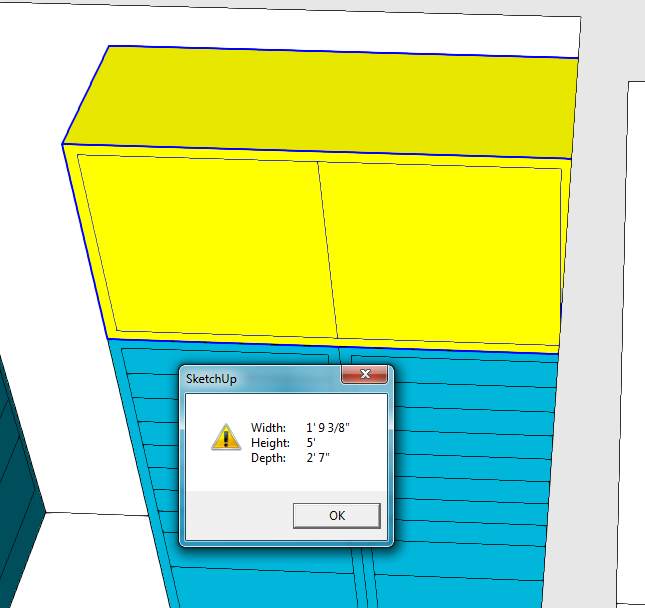
                                      Screenshot - 3_16_2017 , 9_44_41 AM.png

                                      Etaoin Shrdlu

                                      %

                                      (THERE'S NO PLACE LIKE)

                                      G28 X0.0 Y0.0 Z0.0

                                      M30

                                      %

                                      1 條回覆 最後回覆 回覆 引用 0
                                      • L 離線
                                        Laurenceau
                                        最後由 編輯

                                        it doesn't work with 2018 version
                                        plugin .rb instead of .rbz

                                        1 條回覆 最後回覆 回覆 引用 0
                                        • Dave RD 離線
                                          Dave R
                                          最後由 編輯

                                          @laurenceau said:

                                          it doesn't work with 2018 version
                                          plugin .rb instead of .rbz

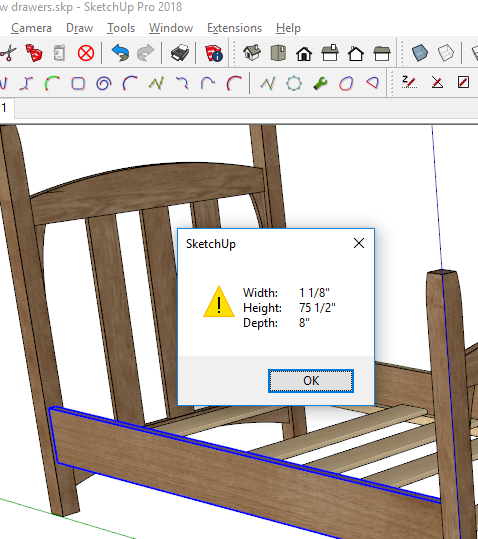
                                          It works just fine in SketchUp 2018.
                                          Screenshot - 12_5_2017 , 4_11_42 AM.png

                                          You can either install the RB file manually or get the RBZ version here and use Install Extension or better, install the Sketchucation Extension Store tool and use it to automatically install the plugins and extensions host here on Sketchucation.

                                          Etaoin Shrdlu

                                          %

                                          (THERE'S NO PLACE LIKE)

                                          G28 X0.0 Y0.0 Z0.0

                                          M30

                                          %

                                          1 條回覆 最後回覆 回覆 引用 0
                                          • dereiD 離線
                                            derei
                                            最後由 編輯

                                            @dave r said:

                                            @laurenceau said:

                                            it doesn't work with 2018 version
                                            plugin .rb instead of .rbz

                                            It works just fine in SketchUp 2018.
                                            [attachment=0:25dij2zt]<!-- ia0 -->Screenshot - 12_5_2017 , 4_11_42 AM.png<!-- ia0 -->[/attachment:25dij2zt]

                                            You can either install the RB file manually or get the RBZ version here and use Install Extension or better, install the Sketchucation Extension Store tool and use it to automatically install the plugins and extensions host here on Sketchucation.

                                            Can't seem to find the plugin in Extension Store... is still available, or was removed?

                                            DESIGNER AND ARTIST [DEREI.UK](http://derei.uk/l)

                                            1 條回覆 最後回覆 回覆 引用 0
                                            • 1
                                            • 2
                                            • 3
                                            • 4
                                            • 3 / 4
                                            • 第一個貼文
                                              最後的貼文
                                            Buy SketchPlus
                                            Buy SUbD
                                            Buy WrapR
                                            Buy eBook
                                            Buy Modelur
                                            Buy Vertex Tools
                                            Buy SketchCuisine
                                            Buy FormFonts

                                            Advertisement