[Plugin][$] Curviloft 2.0a - 31 Mar 24 (Loft & Skinning)


-
No errors to report. I just get the dialog at the bottom to pick the u direction.

Do hidden lines need to be on? -
Installed in on mac book pro mac os 10.6.8 and have this error.
Error Loading File __loader.rb
uninitialized constant TraductorError Loading File bootstrap_Curviloft.rb
uninitialized constant Curviloft::T6Error Loading File CurviloftAlgo.rb
uninitialized constant Curviloft::T6Error Loading File CurviloftCurveMover.rb
uninitialized constant Curviloft::T6Error Loading File CurviloftPalette.rb
uninitialized constant Curviloft::T6Error Loading File CurviloftTool.rb
uninitialized constant Curviloft::T6 -
Sepo, is it possible that when you installed the plugin that you put the contents of the folder loose into the Plugins folder? The files listed in your error message should be in a folder called CURVILOFT_Dir_12 inside the Plugins folder.
-
@lapx said:
No errors to report. I just get the dialog at the bottom to pick the u direction.
Do hidden lines need to be on?That might be in order for the tool to be able to pick the edges...
-
@dave r said:
Sepo, is it possible that when you installed the plugin that you put the contents of the folder loose into the Plugins folder? The files listed in your error message should be in a folder called CURVILOFT_Dir_12 inside the Plugins folder.
 thanks...
 -
Was that the problem?
-
I'm still not able to get the UV tool to work after lofting the curves. Maybe these questions should be posted at the UVtoolkit plugin forum

-
This some how happened in a random instance. I need to know how to stop it from happening again
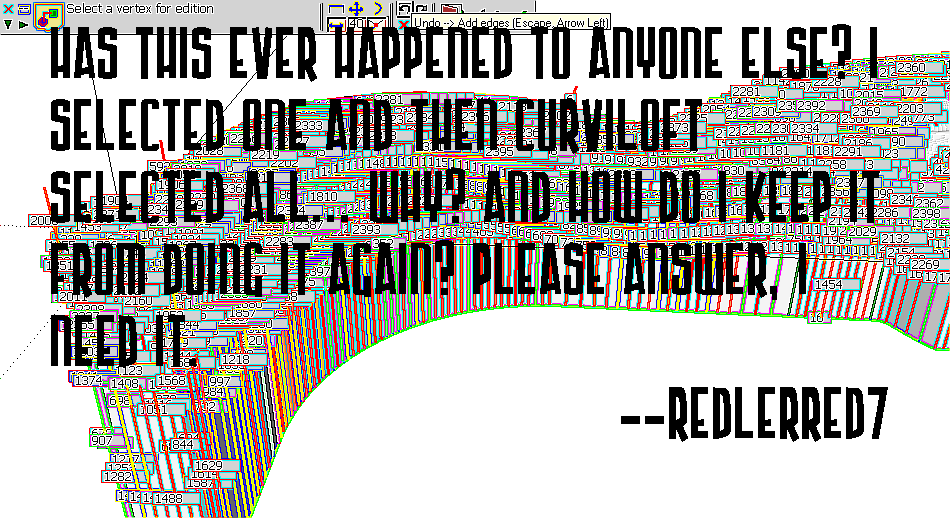
-
@lapx said:
I'm still not able to get the UV tool to work after lofting the curves. Maybe these questions should be posted at the UVtoolkit plugin forum
UV Toolkit? Not QuadFace Tools? (but yea - better post in the thread related to the plugin in question.)
-
@dave r said:
Was that the problem?
Yes... I did not read the footprint...I presumed it was the content of the zipped folder which usually is.
Thanks again. -
@redlerred7 said:
This some how happened in a random instance. I need to know how to stop it from happening again
Do not Double click when you select an edge (otherwise, it extends to all). Also check if the 'Extend to all' option is not set in the button palette.
Fredo
-
@unknownuser said:
@redlerred7 said:
This some how happened in a random instance. I need to know how to stop it from happening again
Do not Double click when you select an edge (otherwise, it extends to all). Also check if the 'Extend to all' option is not set in the button palette.
Fredo
I left click once.
Perhaps it was mouse lag or something. It's not happening now anyway -
this is what i've been looking for.
thank you very much for your efforts.
drawing tent wont be impossible anymore.
for newbie like me, this is a miracle.

-
 thanx,,, its work i love u all
 -
First off, THANK YOU. This is my favorite plugin ever. Awesome stuff.
I have a question though. I have skinned a surface, creating a compound curve.
I decided I wanted to "trim" the edge of the curve without starting over. To do this I moved away from the surface, used curviloft to create a second curved surface perpendicular to the original surface, and then moved it to intersect the original surface where I wanted to clip it.
I then highlighted both surfaces and performed an "intersect with selected."
A line showed up indicating that the intersection made sense to SU, but when I started trying to delete the portion I didn't want anymore the the surface clearly hadn't been parted at the intersection. The skin was being deleted on both sides of the line.
I've tried this several different ways, always with the same result.
Thoughts? Help?
Because this may be hard to visualize, I've attached a demo file. Basically I want to cut the layer called "target" using the layer called "knife."
I haven't done the intersections or anything yet because I wanted to give a pristine look at where I'm starting.
Thanks!
-Ben
-
Youi need to put your knife inside that component. The intersection lines are always created in the editing context you are in so if you do the intersection outside, it won't affect geometry inside.
Triple click on your knife and press Ctl+X to cut it onto the clipboard. The edit the component and under the Edit menu, find an item called "Paste in place". Now intersect.
-
AWESOME.
Thanks.
-
Hi...Can someone PLEASE help me?!?!?! I can't get a large number of plugins to work on my work PC for some reason. I've installed them all on my home PC without any problems, but i just can't install anything smoothly on my work PC. If they do manage to install, the icons are invisible in SKB (which isn't a major problem). I really just want to get the Curviloft tools on my PC at this stage. I've tried installing the plugins on SKB 6, 7, 7 pro and 8 and not one of them was successful?!?!?! I have Fredo 4.2 and all of the latest (as well as the old) plugins, but none of them work...and I've uninstalled and re installed SKB several times, i've turned on all extensions in the preferences dialog box, i've installed everything into the tools folder as well just in case...i have actually tried everything to my knowledge. Has someone had the same problems and figured it out?! Any help will be greatly appreciated.
Thanks,
Cole
-
Well, first You should clean up the Tools folder by removing the files you installed there. Next, make and post a screenshot of the Plugins folder so we can see how your plugins are installed.
-
@gaieus said:
Youi need to put your knife inside that component. The intersection lines are always created in the editing context you are in so if you do the intersection outside, it won't affect geometry inside.
Triple click on your knife and press Ctl+X to cut it onto the clipboard. The edit the component and under the Edit menu, find an item called "Paste in place". Now intersect.
Hi Gaieus. I was wondering if you had any tips on my problem posted below. I'm desperate to get this plugin loaded at the moment and can't get anything to work?!?!






Advertisement