sketchucation logo sketchucation
    • 登入
    Oops, your profile's looking a bit empty! To help us tailor your experience, please fill in key details like your SketchUp version, skill level, operating system, and more. Update and save your info on your profile page today!
    🔌 Smart Spline | Fluid way to handle splines for furniture design and complex structures. Download

    When I zoom in, model gets cut off

    已排程 已置頂 已鎖定 已移動 SketchUp Discussions
    sketchup
    36 貼文 19 Posters 59.7k 瀏覽 19 Watching
    正在載入更多貼文
    • 從舊到新
    • 從新到舊
    • 最多點贊
    回覆
    • 在新貼文中回覆
    登入後回覆
    此主題已被刪除。只有擁有主題管理權限的使用者可以查看。
    • Z 離線
      zackya07
      最後由 編輯

      the easiest way is to open a new sketch up file and copy paste your work. 😄

      1 條回覆 最後回覆 回覆 引用 0
      • jgbJ 離線
        jgb
        最後由 編輯

        @zackya07 said:

        the easiest way is to open a new sketch up file and copy paste your work. 😄

        The only reason this works is because the original drawing extents, if large, affect the zoom and near field clipping threshold.

        Simply turning off perspective when zooming in close prevents near field clipping.
        Turn it on again when backing out. Just a mouse-click.

        Far easier than opening a new SU window, copying and pasting, then having to re-clip and export back the edited version to the original model.


        jgb

        1 條回覆 最後回覆 回覆 引用 0
        • H 離線
          haleh67
          最後由 編輯

          @twoodby said:

          I found this thread because I had the same problem. Here's the solution that I found:

          Under the Camera tab, select the "Perspective" option. The clipping occurs when you are in "Parallel Projection"

          thank youuuuuuuuuuuuuuuuuuuu my friend 👍 👍 😄

          1 條回覆 最後回覆 回覆 引用 0
          • A 離線
            ajgraphics
            最後由 編輯

            Hello Everyone.

            I'm posting to this thread, Why, Yes you guessed it. I am having or was having this same issue. I read through all of your comments and of course, tried them all. I believe someone mentioned about the perspective which works for a few times. Then someone mentioned that an imported component may be the issue. Well, I found that the imported component was the main issue. It seems that particular component did not work well with perspective turned on. Once I deleted that component drawing worked fine.

            1 條回覆 最後回覆 回覆 引用 0
            • S 離線
              slbaumgartner
              最後由 編輯

              If a component has geometry that is very large or is positioned far from the model origin, it will aggravate clipping issues. Always try a component in an empty file to see whether it has such issues (and also if it is excessively detailed for your needs, as that will bloat the model and hurt performance) before importing it into your real model.

              1 條回覆 最後回覆 回覆 引用 0
              • Keith3201K 離線
                Keith3201
                最後由 編輯

                Why is it not possible to specify the camera clipping that you want like in Blender? In Blender, you are able to change the clipping by distance in your view.

                1 條回覆 最後回覆 回覆 引用 0
                • Dave RD 離線
                  Dave R
                  最後由 編輯

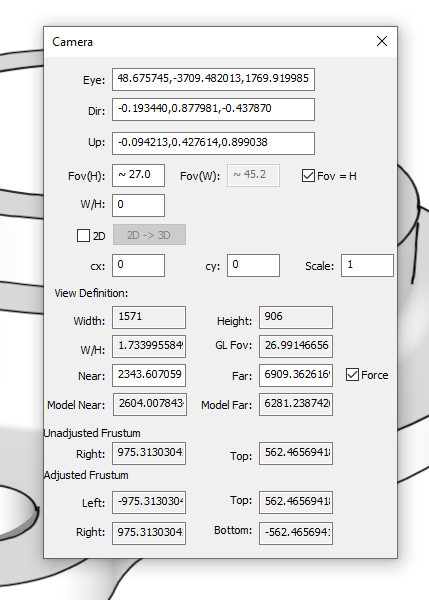
                  @keith3201 said:

                  Why is it not possible to specify the camera clipping that you want

                  What makes you think it isn't possible. It can be set in the Windows build of SketchUp, anyway.
                  Screenshot - 7_16_2020 , 2_10_37 PM.png

                  Etaoin Shrdlu

                  %

                  (THERE'S NO PLACE LIKE)

                  G28 X0.0 Y0.0 Z0.0

                  M30

                  %

                  1 條回覆 最後回覆 回覆 引用 0
                  • Keith3201K 離線
                    Keith3201
                    最後由 編輯

                    I have the windows version but there is no way that I have ever seen to access that menu. It has also never been mentioned in this topic as a way to help with the clipping problem.

                    1 條回覆 最後回覆 回覆 引用 0
                    • Dave RD 離線
                      Dave R
                      最後由 編輯

                      This has been around for years. Open the Ruby Console, paste the following and press Enter.

                      Sketchup.send_action 10624

                      You could also use ThomThom's Camera Tools to access the panel.

                      Etaoin Shrdlu

                      %

                      (THERE'S NO PLACE LIKE)

                      G28 X0.0 Y0.0 Z0.0

                      M30

                      %

                      1 條回覆 最後回覆 回覆 引用 0
                      • Keith3201K 離線
                        Keith3201
                        最後由 編輯

                        Thank you. This might be helpful for highly detailed models

                        1 條回覆 最後回覆 回覆 引用 0
                        • Dave RD 離線
                          Dave R
                          最後由 編輯

                          You're welcome.

                          Generally if you are managing your model correctly clipping really shouldn't be a big problem.

                          Etaoin Shrdlu

                          %

                          (THERE'S NO PLACE LIKE)

                          G28 X0.0 Y0.0 Z0.0

                          M30

                          %

                          1 條回覆 最後回覆 回覆 引用 0
                          • 1
                          • 2
                          • 2 / 2
                          • 第一個貼文
                            最後的貼文
                          Buy SketchPlus
                          Buy SUbD
                          Buy WrapR
                          Buy eBook
                          Buy Modelur
                          Buy Vertex Tools
                          Buy SketchCuisine
                          Buy FormFonts

                          Advertisement