sketchucation logo sketchucation
    • Login
    Oops, your profile's looking a bit empty! To help us tailor your experience, please fill in key details like your SketchUp version, skill level, operating system, and more. Update and save your info on your profile page today!
    Mac User? | Join the Rayscaper Beta for Mac Learn More

    [Plugin] Material Replacer

    Scheduled Pinned Locked Moved Plugins
    79 Posts 42 Posters 94.6k Views 42 Watching
    Loading More Posts
    • Oldest to Newest
    • Newest to Oldest
    • Most Votes
    Reply
    • Reply as topic
    Log in to reply
    This topic has been deleted. Only users with topic management privileges can see it.
    • TIGT
      TIG Moderator
      last edited by

      You don't see it there because it's not in the 'Plugins' menu!
      It's in the 'Tools' menu - as 'Material Replacer'...
      πŸ˜’

      TIG

      1 Reply Last reply
      Reply Quote 0
      • M
        MartinK
        last edited by

        Thanks for a great time saver. πŸ‘

        1 Reply Last reply
        Reply Quote 0
        • C
          caronte01
          last edited by

          thanks Thomas, I use this plugin a lot!

          galletas.jpg

          1 Reply Last reply
          Reply Quote 0
          • McGyverM
            McGyver
            last edited by

            Thank you very much for this extremely useful tool! I Just tried it out and it works smoothly and without any trouble! Thank you!

            Visit My ShareCG Freebie Gallery

            1 Reply Last reply
            Reply Quote 0
            • F
              fullyfledgeded
              last edited by

              Hi, great simple little tool works perfectly, except the material being replaced, did not inherit the same scale of the texture. Any ideas?
              thanks

              1 Reply Last reply
              Reply Quote 0
              • L
                LesZautres
                last edited by

                This plug-in does exactly what I expected through a really nicely made UI!
                Many thanks!

                1 Reply Last reply
                Reply Quote 0
                • NithinN
                  Nithin
                  last edited by

                  I think this plugin can be updated to make this function possible.
                  More details:
                  window frames with different sizes say 4'x3', 2'x3, 5'x2' are present which has same wooden texture(teak). Using this plugin if 4'x3' selected as source material then all other group/model with same dimension(ultimately volume) can be replaced with other material(oak) and other frames should remains unchanged.

                  1 Reply Last reply
                  Reply Quote 0
                  • NithinN
                    Nithin
                    last edited by

                    Hi Thom,

                    with a little guide from TIG here, I manage to update this plugin.

                    I have no knowledge about ruby , not even a basic grammer 😞 , but as I am familiar with other languages like php and C++ , I just gone through the some ruby resources and made this modification.
                    Some minor changes is required as when trying to replace the default material , it is replacing whole model.

                    I am attaching both modified code and skp test file, hope you rectify this minor bug πŸ‘ .


                    http://sketchucation.com/forums/viewtopic.php?f=323&t=55340


                    default material change bug using Material Replacer(Mod)

                    1 Reply Last reply
                    Reply Quote 0
                    • tt_suT
                      tt_su
                      last edited by

                      Thanks. I've added an issue in the BitBucket repo to remind me to merge this: https://bitbucket.org/thomthom/material-replacer/issue/1/merge-user-fix

                      1 Reply Last reply
                      Reply Quote 0
                      • MrMitchellM
                        MrMitchell
                        last edited by

                        I have been exploring the Thea for Sketchup latest build on my Mac at work using SketchupPro2014 and was just playing around with the Thea Materials and Material Replacer this morning and think I have run into a serious problem.

                        I had just added some of the default materials from the Thea library to the sketchup material library and had applied them to some of the components I had been working with earlier.

                        I had applied the materials to the whole components instead of the faces of the components on some, while going inside of the components and adding the materials directly to the faces of the objects on others.

                        I then drew a rectangular plane next to the models to pull the default material color from.

                        Next I successfully used the material replacer to replace the materials applied to the components as a whole from their Thea Material (which was one of the default wood materials) back to the default white/blue sketchup material from the rectangular plane I was pulling from.

                        However when I attempted to replace the materials inside of the components where the faces had been directly painted (using the example 01.mat.thea inside the displacement folder in the Thea Material Library) sketchup hung up.

                        I force quit the program expecting to simply reopen the file, or at least even an earlier version of the file, but to no avail. All I get now when trying to open the file is this error message
                        http://i.imgur.com/R10bA0S.png

                        I even used Time Machine, which pulled versions of the files created earlier... same problem... Could you please shed some light as to how this problem could have occurred, or how I might be able to recover my files?

                        -Thanks

                        1 Reply Last reply
                        Reply Quote 0
                        • tt_suT
                          tt_su
                          last edited by

                          Can you upload or PM the file in question?
                          Does the backup file work? (the one with the tilde)

                          1 Reply Last reply
                          Reply Quote 0
                          • MrMitchellM
                            MrMitchell
                            last edited by

                            Here are the corrupted files. Thankfully I had exported the file as an .obj to render and was able to convert the .obj to a .dae and recomponantize the model back in sketchup... but still... pretty scary.


                            14016 Salter.skp


                            AutoSave_14016 Salter.skp


                            14016 Salter~.skp

                            1 Reply Last reply
                            Reply Quote 0
                            • MrMitchellM
                              MrMitchell
                              last edited by

                              None of the files work. Even when I attempted to recover the files using Time Machine, the restored files still were treated like the corrupted files currently in the folder. Here are the recovered files, from the previous evening in case you want to try and poke at them...


                              14016 Salter.skp


                              14016 Salter~.skp

                              1 Reply Last reply
                              Reply Quote 0
                              • romboutR
                                rombout
                                last edited by

                                @thomthom said:

                                @unknownuser said:

                                When I use paint bucket tool to change the material on some object, the UV is reset.

                                Use the Entity Info to replace materials - then the UV is preserved.

                                Ive used UV textures to uvmap a mesh, is it still possible to replace the material. It keeps messing up the uv cause the base textures have different scale settings. I have the same material 3times, but they all have different settings though

                                1 Reply Last reply
                                Reply Quote 0
                                • JQLJ
                                  JQL
                                  last edited by

                                  Rombout,

                                  You can change materials while keeping the same UV with Fredo Tool's Thrupaint. There's an Icon with a multicolor brush there that does that. That doesn't do it automatically, but you can paint without being inside the group wich is handy.

                                  www.casca.pt
                                  Visit us on facebook!

                                  1 Reply Last reply
                                  Reply Quote 0
                                  • R
                                    ronhiatt
                                    last edited by

                                    TT:

                                    Wow! Thanks very much. Great tool that does what it names says. Rare these days.

                                    Ron

                                    1 Reply Last reply
                                    Reply Quote 0
                                    • asimonasA
                                      asimonas
                                      last edited by

                                      Thank you!

                                      1 Reply Last reply
                                      Reply Quote 0
                                      • J
                                        JDZYN
                                        last edited by

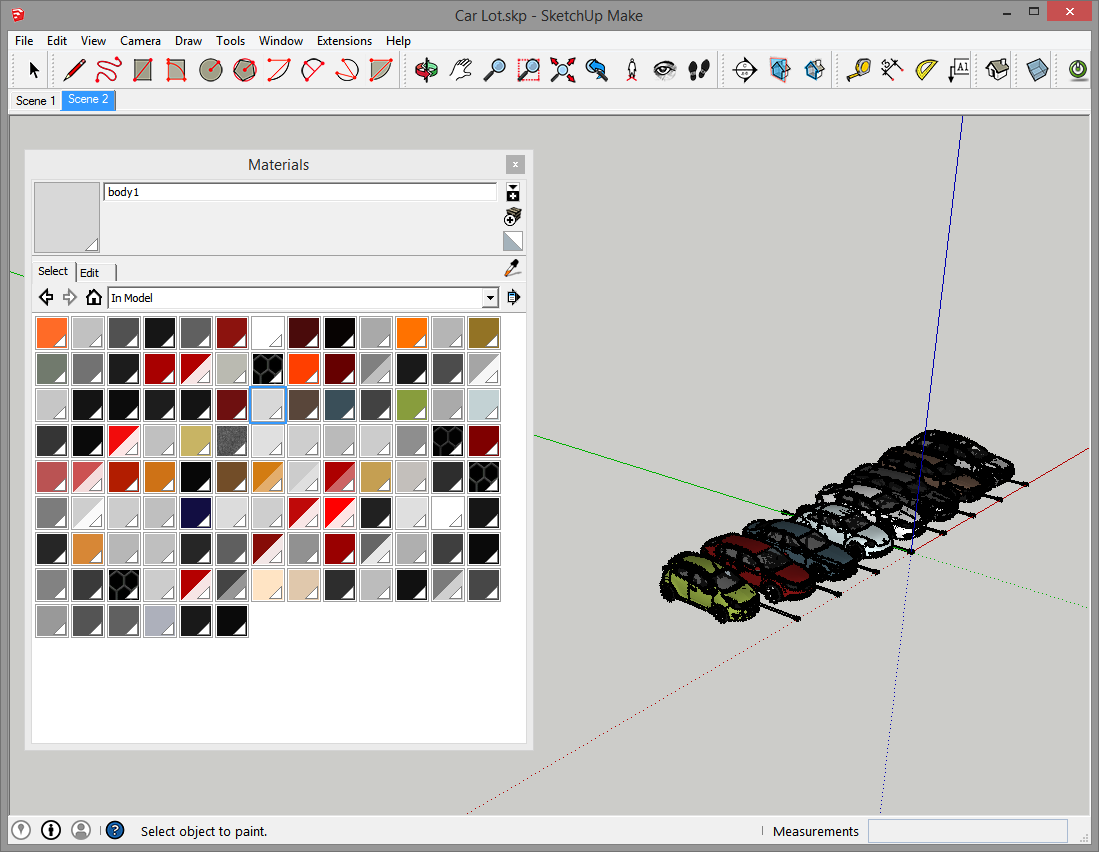
                                        ]I think it would be great to be able to consolidate materials by selecting in the material palette. I've seen the script that isolates objects by material (material selector), but it doesn't seem to work in my model. Besides, I'm trying to take a hundred-ish materials and reduce them to a more manageable figure.

                                        I've run your material consolidator, but the materials aren't exactly the same.
                                        skp material overload.PNG

                                        As you can see... if I could select a couple dozen similar grays and tell them to be one... life would be much better.

                                        1 Reply Last reply
                                        Reply Quote 0
                                        • asimonasA
                                          asimonas
                                          last edited by

                                          I'm using this plug in a lot. Changing materials all the time in my work. It would be good to have an option to change materials in a group or component only and not in all model. Would that be difficult to integrate?
                                          thanks!

                                          1 Reply Last reply
                                          Reply Quote 0
                                          • H
                                            huybinhktr
                                            last edited by

                                            Can you continue to improve this version for su2019?

                                            1 Reply Last reply
                                            Reply Quote 0

                                            Hello! It looks like you're interested in this conversation, but you don't have an account yet.

                                            Getting fed up of having to scroll through the same posts each visit? When you register for an account, you'll always come back to exactly where you were before, and choose to be notified of new replies (either via email, or push notification). You'll also be able to save bookmarks and upvote posts to show your appreciation to other community members.

                                            With your input, this post could be even better πŸ’—

                                            Register Login
                                            • 1
                                            • 2
                                            • 3
                                            • 4
                                            • 1 / 4
                                            • First post
                                              Last post
                                            Buy SketchPlus
                                            Buy SUbD
                                            Buy WrapR
                                            Buy eBook
                                            Buy Modelur
                                            Buy Vertex Tools
                                            Buy SketchCuisine
                                            Buy FormFonts

                                            Advertisement