Soft Edges not appearing in Hidden Line mode
-
Exactly what the title says. I upgraded my Sketchup version to 7.1 and every time I switch to Hidden line view, the softened edges won't appear. The only Plugin currently installed in my system is Sketchy Physics.
The problems can be seen on the shoulders, knees and abdomen of this model:
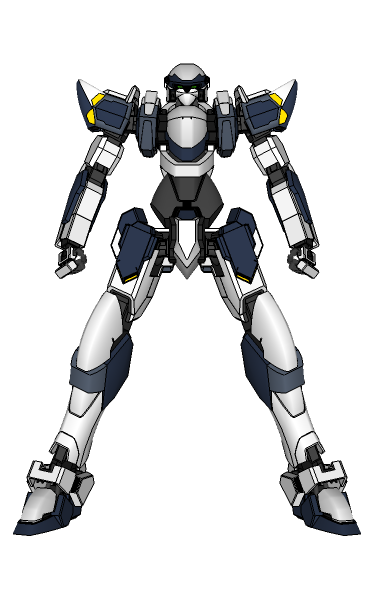
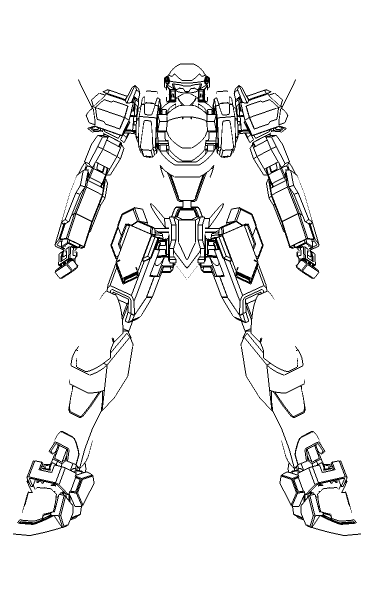
-
Have you got 'Profiles' ticked to show in the Style?
You can set profiles to be as thin as normal edges...
Draw something behind it [like a grid of lines] and you should 'see' the forms obscuring it, even if they don't have edges showing...
Switch 'on' View > Hidden Geometry and you should also see the smoothed edges... -
In SU 7 (maybe just 7.1) soft edges do not appear in the default styles either. Whenever I make some rounded corners and want something displayed, I turn on profiles (with 1 pixel) as TIG suggests.
-
Nope. I usually turn it off since it greatly slows down my old PC. So I guess I'll just turn it on when exporting 2d images.
Thanks for the suggestions!



Hello! It looks like you're interested in this conversation, but you don't have an account yet.
Getting fed up of having to scroll through the same posts each visit? When you register for an account, you'll always come back to exactly where you were before, and choose to be notified of new replies (either via email, or push notification). You'll also be able to save bookmarks and upvote posts to show your appreciation to other community members.
With your input, this post could be even better 💗
Register Login


Advertisement