sketchucation logo sketchucation
    • 登入
    Oops, your profile's looking a bit empty! To help us tailor your experience, please fill in key details like your SketchUp version, skill level, operating system, and more. Update and save your info on your profile page today!
    🔌 Smart Spline | Fluid way to handle splines for furniture design and complex structures. Download

    [Plugin] ExtrudeTools - Full Set

    已排程 已置頂 已鎖定 已移動 Plugins
    636 貼文 178 Posters 793.0k 瀏覽 175 Watching
    正在載入更多貼文
    • 從舊到新
    • 從新到舊
    • 最多點贊
    回覆
    • 在新貼文中回覆
    登入後回覆
    此主題已被刪除。只有擁有主題管理權限的使用者可以查看。
    • TIGT 離線
      TIG Moderator
      最後由 編輯

      Here's another update http://forums.sketchucation.com/viewtopic.php?p=217663#p217663
      The 'Extrude Edges By Vector To Object' tool has additional traps added for rare glitches when a faced edge-selection was used.

      TIG

      1 條回覆 最後回覆 回覆 引用 0
      • TIGT 離線
        TIG Moderator
        最後由 編輯

        Here's yet another update http://forums.sketchucation.com/viewtopic.php?p=217663#p217663
        The 'Extrude Edges By Vector To Object' tool has had a glitch fixed with 'undo' if you'd reversed faces etc...

        TIG

        1 條回覆 最後回覆 回覆 引用 0
        • TIGT 離線
          TIG Moderator
          最後由 編輯

          Here's yet another update http://forums.sketchucation.com/viewtopic.php?p=217663#p217663
          The 'Extrude Edges By Vector To Object' tool has had glitches fixed with 'commit' and extruding faces inside groups to objects outside...

          TIG

          1 條回覆 最後回覆 回覆 引用 0
          • W 離線
            Wildchild
            最後由 編輯

            DUUUDE! Exactly what I was talking about!

            Here's a few tests:

            et1.jpget2.jpget3.jpget4.jpgThis last one took a little bit to work it out but then it did it just fine

            I have a couple more tiny requests to ask, but now i don't have time! 😆

            Eternity is very long, especially towards the end. Woody Allen

            1 條回覆 最後回覆 回覆 引用 0
            • U 離線
              unclex
              最後由 編輯

              [Plugin] ExtrudeTools - Zipped Set 20110525 Installed
              [Plugin] Shape Bender Beta v0.55 Can't work...
              Need Help !!!
              ThanX

              1 條回覆 最後回覆 回覆 引用 0
              • H 離線
                hebeijianke
                最後由 編輯

                @tig said:

                ....

                I translate All the plugins in ExtrudeTools into chinese
                This is the translation file


                chinesetranslation.zip

                1 條回覆 最後回覆 回覆 引用 0
                • TIGT 離線
                  TIG Moderator
                  最後由 編輯

                  @unclex said:

                  [Plugin] ExtrudeTools - Zipped Set 20110525 Installed
                  [Plugin] Shape Bender Beta v0.55 Can't work...
                  Need Help !!!
                  ThanX

                  I [and many others] have both toolsets installed without any interconnected problems 😕
                  Can you explain the nature of the problem a bit more ?
                  Are there any error messages [either at startup or when it's run with the Ruby Console open]? if so please post them here, or perhaps more logically in the ShapeBender thread, as that's the broken tool.
                  Nothing has changed between recent versions of the EEby... tools that I could think might affect ShapeBender in any way. that tool itself has been around for some time...
                  Please check you have progressbar.rb installed in the Plugins folder [available free from Smustard.com] - this is a frequent cause of tools failing that need it [it's not needed for any of the EEby... tools though!]
                  😕

                  TIG

                  1 條回覆 最後回覆 回覆 引用 0
                  • TIGT 離線
                    TIG Moderator
                    最後由 編輯

                    @hebeijianke said:

                    @tig said:

                    ....

                    I translate All the plugins in ExtrudeTools into chinese
                    This is the translation file

                    Thanks
                    I'll include them with the next update of the toolset.
                    Meanwhile Chinese locale users can install them into the TIGtools folder and feedback...

                    TIG

                    1 條回覆 最後回覆 回覆 引用 0
                    • J 離線
                      Jim
                      最後由 編輯

                      Hi TIG,

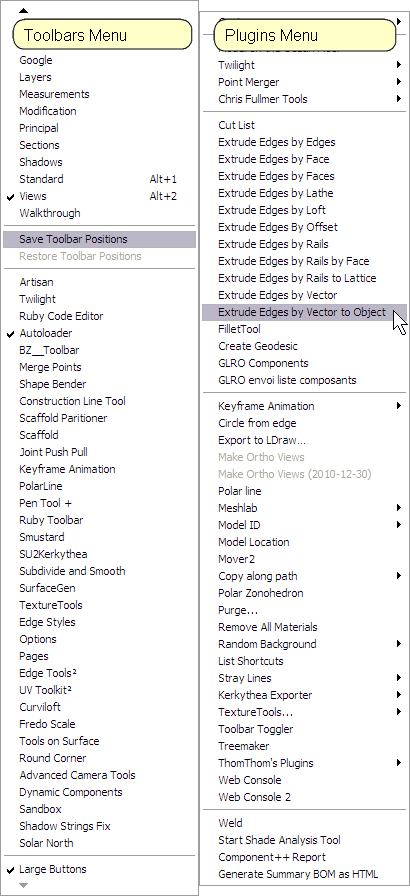
                      Shouldn't there be a Toolbar? I don't see it. I have all the EEb Tools in the Plugins menu, but no Extrusion* in Toolbars.

                      tmpimg.png

                      Hi

                      1 條回覆 最後回覆 回覆 引用 0
                      • TIGT 離線
                        TIG Moderator
                        最後由 編輯

                        There should be a file in ../Plugins/ #extrusionToolbar.rb makes the Toolbar/Sub-Menu.
                        It starts with a '#' so it loads first - it then checks to see if any of the possible EEby...rb files exist and if so it adds the 'Extrusion Tools' toolbar referenced as ' $extrusionToolbar' and an 'Extrusion Tools' submenu referenced as ' $extrusionToolsSubmenu'. As each of the EEby...rb files loads it checks for these $ references and if they don't exist then there is no toolbar/button and the tool's menu item is added direct to Plugins-menu rather than into a subfolder...
                        Your screen-shot suggests that #extrusionToolbar.rb is missing as there's no 'Extrusion Tools' submenu ??
                        Note that the EEby... tools also 'require' deBabelizer.rb ?

                        TIG

                        1 條回覆 最後回覆 回覆 引用 0
                        • J 離線
                          Jim
                          最後由 編輯

                          @tig said:

                          Your screen-shot suggests that #extrusionToolbar.rb is missing as there's no 'Extrusion Tools' submenu ??

                          Ah, I renamed it without the #. Guess I can't do that.

                          Hi

                          1 條回覆 最後回覆 回覆 引用 0
                          • TIGT 離線
                            TIG Moderator
                            最後由 編輯

                            @jim said:

                            @tig said:

                            Your screen-shot suggests that #extrusionToolbar.rb is missing as there's no 'Extrusion Tools' submenu ??

                            Ah, I renamed it without the #. Guess I can't do that.
                            NO! It needs to load before the other tools so they find the toolbar/submenu ready-made...
                            The existence of the EEby...rb tools are checked by it 'by name' so renaming all of those would also stop the toolbar/submenu getting created...
                            Its filename doesn't have to start with a #, it just needs to list somewhere before the other tools in alphanumeric order... I use a leading # on the name of for my tools if I want it to load early - like the '#HolePunchTool.rb', as I want its items high up on the context-menu listings...
                            😒

                            TIG

                            1 條回覆 最後回覆 回覆 引用 0
                            • J 離線
                              Jim
                              最後由 編輯

                              And I use C:\Plugins rather than the default so I can share plugins between versions. EEbX isn't portable in that way either.

                              Thanks.

                              Hi

                              1 條回覆 最後回覆 回覆 引用 0
                              • J 離線
                                Jim
                                最後由 編輯

                                I made these mods to make it portable:

                                starting @ ~ line 50

                                
                                    eePlugins.each{|plugin|
                                	path = File.join(File.dirname(__FILE__), plugin+".rb")
                                	#if Sketchup.find_support_file(plugin+".rb","Plugins/")
                                	if File.exists?(path)
                                	    gotPlugin=true
                                	    break
                                	end#if
                                    }


                                Hi

                                1 條回覆 最後回覆 回覆 引用 0
                                • TIGT 離線
                                  TIG Moderator
                                  最後由 編輯

                                  Here's an updated set http://forums.sketchucation.com/viewtopic.php?p=217663#p217663

                                  The tool now makes the Extrusion Tools toolbar/submenu even if the various .rb files are not located in the standard ../Plugins/ folder and are loaded from elsewhere [it now uses File.dirname(__FILE__) rather than the .find_support_file() which is limited to a standard set of folders]. It just requires that all of the files [including those in the ../TIGtools/ submenu] are kept in the same relative locations rather than the previous absolute ../Plugins/ location...

                                  It also includes the latest Chinese lingvo files, thanks to 'hebeijianke'...

                                  TIG

                                  1 條回覆 最後回覆 回覆 引用 0
                                  • TIGT 離線
                                    TIG Moderator
                                    最後由 編輯

                                    @jim said:

                                    I made these mods to make it portable:

                                    starting @ ~ line 50

                                    
                                    >     eePlugins.each{|plugin|
                                    > 	path = File.join(File.dirname(__FILE__), plugin+".rb")
                                    > 	#if Sketchup.find_support_file(plugin+".rb","Plugins/")
                                    > 	if File.exists?(path)
                                    > 	    gotPlugin=true
                                    > 	    break
                                    > 	end#if
                                    >     }
                                    > 
                                    

                                    I had just made very similar changes - you posted as I uploaded it - see updated set... 😒

                                    TIG

                                    1 條回覆 最後回覆 回覆 引用 0
                                    • J 離線
                                      Jim
                                      最後由 編輯

                                      Frequent updates are another advantage of using a shared Plugins folder! 😆

                                      Thanks again.

                                      Hi

                                      1 條回覆 最後回覆 回覆 引用 0
                                      • TIGT 離線
                                        TIG Moderator
                                        最後由 編輯

                                        @jim said:

                                        Frequent updates are another advantage of using a shared Plugins folder! 😆
                                        I think I'm done for a while on updating this tool... 😒

                                        TIG

                                        1 條回覆 最後回覆 回覆 引用 0
                                        • U 離線
                                          unclex
                                          最後由 編輯

                                          Sorry , my mistake
                                          the reason is another Plugins
                                          Thanx for ur replied

                                          1 條回覆 最後回覆 回覆 引用 0
                                          • M 離線
                                            manson666
                                            最後由 編輯

                                            I'm new Sketchup user
                                            now learning it
                                            I founded out sketchup plug in is strong tool

                                            thx share

                                            1 條回覆 最後回覆 回覆 引用 0
                                            • 1
                                            • 2
                                            • 3
                                            • 4
                                            • 5
                                            • 6
                                            • 31
                                            • 32
                                            • 4 / 32
                                            • 第一個貼文
                                              最後的貼文
                                            Buy SketchPlus
                                            Buy SUbD
                                            Buy WrapR
                                            Buy eBook
                                            Buy Modelur
                                            Buy Vertex Tools
                                            Buy SketchCuisine
                                            Buy FormFonts

                                            Advertisement