sketchucation logo sketchucation
    • Login
    Oops, your profile's looking a bit empty! To help us tailor your experience, please fill in key details like your SketchUp version, skill level, operating system, and more. Update and save your info on your profile page today!
    โš ๏ธ Update | Sketchucation Tools 5.0.8 released with licensing improvements and bugfixes Download

    [Plugin] Edge Tools

    Scheduled Pinned Locked Moved Plugins
    211 Posts 74 Posters 323.4k Views 74 Watching
    Loading More Posts
    • Oldest to Newest
    • Newest to Oldest
    • Most Votes
    Reply
    • Reply as topic
    Log in to reply
    This topic has been deleted. Only users with topic management privileges can see it.
    • srxS
      srx
      last edited by

      Thank you, thank you, thankyou...

      www.saurus.rs

      1 Reply Last reply
      Reply Quote 0
      • thomthomT
        thomthom
        last edited by

        Version 2.0.1

        • Fixed minor issue where the plugin might throw an error if another plugin hadn't already loaded TT_Lib2.

        Thomas Thomassen โ€” SketchUp Monkey & Coding addict
        List of my plugins and link to the CookieWare fund

        1 Reply Last reply
        Reply Quote 0
        • D
          dedmin
          last edited by

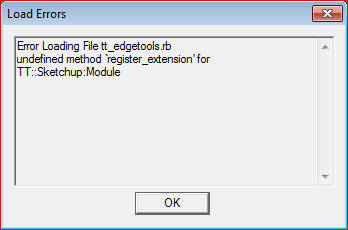
          Capture.PNG

          1 Reply Last reply
          Reply Quote 0
          • thomthomT
            thomthom
            last edited by

            Version 2.0.2

            • Fixed minor namespace reference issue.

            Thomas Thomassen โ€” SketchUp Monkey & Coding addict
            List of my plugins and link to the CookieWare fund

            1 Reply Last reply
            Reply Quote 0
            • D
              dedmin
              last edited by

              ๐Ÿ‘ ๐Ÿ‘ ๐Ÿ‘ ๐Ÿ‘

              1 Reply Last reply
              Reply Quote 0
              • R
                rv1974
                last edited by

                Thank you for all february 05 goodies.

                1 Reply Last reply
                Reply Quote 0
                • thomthomT
                  thomthom
                  last edited by

                  @dedmin said:

                  [attachment=0:375j5dqr]<!-- ia0 -->Capture.PNG<!-- ia0 -->[/attachment:375j5dqr]

                  Thanks for reporting that. I was a bit quick to release the last fix so I forgot to test it before shipping. ๐Ÿ˜ณ

                  Thomas Thomassen โ€” SketchUp Monkey & Coding addict
                  List of my plugins and link to the CookieWare fund

                  1 Reply Last reply
                  Reply Quote 0
                  • D
                    dedmin
                    last edited by

                    @thomthom said:

                    @dedmin said:

                    [attachment=0:1l1j5985]<!-- ia0 -->Capture.PNG<!-- ia0 -->[/attachment:1l1j5985]

                    Thanks for reporting that. I was a bit quick to release the last fix so I forgot to test it before shipping. ๐Ÿ˜ณ

                    That is the minimum we can do to respect and help plugin's writers! โ˜€

                    1 Reply Last reply
                    Reply Quote 0
                    • ArcA
                      Arc
                      last edited by

                      Perfect Thomthom, you're the best.

                      1 Reply Last reply
                      Reply Quote 0
                      • B
                        Ben Ritter
                        last edited by

                        Thank you again for being willing to share your work.

                        1 Reply Last reply
                        Reply Quote 0
                        • B
                          bentleykfrog
                          last edited by

                          @thomthom said:

                          @bentleykfrog said:

                          Awesome toolset, would be nice if divide faces preserved the edges soft, smooth and hidden properties though.

                          thanks thomthom

                          Good idea. I have an update coming up very shortly. Though it won't make it for that, but I'll be on my todo list. ๐Ÿ‘

                          I'm in love with close gaps! It saves me so much time repairing 3d warehouse models.

                          Ohh and I just thought of something else for divide faces. It would be cool if it could snap to previously entered distances, like the line or move tool does.

                          thanks again for your hard work thomthom

                          1 Reply Last reply
                          Reply Quote 0
                          • thomthomT
                            thomthom
                            last edited by

                            @bentleykfrog said:

                            Ohh and I just thought of something else for divide faces. It would be cool if it could snap to previously entered distances, like the line or move tool does.

                            Yea - that's a good idea. There's a few things I'd like to add to it.

                            Thomas Thomassen โ€” SketchUp Monkey & Coding addict
                            List of my plugins and link to the CookieWare fund

                            1 Reply Last reply
                            Reply Quote 0
                            • demD
                              dem
                              last edited by

                              Line disappears, when I try to snap it with angle matching on another side. ๐Ÿ˜ž

                              http://dem.inf.ua/skp/oops.png

                              1 Reply Last reply
                              Reply Quote 0
                              • thomthomT
                                thomthom
                                last edited by

                                @dem said:

                                Line disappears, when I try to snap it with angle matching on another side. ๐Ÿ˜ž

                                http://dem.inf.ua/skp/oops.png

                                Are you keeping the cursor over the face?

                                (I know it's something that could use some improvement.)

                                Thomas Thomassen โ€” SketchUp Monkey & Coding addict
                                List of my plugins and link to the CookieWare fund

                                1 Reply Last reply
                                Reply Quote 0
                                • demD
                                  dem
                                  last edited by

                                  @thomthom said:

                                  Are you keeping the cursor over the face?

                                  Yes. And I notice vertical snap, when moving cursor down.

                                  http://dem.inf.ua/skp/snap.png

                                  1 Reply Last reply
                                  Reply Quote 0
                                  • thomthomT
                                    thomthom
                                    last edited by

                                    @dem said:

                                    And I notice vertical snap, when moving cursor down.

                                    That is something I can not control - it's the SketchUp inference engine.

                                    Thomas Thomassen โ€” SketchUp Monkey & Coding addict
                                    List of my plugins and link to the CookieWare fund

                                    1 Reply Last reply
                                    Reply Quote 0
                                    • K
                                      kreartur
                                      last edited by

                                      Hi Thomas

                                      I'd love to use your cool tool but after installing the files I always get the following window saying:

                                      uninitialized constant TT::LibFehler beim Laden der Datei tt_edgetools.rb
                                      uninitialized constant TT::Lib

                                      what can I do to run your program?
                                      Thank you

                                      1 Reply Last reply
                                      Reply Quote 0
                                      • TIGT
                                        TIG Moderator
                                        last edited by

                                        @kreartur said:

                                        Hi Thomas

                                        I'd love to use your cool tool but after installing the files I always get the following window saying:

                                        uninitialized constant TT::LibFehler beim Laden der Datei tt_edgetools.rb
                                        uninitialized constant TT::Lib

                                        what can I do to run your program?
                                        Thank you

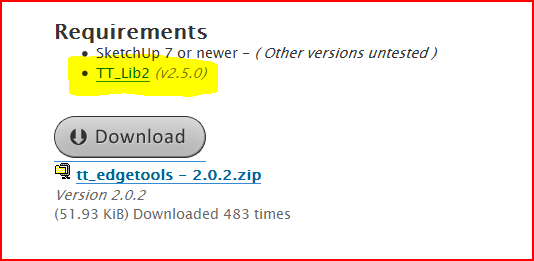
                                        Go to the download page [post#1] and use the link to the required 'Library' [TT_Lib2] and install in the Plugins folder as instructedCapture.PNG

                                        TIG

                                        1 Reply Last reply
                                        Reply Quote 0
                                        • C
                                          cobb89
                                          last edited by

                                          is close gaps same as the commercial plugin CloseOpens available on smustard??...I haven't used CloseOpens.. ๐Ÿ˜’

                                          1 Reply Last reply
                                          Reply Quote 0
                                          • A
                                            ahnvtk
                                            last edited by

                                            These are really useful, thanks!

                                            It wasn't so obvious how to enter a distance threshold (or that you needed to) in the "Value Control Box" (measurements toolbar) for the "close edge gaps" tool. After you select the tool it seems you can't select the measurement toolbar; apparently you're just supposed to type. If the toolbar can be selected that will be a bit more intuitive.

                                            However I'm not figuring out how to use the "make vertices colinear" at all; where is that demonstrated (or where could it be)?


                                            1 Reply Last reply
                                            Reply Quote 0

                                            Hello! It looks like you're interested in this conversation, but you don't have an account yet.

                                            Getting fed up of having to scroll through the same posts each visit? When you register for an account, you'll always come back to exactly where you were before, and choose to be notified of new replies (either via email, or push notification). You'll also be able to save bookmarks and upvote posts to show your appreciation to other community members.

                                            With your input, this post could be even better ๐Ÿ’—

                                            Register Login
                                            • 1
                                            • 2
                                            • 3
                                            • 4
                                            • 5
                                            • 6
                                            • 7
                                            • 8
                                            • 9
                                            • 10
                                            • 11
                                            • 6 / 11
                                            • First post
                                              Last post
                                            Buy SketchPlus
                                            Buy SUbD
                                            Buy WrapR
                                            Buy eBook
                                            Buy Modelur
                                            Buy Vertex Tools
                                            Buy SketchCuisine
                                            Buy FormFonts

                                            Advertisement