[req] help with simple plugin
-
Hi, I am new to ruby scripting and amazed by the possibilities. I am trying to write a simple script that distorts the geometry of all selected faces by a random amount.
I first triangulate all selected faces with TIGs triangulateFaces that I call from within the script which works fine. Then I want to transform each vertices of every face by a random x,y,and z amount.
with my limited programming experience I am so far unable to get it going. Here is what I thought:
for f in faces
for v in f.vertices
v.position = v.position + [xrand,yrand,zrand]
end #for
end #forBut that (and 23 other options I tried) does not work. Can anyone help me here?
-
It's a good thought, but as you found out - it doesn't work that way.
To move vertices, faces, and edges you will need to go through the Entities collection.
Something like should work:
for f in faces for v in f.vertices tr = Geom;;Transformation.new(v.position + [xrand,yrand,zrand]) Sketchup.active_model.entities.transform_entities(tr, v) end #for end #for -
You will need a line the define xrand etc...
Something like...
xrand=10*rand
and the same for yrand and zrand - the 10* give an offset between 0" and 10"...
This only adds to the vertex position - you need another line transforming the vertices in the -ve, like
xrand=-10*randetc afterwards ? -
Ok. Thank you guys. Almost there. The main method works fine in the webconsole, but when I save it as a script it tells me: "distort.rb:42: parse error, expecting `kEND'", which I guess means that end end is missing in line 42 (before the menu).
I seriously have no Idea why. Please help me!# gl_distort require 'sketchup.rb' def GL_distort model = Sketchup.active_model entities = model.entities selection = model.selection prompts = ['Random Distortion Distance'] defaults = [0.to_l] results = UI.inputbox prompts, defaults, 'Distance for random distortion;' distance = results [0] model.start_operation "Distort" selection.each do |e| if (e.is_a? Sketchup;;Face) for v in e.vertices xrand=(-distance/2)+distance*rand yrand=(-distance/2)+distance*rand zrand=(-distance/2)+distance*rand # puts(xrand, yrand, zrand) vector = Geom;;Vector3d.new xrand,yrand,zrand tr = Geom;;Transformation.translation vector Sketchup.active_model.entities.transform_entities(tr, v) end #for end #if end #do model.commit_operation end #main ### Menu ### if not file_loaded?(__FILE__) UI.menu("Plugins").add_item("Distort"){GL_distort} end #if file_loaded(__FILE__) -
Change from
GL_distorttogl_distorta def must start with a lowercase letter... -
@tig said:
Change from
GL_distorttogl_distorta def must start with a lowercase letter...still the same error...
-
Changed every
GL_distortto lowercase ?
Works fine for me... -
@tig said:
Changed every
GL_distortto lowercase ?
Works fine for me...yes. both of them. thank you. I guess it has something to do with the "for v in e.vertices loop". If I take it out completely it parses fine. Can it be that something would not work in Sketchup 6? I am still running v6 on a mac. Strange thing is: it runs fine in the webconsole. Any idea how to resolve this?
Thanks for your time. G
-
This is my version that works fine in v7.
Try it in v6...#gl_distort.rb -
TIG: Thank you. It works. Don't ask me why. Your and my code are identical with the exception of a couple of blank lines. I checked that twice and then again. And side by side. And then again. And I have no idea. But it its working.

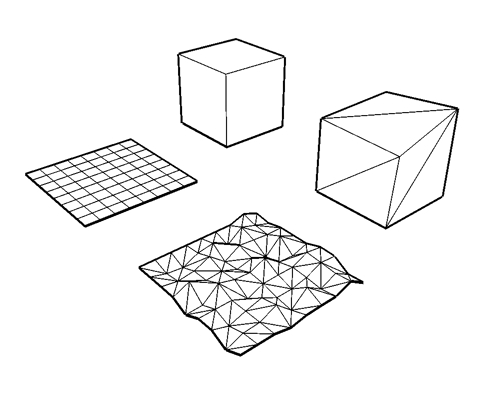
I added input for xyz coordinates as you can see on the image. The crinkled surface was distorted only along the z axis, the top plane of the cube was distorted in three dimensions.
This is just for fun. Please use at your own risk and save before using. It crashed on me a couple of times already.
Thank you much for all your time. G

Hello! It looks like you're interested in this conversation, but you don't have an account yet.
Getting fed up of having to scroll through the same posts each visit? When you register for an account, you'll always come back to exactly where you were before, and choose to be notified of new replies (either via email, or push notification). You'll also be able to save bookmarks and upvote posts to show your appreciation to other community members.
With your input, this post could be even better 💗
Register Login


Advertisement