sketchucation logo sketchucation
    • 登入
    Oops, your profile's looking a bit empty! To help us tailor your experience, please fill in key details like your SketchUp version, skill level, operating system, and more. Update and save your info on your profile page today!
    🔌 Smart Spline | Fluid way to handle splines for furniture design and complex structures. Download

    [Plugin] VisMap 2 - Improved Layer/Scene Visibility Map

    已排程 已置頂 已鎖定 已移動 Plugins
    41 貼文 21 Posters 29.8k 瀏覽 21 Watching
    正在載入更多貼文
    • 從舊到新
    • 從新到舊
    • 最多點贊
    回覆
    • 在新貼文中回覆
    登入後回覆
    此主題已被刪除。只有擁有主題管理權限的使用者可以查看。
    • josephkim626J 離線
      josephkim626
      最後由 編輯

      Hi, I have been using this plugin until 2014 came out. It hasn't been working for sometime. Will there be any future development?

      1 條回覆 最後回覆 回覆 引用 0
      • J 離線
        Jim
        最後由 編輯

        Martin gave me the ok to update this for Sketchup 14/15. I might not have time until the weekend.

        Hi

        1 條回覆 最後回覆 回覆 引用 0
        • D 離線
          driven
          最後由 編輯

          can you leave out the dated css??

          john

          learn from the mistakes of others, you may not live long enough to make them all yourself...

          1 條回覆 最後回覆 回覆 引用 0
          • D 離線
            db11
            最後由 編輯

            @jim said:

            Martin gave me the ok to update this for Sketchup 14/15. I might not have time until the weekend.

            That's great news Jim. Will look forward to the update.

            1 條回覆 最後回覆 回覆 引用 0
            • josephkim626J 離線
              josephkim626
              最後由 編輯

              @db11 said:

              @jim said:

              Martin gave me the ok to update this for Sketchup 14/15. I might not have time until the weekend.

              That's great news Jim. Will look forward to the update.

              Same here!

              1 條回覆 最後回覆 回覆 引用 0
              • J 離線
                Jim
                最後由 編輯

                Here is version 2.1.

                • Updated to work with Ruby 2 versions of SketchUp (version 14 or later.) Use the original version if you want to use Vismap2 on earlier versions of SketchUp.
                • Made a SketchUp Extension to allow enabling/disabling in extension managers.

                I am not sure how to handle distribution. I am unable to put it in the Plugins Store under Martin's name. That would make it harder to do further updates. I could post it under my plugins, but not sure if it would cause much confusion.


                vismap-v2.1.rbz

                Hi

                1 條回覆 最後回覆 回覆 引用 0
                • J 離線
                  Jim
                  最後由 編輯

                  @driven said:

                  can you leave out the dated css??

                  john

                  At some point. Can you help? Do you do Bitbucket/git?

                  Hi

                  1 條回覆 最後回覆 回覆 引用 0
                  • D 離線
                    driven
                    最後由 編輯

                    @jim said:

                    At some point. Can you help? Do you do Bitbucket/git?

                    git, a bit...

                    I clone things to my mac, mess about, then panic when it asks if I want to commit changes...
                    I may still even have css for this one, a 'native' os look...
                    john

                    learn from the mistakes of others, you may not live long enough to make them all yourself...

                    1 條回覆 最後回覆 回覆 引用 0
                    • G 離線
                      glro
                      最後由 編輯

                      @jim said:

                      Here is version 2.1.

                      • Updated to work with Ruby 2 versions of SketchUp (version 14 or later.) Use the original version if you want to use Vismap2 on earlier versions of SketchUp.
                      • Made a SketchUp Extension to allow enabling/disabling in extension managers.

                      I am not sure how to handle distribution. I am unable to put it in the Plugins Store under Martin's name. That would make it harder to do further updates. I could post it under my plugins, but not sure if it would cause much confusion.

                      works perfectly again in SU15

                      thank you

                      1 條回覆 最後回覆 回覆 引用 0
                      • Bob JamesB 離線
                        Bob James
                        最後由 編輯

                        Thank you for updating it! Once again, a very useful tool.

                        i7-4930K 3.4Ghz, 2x GTX780 6GB, 32GB DDR3-1600 ECC, OCZ Vertex 4 500GB, WD Black 3TB, 32TB NAS, 4x 27" Monitors, SpaceMouse Pro, X-keys XK-60

                        1 條回覆 最後回覆 回覆 引用 0
                        • josephkim626J 離線
                          josephkim626
                          最後由 編輯

                          I also conform that it works fine in 2014 as well.

                          Thank you so much.

                          1 條回覆 最後回覆 回覆 引用 0
                          • J 離線
                            Jim
                            最後由 編輯

                            👍

                            Hi

                            1 條回覆 最後回覆 回覆 引用 0
                            • Bob JamesB 離線
                              Bob James
                              最後由 編輯

                              The download from your website does not contain the file vismap2_extension.rb
                              I have it and it identifies the Version as 2.1

                              VisMap appears in the list of extensions in SU and operates as expected with or without the file vismap2_extension.rb. I assume from this that the file is no longer needed. Correct?

                              Magically, if I add a # in front of vismap2_menu.rb to make it #vismap2_menu.rb, SU complains on startup, but VisMap appears at the top of the extension list!!

                              VisMap is on neither Extension Warehouse or SketchUcation Plugin Store. IMHO it should: it's a great tool for people with large numbers of scenes (like me).

                              It also does not have a toolbar icon. IMHO I think it needs one.

                              i7-4930K 3.4Ghz, 2x GTX780 6GB, 32GB DDR3-1600 ECC, OCZ Vertex 4 500GB, WD Black 3TB, 32TB NAS, 4x 27" Monitors, SpaceMouse Pro, X-keys XK-60

                              1 條回覆 最後回覆 回覆 引用 0
                              • Bob JamesB 離線
                                Bob James
                                最後由 編輯

                                @tig said:

                                I am not sure how to handle distribution. I am unable to put it in the Plugins Store under Martin's name. That would make it harder to do further updates. I could post it under my plugins, but not sure if it would cause much confusion.

                                I vote for you to put it in the store(s) as a Tig-VisMap2.1

                                i7-4930K 3.4Ghz, 2x GTX780 6GB, 32GB DDR3-1600 ECC, OCZ Vertex 4 500GB, WD Black 3TB, 32TB NAS, 4x 27" Monitors, SpaceMouse Pro, X-keys XK-60

                                1 條回覆 最後回覆 回覆 引用 0
                                • L 離線
                                  laaljohn
                                  最後由 編輯

                                  This plugin looks great and ideal for what I need. Unfortunately I can't get it to work and keep getting the following error message.
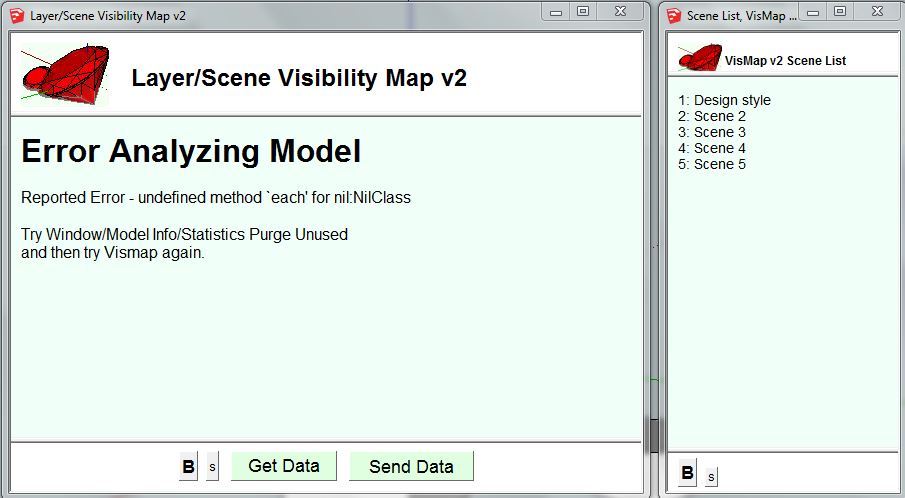
                                  Capture.JPG
                                  I'm running SU8, and have purged the components, saved the model and tried running VisMap2 again, and get the same error. This occurs on both model I'm working on with ~25 layers and scenes, and a newly created model with 3 layers and 4 scenes.

                                  Any suggestions gratefully received.

                                  1 條回覆 最後回覆 回覆 引用 0
                                  • M 離線
                                    monkers
                                    最後由 編輯

                                    Just bumping this thread guys. Would love to see this working in later versions of SU 18-19-20 etc

                                    In SU19 I get this message. I'm not sure why because in a blank scene it can get data fine. But when I try load it in a more complex scene I get the below message. I have tried removing symbols and special characters such as _ & etc from both scene names and layers names with no effect.

                                    Error Analyzing Model

                                    Reported Error - undefined method `each' for nil:NilClass

                                    Try Window/Model Info/Statistics Purge Unused
                                    and then try Vismap again.

                                    I would be happy to buy the plugin or pay for time to get it working if someone is able to have a go at it. Would be pretty useful for me.

                                    Cheers

                                    1 條回覆 最後回覆 回覆 引用 0
                                    • J 離線
                                      jsteacy
                                      最後由 編輯

                                      @monkers said:

                                      Just bumping this thread guys. Would love to see this working in later versions of SU 18-19-20 etc

                                      I would be happy to buy the plugin or pay for time to get it working if someone is able to have a go at it. Would be pretty useful for me.

                                      Cheers

                                      I asked martin (the original developer) years ago if he would let me find someone to fix it. He said yes, and I got distracted. But about a year ago I found someone to fix it. I just emailed Martin for permission to post the corrected files. It is an amazingly useful tool and I haven't had any trouble with the fixed version so far. If I can share it I want it to be 'by the book' in the legal sense which I have no experience in and not sure what it means/how to go about it. I figured verifying with him that it is ok post is step one.

                                      1 條回覆 最後回覆 回覆 引用 0
                                      • J 離線
                                        jsteacy
                                        最後由 編輯

                                        Hi, I received permission to post the fixed Vismap. To the Sketchucation world, how do we get it into the Plugin store?

                                        1 條回覆 最後回覆 回覆 引用 0
                                        • M 離線
                                          monkers
                                          最後由 編輯

                                          @jsteacy said:

                                          Hi, I received permission to post the fixed Vismap. To the Sketchucation world, how do we get it into the Plugin store?

                                          Thats fantantasic I really appreciate both you and Martin getting back to us here. I received your email but no attachment. Its appears email filters do not like the rbz files. There is an option to attach the file on this forum just below the comment text box there's an upload attachment tab. Maybe give that a whirl at least that way its here for everyone.

                                          1 條回覆 最後回覆 回覆 引用 0
                                          • J 離線
                                            jsteacy
                                            最後由 編輯

                                            Everyone, here is the fixed vismap2, hopefully it ends up on the plugin store someday. It runs in 2020 so I assume it's backwards compatible.

                                            Martin Reinhart is the original programmer but moved on, he gave me permission to find someone to fix it and repost. Turns out my brother-in-law was able to do just that but he doesn't want to be named/credited. All usage/modification should follow Martin's original licensing which I guess is just freeware.

                                            I'm not a coder, so all I can tell you is how to use it and that the errors went away when I started using the attached script.

                                            Definitely a great one. Would highly recommend.


                                            should work up to SU2020

                                            1 條回覆 最後回覆 回覆 引用 0
                                            • 1
                                            • 2
                                            • 3
                                            • 2 / 3
                                            • 第一個貼文
                                              最後的貼文
                                            Buy SketchPlus
                                            Buy SUbD
                                            Buy WrapR
                                            Buy eBook
                                            Buy Modelur
                                            Buy Vertex Tools
                                            Buy SketchCuisine
                                            Buy FormFonts

                                            Advertisement
