sketchucation logo sketchucation
    • Login
    Oops, your profile's looking a bit empty! To help us tailor your experience, please fill in key details like your SketchUp version, skill level, operating system, and more. Update and save your info on your profile page today!
    ⚠️ Update | Sketchucation Tools 5.0.8 released with licensing improvements and bugfixes Download

    [Plugin] CleanUp

    Scheduled Pinned Locked Moved Plugins
    974 Posts 217 Posters 1.2m Views 217 Watching
    Loading More Posts
    • Oldest to Newest
    • Newest to Oldest
    • Most Votes
    Reply
    • Reply as topic
    Log in to reply
    This topic has been deleted. Only users with topic management privileges can see it.
    • thomthomT
      thomthom
      last edited by

      @utiler said:

      I'm wondering if you have thought about adding an option to move all verticies to Z=0. I often import dwg files that for some reason some lines are just that tiny bit off Z which causes all sorts of issues in finding out what is and isn't flattened....

      "There's an extension for that!": Architect Tools (Look for the big weight-icon that will flatten everything like the Hulk)

      Thomas Thomassen β€” SketchUp Monkey & Coding addict
      List of my plugins and link to the CookieWare fund

      1 Reply Last reply
      Reply Quote 0
      • A
        antonio.calvo
        last edited by

        Thanks so much for your plugins, enjoy the cookie. I'm pretty new posting on this forum althought I have been following all of you guys and your fantastic work for a long time. Recently I'm working in a large model and your plugin is givin me a couple of errors of the model.

        Results of Validity Check.

        CLoop (1154934) does not reference CFace (1161656) - fixed
        The plane equation for CFace (4395989) is not valid - fixed

        Both of then never seem to be fixed after running the plugin. Also straight after closing Sketchup, it will create a bug splat! Is driving me mad πŸ˜• and can't find which part of the model is doing it. Any help will be great. Thank you

        1 Reply Last reply
        Reply Quote 0
        • cottyC
          cotty
          last edited by

          @antonio.calvo said:

          ...and can't find which part of the model is doing it.

          Without having a look at the model no one else will be able to find it too...

          my SketchUp gallery

          1 Reply Last reply
          Reply Quote 0
          • TIGT
            TIG Moderator
            last edited by

            @antonio.calvo said:

            Thanks so much for your plugins, enjoy the cookie. I'm pretty new posting on this forum althought I have been following all of you guys and your fantastic work for a long time. Recently I'm working in a large model and your plugin is givin me a couple of errors of the model.

            Results of Validity Check.

            CLoop (1154934) does not reference CFace (1161656) - fixed
            The plane equation for CFace (4395989) is not valid - fixed

            Both of then never seem to be fixed after running the plugin. Also straight after closing Sketchup, it will create a bug splat! Is driving me mad πŸ˜• and can't find which part of the model is doing it. Any help will be great. Thank you
            Try running Edge Tools on the problem model's geometry [edit 'containers' to access their contents etc]...
            Duplicated vertices that are not 'welded' have been cited as culprits for this kind of thing...
            http://sketchucation.com/pluginstore?pln=tt_edgetools

            TIG

            1 Reply Last reply
            Reply Quote 0
            • A
              antonio.calvo
              last edited by

              Thanks TIG, spoke with Rich and that was he suggestion too. So i run edge inspector in each component of the model and ended up fixing thousands of tiny gaps/edges. After the whole process (didn't take as long as I was imagining) all fixed and no more crashes! Thanks again for all your tips and great plugins.

              1 Reply Last reply
              Reply Quote 0
              • Z
                zhenning
                last edited by

                Hi

                I imported an STL file into sketchup 2014 and I am trying to clean the faces with cleanup and it appears to cause some problems.

                CEdge (15569) and CEdge (1510) connect the same 2 vertices - fixed
                CEdge (14024) and CEdge (1479) connect the same 2 vertices - fixed
                CEdge (1268) and CEdge (15568) connect the same 2 vertices - fixed
                The plane equation for CFace (15570) is not valid - fixed
                The plane equation for CFace (15576) is not valid - fixed
                The plane equation for CFace (15588) is not valid - fixed
                The plane equation for CFace (15637) is not valid - fixed
                The plane equation for CFace (15643) is not valid - fixed
                The plane equation for CFace (15655) is not valid - fixed
                The plane equation for CFace (15606) is not valid - fixed
                The plane equation for CFace (15662) is not valid - fixed
                The plane equation for CFace (15675) is not valid - fixed
                The plane equation for CFace (15829) is not valid - fixed
                The plane equation for CFace (15822) is not valid - fixed
                The plane equation for CFace (15781) is not valid - fixed
                The plane equation for CFace (15795) is not valid - fixed
                The plane equation for CFace (15802) is not valid - fixed
                The plane equation for CFace (15815) is not valid - fixed
                The plane equation for CFace (15755) is not valid - fixed
                The plane equation for CFace (15767) is not valid - fixed
                The plane equation for CFace (15774) is not valid - fixed

                I am using SuSolid to check whether the model is watertight. Directly after i import, the SuSolid shows no problem with the model. However after i ran cleanup, some issues appear. I am using Sketchup 2014.
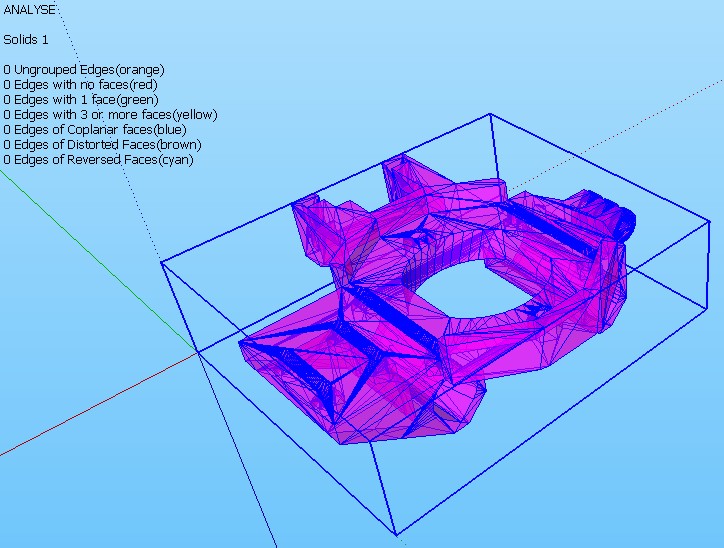
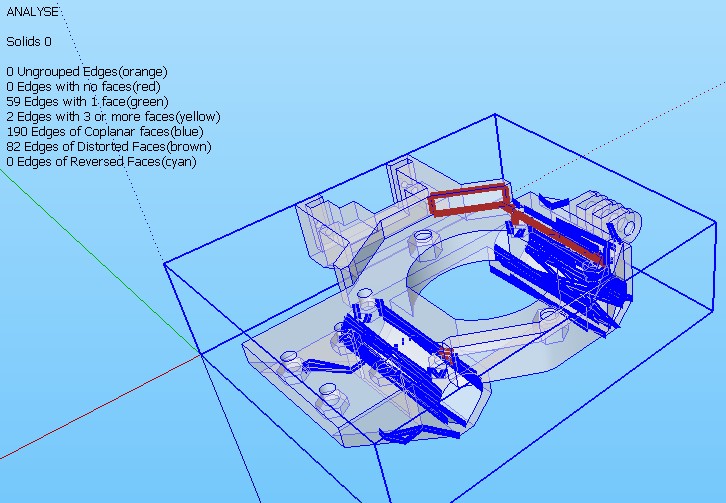
                After import


                After running cleanup

                1 Reply Last reply
                Reply Quote 0
                • cottyC
                  cotty
                  last edited by

                  And the question is?

                  my SketchUp gallery

                  1 Reply Last reply
                  Reply Quote 0
                  • M
                    mac1
                    last edited by

                    zhenning:
                    I have used MeshLab to decimate models and found it is best to limit the number of actions taken to one at a time and the sequence can also affect the out come. I have not used ThomThom's plugin but, trying to limit the number of corrections to few at a time may help you keep it a solid. In addition using Tig's solid solver has quite often helped after cleanup. What analyzer are you using one of the 3d printers?

                    1 Reply Last reply
                    Reply Quote 0
                    • M
                      mac1
                      last edited by

                      zhenning:
                      Arg forgot 😲
                      http://sketchucation.com/forums/viewtopic.php?p=359994#p359994

                      1 Reply Last reply
                      Reply Quote 0
                      • Z
                        zhenning
                        last edited by

                        @cotty said:

                        And the question is?

                        The cleanup seems to delete wrong faces? The coplanar error appears only after the cleanup plugin is used to clean the model.

                        1 Reply Last reply
                        Reply Quote 0
                        • Z
                          zhenning
                          last edited by

                          Attached is the file:

                          Dropbox

                          favicon

                          (www.dropbox.com)

                          After some trials, the errors happens when i tried merge faces 😞

                          1 Reply Last reply
                          Reply Quote 0
                          • M
                            mac1
                            last edited by

                            Initial application of cleanup does a good job of fixing errors, then running TIG's solid solver had problems to the point of destroying model. That just haapens some times.
                            After cleanup suggest you save the file as a stl you can then use one of the free apps some 3 d printers have and attempt to fix the model. The attached jpg shows my results using NetFab more work need to be done. Shapeway had a free service where they would run your model thru there app and possibly fix model. Sadly I have lost link and will have to look for it. Here is info I have
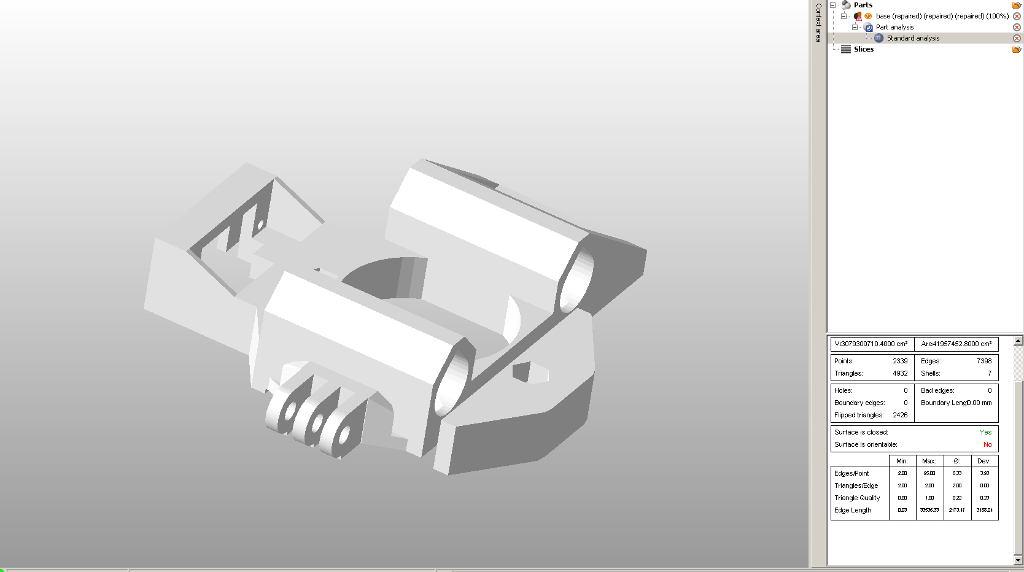
                            base.jpg
                            And the link on use of the app. It free version so does not give full capability

                            1 Reply Last reply
                            Reply Quote 0
                            • M
                              mac1
                              last edited by

                              Found 1 link http://www.shapeways.com/tutorials/how_to_use_meshlab_and_netfabb.
                              Since Su has a STL export plugin you do not need to use MESHLAB

                              1 Reply Last reply
                              Reply Quote 0
                              • M
                                mac1
                                last edited by

                                Link 2 http://www.netfabb.com/news.php?nid=16

                                1 Reply Last reply
                                Reply Quote 0
                                • Z
                                  zhenning
                                  last edited by

                                  Found the cause of it. Actually its from the stl 😞 I have used netfabb to try to fix it. So, the CFace errors are those extra surfaces added from netfabb to make the model water tight. Then only i imported into sketchup and try to clean it. I managed to solve it by importing the stl directly, clean using cleanup, redraw uneven and erroneous faces. No problem after that. Thanks for the replies mac1
                                  😍

                                  1 Reply Last reply
                                  Reply Quote 0
                                  • TIGT
                                    TIG Moderator
                                    last edited by

                                    @lersince1991 said:

                                    Is Cleanup working in SKU 2015? Doesn't seem to be appearing in the extensions tab at all?
                                    Did you also install the latest Lib for thomthom's tools ?
                                    He updated everything to suit v2015 a few weeks ago...

                                    TIG

                                    1 Reply Last reply
                                    Reply Quote 0
                                    • L
                                      Lersince1991
                                      last edited by

                                      Is Cleanup working in SKU 2015? Doesn't seem to be appearing in the extensions tab at all?

                                      Edit: Sorry it is working! (I thought I had restarted ketchup but I hadn't)

                                      1 Reply Last reply
                                      Reply Quote 0
                                      • L
                                        Lersince1991
                                        last edited by

                                        @tig said:

                                        @lersince1991 said:

                                        Is Cleanup working in SKU 2015? Doesn't seem to be appearing in the extensions tab at all?
                                        Did you also install the latest Lib for thomthom's tools ?
                                        He updated everything to suit v2015 a few weeks ago...

                                        Edited:
                                        @unknownuser said:

                                        Sorry it is working! (I thought I had restarted ketchup but I hadn't)

                                        Sorry for alerting you!
                                        I'm now using the sketchucation extension manager which is a god send for keeping everything up to date and installing quickly!

                                        1 Reply Last reply
                                        Reply Quote 0
                                        • T
                                          TRIPOD
                                          last edited by

                                          I use SU 2015 x64 Portable. First starting SU was correct with plugins. Next start SU appear errors loading cleanup. TT Lib (latest version) had already installed with extension manager but SU says that it not install. Screenshot below. What is it? Why CleanUp is not loading.
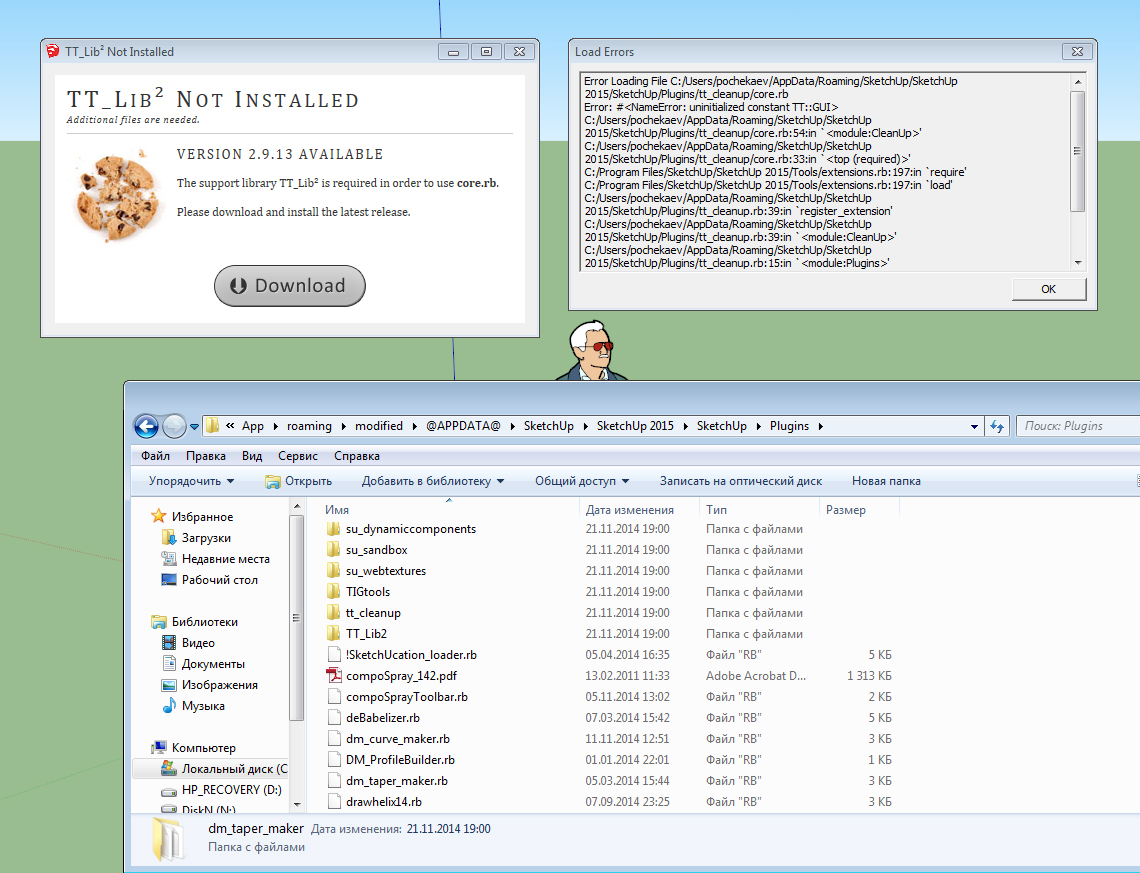
                                          http://i67.fastpic.ru/big/2014/1125/98/191fa7fbdbc9dd68ea1d99dae96a8c98.jpg

                                          1 Reply Last reply
                                          Reply Quote 0
                                          • J
                                            Jim
                                            last edited by

                                            What is "Portable" SketchUp? Where did you get it? Whatever it is, it is not a supported installation.


                                            Hi

                                            1 Reply Last reply
                                            Reply Quote 0

                                            Hello! It looks like you're interested in this conversation, but you don't have an account yet.

                                            Getting fed up of having to scroll through the same posts each visit? When you register for an account, you'll always come back to exactly where you were before, and choose to be notified of new replies (either via email, or push notification). You'll also be able to save bookmarks and upvote posts to show your appreciation to other community members.

                                            With your input, this post could be even better πŸ’—

                                            Register Login
                                            • 1
                                            • 2
                                            • 3
                                            • 4
                                            • 5
                                            • 6
                                            • 48
                                            • 49
                                            • 4 / 49
                                            • First post
                                              Last post
                                            Buy SketchPlus
                                            Buy SUbD
                                            Buy WrapR
                                            Buy eBook
                                            Buy Modelur
                                            Buy Vertex Tools
                                            Buy SketchCuisine
                                            Buy FormFonts

                                            Advertisement
